
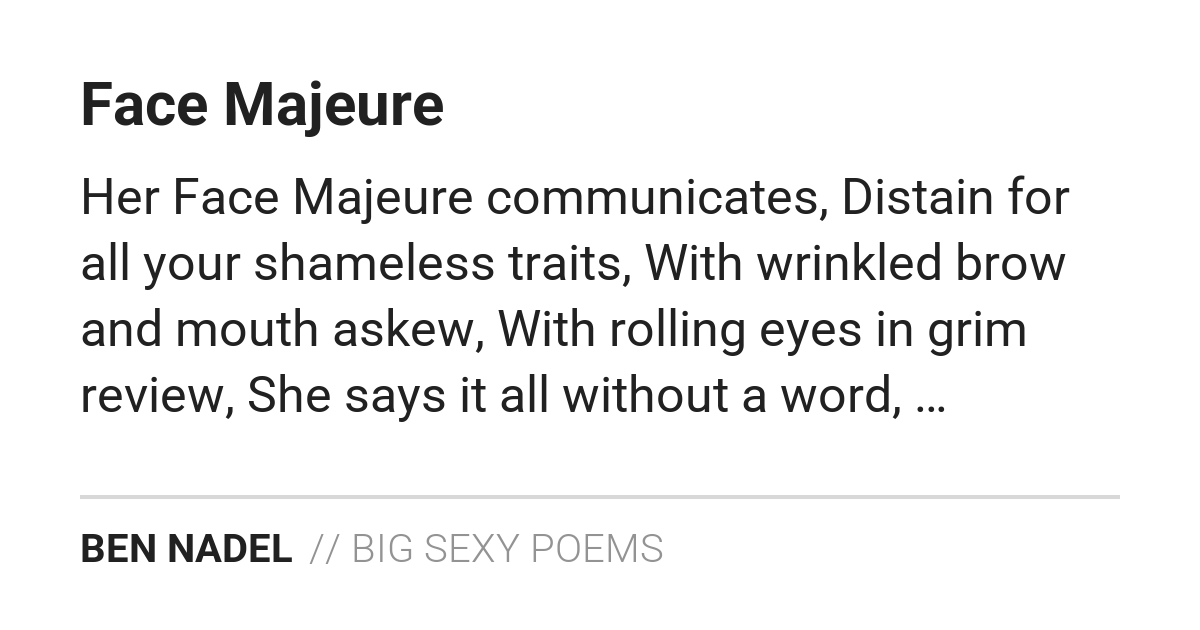
A few days ago, I looked at using ColdFusion to generate text-based Open Graph images with CFImage. ColdFusion itself doesn't have all the tools necessary to do this; so I ended up dipping into the Java layer for text-layout calculations. Once I had an algorithm that worked, I started to integrate those dynamic Open Graph (OG) images into Big Sexy Poems. And at that point, I had to figure out how to safely expose the image generation without creating too much of an attack surface for malicious actors.
Security Concerns
In Big Sexy Poems, I'm generating the OG images on-the-fly when they're requested by a social platform. Even though the images are generated in less than 100ms, the process still puts undue stress on the CPU. If social platforms are the only actors making these requests, it's not a problem. But, if a malicious actor starts hammering this end-point, it could lead to CPU saturation and overall service degradation.
To help mitigate this risk, I've taken the following integration steps:
I'm caching the image URL in the Cloudflare CDN (Content Delivery Network).
I'm versioning the URL based on a "thumbprint" of the poem (a combination of title, content, and author).
I'm locking the URL down to a set of explicit parameters to avoid malicious bypassing of the image cache.
I'm rate-limiting the number of times any Open Graph image can be generated across the entire app.
I know that I'm over-thinking the security concerns of this particular ColdFusion application since I'm the only user. But that's the point — this application is a playground in which I get to think about these kind of issues.
Caching Dynamic ColdFusion Images In Cloudflare
The Big Sexy Poems ColdFusion application doesn't use URL rewriting. Like many ColdFusion apps, all requests flow through the root index.cfm template with URL parameters that dictate the internal routing. As such, Cloudflare sees these image requests as "dynamic". Which means that Cloudflare won't cache the image response in its CDN even if the HTTP response headers contain Cache-Control directives.
In order to flag these requests as cache-eligible, I had to go into the Cloudflare cache rules and add a custom filter expression that looks for specific query string parameters (line-breaks added for readability):
(http.request.uri.query
	contains
		"event=share.poem.openGraphImage")
In my ColdFusion application, the event parameter dictates routing. I've opted to identify specific end-points in my Cloudflare filter instead of trying to use a more generic URL flag (following the principle of least access).
This rule is also configured to use the Cache-Control header if it's present in the response. This allows me to define the terms of the "Edge Caching" (how long the image is cached in the CDN) using cfheader(), which we'll see in the next section.
Locking Down the Open Graph URL Structure
Since requests to my ColdFusion application all run through the root index.cfm template, all request differentiation happens at the URL search parameter (query string) level. As such, I have to configure the Cloudflare CDN to include the entire query string when considering unique URLs. This allows for great flexibility on my end; but, it opens up an attack vector.
If the entire URL query string is considered by Cloudflare, a malicious actor could add random search parameters (ex, ?foo=1x9cnz4) in order to bypass the Cloudflare cache. This would give an attacker simple means to overload my server's CPU with tons of image generation.
To prevent this malicious cache bypass, I'm restricting the Open Graph image URL to contain a finite set of search parameters. Any request that contains additional parameters will be rejected prior to image generation.
This approach is easy to implement since my ColdFusion application controls both the Open Graph image generation and the rendering of the <meta> tag that defines the Open Graph image URL. As such, I control both the inputs and the outputs of this URL orchestration.
In Big Sexy Poems, the Open Graph images are meant to show a visual preview of the poem itself. As such, I need to ensure that the image URL changes when the contents of the poem change. I'm calculating a "version" of the image by hashing-together the poem name, poem content, and author name. These are the three elements present in the Open Graph image; and now when they change, the hash() will change, and the "version" of the URL will change.
Here is the ColdFusion module that calculates the Open Graph metadata and defines the locked-down URL. The URL contains the following parameters:
eventshareID- impliedshareToken- impliedimageVersion
Please note that my Router.cfc is including both shareID and shareToken even though they aren't illustrated in the following code — the entire poem share subsystems automatically includes those two parameters in all relevant URL generation.
<cfscript>

	// Define properties for dependency-injection.
	config = request.ioc.get( "config" );
	router = request.ioc.get( "core.lib.web.Router" );

	// ColdFusion language extensions (global functions).
	include "/core/cfmlx.cfm";

	// ------------------------------------------------------------------------------- //
	// ------------------------------------------------------------------------------- //

	// Note: using "og" prefix to avoid "url" scope collision.
	ogUrl = router.externalUrlFor({ event: "share.poem" });
	ogTitle = request.poem.name;
	ogDescription = "A poem by #request.user.name# (hosted on #config.site.name#).";

	// In order to show a different Open Graph image when the contents of the poem change,
	// we need to create a thumbprint of the content that can act as cache invalidation.
	// This allows the URL to be a bit more dynamic without opening up an attack vector
	// (for CPU saturation).
	// --
	// Todo: move hashing to a centralized location (ex, ShareService)?
	ogImageUrl = router.externalUrlFor({
		event: "share.poem.openGraphImage",
		imageVersion: hash( request.poem.name & request.poem.content & request.user.name )
	});

	include "./openGraph.view.cfm";
	exit;

</cfscript>
This ogImageUrl value is then used to to drive the og:image and twitter:image meta tags:
<cfoutput>

	<!-- Facebook Open Graph tags. -->
	<meta property="og:type" content="website" />
	<meta property="og:url" content="#e4a( ogUrl )#" />
	<meta property="og:title" content="#e4a( ogTitle )#" />
	<meta property="og:description" content="#e4a( ogDescription )#" />
	<meta property="og:image" content="#e4a( ogImageUrl )#" />

	<!-- Twitter Card tags. -->
	<meta name="twitter:card" content="summary_large_image" />
	<meta name="twitter:url" content="#e4a( ogUrl )#" />
	<meta name="twitter:title" content="#e4a( ogTitle )#" />
	<meta name="twitter:description" content="#e4a( ogDescription )#" />
	<meta name="twitter:image" content="#e4a( ogImageUrl )#" />

</cfoutput>
On the Open Graph image generation side, I'm then inspecting the URL and ensuring that it wasn't tampered with. This includes:
Making sure that only the finite set of parameters are present in the query string (and throwing a
403 Forbiddenerror if anything else is present).Making sure the calculated
imageVersionis correct (and redirecting to correct URL as needed).Making sure the rate-limiting has not been exceeded.
Here's an abbreviated version of this Open Graph image generation template. This is the top of the file that deals with these security constraints:
<cfscript>

	// Define properties for dependency-injection.
	logger = request.ioc.get( "core.lib.util.Logger" );
	rateLimitService = request.ioc.get( "core.lib.util.RateLimitService" );
	reqeustHelper = request.ioc.get( "core.lib.web.RequestHelper" );
	router = request.ioc.get( "core.lib.web.Router" );

	// ColdFusion language extensions (global functions).
	include "/core/cfmlx.cfm";

	// ------------------------------------------------------------------------------- //
	// ------------------------------------------------------------------------------- //

	// Caution: this URL is going to be placed behind the CDN caching mechanics. As such,
	// we want to make sure that this URL contains NOTHING OTHER than the desired search
	// parameters. Since the CDN will cache unique responses based on changes to the query
	// string variations, this end-point becomes an attack vector in which the CPU can be
	// overloaded by the image generation. If the URL contains any extra data, we're going
	// to reject it safely.
	// --
	// Note: since this is a ColdFusion end-point, a special caching rule has been setup
	// in Cloudflare to allow this specific URL to be eligible for caching.
	reqeustHelper.ensureStrictSearchParams([
		"event",
		"shareID",
		"shareToken",
		"imageVersion"
	]);

	// Todo: move hash logic to a centralized location (ex, ShareService)?
	expectedImageVersion = hash( request.poem.name & request.poem.content & request.user.name );

	// If the image version is a mismatch, redirect to the latest version. This allows us
	// to avoid a 404 Not Found error from the user's perspective.
	if ( compare( url.imageVersion, expectedImageVersion ) ) {

		router.goto({
			event: url.event,
			shareID: url.shareID,
			shareToken: url.shareToken,
			imageVersion: expectedImageVersion
		});

	}

	// As a final safe-guard, we're going to rate-limit image generation across the app.
	rateLimitService.testRequest( "poem-share-og-image-by-app" );

	// If we made it this far without error, image generation is about to begin. Let's
	// log this for now so that I can get a sense of how often this actually happens (and
	// if I should be worried about the volume).
	logger.info( "Open Graph image generation." );

	// .... truncated .... //

</cfscript>
The .ensureStrictSearchParams() method locks down the URL scope and the cgi.path_info (since this is also a way to create variations on the same URL):
component {

	// .... truncated .... //

	/**
	* I ensure that the URL scope only contains the given search params. If any additional
	* params are present, an error is thrown.
	*/
	public void function ensureStrictSearchParams( required array searchParams ) {

		// While not technically a query-string parameter, the path-info represents a part
		// of the URL that can change independently of the script name. As such, for the
		// purposes of locking the URL down to a set of search parameters, we're going to
		// treat the path-info as if it were a search parameter.
		if ( requestMetadata.getPathInfo().len() ) {

			throw(
				type = "App.Forbidden",
				message = "URL contains non-strict path-info."
			);

		}

		var scope = url.copy();

		for ( var key in searchParams ) {

			scope.delete( key );

		}

		// Now that we've deleted all the matching keys, the scope SHOULD BE empty. If the
		// scope is NOT empty, it means the request has unexpected url entries.
		if ( ! scope.isEmpty() ) {

			throw(
				type = "App.Forbidden",
				message = "URL contains non-strict parameters."
			);

		}

	}

}
At this point, my ColdFusion application will only create Open Graph images for very specific URL structures. Attempts to tamper with the URL as a means to bypass the Cloudflare cache will result in either an error or a redirect. The only image generation that takes place in Big Sexy Poems is for the images that need to be served legitimately.
Caching the Response
Once the Open Graph image is generated, I serve it up with ETag and Cache-Control headers. I don't think the ETag header plays any significant role here but I'm including it nonetheless. The Cache-Control header defines the max age the image can be cached before its considered "stale". Since the image URL is locked to a "version" (hash of the poem contents), I could theoretically cache these images forever. But, since I'm still working out any kinks, I'm only caching them for 24-hours:
<cfscript>

	// .... truncated .... //

	// There's no way in ColdFusion to get the "rendered image" binary without dealing
	// with some sort of file I/O. As such, we're going to render the image to a temporary
	// file, serve the file, and then delete the temporary image.
	scratchDisk.withPngFile( ( pngFile ) => {

		imageWrite( ogImage, pngFile, true );

		cfheader(
			name = "ETag",
			value = expectedImageVersion
		);
		cfheader(
			name = "Cache-Control",
			value = "public, max-age=#( 60 * 60 * 24 )#"
		);
		// Todo: replace with shared binary template.
		cfcontent(
			type = "image/png",
			file = pngFile
		);

	});

</cfscript>
Once I'm confident that the image generation is working well, I can bump the max-age value to whatever the upper limit is. I can also add a designVersion to the hash() calculation — something that indicates design changes in the image itself. But, I don't need to at this point.
The Full Open Graph Image Generation File
Here's the full openGraphImage.cfm ColdFusion template. I go back-and-forth on whether I want to move any of this into a shared component. It feels strange to have so much logic in what amounts to a "controller"; but, in the spirit of WET (Write Everything Three-times), I'll leave it here for now until I discover that parts of it can be reused.
<cfscript>

	// Define properties for dependency-injection.
	logger = request.ioc.get( "core.lib.util.Logger" );
	rateLimitService = request.ioc.get( "core.lib.util.RateLimitService" );
	reqeustHelper = request.ioc.get( "core.lib.web.RequestHelper" );
	router = request.ioc.get( "core.lib.web.Router" );
	scratchDisk = request.ioc.get( "core.lib.util.ScratchDisk" );

	// ColdFusion language extensions (global functions).
	include "/core/cfmlx.cfm";

	// ------------------------------------------------------------------------------- //
	// ------------------------------------------------------------------------------- //

	// Caution: this URL is going to be placed behind the CDN caching mechanics. As such,
	// we want to make sure that this URL contains NOTHING OTHER than the desired search
	// parameters. Since the CDN will cache unique responses based on changes to the query
	// string variations, this end-point becomes an attack vector in which the CPU can be
	// overloaded by the image generation. If the URL contains any extra data, we're going
	// to reject it safely.
	// --
	// Note: since this is a ColdFusion end-point, a special caching rule has been setup
	// in Cloudflare to allow this specific URL to be eligible for caching.
	reqeustHelper.ensureStrictSearchParams([
		"event",
		"shareID",
		"shareToken",
		"imageVersion"
	]);

	// Todo: move hash logic to a centralized location (ex, ShareService)?
	expectedImageVersion = hash( request.poem.name & request.poem.content & request.user.name );

	// If the image version is a mismatch, redirect to the latest version. This allows us
	// to avoid a 404 Not Found error from the user's perspective.
	if ( compare( url.imageVersion, expectedImageVersion ) ) {

		router.goto({
			event: url.event,
			shareID: url.shareID,
			shareToken: url.shareToken,
			imageVersion: expectedImageVersion
		});

	}

	// As a final safe-guard, we're going to rate-limit image generation across the app.
	rateLimitService.testRequest( "poem-share-og-image-by-app" );

	// If we made it this far without error, image generation is about to begin. Let's
	// log this for now so that I can get a sense of how often this actually happens (and
	// if I should be worried about the volume).
	logger.info( "Open Graph image generation." );

	// ------------------------------------------------------------------------------- //
	// ------------------------------------------------------------------------------- //

	poemName = request.poem.name.trim();
	poemContent = request.poem.content.trim()
		// Replace double-dashes with em dashes.
		.replace( "--", "—", "all" )
		// Replace all white space with a space - we're going to render the poem as a
		// "single line" in order to more thoroughly use the visual space.
		.reReplace( "\s+", " ", "all" )
	;
	poemAuthor = request.user.name.trim().ucase();
	brandName = ucase( "// Big Sexy Poems" );

	// ------------------------------------------------------------------------------- //
	// ------------------------------------------------------------------------------- //

	// The Open Graph image is a single canvas onto which we will PASTE smaller, text-
	// based images. By constructing individual text blocks as smaller images, it helps us
	// determine the rendered height and width of the smaller text blocks. Which, in turn,
	// helps us layout the text blocks relative to each other.

	// Each of the calls to `renderTextBlock()` returns the following data structure:
	//
	// * image - the ColdFusion image object.
	// * width - the width of the ColdFusion image object.
	// * height - the height of the ColdFusion image object.
	// * linesIncluded - the array of rendered text lines.
	// * linesExcluded - the array of omitted text lines.

	// Aspect ratio of `1.91:1` for Open Graph (OG) social media images.
	ogWidth = 1200;
	ogHeight = 630;
	ogImage = imageNew( "", ogWidth, ogHeight, "rgb", "ffffff" );
	// Keep a large buffer around the image content in order to keep the text readable
	// across the various social media treatments. We won't stick to this exactly; but it,
	// will help point us in the right direction.
	bodyMargin = 80;
	bodyWidth = ( ogWidth - bodyMargin - bodyMargin );

	// Define and render the title block.
	titleX = bodyMargin;
	titleY = ( bodyMargin - 10 );
	titleRendering = renderTextBlock(
		text = poemName,
		textColor = "212121",
		backgroundColor = "ffffff",
		fontFamily = "Roboto Bold",
		fontSize = 60,
		lineHeight = 76,
		maxWidth = bodyWidth,
		maxLines = 2
	);
	ogImage.paste( titleRendering.image, titleX, titleY );

	// Define and render the content block. The number of lines that we render for the
	// content must decrease as the number of lines rendered for the title increases. This
	// way, if the tittle wraps to multiple lines, we don't accidentally push the content
	// down over the OG footer.
	contentMaxLines = ( 5 - titleRendering.linesIncluded.len() );
	contentX = bodyMargin;
	contentY = ( titleY + titleRendering.height + 27 );
	contentRendering = renderTextBlock(
		text = poemContent,
		textColor = "212121",
		backgroundColor = "ffffff",
		fontFamily = "Roboto Regular",
		fontSize = 50,
		lineHeight = 66,
		maxWidth = bodyWidth,
		maxLines = contentMaxLines
	);
	ogImage.paste( contentRendering.image, contentX, contentY );

	// ------------------------------------------------------------------------------- //
	// ------------------------------------------------------------------------------- //

	// Horizontal rule for the footer.
	ruleX = bodyMargin;
	ruleY = 495;
	ogImage.setDrawingColor( "d8d8d8" );
	ogImage.drawRect( ruleX, ruleY, bodyWidth, 4, true );

	// Define and render the author block.
	authorX = bodyMargin;
	authorY = ( ruleY + 30 );
	authorRendering = renderTextBlock(
		text = poemAuthor,
		textColor = "212121",
		backgroundColor = "ffffff",
		fontFamily = "Roboto Bold",
		fontSize = 40,
		lineHeight = 50,
		maxWidth = fix( bodyWidth * 0.62 ),
		truncate = false
	);
	ogImage.paste( authorRendering.image, authorX, authorY );

	// Define and render the branding block.
	brandX = ( authorX + authorRendering.width + 14 );
	brandY = authorY;
	brandRendering = renderTextBlock(
		text = brandName,
		textColor = "939393",
		backgroundColor = "ffffff",
		fontFamily = "Roboto Light",
		fontSize = 40,
		lineHeight = 50,
		maxWidth = fix( bodyWidth / 2 )
	);
	ogImage.paste( brandRendering.image, brandX, brandY );

	// ------------------------------------------------------------------------------- //
	// ------------------------------------------------------------------------------- //

	// There's no way in ColdFusion to get the "rendered image" binary without dealing
	// with some sort of file I/O. As such, we're going to render the image to a temporary
	// file, serve the file, and then delete the temporary image.
	scratchDisk.withPngFile( ( pngFile ) => {

		imageWrite( ogImage, pngFile, true );

		cfheader(
			name = "ETag",
			value = expectedImageVersion
		);
		cfheader(
			name = "Cache-Control",
			value = "public, max-age=#( 60 * 60 * 24 )#"
		);
		// Todo: replace with shared binary template.
		cfcontent(
			type = "image/png",
			file = pngFile
		);

	});

	// ------------------------------------------------------------------------------- //
	// ------------------------------------------------------------------------------- //

	/**
	* I render the given text to a canvas, wrapping the text onto multiple lines at the
	* given width. The returned canvas will be cropped to the smallest box that fits the
	* text within the given constraints.
	*/
	private struct function renderTextBlock(
		required string text,
		required string textColor,
		required string backgroundColor,
		required string fontFamily,
		required string fontSize,
		required numeric lineHeight,
		required numeric maxWidth,
		numeric maxHeight = 0,
		numeric maxLines = 1,
		boolean antialiasing = true,
		boolean truncate = true,
		boolean debug = false,
		) {

		// If no height is provided, we'll calculate enough height for the given number of
		// lines (according to line-height).
		if ( ! maxHeight ) {

			maxHeight = fix( maxLines * lineHeight * 1.1 );

		}

		var textImage = imageNew( "", maxWidth, maxHeight, "rgb", backgroundColor );
		textImage.setAntialiasing( antialiasing );
		textImage.setDrawingColor( textColor );

		var results = {
			image: textImage,
			width: maxWidth,
			height: maxHeight,
			linesIncluded: [],
			linesExcluded: []
		};

		var awtContext = textImage.getBufferedImage()
			.getGraphics()
			.getFontRenderContext()
		;
		// Caution: When decoding a font definition, you can use either a space (" ") or
		// a dash ("-") delimiter. But, you cannot mix-and-match the two characters. As
		// such, if you have a Font name which has spaces in it (ex, "Roboto Thin"), you
		// MUST USE the dash delimiter in order to prevent Java from parsing the font name
		// as a multi-item list. In this case, note that I'm using the "-" because I know
		// my font name doesn't contain a dash.
		var awtFont = createObject( "java", "java.awt.Font" )
			.decode( "#fontFamily#-#fontSize#" )
		;

		// The rendering will be performed in several passes. First, we'll analyze the
		// text and break it up into separate lines with accompanying bounding box
		// metrics. Then, we'll calculate the layout of those lines with a vertical
		// rhythm, determining which lines will be rendered, which will be truncated, and
		// which will be omitted. And then, finally, we'll render the lines to the canvas.
		var tokens = text.reMatch( "\S+" );
		var lines = [];
		var line = nullValue();

		while ( tokens.len() ) {

			// We're starting a new line.
			if ( isNull( line ) ) {

				line = {
					text: "",
					metrics: nullValue()
				};
				lines.append( line );

			}

			var pendingToken = tokens.shift();
			var pendingText = line.text.listAppend( pendingToken, " " );
			var pendingLayout = createObject( "java", "java.awt.font.TextLayout" )
				.init( pendingText, awtFont, awtContext )
			;
			var pendingBounds = pendingLayout.getBounds();
			var pendingMetrics = {
				boxWidth: pendingBounds.width,
				boxHeight: pendingBounds.height,
				// The following properties will be the same for all lines.
				textX: pendingBounds.x,
				textY: pendingBounds.y,
				textAscent: pendingLayout.getAscent(),
				textDescent: pendingLayout.getDescent(),
				textHeight: ( pendingLayout.getAscent() + pendingLayout.getDescent() )
			};

			// If we haven't exceeded the max width, continue onto the next token.
			if ( pendingBounds.width <= maxWidth ) {

				line.text = pendingText;
				line.metrics = pendingMetrics;
				continue;

			}

			// Edge-case: we've exceeded the max width by adding the pending token, but
			// it's just one really long token. Moving it to the next line won't help
			// since it will be too long on the next line as well. Let's just jam it into
			// one line and let the canvas cropping truncate it naturally.
			if ( pendingText == pendingToken ) {

				line.text = pendingText;
				line.metrics = pendingMetrics;
				line = nullValue();
				continue;

			}

			// Common-case: we've exceeded the max width by adding the pending token to
			// the formerly-fitting line. We need to move the last token back into the
			// pending tokens and consider the previous line complete.
			tokens.unshift( pendingToken );
			line = nullValue();

		}

		// At this point, we have the text broken up into WIDTH-based lines. Now, let's
		// calculate the vertical rhythm of those lines.
		var y = 0;
		var maxRenderedHeight = 0;
		var maxRenderedWidth = 0;

		for ( var line in lines ) {

			// In ColdFusion, the text is drawn from its baseline coordinates. The
			// baseline offset can be calculated from the current vertical offset (y) and
			// the ascent of the text (which is the space from the top-right of the text
			// to the baseline). Instead of trying to center the line of text within the
			// line-height space, we're going to bias the line of text to the top of the
			// vertical space and fulfill the line-height requirement with what amounts to
			// a bottom-margin. This will just make our lives easier.
			line.x = 0;
			line.yAscent = line.y = y;
			line.yBaseline = ( y + line.metrics.textAscent );
			line.yDescent = ( y + line.metrics.textHeight );
			line.height = line.metrics.textHeight;
			line.width = ( ( line.metrics.textX * 2 ) + line.metrics.boxWidth );
			// If the bottom of the text is within the max constraints for the canvas,
			// let's flag the line as rendered.
			line.isRendered = ( line.yDescent <= maxHeight );

			// If the line is going to be rendered, update the max rendered dimensions.
			if ( line.isRendered ) {

				maxRenderedHeight = ceiling( line.yDescent );
				maxRenderedWidth = max( maxRenderedWidth, ceiling( line.width ) );

			}

			// At this point, we don't need the metrics object anymore - we've folded all
			// the relevant values into the line object.
			line.delete( "metrics" );

			// Copy the line to the appropriate result bucket.
			if ( line.isRendered ) {

				results.linesIncluded.append( line );

			} else {

				results.linesExcluded.append( line );

			}

			// Move to next line rendering position.
			y += lineHeight;

		}

		// If we have any excluded lines, let's indicate that we're truncating the text.
		if ( truncate && results.linesExcluded.len() ) {

			var ellipsis = canonicalize( "&##x2026;", false, false );
			var lastLine = results.linesIncluded.last();

			// Note: this isn't a perfect truncation - we're just guessing that removing
			// three characters should be enough to show the ellipsis without the ellipsis
			// itself being truncated by the canvas cropping.
			lastLine.text = lastLine.text.reReplace( "...$", ellipsis );

		}

		// At this point, we have the text broken up into included / excluded lines. Now,
		// we need to render the included lines to the canvas.
		var textOptions = {
			size: fontSize,
			font: fontFamily
		};

		for ( var line in results.linesIncluded ) {

			textImage.drawText( line.text, line.x, line.yBaseline, textOptions );

		}

		// If we're debugging the output, clearly outline both the canvas and the text.
		// This will help us get a sense of how close we are to truncation.
		if ( debug ) {

			// Outline the canvas.
			textImage.setDrawingColor( "cc0000" );
			textImage.drawRect( 0, 0, ( maxWidth - 1 ), ( maxHeight - 1 ) );
			// Outline the text block.
			textImage.setDrawingColor( "00aa00" );
			textImage.drawRect( 0, 0, ( maxRenderedWidth - 1 ), ( maxRenderedHeight - 1 ) );
			// Make sure the canvas doesn't get cropped (for all intents and purposes).
			maxRenderedWidth = maxWidth;
			maxRenderedHeight = maxHeight;

		}

		// The initial canvas was maxWidth x maxHeight - now that we've rendered the text,
		// we can crop it down to the visual space that we know we used. The calling
		// context can then use the width / height of the image object to help with layout
		// and composition of multiple blocks.
		results.width = min( maxWidth, maxRenderedWidth );
		results.height = min( maxHeight, maxRenderedHeight );
		textImage.crop( 0, 0, results.width, results.height );

		return results;

	}

</cfscript>
How much fun is it build stuff in ColdFusion? AMIRIGHT?!

Reader Comments
Post A Comment — ❤️ I'd Love To Hear From You! ❤️
Post a Comment →