Using Custom Fonts In CommandBox Docker Image And Windows ColdFusion
In Big Sexy Poems, I need to create dynamic Open Graph (OG) images for my poem share links using CFImage. I don't know exactly what those will look like yet; but I know that I'll render poem-specific text into the image. Out of the box, the CommandBox Docker image contains nothing more than the default JVM fonts. As such, I need to install custom fonts for CFImage in both my local Docker image as well as my Windows VPS (Virtual Private Server).
Downloading Custom Fonts
I get overwhelmed by the vast array of options when it comes to fonts. I know that some fonts look good and other don't; but I have no insight into the theories of typography and its use within effective graphic design. To start this process, I went with Roboto. It's a safe and popular font and provides variants at every font weight. This will give me a lot of flexibility in my OG image generation.
Google Fonts provides a way to download each font family as a .zip file. I downloaded and unzipped the archive.
Install Custom Fonts In CommandBox Docker Image
ChatGPT tells me that the CommandBox Docker image is Ubuntu-based; and that it stores fonts in /usr/share/fonts/. When I design my Dockerfile, I like to have the host folder paths match the folder paths within the image. So I copied the "Roboto" folder from the .zip (downloaded above) into my CFML code repository:
./usr/share/fonts/truetype/custom/roboto
Then I added a COPY line to my Dockerfile. The Roboto font comes with both variable fonts and static fonts. I know nothing about how variable fonts work; and I'm certain that I'll have better luck getting the static fonts to work properly in ColdFusion. As such, my COPY line only copies the static fonts:
FROM ortussolutions/commandbox:jdk17

# Custom fonts for image generation.
COPY /usr/share/fonts/truetype/custom/roboto/static/*.ttf /usr/share/fonts/truetype/custom/roboto/static/
I then rebuilt the Docker image:
docker compose build --no-cache cfml
Started my Docker compose setup:
docker compose up
And entered the running CFML container in order to confirm that the font was in place:
# Enter the running container using sh
docker compose exec cfml sh

# List out system fonts.
fc-list
This listed out both the default DejaVu font and my custom Roboto font.
Install Custom Fonts In Windows ColdFusion
Getting the fonts to work on my Windows ColdFusion installation was a challenge. The "Font Management" section of the ColdFusion administrator has a way to register user defined fonts. But, registering the Roboto font in this manner didn't seem to have any effect. Meaning, it would show up in the list of fonts but I couldn't consume this font in CFImage without an error.
Thankfully I came across a post on the Adobe Community forum that spelled out a solution:
- Open the Roboto folder in the Windows "Finder".
- Select all the static font files.
- Right-click the selection.
- Choose the "Install For All Users" option in the context menu.
This installs the Roboto font as a system font which the JVM will be able to access after the next ColdFusion service reboot.
Testing The Custom Font In ColdFusion
Once I had the Roboto font installed, I wrote a ColdFusion script to generate a CFImage that would showcase each of the font variants. This would both test access to the font and give a visual guide that I could use in my Open Graph image creation:
<cfscript>

	// These are all the font variations provided by the Roboto font files. I made this
	// list using the `fc-list` command results from within my Docker container.
	fontFamilies = [
		"Roboto Black",
		"Roboto ExtraBold",
		"Roboto Bold",
		"Roboto SemiBold",
		"Roboto Medium",
		"Roboto Light",
		"Roboto ExtraLight",
		"Roboto Thin",
		"",
		"Roboto SemiCondensed Black",
		"Roboto SemiCondensed ExtraBold",
		"Roboto SemiCondensed SemiBold",
		"Roboto SemiCondensed Medium",
		"Roboto SemiCondensed Light",
		"Roboto SemiCondensed ExtraLight",
		"Roboto SemiCondensed Thin",
		"",
		"Roboto Condensed Black",
		"Roboto Condensed ExtraBold",
		"Roboto Condensed SemiBold",
		"Roboto Condensed Medium",
		"Roboto Condensed Light",
		"Roboto Condensed ExtraLight",
		"Roboto Condensed Thin",
	];

	img = imageNew( "", 1550, 3050, "rgb", "ffffff" );
	img.setAntialiasing( true );
	img.setDrawingColor( "212121" );

	// Font rendering variables for tweaking.
	size = 40;
	lineHeight = 50;
	margin = 30;
	x = 25;
	y = 0;
	sampleText = "My name is Ozymandias, king of kings: Look on my works, ye Mighty, and despair!"

	// Iterate over each font family variant and output the NAME of the font a test line.
	for ( fontFamily in fontFamilies ) {

		y += margin;

		// Line break between font-families.
		if ( ! fontFamily.len() ) {

			y += margin;
			continue;

		}

		options = {
			size: size,
			font: fontFamily
		};

		img.drawText( fontFamily, x, ( y += lineHeight ), options );
		img.drawText( sampleText, x, ( y += lineHeight ), options );

	}

	tempFile = expandPath( "/upload/temp/roboto.png" );

	imageWrite( img, tempFile, true );

	// Serve AND delete temporary image file.
	cfcontent(
		type = "image/png",
		file = tempFile,
		deleteFile = true
	);

</cfscript>
When I run this ColdFusion code, I get the following image output:
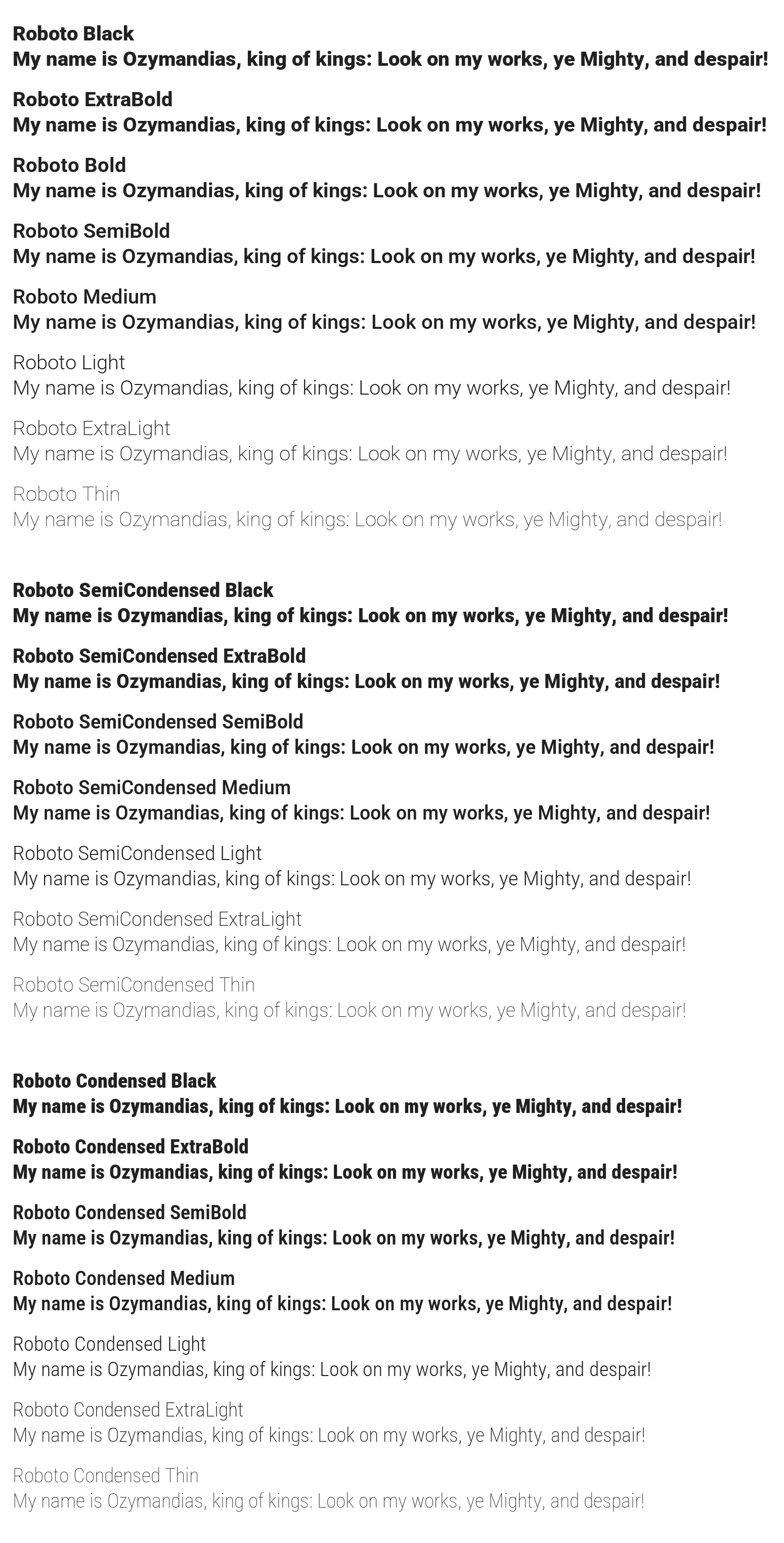
A nice visual guide!
This post is mostly for myself so that the next time I have to install a custom font in my ColdFusion application, I'll have something to reference. And, if anyone knows of a way to have this driven more from the code itself (ie, not having to "Install For All Users" on Windows or set up custom JVM arguments), please let me know!
Want to use code from this post? Check out the license.

Reader Comments
I've noticed that sometimes the font names registered in ColdFusion are different than what you'd think... so it is good to list them.
I previously used
cfide.adminiapi.administrator(), logged in, usedcfide.adminapi.runtime()and then used thegetFonts()method to receive a struct with system, user & JVM fonts.... but that approach isn't fully working any more. (NOTE: I use HTML with webfonts & WKHTMLTOImage to create images on-the-fly.)With ACF 2016-2025 (or BoxLang in ACF mode), you can use the following CFML to programmatically return an array of registered JVM fonts. (I'm not sure how to do this in Lucee.)
@James,
100% it actually took me a good bit of trial-and-error to figure out what the font-names were. When I ran
fc-list, it gave me more than actually worked. So I just kept commenting-out names until I had the list working.I had tried to use a
cfideexample that I had found; but it was throwing some CFML error about a resource not being found; but the error was coming from insideadminstrator.cfcso I couldn't see what it was.Post A Comment — ❤️ I'd Love To Hear From You! ❤️
Post a Comment →