A few weeks, I took a look at the formatDate() function in Angular 10. In that post, I demonstrated that the date mask used by the formatDate() function could include escaped string literals that would be output as-is without being interpolated. After that post, I wondered if the same thing could be done in Lucee CFML. It doesn't look like it works in dateFormat() or timeFormat(). But then, I stumbled upon this Adobe post by David Byers. In it, he demonstrated that string literals do work in the dateTimeFormat() function. I rarely use the dateTimeFormat() function, so I wanted to try this for myself in Lucee CFML 5.3.7.47.
According to David's article, using a string literal in the dateTimeFormat() function works just like it does within the formatDate() function in Angular 10. That is, all you have to do is surround your string literal in single-quotes. Let's try that:
<cfscript>
echoLine(
"DateFormat",
now().dateFormat( "yyyy-mm-dd 'and a string literal'" )
);
echoLine(
"TimeFormat",
now().timeFormat( "HH:nn:ss TT 'and a string literal'" )
);
echoLine(
"DateTimeFormat",
now().dateTimeFormat( "yyyy-mm-dd HH:nn:ss TT 'and a string literal'" )
);
// ------------------------------------------------------------------------------- //
// ------------------------------------------------------------------------------- //
public void function echoLine(
required string key,
required string value
) {
echo( "<p> <strong>#key# →</strong> #value# </p>" );
}
</cfscript>
As you can see, I am testing this in the three main date formatting functions, each of which contains the phrase, 'and a string literal'. And, if we run this ColdFusion code in Lucee CFML, we get the following output:
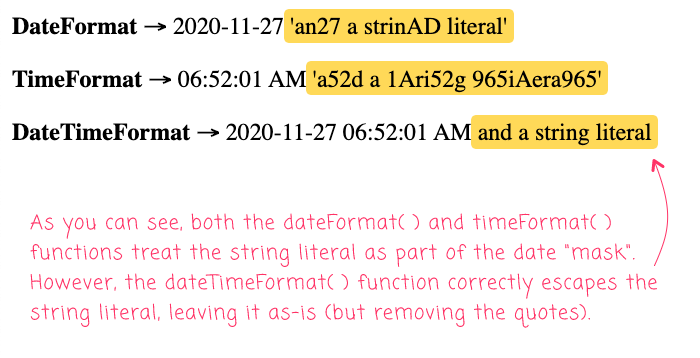
As you can see, both the dateFormat() and timeFormat() functions consumed the string literal as part of the mask. However, the dateTimeFormat() function was able to treat the string literal as a stand-alone value, keeping it in the output as-is (but removing the single-quote).
It seems odd that this works in one date/time function but not the others. I'll have to check to see if there is a feature-enhancement request somewhere in the Lucee Dev Tickets. That said, it's pretty cool that string literals do work in dateTimeFormat(). I don't often need them; but, now I have this hot tip in my back-pockets.

Reader Comments