
The other day, I was talking to Bryan Stanley about managing CFThreads in ColdFusion. He was working on a load-testing utility and needed to be able spawn and subsequently terminate CFThreads as part of a barrage of tests. When it comes to threads, I normally think of terminating a thread internally (ie, from within the thread itself); I don't think I've ever terminated a thread externally (ie, from the parent request). As such, I wanted to give it a quick try in an effort to build out my mental model.
When you spawn a new CFThread in ColdFusion, the thread doesn't start running instantly. In fact, depending on your license and your ColdFusion administrator settings, there is a limit to the number of CFThreads that can be running at any time. As such, your CFThread may end up getting queued and run at a later time (when the queue is processed).
To test termination in both states - pending and running - we can adjust the duration of the parent request. To start with, I'm going to sleep the parent request for a few milliseconds in order to give the asynchronous thread time to start running:
<cfscript>

	// Setup a thread that we know will take a whlie to run. By implementing
	// an internal loop with a sleep(), we know that this will take at least
	// 1,000ms to run at a minimum.
	thread
		action = "run"
		name = "tempThread"
		{

		for ( var i = 0 ; i < 100 ; i++ ) {

			thread.index = i;

			sleep( 10 );

		}

	}

	// When we define a thread, it doesn't necessarily start executing right
	// away. As such, let's briefly sleep the main thread in order to give
	// the asynchronous thread time to spawn.
	sleep( 123 );

	// Kill it with fire!
	thread
		action = "terminate"
		name = "tempThread"
	;

	writeDump( cfthread.tempThread );

</cfscript>
As you can see, I'm creating an asynchronous CFThread that will take at least 1,000ms (100 iterations x 10ms) to finish running. Then, I sleep the parent thread for a few milliseconds in order to give ColdFusion time to invoke the thread. Then, we terminate it and CFDump it out which gives us the following:
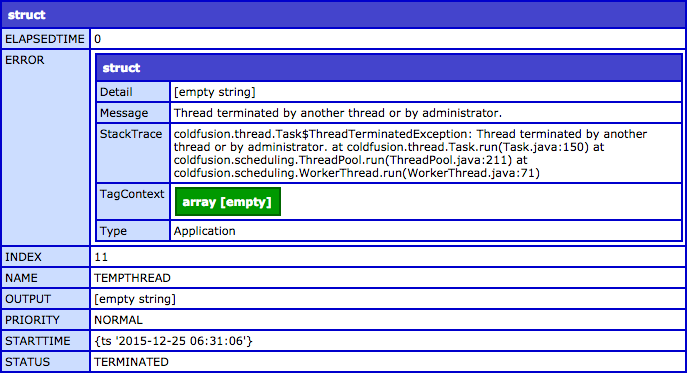
As you can see the status of the thread is "TERMINATED" and we get an error populated in the "ERROR" field:
Thread terminated by another thread or by administrator.
Ok, now let's remove the sleep() from the parent request so that we can terminate the asynchronous CFThread before ColdFusion has a chance to run it. I'm not going to bother showing the code since it's just one line commented-out; but, when we run it we get the following output:
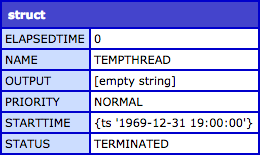
As you can see, we still get a status of "TERMINATED"; however, there is no "ERROR" field. This is really interesting - terminating a thread is only considered an error if the thread has already started running.
As a final thought, I would also just add a reminder that you can only terminate threads that were spawned in the current request. Remember, CFThread names only have to be unique to a single request - not to an instance of ColdFusion. This is because ColdFusion only tracks and exposes threads on a per-request basis. As such, you won't be able to terminate a thread that was spawned in a previous request - ColdFusion will tell you that no such thread exists.
Most of the time, I use CFThreads with a "set it and forget it" mindset. As such, I don't immediately have a good use-case for terminating a thread from the parent request. But, at least it's easy enough to do once you understand what is going on.

Reader Comments
This is really interesting. Sometimes, I wonder if a thread actually executed. I suspect that some threads may sometimes be dropped by CF. Have you ever seen evidence of this? Typically, I spawn a thread to do image manipulation, resizing, rotating, etc. And sometimes, I find that the images haven't always been rotated as expected.
@Chris,
I'm not sure that I've ever suspected ColdFusion of simply dropping threads. But, since errors can happen very silently within a CFThread, they can quickly disappear unless you are wrapping your logic in a try/catch block INSIDE the thread.
That said, there is a limit to the number of threads that ColdFusion can queue. I can't remember offhand if that is a hard-coded limit or a setting in the ColdFusion Administrator. If you have enough threads queued, ColdFusion will start throwing errors about not being able to queue a new thread. But, that error is pretty "loud", so you'd probably see it.
Definitely very curious, though.