
Yesterday, I came across a blog post by Chris Simmons on including Mail and Log menu items in the CommandBox system tray. I use CommandBox as my base Docker image for ColdFusion; but, using the Docker image doesn't give me access to the system tray functionality. Instead, I implement a similar strategy by including a floating UI widget in my local development environment.
This developer UI widget renders in the top-right of my screen:
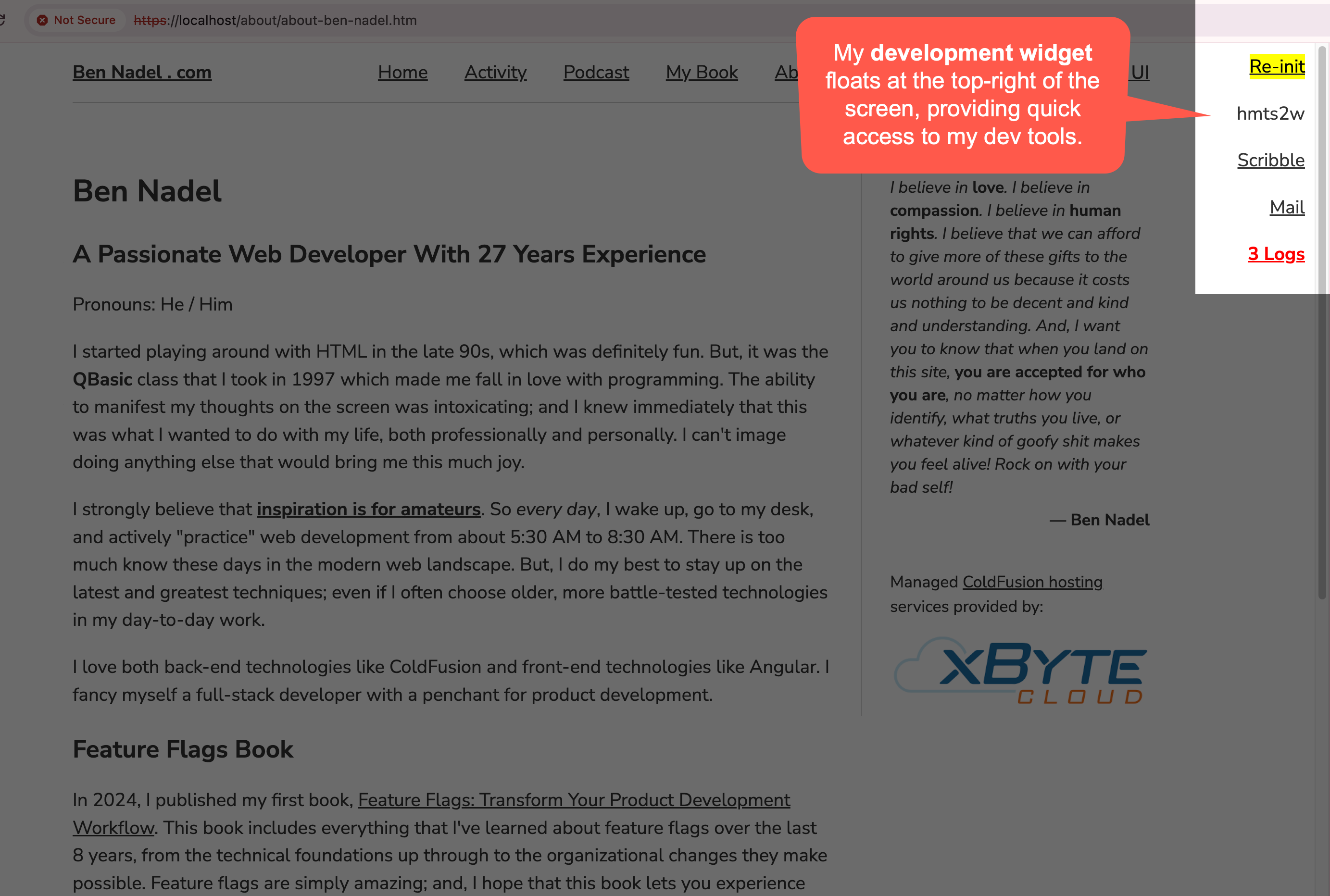
Aside: obviously, this requires having a design that allows for non-overlapping UI widgets in the top-right of the screen. But, this is true for most of my simple interfaces. For non-compatible designs, I just remove the widget.
In my ColdFusion applications, I lean heavily on custom tags and the CFModule tag to create and consume shared functionality. I love custom tags because they provide strong encapsulation with little ceremony. My local developer UI widget is nothing more than a custom tag, localDevelopment.cfm, that I include in the bottom of my layout templates.
For example, here's a heavily truncated version of the standard layout on this blog - you'll see that the very last element inside my <body> tag is a CFModule tag:
<cfoutput>

	<!doctype html>
	<html lang="en">
	<head>
		<!--- truncated --->
	</head>
	<body id="body" class="standard">

		<header>
			<!--- truncated --->
		</header>
		<main id="main-content">
			<!--- truncated --->
		</main>
		<footer>
			<!--- truncated --->
		</footer>

		<cfmodule template="/client/_shared/tag/localDevelopment.cfm" />

	</body>
	</html>

</cfoutput>
While this ColdFusion custom tag is included in every request and in every environment, it has logic that short-circuits with a guard statement that only allows rendering in non-live environments. Implementing the guard statement is straightforward since all of my custom tags - like my controller templates - use a two-file mechanic: one for the "control flow" and one for the "rendering".
And, since my localDevelopment.cfm module has its only CSS styles, it actually has three collocated files that work in unison:
localDevelopment.cfm- the custom tag ingress / control flow.localDevelopment.view.cfm- the rendering.localDevelopment.view.less- the Less CSS styles.
The custom tag ingress / control flow template checks the config to figure out where the tag is being rendered; and performs an early-exit in production. In local development environments, it gathers information about the logs and provides quick links to the re-initialization, Mail and Scribble features.
Here's an abbreviated version of the developer widget for this blog:
<cfscript>

	// Define properties for dependency-injection.
	config = request.ioc.get( "config" );
	requestMetadata = request.ioc.get( "core.lib.web.RequestMetadata" );

	// ColdFusion language extensions (global functions).
	include "/core/cfmlx.cfm";

	// ------------------------------------------------------------------------------- //
	// ------------------------------------------------------------------------------- //

	// ONLY SHOW IN THE LOCAL DEVELOPMENT ENVIRONMENT.
	if ( config.isLive ) {

		exit;

	}

	urlWithInit = getInitUrl();
	slug = generateSlug();
	logCount = getLogCount();

	include "./localDevelopment.view.cfm";
	exit;

	// ------------------------------------------------------------------------------- //
	// ------------------------------------------------------------------------------- //

	/**
	* I generate a slug to be used with the emulated encapsulation. The slug will always
	* start with a letter so that it can be used as a JavaScript variable.
	*/
	private string function generateSlug( numeric length = 6 ) {

		// ... truncated ...

	}


	/**
	* I return the URL that will re-init the application and bring the user back to the
	* same/current page.
	*/
	private string function getInitUrl() {

		// ... truncated ...

	}


	/**
	* I get the number of log files in the local directory.
	*/
	private numeric function getLogCount() {

		// ... truncated ...

	}

</cfscript>
My ColdFusion custom tags are generally structured in three parts:
- Inversion of Control (IoC) injections.
- Data initialization, validation, and processing.
- Private methods.
If you look closely above, you'll see that just before my private methods, I CFInclude the view aspect of the custom tag, localDevelopment.view.cfm. This view template provides the floating UI that we saw in the screenshot above:
<cfoutput>

	<div aria-hidden="true" data-turbo="false" g8c588 class="g8c588">

		<div class="corner">
			<a href="#e4a( urlWithInit )#">
				<mark>Re-init</mark>
			</a>

			#e( slug )#

			<a href="/scribble/index.cfm" target="_blank">
				Scribble
			</a>

			<a href="http://localhost:8025" target="_blank">
				Mail
			</a>

			<cfif logCount>
				<a href="/index.cfm?event=dev.log" target="_blank" style="color: red ;">
					<strong>
						#numberFormat( logCount )# Logs
					</strong>
				</a>
			</cfif>
		</div>

	</div>

</cfoutput>
Since this CFML template is being included into the custom tag, it has access to the custom tag's variables, including private methods and cfmlx global extensions. This is why it can make use of "global" user defined functions (UDFs) like e() and e4a().
In the view template, notice that the host element has a 6-character token, g8c588. In order to simulate scoped CSS in my ColdFusion applications, I use random, globally-unique tokens that act as attribute / class hooks for CSS styling. In fact, this local development widget both consumes and produces such a token. That's what the generateSlug() method (above) is doing - it's producing a new, random 6-character token on every render.
This g8c588 token is then used by the localDevelopment.view.less file to scope its CSS selectors to this custom tag and this custom tag only:
[g8c588] {
	.corner {
		align-items: flex-end ;
		display: flex ;
		flex-direction: column ;
		gap: 20px ;
		position: fixed ;
		right: 10px ;
		top: 10px ;
		z-index: 9999 ;

		@media screen and ( max-width: 1024px ) {
			display: none ;
		}
	}
}
Note: including
*.view.lessfiles into the front-end asset build pipeline is beyond the scope of this post. But know that this Less CSS file is being included, along with many others, into the CSS bundle generated by my Parcel.js build system.
Using a ColdFusion custom tag to expose developer-facing functionality is not a pure win. Clearly there's some ceremony involved: making sure to include it within the layout templates and then making sure the build system pulls in the CSS. Then there's the overlapping UI to contend with. But, on the flip side, since it's all ColdFusion, I get direct access to application logic and can surface more insightful functionality. Overall, I've been loving this approach.
Epilogue: Framework vs Application Responsibility
I'm sure that many, if not all, of the ColdFusion web frameworks have some sort of magical debugging template that they can render at the bottom of the requested page. While that gets you up-and-running faster, I've often found it to be limiting in the long run. I much prefer this kind of functionality be a responsibility of the application itself so that I have clarity on where it resides, when it gets rendered, and how I can modify it as the development needs of the application evolve.
For example, I don't have any tests in my blog platform. But, my Big Sexy Poems platform does. Which is why its version of the localDevelopment.cfm ColdFusion custom tag has a link to run the test suite. If this development widget were part of the framework and not part of the application, having such a divergence would become unnecessarily challenging.

Reader Comments
Post A Comment — ❤️ I'd Love To Hear From You! ❤️
Post a Comment →