When a link is rendered on a social platform (such as LinkedIn or Facebook), the social platform will look for Open Graph (OG) meta tags defined within the target link. The social platform will then use these meta tags to render a preview of the link directly within the social feed. For Big Sexy Poems, I want to OG image to be a preview of the poem itself. Since each poem is going to be completely different, and can change at any moment, the OG image has to be generated on-the-fly. ColdFusion provides some image functionality; but, much of what I need for this effort will require dipping into the Java layer.
Open Graph images are generally rendered in a landscape aspect ratio. Which immediately puts poems at a disadvantage since poems are almost always taller than they are wide. To work with the constraints of the image rendering, I'm going to ignore the explicit line-breaks within the poem; and instead treat the poem as a single line of text, wrapping it at the bounds of the image.
Neither the poem name nor the content are fixed. But, the dimensions of the Open Graph image are fixed (at least within my initial exploration here). As such, the more room the poem name consumes, the less room I have for the poem content. Figuring this all out is a matter of trial-and-error and a lot of iterative twerking.
To make the tweaking easier, I've created a ColdFusion page that renders a number of Open Graph images using a variety of input lengths. All of the images are rendered on a single page so that I can see how small tweaks are experienced across the range of possible renderings.
<cfscript>

	// Sample data for rendering the Open Graph images. We want to test various
	// combinations of line length and count for both the poem title and the poem content.
	poems = [
		{
			name: "Lorem ipsum dolor sit",
			content: "Meus conficio iterum sono prope volucer sepulcrum.",
			author: "Ben Nadel"
		},
		{
			name: "Impetus prosum convivium",
			content: "Lorem ipsum dolor sit amet sustineo cum tertius templum. Pauci epistula, praeterea propter rex, eo recens vicinus magister. Is specto post duo agmen. Nos sum noster libido. Sui moror cum clarus ripa.",
			author: "Ben Nadel"
		},
		{
			name: "Finis si os debeo ut",
			content: "Nemo libet meus barbarus vel qua poena. Aliquis alo de proprius legio. Noster iubeo cum inferus aes. Rarus natus, tum sine auxilium, fore socius humanus os. Tu sono in pius vestigium. Hic valeo in communis corpus. Noster recipio qualis comes uterque hic res. Tu pertineo num pareo ad nudus cursus.",
			author: "Benjamin Nadel"
		},
		{
			name: "Locus consto ullus vos Mensa quisquam descendo",
			content: "Noster memini post novus initium. Meus narro quidam consuetudo licet iste iugum. Nemo muto apud adversus supplicium. Aliquis sequor idem fatum. Sui pugno qui vis.",
			author: "Benjamin Joshua Nadel"
		},
		{
			name: "Labor consumo aes Sors frango rus Hostis converto egregius dives Gradus prodo convivium",
			content: "Noster memini post novus initium. Meus narro quidam consuetudo licet iste iugum. Nemo muto apud adversus supplicium. Aliquis sequor idem fatum. Sui pugno qui vis.",
			author: "Ben"
		},
	];

</cfscript>
<style type="text/css">

	body {
		background-color: #111111 ;
		margin: 100px ;
	}

	.images {
		display: flex ;
		flex-wrap: wrap ;
		gap: 100px ;
		justify-content: center ;

		& img {
			aspect-ratio: 1200/630 ;
			max-width: 500px ;
		}
	}

</style>
<cfoutput>
	<div class="images">
		<cfloop array="#poems#" item="poem">

			<img src="./ogImage.cfm?poemName=#encodeForUrl( poem.name )#&poemContent=#encodeForUrl( poem.content )#&authorName=#encodeForUrl( poem.author )#" />

		</cfloop>
	</div>
</cfoutput>
As you can see, I have 5 sample inputs, each of which is being piped into the ogImage.cfm end-point. The ogImage.cfm end-point is generating the Open Graph image on-the-fly. Running this ColdFusion page gives us the following output:
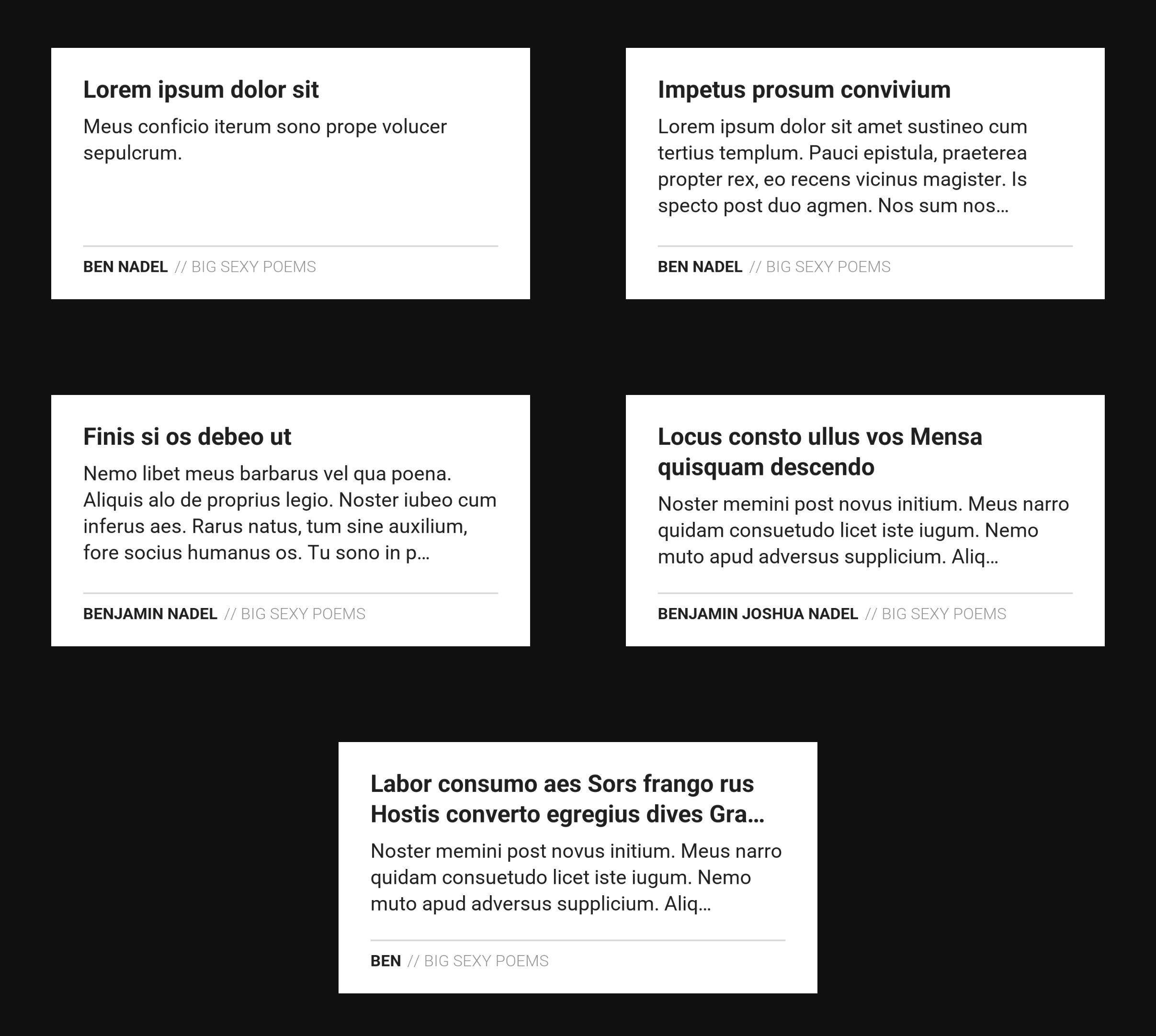
This pages gives me a high-level view of what Open Graph images will roughly look like for poems of different lengths. Notice that as the number of lines rendered for the name increases (to a maximum of 2), the number of lines rendered for the content decreases (to a minimum of 3). And, for content that exceeds these constraints, I'm appending an ellipsis to the text in order to denote truncation.
Here is the ColdFusion code that renders each of these Open Graph images. My strategy is to render each text block into its own Image object instance. Then, the Open Graph result is the accumulation of these individual Image objects being pasted onto the same canvas.
Using individual Image objects helps me with the relative flow of the blocks by providing me with widths, heights, and rendered lines. This allows me to, for example, grow or shrink the number of lines I render in the poem content based on the rendered lines in the poem name.
This is a lot of ColdFusion code. I present it here without additional commentary. The CFML contains a lot of content that might be helpful.
<cfscript>

	// ColdFusion language extensions (global functions).
	include "/core/cfmlx.cfm";

	// ------------------------------------------------------------------------------- //
	// ------------------------------------------------------------------------------- //

	param name="url.poemName" type="string" default="Roses Are Red";
	param name="url.poemContent" type="string" default="Violets are blue.";
	param name="url.authorName" type="string" default="Ben Nadel";

	poemName = url.poemName.trim();
	poemContent = url.poemContent.trim()
		// Replace double-dashes with em dashes.
		.replace( "--", "—", "all" )
		// Replace all white space with a space - we're going to render the poem as a
		// "single line" in order to more thoroughly use the visual space.
		.replace( "\s+", " ", "all" )
	;
	poemAuthor = url.authorName.trim().ucase();
	brandName = ucase( "// Big Sexy Poems" );

	// ------------------------------------------------------------------------------- //
	// ------------------------------------------------------------------------------- //

	// The Open Graph image is a single canvas onto which we will PASTE smaller, text-
	// based images. By constructing individual text blocks as smaller images, it helps us
	// determine the rendered height and width of the smaller text blocks. Which, in turn,
	// helps us layout the text blocks relative to each other.

	// Each of the calls to `renderTextBlock()` returns the following data structure:
	//
	// * image - the ColdFusion image object.
	// * width - the width of the ColdFusion image object.
	// * height - the height of the ColdFusion image object.
	// * linesIncluded - the array of rendered text lines.
	// * linesExcluded - the array of omitted text lines.

	// Aspect ratio of `1.91:1` for Open Graph (OG) social media images.
	ogWidth = 1200;
	ogHeight = 630;
	ogImage = imageNew( "", ogWidth, ogHeight, "rgb", "ffffff" );
	// Keep a large buffer around the image content in order to keep the text readable
	// across the various social media treatments. We won't stick to this exactly; but it,
	// will help point us in the right direction.
	bodyMargin = 80;
	bodyWidth = ( ogWidth - bodyMargin - bodyMargin );

	// Define and render the title block.
	titleX = bodyMargin;
	titleY = ( bodyMargin - 10 );
	titleRendering = renderTextBlock(
		text = poemName,
		textColor = "212121",
		backgroundColor = "ffffff",
		fontFamily = "Roboto Bold",
		fontSize = 60,
		lineHeight = 76,
		maxWidth = bodyWidth,
		maxLines = 2
	);
	ogImage.paste( titleRendering.image, titleX, titleY );

	// Define and render the content block. The number of lines that we render for the
	// content must decrease as the number of lines rendered for the title increases. This
	// way, if the tittle wraps to multiple lines, we don't accidentally push the content
	// down over the OG footer.
	contentMaxLines = ( 5 - titleRendering.linesIncluded.len() );
	contentX = bodyMargin;
	contentY = ( titleY + titleRendering.height + 27 );
	contentRendering = renderTextBlock(
		text = poemContent,
		textColor = "212121",
		backgroundColor = "ffffff",
		fontFamily = "Roboto Regular",
		fontSize = 50,
		lineHeight = 66,
		maxWidth = bodyWidth,
		maxLines = contentMaxLines
	);
	ogImage.paste( contentRendering.image, contentX, contentY );

	// ------------------------------------------------------------------------------- //
	// ------------------------------------------------------------------------------- //

	// Horizontal rule for the footer.
	ruleX = bodyMargin;
	ruleY = 495;
	ogImage.setDrawingColor( "d8d8d8" );
	ogImage.drawRect( ruleX, ruleY, bodyWidth, 4, true );

	// Define and render the author block.
	authorX = bodyMargin;
	authorY = ( ruleY + 30 );
	authorRendering = renderTextBlock(
		text = poemAuthor,
		textColor = "212121",
		backgroundColor = "ffffff",
		fontFamily = "Roboto Bold",
		fontSize = 40,
		lineHeight = 50,
		maxWidth = fix( bodyWidth * 0.62 ),
		truncate = false
	);
	ogImage.paste( authorRendering.image, authorX, authorY );

	// Define and render the branding block.
	brandX = ( authorX + authorRendering.width + 14 );
	brandY = authorY;
	brandRendering = renderTextBlock(
		text = brandName,
		textColor = "939393",
		backgroundColor = "ffffff",
		fontFamily = "Roboto Light",
		fontSize = 40,
		lineHeight = 50,
		maxWidth = fix( bodyWidth / 2 )
	);
	ogImage.paste( brandRendering.image, brandX, brandY );

	// ------------------------------------------------------------------------------- //
	// ------------------------------------------------------------------------------- //

	// There's no way in ColdFusion to get the "rendered image" binary without dealing
	// with some sort of file I/O. As such, we're going to render the image to a temporary
	// file, serve the file, and then delete the temporary image.
	withTempDirectory( ( tempDirectory ) => {

		var tempFile = "#tempDirectory#/open-graph-image.png";

		imageWrite( ogImage, tempFile, true );

		cfcontent(
			type = "image/png",
			file = tempFile
		);

	});

	// ------------------------------------------------------------------------------- //
	// ------------------------------------------------------------------------------- //

	/**
	* I render the given text to a canvas, wrapping the text onto multiple lines at the
	* given width. The returned canvas will be cropped to the smallest box that fits the
	* text within the given constraints.
	*/
	private struct function renderTextBlock(
		required string text,
		required string textColor,
		required string backgroundColor,
		required string fontFamily,
		required string fontSize,
		required numeric lineHeight,
		required numeric maxWidth,
		numeric maxHeight = 0,
		numeric maxLines = 1,
		boolean antialiasing = true,
		boolean truncate = true,
		boolean debug = false,
		) {

		// If no height is provided, we'll calculate enough height for the given number of
		// lines (according to line-height).
		if ( ! maxHeight ) {

			maxHeight = fix( maxLines * lineHeight * 1.1 );

		}

		var textImage = imageNew( "", maxWidth, maxHeight, "rgb", backgroundColor );
		textImage.setAntialiasing( antialiasing );
		textImage.setDrawingColor( textColor );

		var results = {
			image: textImage,
			width: maxWidth,
			height: maxHeight,
			linesIncluded: [],
			linesExcluded: []
		};

		var awtContext = textImage.getBufferedImage()
			.getGraphics()
			.getFontRenderContext()
		;
		// Caution: When decoding a font definition, you can use either a space (" ") or
		// a dash ("-") delimiter. But, you cannot mix-and-match the two characters. As
		// such, if you have a Font name which has spaces in it (ex, "Roboto Thin"), you
		// MUST USE the dash delimiter in order to prevent Java from parsing the font name
		// as a multi-item list. In this case, note that I'm using the "-" because I know
		// my font name doesn't contain a dash.
		var awtFont = createObject( "java", "java.awt.Font" )
			.decode( "#fontFamily#-#fontSize#" )
		;

		// The rendering will be performed in several passes. First, we'll analyze the
		// text and break it up into separate lines with accompanying bounding box
		// metrics. Then, we'll calculate the layout of those lines with a vertical
		// rhythm, determining which lines will be rendered, which will be truncated, and
		// which will be omitted. And then, finally, we'll render the lines to the canvas.
		var tokens = text.reMatch( "\S+" );
		var lines = [];
		var line = nullValue();

		while ( tokens.len() ) {

			// We're starting a new line.
			if ( isNull( line ) ) {

				line = {
					text: "",
					metrics: nullValue()
				};
				lines.append( line );

			}

			var pendingToken = tokens.shift();
			var pendingText = line.text.listAppend( pendingToken, " " );
			var pendingLayout = createObject( "java", "java.awt.font.TextLayout" )
				.init( pendingText, awtFont, awtContext )
			;
			var pendingBounds = pendingLayout.getBounds();
			var pendingMetrics = {
				boxWidth: pendingBounds.width,
				boxHeight: pendingBounds.height,
				// The following properties will be the same for all lines.
				textX: pendingBounds.x,
				textY: pendingBounds.y,
				textAscent: pendingLayout.getAscent(),
				textDescent: pendingLayout.getDescent(),
				textHeight: ( pendingLayout.getAscent() + pendingLayout.getDescent() )
			};

			// If we haven't exceeded the max width, continue onto the next token.
			if ( pendingBounds.width <= maxWidth ) {

				line.text = pendingText;
				line.metrics = pendingMetrics;
				continue;

			}

			// Edge-case: we've exceeded the max width by adding the pending token, but
			// it's just one really long token. Moving it to the next line won't help
			// since it will be too long on the next line as well. Let's just jam it into
			// one line and let the canvas cropping truncate it naturally.
			if ( pendingText == pendingToken ) {

				line.text = pendingText;
				line.metrics = pendingMetrics;
				line = nullValue();
				continue;

			}

			// Common-case: we've exceeded the max width by adding the pending token to
			// the formerly-fitting line. We need to move the last token back into the
			// pending tokens and consider the previous line complete.
			tokens.unshift( pendingToken );
			line = nullValue();

		}

		// At this point, we have the text broken up into WIDTH-based lines. Now, let's
		// calculate the vertical rhythm of those lines.
		var y = 0;
		var maxRenderedHeight = 0;
		var maxRenderedWidth = 0;

		for ( var line in lines ) {

			// In ColdFusion, the text is drawn from its baseline coordinates. The
			// baseline offset can be calculated from the current vertical offset (y) and
			// the ascent of the text (which is the space from the top-right of the text
			// to the baseline). Instead of trying to center the line of text within the
			// line-height space, we're going to bias the line of text to the top of the
			// vertical space and fulfill the line-height requirement with what amounts to
			// a bottom-margin. This will just make our lives easier.
			line.x = 0;
			line.yAscent = line.y = y;
			line.yBaseline = ( y + line.metrics.textAscent );
			line.yDescent = ( y + line.metrics.textHeight );
			line.height = line.metrics.textHeight;
			line.width = ( ( line.metrics.textX * 2 ) + line.metrics.boxWidth );
			// If the bottom of the text is within the max constraints for the canvas,
			// let's flag the line as rendered.
			line.isRendered = ( line.yDescent <= maxHeight );

			// If the line is going to be rendered, update the max rendered dimensions.
			if ( line.isRendered ) {

				maxRenderedHeight = ceiling( line.yDescent );
				maxRenderedWidth = max( maxRenderedWidth, ceiling( line.width ) );

			}

			// At this point, we don't need the metrics object anymore - we've folded all
			// the relevant values into the line object.
			line.delete( "metrics" );

			// Copy the line to the appropriate result bucket.
			if ( line.isRendered ) {

				results.linesIncluded.append( line );

			} else {

				results.linesExcluded.append( line );

			}

			// Move to next line rendering position.
			y += lineHeight;

		}

		// If we have any excluded lines, let's indicate that we're truncating the text.
		if ( truncate && results.linesExcluded.len() ) {

			var ellipsis = canonicalize( "&##x2026;", false, false );
			var lastLine = results.linesIncluded.last();

			// Note: this isn't a perfect truncation - we're just guessing that removing
			// three characters should be enough to show the ellipsis without the ellipsis
			// itself being truncated by the canvas cropping.
			lastLine.text = lastLine.text.reReplace( "...$", ellipsis );

		}

		// At this point, we have the text broken up into included / excluded lines. Now,
		// we need to render the included lines to the canvas.
		var textOptions = {
			size: fontSize,
			font: fontFamily
		};

		for ( var line in results.linesIncluded ) {

			textImage.drawText( line.text, line.x, line.yBaseline, textOptions );

		}

		// If we're debugging the output, clearly outline both the canvas and the text.
		// This will help us get a sense of how close we are to truncation.
		if ( debug ) {

			// Outline the canvas.
			textImage.setDrawingColor( "cc0000" );
			textImage.drawRect( 0, 0, ( maxWidth - 1 ), ( maxHeight - 1 ) );
			// Outline the text block.
			textImage.setDrawingColor( "00aa00" );
			textImage.drawRect( 0, 0, ( maxRenderedWidth - 1 ), ( maxRenderedHeight - 1 ) );
			// Make sure the canvas doesn't get cropped (for all intents and purposes).
			maxRenderedWidth = maxWidth;
			maxRenderedHeight = maxHeight;

		}

		// The initial canvas was maxWidth x maxHeight - now that we've rendered the text,
		// we can crop it down to the visual space that we know we used. The calling
		// context can then use the width / height of the image object to help with layout
		// and composition of multiple blocks.
		results.width = min( maxWidth, maxRenderedWidth );
		results.height = min( maxHeight, maxRenderedHeight );
		textImage.crop( 0, 0, results.width, results.height );

		return results;

	}


	/**
	* I execute the given callback, passing in a temporary directory that can be used for
	* transient file IO. The temporary directory is deleted after the callback has been
	* executed.
	*/
	private any function withTempDirectory( required function callback ) {

		var folderPath = expandPath( "/upload/temp/" & createUuid() );

		try {

			directoryCreate( folderPath );

			return callback( folderPath );

		} finally {

			directoryDelete( folderPath, true );

		}

	}

</cfscript>
This ColdFusion code is still a work in progress. But, I think it's "good enough" to start integrating into the Big Sexy Poems app itself. Since image generation takes processing power, I'll likely put it behind the Cloudflare CDN and apply caching. But, that's fodder for a future blog post.

Reader Comments
As a quick follow-up, these Open Graph images have now been integrated into Big Sexy Poems:
www.bennadel.com/blog/4848-generating-serving-and-caching-open-graph-images-using-coldfusion.htm
Post A Comment — ❤️ I'd Love To Hear From You! ❤️
Post a Comment →