
Over the years, I've come to believe deeply in the supremacy of the URL. That is, when navigating around a web application, I believe that the vast majority of views should be accessible by URL in order to facilitate deep-linking to anywhere within the app (either in a Single-Page Application context or in a Multi-Page Application context). But, as strongly as I feel about this, I've never quite reconciled it with the way in which I manage my post-back URLs in ColdFusion. As such, I wanted to briefly consider both the aesthetics and ergonomics of post-back URLs.
In this exploration, I'm considering a "post-back URL" to be the URL that goes in the action attribute of a <form> tag. In most of my ColdFusion workflows, forms will submit back to the same page with a submitted=true flag that indicates that the data should be processed (as opposed to initialized). Hence the "post back" nomenclature.
Let's consider a list of widgets that each have an edit link. Each edit link contains the unique id of the target widget:
<h1>
	Widgets
</h1>

<ul>
	<li>
		<a href="./edit.cfm?id=1">Edit - Widget One</a>
	</li>
	<li>
		<a href="./edit.cfm?id=2">Edit - Widget Two</a>
	</li>
	<li>
		<a href="./edit.cfm?id=3">Edit - Widget Three</a>
	</li>
</ul>
All three of these links are GET requests that will take the user to the edit view and load the widget data associated with the given id (note that the data loading is not shown in this demo). Since my ColdFusion workflows all post back to themselves, the edit page will render a form whose action attribute points back to edit.cfm. And, in this incarnation, the id value will appended to the request using a hidden <input> field:
<cfscript>

	param name="url.id" type="numeric";
	param name="form.submitted" type="boolean" default=false;

	if ( form.submitted ) {

		// ... process form submission ....

	}

</cfscript>
<cfoutput>

	<h2>
		Edit Widget
	</h2>

	<form method="post" action="./edit.cfm">
		<input type="hidden" name="id" value="#encodeForHtmlAttribute( url.id )#" />
		<input type="hidden" name="submitted" value="true" />

		Name:
		<input type="text" value="...." />
		<button type="submit">
			Save
		</button>
	</form>

</cfoutput>
This approach has problematic ergonomics regarding the delivery of the id value. On the initial page load, the id is provided in the URL search parameters. However, on post-back (ie, the form submission), the hidden input delivers the id value as part of the form data. Which means that our CFParam tag for url.id will throw an error on post-back:
The required parameter
url.idwas not provided.This page uses the
cfparamtag to declare the parameterurl.idas required for this template. The parameter is not available. Ensure that you have passed or initialized the parameter correctly. To set a default value for the parameter, use thedefaultattribute of thecfparamtag.
Historically, in order to remediate this problem I'll create a unified "context" object that combines both the url and the form scope. Then, I'll use this context object scoping in places where a variable might be provided in either the URL or the form data.
In the following refactoring, notice that I start off by merging the form scope into the url scope (giving the form scope higher precedence). Then, I'll use context.id instead of url.id for all subsequent references:
<cfscript>

	// Create a unified container for URL+FORM variables.
	context = url
		.copy()
		.append( form )
	;

	param name="context.id" type="numeric";
	param name="context.submitted" type="boolean" default=false;

	if ( context.submitted ) {

		// ... process form submission ....

	}

</cfscript>
<cfoutput>

	<h2>
		Edit Widget
	</h2>

	<form method="post" action="./edit-b.cfm">
		<input type="hidden" name="id" value="#encodeForHtmlAttribute( context.id )#" />
		<input type="hidden" name="submitted" value="true" />

		Name:
		<input type="text" value="...." />
		<button type="submit">
			Save
		</button>
	</form>

</cfoutput>
This remediates the CFParam error; but, it opens up a new set of ergonomic and aesthetic problems. First, on page load the URL looks like this:
./edit-b.cfm?id=1
But, upon form submission, the URL looks like this:
./edit-b.cfm
When the form is submitted, the id value has moved from the url scope into the form scope and is no longer needed in the search parameters. This is fine because of the context object; but, it means that the URL no longer represents a valid location within the application routing. Which means, if the user where to focus the location bar and hit Enter, the ColdFusion application would result in an error (since no id value is being provided).
It also means that the URL is no longer shareable after the form has been submitted. Imagine a scenario in which the user is having an issue with the form submission and wants to open a Support Ticket. They might copy-paste the URL into the Support Ticket in an effort to provide more meaningful context; but, all of the meaningful information has been moved out of the URL and into the form data (making their copy-pasted URL meaningless to the Support staff).
To solve both the aesthetic and the ergonomic problems, I realize that what I need to do is keep URL data in the URL and form data in the form. My mistake has always been moving the URL data into the form during the post-back workflow. This has caused me nothing but problems over the years.
Refactoring the example once again, this time I'm going to keep the id in the URL (via the action attribute) and the submitted flag in the form (via the hidden input):
<cfscript>

	param name="url.id" type="numeric";
	param name="form.submitted" type="boolean" default=false;

	if ( form.submitted ) {

		// ... process form submission ....

	}

</cfscript>
<cfoutput>

	<h2>
		Edit Widget
	</h2>

	<form method="post" action="./edit-c.cfm?id=#encodeForUrl( url.id )#">
		<input type="hidden" name="submitted" value="true" />

		Name:
		<input type="text" value="...." />
		<button type="submit">
			Save
		</button>
	</form>

</cfoutput>
This ColdFusion code no longer needs the context object creation since we're propagating the data in the same scopes. The id value stays in the URL, as part of the action attribute, and the submitted value stays in the form. And when the form is submitted, we can see this continued separation in the network activity:
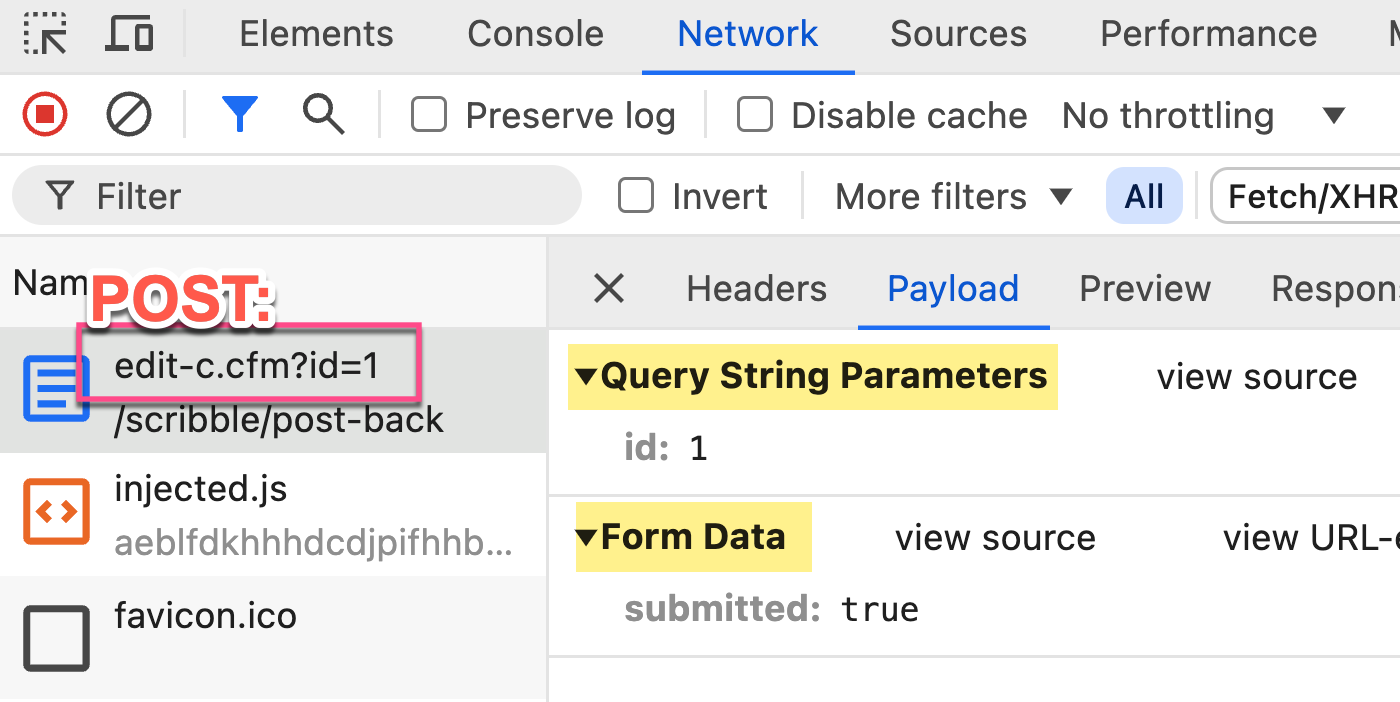
Once we decide to keep the URL data in the url scope and the form data in the form scope, we can simplify this even further by using the cgi.query_string variable. This variable simply echoes back what the client provided in the request URL. We can even use the cgi.script_name which echoes back the requested template.
In this final refactoring, we're going to define a postBackAction value at the top of the page and then render it into the action attribute. We only have a single form in this demo; but, we can assume that a variable like this might be defined earlier in the request and then used more widely.
<cfscript>

	// All forms in this ColdFusion application post-back to themselves for processing. As
	// such, we can define a generic post-back action attribute value that any form can
	// use to propagate the request URL.
	postBackAction = "#cgi.script_name#?#encodeForHtmlAttribute( cgi.query_string )#";

	// ------------------------------------------------------------------------------- //
	// ------------------------------------------------------------------------------- //

	param name="url.id" type="numeric";
	param name="form.submitted" type="boolean" default=false;

	if ( form.submitted ) {

		// ... process form submission ....

	}

</cfscript>
<cfoutput>

	<h2>
		Edit Widget
	</h2>

	<!--- Note: Action is using the post-back URL. --->
	<form method="post" action="#postBackAction#">
		<input type="hidden" name="submitted" value="true" />

		Name:
		<input type="text" value="...." />
		<button type="submit">
			Save
		</button>
	</form>

</cfoutput>
With this final approach, we have several benefits:
-
The URL always represents a valid, deep-linkable, shareable location within the ColdFusion application.
-
Data never migrates from one scope to another which means that we never have to combine the
urlandformscopes into acontextpseudo-scope. -
Form data can never be submitted via the URL as part of a malicious attack since form data will always be accessed via the
formscope (which isn't populated during a GET request). -
We can create a generic
postBackActionvalue in order to make<form>rendering a little less tedious. -
It helps us remember the supremacy of the URL; and that it should always be meaningful in the current application context.
This is going to be my ColdFusion application strategy moving forward. I can't think of a scenario, off-hand, in which this would be problematic; but, I'll report back if a problem arises.
URL Rewriting Considerations
In the above code, I use the cgi.script_name to generically identify the ColdFusion template being requested. This works fine for basic ColdFusion applications; but, might not work for all types of ColdFusion applications. For example, if an application is using URL rewriting, the "requested template" might be passed to the ColdFusion application as a query string parameter. Or, it might be appended to the resource as the cgi.path_info value. In such cases, it might not be easy to generically define a postBackAction. But, that was just an efficiency, not a necessity.

Reader Comments
Re: using the
cgi.query_stringvariable; the one thing about that which doesn't sit well with me is that you will end up posting back to a URL that you (as the programmer) don't fully control. Meaning, if a malicious actor crafts a URL to send to someone else that brings that user to a form, the form will end up posting back to a URL that contains whatever information the malicious actor included.In theory, this shouldn't matter because it shouldn't be any different than the security around any URL (GET or POST). But, you just always want to have it in the back of your mind that you can't trust a URL. As much as you might accept any URL, you have to be sure that you always validate inputs on the server-side before you act on that URL.
So as I'm applying this technique to Dig Deep Fitness, I'm realizing that there is a scenario that complicates this a bit: setting default values in a form. In some places, I want to pass a URL-based parameter to the initial form rendering to setup a default; but then, once the form is submitted, I want to use the form-based value. In my current approach, where it's the same variable, keeping things in the URL doesn't make sense.
What I think I'll do, however, is break it up into two values:
I can handle this by using two different
cfparamtags, like:Notice that it's two different, non-colliding names (
url.defaultThingandform.thing). Once the form submission starts processing, theurlvalue essentially gets discarded and theformvalue is what is consume.Ok, one more caveat I've run into while trying to apply this approach. My initial mechanics are to use the
cgi.query_string. But, I do have some control-flows where I redirect the user to a new page with some transient information in the URL (specifically a "success message" flag so that the app renders a message to the user). If this new page also contains a form that posts back to itself, thecgi.query_stringwill contain that transient information. Of course, I don't actually want that transient information to be encoded into theactionattribute of the form.So, I can do one of two things:
I can use some pattern matching to replace-out the transient data in the
postBackActionvariable at the time I define it.I can manually construct the
postBackActionfrom theurlscope, explicitly skipping over some block-listed keys.I think either approach is completely valid. I'll likely start with the regular expression replace initially and see how it goes. But, the more keys that might need to be omitted, the more it might make sense to manually construct the variable string.
And, it's also important (for me) to keep in mind that the
postBackActionis intended to be an efficiency, not a mandate. If it proves to be more trouble than it's worth, I can just explicitly define the search parameters in theactionattribute directly.Hey Ben - we have survived Christmas, mostly. I wanted to share some elaborate thoughts on this as I use a bit of a different strategy. I may post about it just to help with flow as posting a reply might be difficult to follow.
I've embraced a bit of the old fusebox method by always providing a hidden fuseaction field in my form submits. e.g. fuseaction=post-article-reply and in your example above, an additional hidden field - for aticleid = 1.
On all form submits - I have a custom tag that changes all form and URL elements to variables. So, managing the request on a page doesn't really know where it comes from.
All request end up going to an index page that has a command_layer.cfm which handles what happens based on the fuseaction. In this case - it runs into a cfswitch with the "post-article-reply". Executes the post and additional code can retrieve the article to display it.
As I continue to type, I am realizing how difficult the response is to follow. But here's a short diagram(ish) of the structure.
Post to index.cfm of the current folder...
--- cfinclude variables.cfm (file that accepts and creates defaults)
--- cfinclude command_layer.cfm (file that runs commands based on fuseaction) this file has cfinvokes to a queryprocessing cfc module
--- cfinclude presentation_layer (this file also has switches and displays the page to render based on fuseaction
I think I'll use the rest of my weekend to get my blog up!!! Best wishes fellow developers. Hope everyone had a great holiday season.
@Angel,
Merry Christmas to everyone's favorite "Chicken Dad" 😆 It actually sounds like our various approaches are fairly similar. When I'm not using FW/1 at work, I too am using what amounts to a fusebox-esque approach to architecture. I have nested
switchstatements which route the request to the correct controller file; and then I roll each rendered view up into a page. It sounds like we just maybe organize it a little differently, but the high-level idea sounds very familiar to me.If you do write something down this weekend, please cross-post it here so we can take a look 🙌
Hi Ben
I think this is the approach that Coldbox [controller
rcscope] & FW1 [controllerrcscope].In Coldbox, the
prcscope stands for private request context scope, which refers to variables created inside a controller method, like thelocalscope. Thercscope is a pass through scope, generally originating from aformorurlvariable.Interestingly, in non framework Coldfusion applications, I often use the Post/Redirect/Get (PRG) Design Pattern:
https://www.geeksforgeeks.org/post-redirect-get-prg-design-pattern/
But with a twist.
Before I do the
cflocationredirect, I set asessionvariable that will allow me to do stuff, after I get redirected. In fact, most of the time, this isn't even required.The PRG pattern prevents those annoying Do you wish to resubmit this form? message.
@Charles,
Ah, very nice, I didn't realize this pattern had a name. But, totally, this is the way to do things as far as I'm concerned. Even when I need re-render the same page, I'll always do a redirect back to the same page to avoid the form submission problem.
As far as setting the post-submission session stuff, I go back and forth on different ways to do this kind of thing. The approach that I've been playing with recently is appending 1 or 2 variables in the URL that indicate a "success" condition. Like:
/index.cfm?flash=user.created&flashData=123Then, I have a centralized point in my controller-flow that will examine the
flash/flashDataand render a success message and typically perform ahistory.replaceState()call on the client-side to strip theflash/flashDataout of the URL so that if the user refreshes the page, the success message will disappear.It's not a perfect solution - I never quite love any of the solutions I come up with. But, I'm liking it for the moment.
@Ben Nadel, @Charles Robertson
Just a geeky thought - I shy away from using the redirects. To me - those things are the death of debugging if not done with good foresight. I have pretty much taken them out of every project I have worked with.
@Angel Gonzalez,
I am kind of talking about
cflocation, using the PRG pattern? I think Coldbox & FW1 encourage the use ofredirect()at the end of controller methods, which emulates PRG.I guess, if this is used at the end of a call chain, then hopefully there shouldn't be a debugging issue. 🙂
@Angel,
Yeah, I'm curious to hear what you do after a POST submission? Do you just render a new View?
Post A Comment — ❤️ I'd Love To Hear From You! ❤️
Post a Comment →