
As I've been trying to build-up my knowledge of how Cookies interact with ColdFusion applications, I noticed that the CFCookie tag accepts a "number of days" in its expires attribute. And, the moment I see "days", I think "time-spans". As such, I wanted to see if I could use the createTimeSpan() function to define the cookie expires attribute in ColdFusion - turns out, you can!
To test this, all I did was define a few cookies using various expires techniques: "now", "number of days", and two different time-spans:
<cfscript>

	cookie[ "expire_now" ] = {
		preserveCase: true,
		value: "",
		expires: "now"
	};

	cookie[ "expire_1" ] = {
		preserveCase: true,
		value: "",
		expires: 1 // Number of "days".
	};

	cookie[ "expire_1_hour_span" ] = {
		preserveCase: true,
		value: "",
		expires: createTimeSpan( 0, 1, 0, 0 ) // 1-hour span.
	};

	cookie[ "expire_1_minute_span" ] = {
		preserveCase: true,
		value: "",
		expires: createTimeSpan( 0, 0, 1, 0 ) // 1-minute span.
	};

</cfscript>
As you can see, I'm creating two time-spans: 1-hour and 1-minute. And, when we run this ColdFusion code (in either Lucee CFML or Adobe ColdFusion), we get the following output:
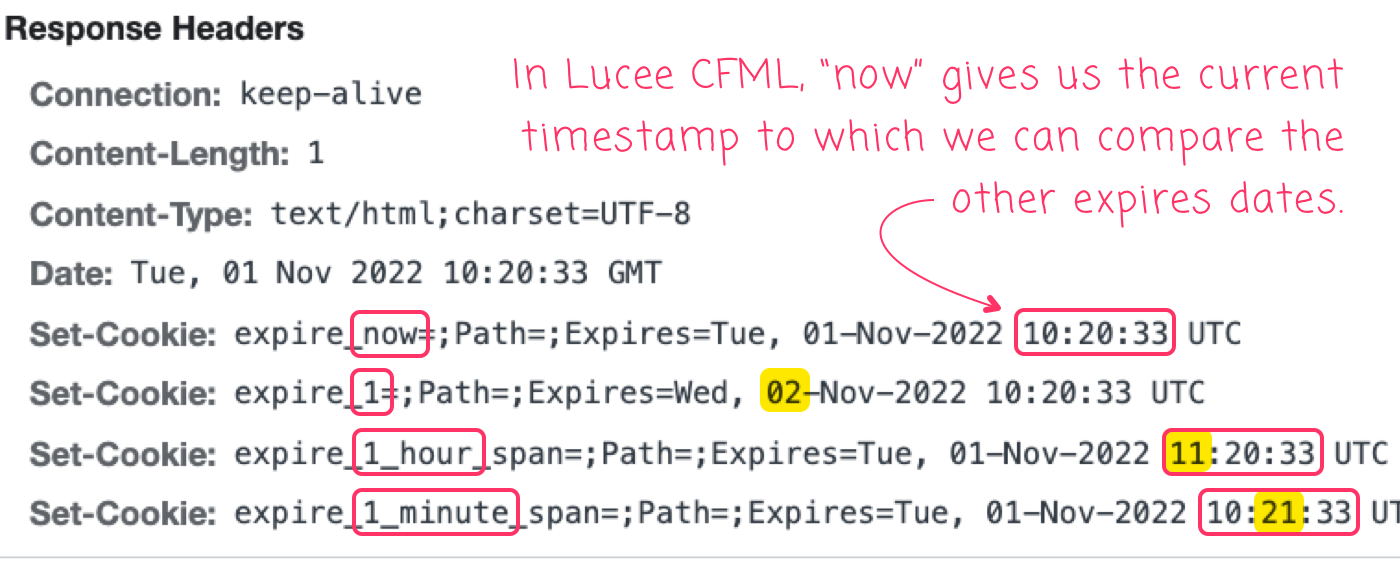
By using the now value in our first cookie, Lucee CFML shows us what the current date/time is on the server. This gives us an easy value to which we can compare the createTimeSpan() values. And, if we look at the last two Set-Cookie HTTP headers, we can see that the 1-hour and 1-minute time-spans both set the correct, relative date/time values for the cookie Expires property.
ASIDE: I'm quoting my cookie keys in the above code since it seems to provide the best cross-product consistency in my CommandBox environment for the keys sent to the browser. The name of the cookie needs to be quoted in order for key-casing to work in Adobe ColdFusion (and it works without
preserveCase); but,preserveCaseseems to be needed for key-casing to work in Lucee CFML. That said, if I switch from the struct-base approach to thecfcookie()tags-in-script approach, the behaviors become more consistent.This is also likely to depend on the application-level key-casing settings. Long story short, just be sure to test the key-casing behavior in your particular ColdFusion environment because cookies with different key-casings are considered different; and, they become a huge pain to work with.
The createTimeSpan() function seems like a convenient way to set the expires attribute on the CFCookie tag. I'm glad to see it working the same in both Adobe ColdFusion and Lucee CFML.

Reader Comments