When I first looked at the CSP (Content Security Policy) friendly build of Alpine.js back in 2024, it was very limited. So limited in fact, that I tried to shoehorn-in the Angular.js parser for better functionality. Flash forward 2 years, and the CSP friendly build of Alpine.js is way better! At the end of 2025, the team materialized my Angular.js proof-of-concept by embedding a lexer, parser, and evaluator into the CSP version. Which means that we can now go beyond the original constraints of bare references to having full-on expressions and method invocations.
Run this demo in my JavaScript Demos project on GitHub.
View this code in my JavaScript Demos project on GitHub.
When the CSP build of Alpine.js was first introduced, it supported almost nothing in the Alpine.js vocabulary. From what I remember, it was limited to x-data references and method names in the DOM (Document Object Model). Everything else had to be tucked away behind the internal component logic.
This is because Alpine.js uses the Function() constructor to evaluate JavaScript expressions. And in stricter CSPs that omit the unsafe-eval directive, the browser blocks this kind of dynamic expression evaluation.
Since v3.15.0, the Alpine.js CSP build works within the limitations of this CSP restriction by manually tokenizing and parsing each JavaScript expression into an Abstract Syntax Tree (AST); and then manually evaluating said AST against a scope in the Alpine.js proxy chain.
This JavaScript "simulation" is robust, but not perfect. There are still some things that it doesn't support; but, the feature gap is quite small; and I don't think it will be a problem for me.
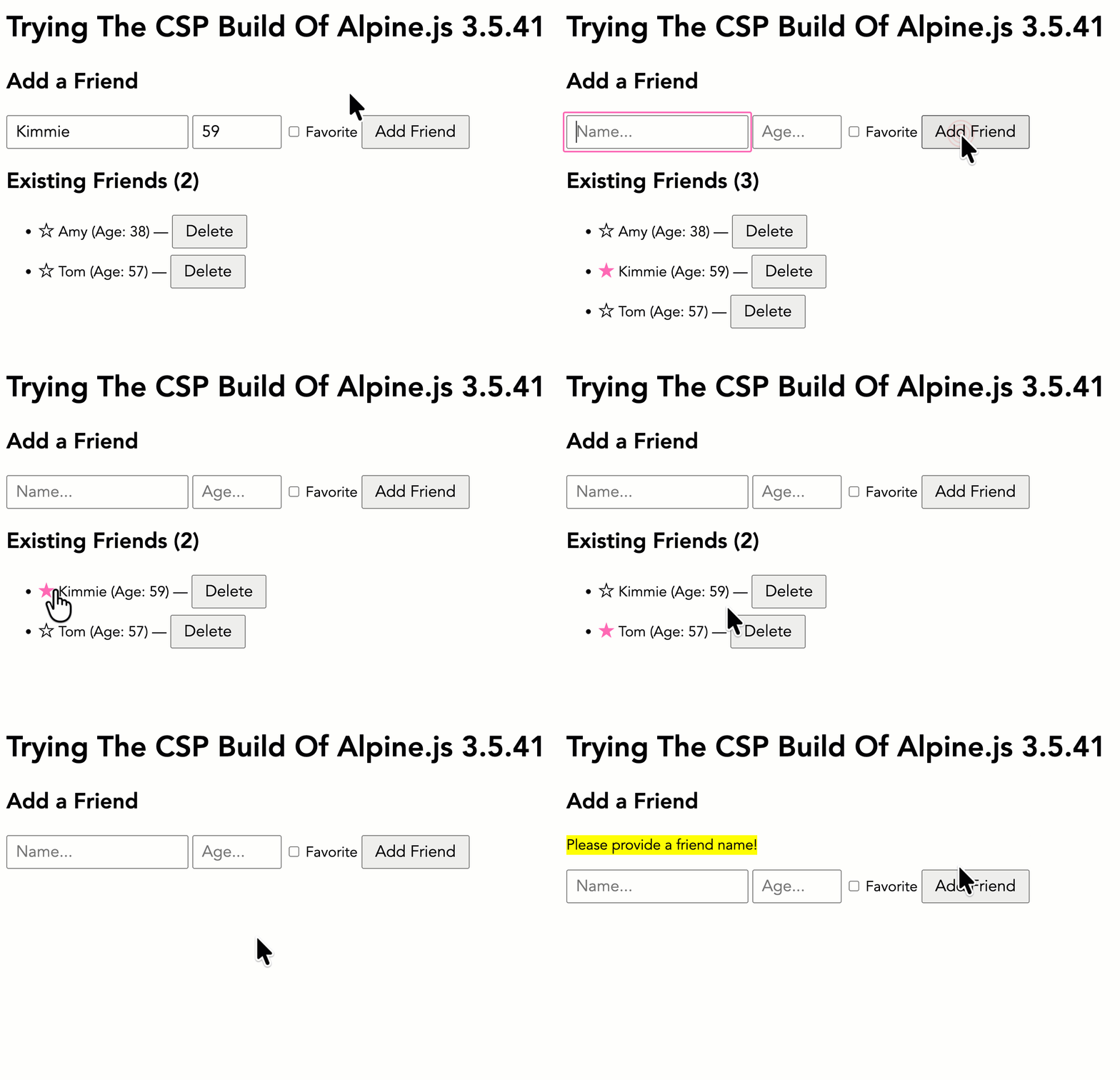
I wanted to put together a quick demo that exercises a number of the Alpine.js feature while using the CSP build. The following demo creates a collection of Friends and provides Add, Favorite, and Delete functionality. It showcases:
- Nested property access.
@eventhandler bindings.:propertyattribute bindings.- Method invocation with arguments.
x-forloops with<template>elements.x-modeltwo-way data bindings.
It's not a very robust demo, but it works with the CSP build. And it's not hard to imagine this demo scaling up for any CSP-constrained application.
In the following code, note that I have a <meta> tag that defines the Content Security Policy for the page. It provides a nonce token that has to be mirrored within the <script> tags in order to adhere to the browser's security. Normally I'd supply this information as an HTTP response header; but since the demo is hosting on GitHub Pages, I only have client-side processing.
<!doctype html>
<html lang="en">
<head>
<!-- Make sure we're not allowing any unsafe-eval work. -->
<meta
http-equiv="Content-Security-Policy"
content="
script-src 'nonce-abc123' 'strict-dynamic';
object-src 'none';
base-uri 'none';
"
/>
<link rel="stylesheet" type="text/css" href="./main.css" />
</head>
<body>
<h1>
Trying The CSP Build Of Alpine.js 3.5.41
</h1>
<section x-data="app">
<h2>
Add a Friend
</h2>
<p x-show="form.error">
<mark x-text="form.error"></mark>
</p>
<form @submit.prevent="processForm( $event )">
<input
type="text"
x-ref="name"
x-model.trim.fill="form.name"
value="Kimmie"
placeholder="Name..."
/>
<input
type="text"
x-model.trim.fill="form.age"
value="59"
size="8"
placeholder="Age..."
/>
<label>
<input
type="checkbox"
x-model.boolean="form.isFavorite"
value="1"
/>
Favorite
</label>
<button type="submit">
Add Friend
</button>
</form>
<div x-show="friends.length">
<h2>
Existing Friends (<span x-text="friends.length"></span>)
</h2>
<ul>
<template x-for="( friend, i ) in friends" :key="friend.id">
<li>
<button
@click="toggleFavorite( friend )"
class="star"
:class="{ isOn: friend.isFavorite }">
</button>
<span x-text="friend.name"></span>
<span x-show="friend.age">
(Age: <span x-text="friend.age"></span>)
</span>
—
<button @click="remove( i )" class="text">
Delete
</button>
</li>
</template>
</ul>
</div>
</section>
<!-- The CSP version of the Alpine build. -->
<script type="text/javascript" nonce="abc123" src="../../vendor/alpine/3.5.41/alpine-csp.3.5.41.js" defer></script>
<script type="text/javascript" nonce="abc123">
// In the CSP build, components cannot be implicitly registered on the global /
// window scope. As such, we have to explicitly register our component with Alpine
// during the initialization event.
document.addEventListener( "alpine:init", () => Alpine.data( "app", AppComponent ) );
/**
* Our demo component, instantiated via `x-data` and the above registration.
*/
function AppComponent() {
return {
// Properties.
form: {
name: "",
age: "",
isFavorite: false,
error: "",
},
friends: [],
// Methods.
init,
processForm,
remove,
toggleFavorite,
};
// ---
// LIFE-CYCLE METHODS.
// ---
/**
* I initialize the component.
*/
function init() {
this.friends.push(
{ id: 1, name: "Amy", age: 38, isFavorite: false, },
{ id: 2, name: "Tom", age: 57, isFavorite: false, }
);
}
// ---
// PUBLIC METHODS.
// ---
/**
* I process the form submission, adding a new friend if a name has been
* provided.
*/
function processForm( event ) {
if ( ! this.form.name ) {
this.form.error = "Please provide a friend name!";
return;
}
// Add the new friend.
this.friends.push({
id: Date.now(),
name: this.form.name,
age: parseInt( this.form.age, 10 ),
isFavorite: this.form.isFavorite,
});
// Sort the friends based on name.
this.friends.sort( ( a, b ) => a.name.localeCompare( b.name ) );
// Reset the form data.
this.form.name = "";
this.form.age = "";
this.form.isFavorite = false;
this.form.error = "";
// Refocus the initial form field.
this.$refs.name.focus();
}
/**
* I remove the friend at the given index.
*/
function remove( i ) {
this.friends.splice( i, 1 );
}
/**
* I toggle the state of the favorite flag for the given friend.
*/
function toggleFavorite( friend ) {
friend.isFavorite = ! friend.isFavorite;
}
}
</script>
</body>
</html>
It's so awesome that the Alpine.js team got this working! And it's what finally allowed me to get Alpine.js working on my blog. This week, I was able to replace Hotwire — including both its Turbo and Stimulus libraries — with HTMX v4 and Alpine.js.
For the record, here's the ColdFusion code (truncated) that produces my blog's CSP HTTP header:
component {

	/**
	* I return the Content Security Policy (CSP) configuration, including the inline
	* nonce and the relevant HTTP Headers.
	*/
	public struct function getCspConfig() {

		// When CSP violations are blocked by the browser, the browser will (eventually)
		// report those violations to this end-point.
		var reportToUrl = "#config.url#index.cfm?event=api.csp.report";
		// The nonce (N-once) is a unique value that is generated fresh on for page
		// request. It is then included in the CSP header and must match "nonce"
		// attributes in scripts tags as a means denote the script tags as trusted. You
		// can think if it kind of like a reverse CSRF-Token.
		var nonce = secureRandom.getEncodedBytes( 16, "base64" );

		var directives = [
			// Configure how script tags are allow-listed. "nonce-{token}" requires
			// script tags to include the "nonce" attribute with the given value.
			// "strict-dynamic" allows already-trusted scripts to programmatically load
			// additional scripts without supplying a nonce attribute. "https:" is a
			// fallback for Safari, which doesn't support "strict-dynamic".
			// "unsafe-inline" is a fallback for really old browsers.
			// --
			// NOTE: The browsers are smart enough to ignore the older, looser script
			// tag directives if they also support "strict-dynamic". As such, the
			// presence of these does not reduce the strength of the policy.
			"script-src 'nonce-#nonce#' 'strict-dynamic' https: 'unsafe-inline'",
			// Deny all object media loads (such as Flash/SWF plugins).
			"object-src 'none'",
			// Block injection of <base> tags, which a malicious actor could use to
			// change the loading of relative-path script tags.
			"base-uri 'none'",
			// Report CSP violations to the the following end-point. Older browsers use
			// the report-uri directive while newer browsers use the Report-To header.
			"report-uri #reportToUrl#",
			"report-to csp-endpoint"
		];

		// NOTE: While the Report-To HTTP header is technically broader in scope than the
		// Content-Security-Policy HTTP header, I have no other use for it at this time.
		// As such, I'm defining it as part of the CSP configuration (especially since
		// the two headers have to agree on the reporting group). This may change in the
		// future if I ever need an additional reporting end-point.
		return {
			nonce: nonce,
			header: {
				name: "Content-Security-Policy",
				value: directives.toList( "; " )
			},
			reportToHeader: {
				name: "Report-To",
				value: serializeJsonHotfix({
					group: "csp-endpoint",
					max_age: 10886400,
					endpoints: [
						{
							"url": reportToUrl
						}
					]
				})
			}
		};

	}

}
Note that there's no unsafe-eval in my list of directives. And yet, Alpine.js is running on this page (at the time of this writing) thanks to the new CSP build.
I think that some of these CSP directives are old and are no longer necessary. I'll clean those up soon.

Reader Comments
One thing to underscore is that with the CSP build, Alpine puts mechanisms in place that prevent you from accessing the global object /
windowin certain pathways. In the normal build of Alpine, you can just put the component factory functions on the global scope:... and then reference them directly in the DOM:
In the CSP build, you cannot do that because the CSP build won't allow references to be resolved against the
windowscope. As such, you must declare your components via theApline.data()method. This essentially creates a whitelist of component names that Alpine will allow in the DOM.Post A Comment — ❤️ I'd Love To Hear From You! ❤️
Post a Comment →