
I've been feeling a little blocked — creatively — lately. So, I've been trying to keep my mind active with a little internal house-cleaning on my blog infrastructure. One of the things that my blog has to do is generate search engine optimized (SEO) URLs based on semantic segments. For example, the deep-link to a blog post looks something like this:
/blog/123-coldfusion-is-my-jam.htm
This resource is just a concrete implementation of this template:
/blog/{id}-{slug}.htm
Today, I'm hand-coding these URLs all over the place (with some minor efficiencies). Then, I'm using regular expression patterns to parse these URLs on each request in order to route incoming URLs back to the correct ColdFusion Controllers.
There's a lot of room for improvement; and one of the first things I'm thinking about it how to generate these value-interpolated SEO URLs using centralized mechanics.
Using Java's Pattern Matcher
As with all things "pattern" related, my mind immediately went to regular expressions. And when it comes to parsing with regular expressions (RegEx), there's nothing quite as elegant as Java's Pattern and Matcher classes. In fact, I've created a whole ColdFusion library that does nothing more than wrap these classes (see my ColdFusion JRegEx repository).
As a first thought, I figured I could define a pattern-based URL like:
/blog/{{id}}-{{slug}}.htm
And then create a method that generates a "stamping" function — ie, returns a closure — that will output interpolated values when given a dictionary of tokens to use. The stamping function is generated using a templateNew() function, which is intended to provide this as a generic mechanic:
<cfscript>

	// ColdFusion language extensions (global functions).
	include "/core/cfmlx.cfm";

	// ------------------------------------------------------------------------------- //
	// ------------------------------------------------------------------------------- //

	stamp = templateNew( "Good morning {{name}}, I hope you {{assertion}}!" );

	dump(
		label = "Using Java Pattern Matcher",
		var = [
			stamp({ name = "Sarah", assertion = "have a great day" }),
			stamp({ name = "Laura", assertion = "stay cool" }),
			stamp({ name = "Jason", assertion = "keep on keeping on" }),
		]
	);

	// ------------------------------------------------------------------------------- //
	// ------------------------------------------------------------------------------- //

	/**
	* I return a function that can stamp-out the given template, interpolating the terms
	* from the provided dictionary into the template string. Placeholders are in the form
	* of `{{token}}`. Any token missing from the dictionary will be interpolated as an
	* empty string.
	*/
	private string function templateNew( required string templateSource ) {

		return ( required struct dictionary ) => {

			var matcher = new java( "java.util.regex.Pattern" )
				.compile( "\{\{([a-zA-Z0-9_$]+)\}\}" )
				.matcher( templateSource )
			;
			var buffer = new java( "java.lang.StringBuffer" )
				.init()
			;

			while ( matcher.find() ) {

				var replacement = toString( dictionary[ matcher.group( 1 ) ] ?? "" );

				matcher.appendReplacement(
					buffer,
					matcher.quoteReplacement( replacement )
				);

			}

			matcher.appendTail( buffer );

			return buffer.toString();

		};

	}

</cfscript>
In this ColdFusion code, I'm generating one template "stamper" function, and then I'm stamping-out three different versions of the template using three different input dictionaries. And, when we run this CFML code, we get the following output:
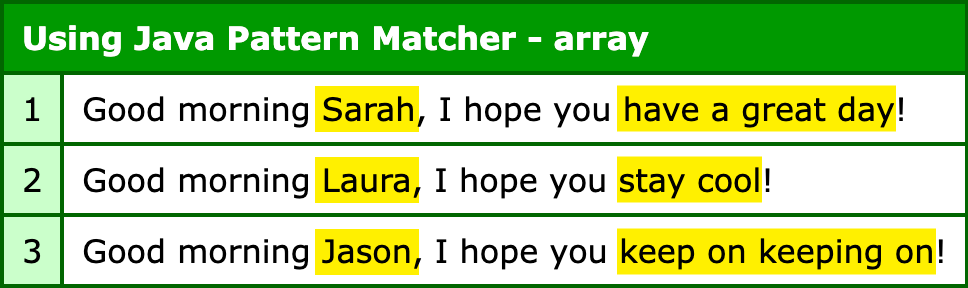
The nice thing about the Java Pattern and Matcher classes is that you get really fine-grain control over how you traverse and replace pattern matches. In this case, I don't have any missing tokens; but you can see from the logic that any missing token results in an empty string thanks to the null coalescing operator (??).
Using ColdFusion's Native Interpolation
After I finished the Java-based approach, I had an epiphany — ColdFusion has effortless string interpolation mechanics already! Really, the only thing that I'm trying to do is defer the evaluation of the string template. Which is exactly what we're already doing with our templateNew() factory function - it's producing a closure that defers evaluation.
If I just make the whole process less generic, I can define the closure in the same place that I'm defining the string template. And instead of using {{token}} patterns, I can use CFML string interpolation directly, #token#:
<cfscript>

	// ColdFusion language extensions (global functions).
	include "/core/cfmlx.cfm";

	// ------------------------------------------------------------------------------- //
	// ------------------------------------------------------------------------------- //

	// A simple closure which defers evaluation of the template string.
	stamp = () => "Good morning #name#, I hope you #assertion#!";

	// Note: in this version, we're not passing in a "dictionary" - we're leaning on the
	// arguments scope (of named parameters) as our dictionary for interpolation.
	dump(
		label = "Using ColdFusion Closure",
		var = [
			stamp( name = "Sarah", assertion = "have a great day" ),
			stamp( name = "Laura", assertion = "stay cool" ),
			stamp( name = "Jason", assertion = "keep on keeping on" ),
		]
	);

</cfscript>
In this case, stamp() is a ColdFusion closure; and the only thing that this closure is doing is returning an interpolated string. When I invoke the stamp() function this time, I'm not passing in a dictionary, I'm just using named arguments. Then, when ColdFusion evaluates the string template, it will search through the local scope and then the arguments scope for the interpolated variables. Which is how my named arguments end up in the interpolated output:
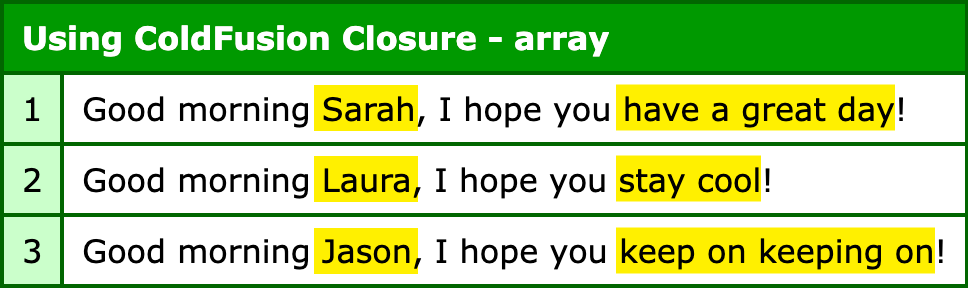
As you can see, we get the exact same output with the CFML string interpolation as we do with the Java Pattern / Matcher approach. Except only a fraction of the code was required.
All Solutions Are Trade-Offs
Both of the approaches above generated the exact same output. But, to be clear, the two approaches aren't functionality equivalent. The first approach is invoked with a dictionary of tokens; and is resilient to a missing token, falling back to the empty string.
The second approach is invoked with named arguments as tokens; and will throw a missing variable error if a token is missing; or worse, it might accidentally pull a missing token out of the parent variables scope.
All solutions are a trade-off, typically between how generic and reusable something is vs. how resilient it is to failure vs. how easy it is to use and invoke. There's no "one right" answer; and it often has to do with how large the "blast radius" of your choices are.
That said, if you're using ColdFusion, you're already making good choices. At that point, your solutions are just different shades of awesome!

Reader Comments
Hi Ben
What's nice about this tutorial is that the more complicated first version of the solution may actually show the internal mechanics of how the second solution works, behind the scenes.
So, the first version was useful after all?
I mean Coldfusion is built on top of Java, right? 😊
And it's great to see the use of a closure.
Post A Comment — ❤️ I'd Love To Hear From You! ❤️
Post a Comment →