
Using Sets To Gather Unique Values In Adobe ColdFusion 2025.0.8
In my post yesterday, about building a personalized CFSummit 2026 schedule viewer, I used the new Sets feature of Adobe ColdFusion 2025 update 8 in order to gather the unique collection of "Track Names" for the conference. Sets are kind of like a half-way point between Structs and Arrays. They're one-dimensional like Arrays; and they have a deduplicated key-space like Structs; except they don't have keys at all — just values. After using them for the first time, I wanted to put together a quick demo.
In this exploration, I'm building up a collection of conference sessions, each with a track property. My goal is to use the setNew() functionality to extract the unique values of track from the full collection of sessions. But first, let's look at how I would have done this before sets were added to CFML:
<cfscript>

	// ColdFusion language extensions (global functions).
	include "/core/cfmlx.cfm";

	// ------------------------------------------------------------------------------- //
	// ------------------------------------------------------------------------------- //

	sessions = [
		{ id: 1, name: "...", track: "Artificial Intelligence" },
		{ id: 2, name: "...", track: "ColdFusion Core" },
		{ id: 3, name: "...", track: "ColdFusion Core" },
		{ id: 4, name: "...", track: "ColdFusion Architecture" },
		{ id: 5, name: "...", track: "Rich Internet Applications" },
		{ id: 6, name: "...", track: "Databases" },
		{ id: 7, name: "...", track: "ColdFusion Core" },
	];

	// ------------------------------------------------------------------------------- //
	// ------------------------------------------------------------------------------- //

	trackNames = {};

	for ( element in sessions ) {

		trackNames[ element.track ] = true;

	}

	dump( trackNames.keyArray() );

</cfscript>
In this traditional approach, I'm leveraging the fact that Structs have a unique key-space. Which means that when I add duplicate keys to the struct, all I'm doing is overwriting the previous entry (essentially a no-op in this context). The collection of keys then acts as the set of unique values.
Aside: I could have stored the track name as the value in each entry as well; and then used
trackNames.valueArray()to retrieve the unique collection. This approach is more helpful when you want to record non-string values.
In the above code, note that I assign true to each track name. This true is a throw-away value. It serves no purpose other than to adhere to the syntactic nature of the Struct. And that's where Sets come in. As of ColdFusion 2025.0.8, we can now do this without having to assign the throw-away value.
<cfscript>

	// ColdFusion language extensions (global functions).
	include "/core/cfmlx.cfm";

	// ------------------------------------------------------------------------------- //
	// ------------------------------------------------------------------------------- //

	sessions = [
		{ id: 1, name: "...", track: "Artificial Intelligence" },
		{ id: 2, name: "...", track: "ColdFusion Core" },
		{ id: 3, name: "...", track: "ColdFusion Core" },
		{ id: 4, name: "...", track: "ColdFusion Architecture" },
		{ id: 5, name: "...", track: "Rich Internet Applications" },
		{ id: 6, name: "...", track: "Databases" },
		{ id: 7, name: "...", track: "ColdFusion Core" },
	];

	// ------------------------------------------------------------------------------- //
	// ------------------------------------------------------------------------------- //

	// Just like the traditional example, but with no throw-away value.
	trackNames = setNew();

	for ( element in sessions ) {

		trackNames.add( element.track );

	}

	dump( trackNames );

</cfscript>
This approach is exactly the same tactically; but instead of including the true assignment, all I'm doing is calling .add() on the set to include the track name in the unique collection. And, just as with the Struct-based approach, colliding track names are essentially no-ops. Only with Structs, I'm overwriting a duplicate key and with Sets — according to the documentation — the non-unique .add() calls are ignored.
When we run this CFML with the new Set, we get the following output:
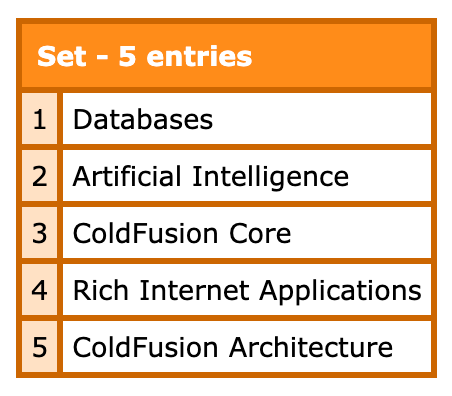
A fun new color for us to enjoy in our dumps (don't tell your gastroenterologist!)
One cool thing about Sets is that they can be initialized from an array. Which means that we can get a little fancy with short-hand notation for lambda functions to pluck the track names out of the sessions collection in one step:
<cfscript>

	// ColdFusion language extensions (global functions).
	include "/core/cfmlx.cfm";

	// ------------------------------------------------------------------------------- //
	// ------------------------------------------------------------------------------- //

	sessions = [
		{ id: 1, name: "...", track: "Artificial Intelligence" },
		{ id: 2, name: "...", track: "ColdFusion Core" },
		{ id: 3, name: "...", track: "ColdFusion Core" },
		{ id: 4, name: "...", track: "ColdFusion Architecture" },
		{ id: 5, name: "...", track: "Rich Internet Applications" },
		{ id: 6, name: "...", track: "Databases" },
		{ id: 7, name: "...", track: "ColdFusion Core" },
	];

	// ------------------------------------------------------------------------------- //
	// ------------------------------------------------------------------------------- //

	// Creating a set from an array. In this case, we're going to pluck the "track" keys
	// from the list of sessions as the set initialization vector.
	trackNames = setNew( sessions.map( v => v.track ) );

	// Sets elements can be generated from `.toList()` and `.toArray()`.
	echo( "<p> #trackNames.toList( ', ' )# </p>" );

</cfscript>
That's pretty nice! I personally go back-and-forth on whether or not a line of code like that is too dense. But, it's probably reasonable enough.
Sets Do NOT Work With Complex Values
One important note is that the Adobe documentation on Sets is misleading. According to the documentation, it states:
Sets can hold any ColdFusion value - numbers, strings, closures, structs, or any other object.
While it's true that a call to .add() will accept complex values, it's misleading in that it will not do what you think it does. Meaning, when you add a complex value to a Set, it's not treating it as a unique value by reference. My guess is that it's using something like a hashCode() under the hood to determine equivalence.
Testing this is rather trivial. In the following ColdFusion code, a and b are unique values but have the exact same shape (hence why I think it's doing some hashCode() calculation under the hood):
<cfscript>

	// ColdFusion language extensions (global functions).
	include "/core/cfmlx.cfm";

	// ------------------------------------------------------------------------------- //
	// ------------------------------------------------------------------------------- //

	a = {v:1}; // Unique complex value.
	b = {v:1}; // Unique complex value.
	c = a;     // Existing value reference.

	temp = setNew();
	temp.add( a );

	dump([
		"has( b ) : #temp.has( b )#", // Should be NO (b != a).
		"has( c ) : #temp.has( c )#", // Should be YES (c == a).
	]);

	// ------------------------------------------------------------------------------- //
	// ------------------------------------------------------------------------------- //

	all = setNew();
	all.add( a ); // Should include.
	all.add( b ); // Should include.
	all.add( c ); // Should IGNORE.

	// CAUTION: has only ONE element in the results.
	dump( all );

</cfscript>
Since a and b are unique complex values, our final Set should contain two elements. But when we run this CFML code, we get the following output:
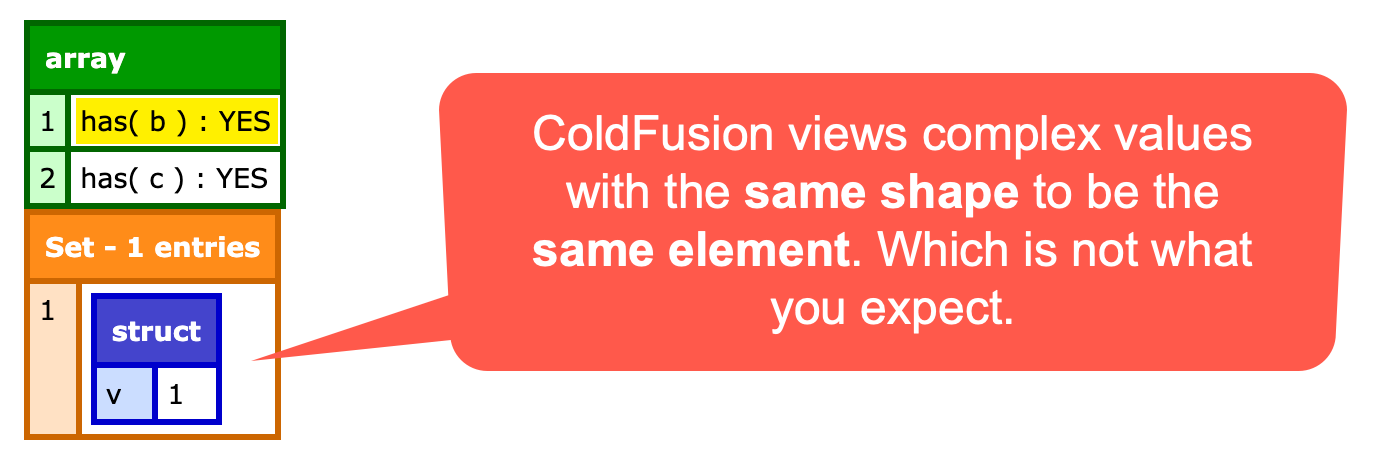
We should have had 2 elements in the Set; but we end up with 1 element in the Set; because ColdFusion thinks a and b are the same value.
So Sets do "support" complex values in so much as that they don't throw an error when you attempt to add them. But, to quote Inigo Montoya, "I do not think (that word) means what you think it means.".
As an aside, I just wanted to sanity check what JavaScript would do with the same code:
a = {v:1}; // Unique complex value.
b = {v:1}; // Unique complex value.
c = a;     // Existing value reference.

temp = new Set();
temp.add( a );

console.dir([
	`has( b ) : ${ temp.has( b ) }`, // Should be NO (b != a).
	`has( c ) : ${ temp.has( c ) }`, // Should be YES (c == a).
]);
If you paste that into your browser console, you get:
0 : "has( b ) : false"
1 : "has( c ) : true"
... which is correct.
Is this a bug? I'd call it an expectation bug. Meaning, after 30 years, no one expects ColdFusion to ever play nicely with complex object reference equivalence. Which is why this is one of the first things I tested when I saw that Adobe added Sets — because it would be such a sea change from how the language has always worked.
And There's More
In additional to enabling unique collections, Sets can also calculate intersections, unions, and differences. You can also initialize a set to be "ordered" or "nocase" — note that sets are unordered and case-sensitive by default.
Sets have been available in JavaScript for years and I've never used them. I'll be curious to see if I start bringing Sets into my CFML mindset.
Want to use code from this post? Check out the license.

Reader Comments
I added a ticket for being able to chain mutation member methods on the set object. This would bring it into alignment with Structs and Arrays. There's no reason for chaining not to work as expected.
CF-4232538 - setNew() mutation member methods should be chainable
Post A Comment — ❤️ I'd Love To Hear From You! ❤️
Post a Comment →