
Using jSoup To Translate User-Generated Content Into CFMailML Custom Tags
In my CFMailML project, I use ColdFusion custom tags to define a domain specific language (DSL) for CFMail content. The goal is to generate robust, cross-client email content without a build step and without complex syntax hurdles. And, for the last 8 years, this has been working well. But there's been a huge functionality gap when it comes to user-generated content (UGC). As a thought experiment, I wanted to see if I could use jSoup to parse UGC values and dynamically map them onto CFMailML invocations.
For context, CFMailML (CFMail Markup Language) works by importing a set of ColdFusion custom tags and then using those custom tags to author HTML-inspired email templates. Example:
<cfimport prefix="core" taglib="../cfmailml/core/" />
<cfimport prefix="html" taglib="../cfmailml/core/html/" />
<core:Email>
<html:h1>
Welcome to the Application
</html:h1>
<html:p>
I think you're really going to love it here.
<html:a href="...">Find out more</html:a> →
</html:p>
</core:Email>
When these <html:h1> and <html:p> ColdFusion custom tags render, they don't just output h1 and p tags, respectively, they also inline style attributes, prioritize font-family strings for line-breaks, render block margins as interstitial <table> elements, strip line-leading white-space, and cascade CSS with all the insane caveats that comes with building robust email content (even in 2026).
Aside: Litmus still reports Outlook Desktop as the 3rd most popular email client; which is bonkers; and is the reason that so much of these headaches still exist. Come on, man!
Now imagine that I need to send a "New Comment" email from this blog. I can easily create the outer template for this email using CFMailML. But the user's comment is provided as an opaque #commentHtml# interpolation:
<html:h1>
	New Comment From #userName#:
</html:h1>
<html:div>
	<!--- Markdown parsed into HTML via Flexmark. --->
	#commentHtml#
</html:div>
This commentHtml variable will contain all manner of <p> and <strong> and <li> tags that get zero CFMailML love since they aren't being rendered using the CFMailML custom tags.
But! What if I parse the commentHtml using jSoup, then walk the resultant DOM (Document Object Model) tree and dynamically invoke CFMailML tags for each Element that I encounter?
To setup this experiment, I created a static file of user-generated content. This is meant to represent the Markdown → HTML result from a new comment submission:
<main>
	<p>
		This is content provided by the <strong><em>user</em></strong>!
	</p>
	<p>
		Checkout my <a href="https://www.bennadel.com/">website (bennadel.com)</a>
		- I think you'll really dig it. Here are some reasons:
	</p>
	<ul>
		<li>It has pretty photos</li>
		<li>It has fun code</li>
		<li>It has user engagement (sometimes)</li>
	</ul>
</main>
Now I'll create a simplified email template using CFMailML syntax. The above UGC is going to be interpolated into the email like it would normally; however, it's going to be wrapped in a custom tag, UserGeneratedContent.cfm. This custom tag will do the HTML → jSoup → CFMailML translation:
<!--- Import custom tag libraries. --->
<cfimport prefix="core" taglib="../../../cfmailml/core/" />
<cfimport prefix="html" taglib="../../../cfmailml/core/html/" />
<cfimport prefix="custom" taglib="." />

<!--- // ------------------------------------------------------------------------- // --->
<!--- // ------------------------------------------------------------------------- // --->

<core:Email
	subject="This is the subject"
	teaser="This is the inbox teaser">
	<core:Body>

		<html:h1>
			Testing User Generated Content
		</html:h1>

		<html:p>
			This is some inline content, controlled by the <html:strong>system</html:strong>.
			I have exacting control over the styling and margins.
		</html:p>

		<html:hr />

		<!---
			The UserGeneratedContent.cfm custom tag will take the tag body, parse it into
			a Document Object Model (DOM) using jSoup. Then, will walk the DOM tree and
			translate DOM nodes into CFMailML custom tag invocations. Which means that the
			UGC elements will be able to pick up and use any of the inherited styles.
		--->
		<custom:UserGeneratedContent>
			<!---
				Part of the power of CFMailML is that we can scope styles to a tag
				context. The following HtmlEntityTheme tags will define stles that will
				only be available inside the UserGeneratedContent tag.
			--->
			<core:HtmlEntityTheme entity="p, li">
				color: hotpink ;
			</core:HtmlEntityTheme>
			<core:HtmlEntityTheme entity="li">
				font-weight: 700 ;
			</core:HtmlEntityTheme>
			<core:HtmlEntityTheme entity="a">
				color: darkblue ;
			</core:HtmlEntityTheme>

			<cfoutput>
				#fileRead( expandPath( "./user_content.htm" ), "utf-8" )#
			</cfoutput>
		</custom:UserGeneratedContent>

		<html:hr />

		<html:p>
			And that's all she wrote!
		</html:p>

	</core:Body>
</core:Email>
Notice that inside of the <custom:UserGeneratedContent> block, I have several HtmlEntityTheme tags. These scope the given CSS properties to the user-generated content block - which is part of the magic that CFMailML provides.
And if we run this ColdFusion code, we get the following output:
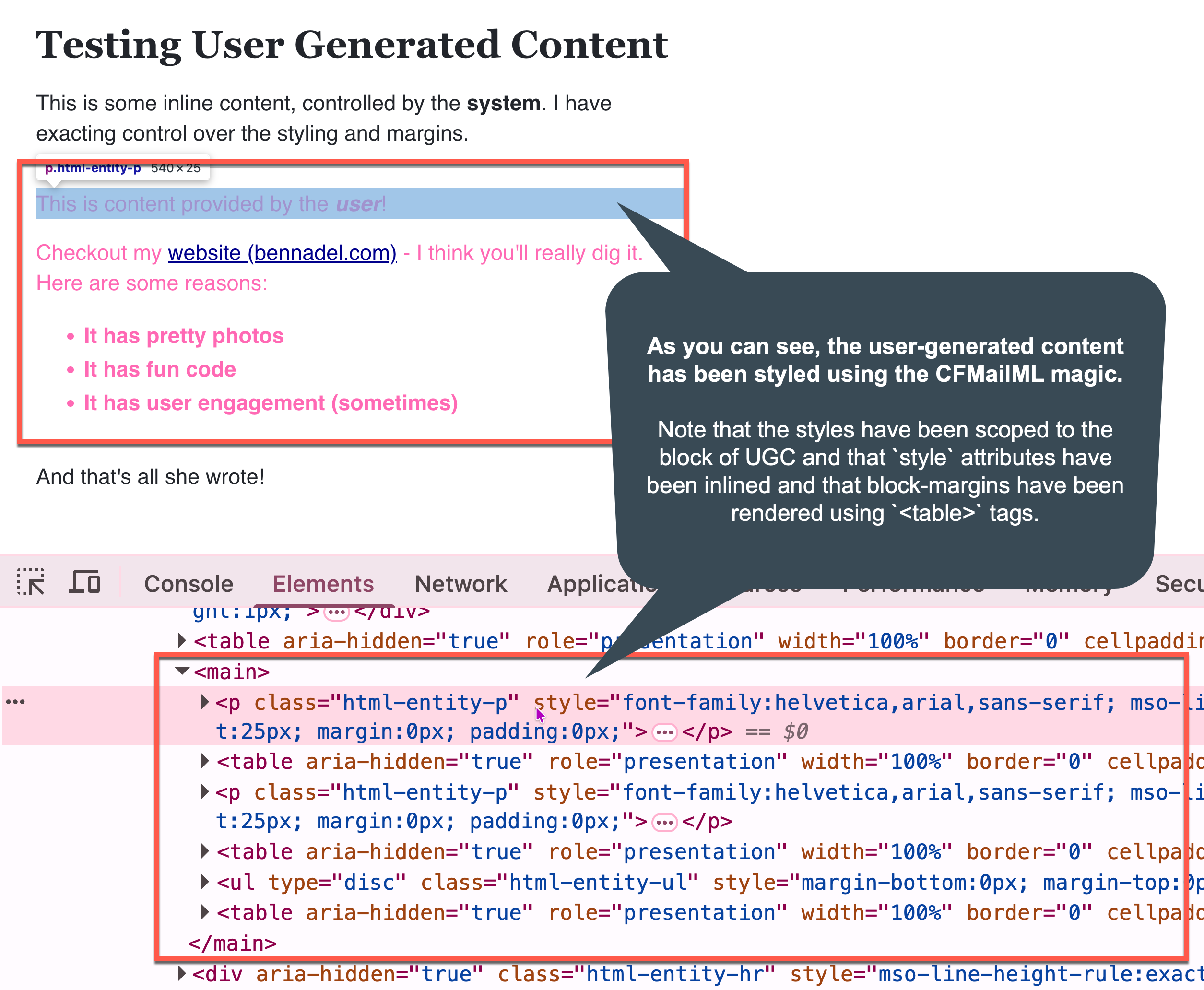
Immediately we can see that the block of user-generated content is styled in hotpink, which is what we would hope to see given the HtmlEntityTheme configuration. And when we inspect the underlying HTML that's been rendered to the page, we can see that the style attributes have been injected and that block-margins have been rendered as <table> tags (how fun is email!).
This is working because the UserGeneratedContent.cfm custom tag is parsing the user's content into HTML and then translating the HTML DOM into CFMailML "DOM", so to speak. It does this using a recursive function that maps element names onto <CFModule> calls:
<cfscript>

	if ( thistag.executionMode == "end" ) {

		translateUserContent( thistag.generatedContent );

	}

	// ------------------------------------------------------------------------------- //
	// ------------------------------------------------------------------------------- //

	/**
	* I parse the user generated content (UGC) into a DOM tree (using jSoup), then walks
	* the tree re-creating DOM elements using the CFMailML custom tags. This allows UGC to
	* take-on all of the styling and low-level hacks needed for some mail clients.
	*/
	private void function translateUserContent( required string generatedContent ) {

		// Note: JAR-path based instantiation only available in Adobe ColdFusion since
		// version 2025. Before then, the JavaLoader project is needed.
		var jarPaths = [ expandPath( "./jsoup-1.22.1.jar" ) ];
		var doc = createObject( "java", "org.jsoup.Jsoup", jarPaths )
			.parseBodyFragment( generatedContent.trim() )
		;

		// Overwrite the contents of the current tag with the translated DOM tree.
		cfsavecontent( variable = "thistag.generatedContent" ) {

			renderChildren( doc.body() );

		}

	}


	/**
	* I iterate over the given container's nodes, using a depth-first approach, and
	* translate the HTML elements into CFMailML custom tag invocations. This method
	* expects to be able to write to the output buffer as its implementation mechanism.
	*/
	private void function renderChildren( required any parentNode ) {

		for ( var node in parentNode.childNodes() ) {

			var nodeName = node.nodeName().lcase();

			switch ( nodeName ) {
				// Whitelist node names that have corresponding custom tags.
				case "a":
				case "blockquote":
				case "code":
				case "div":
				case "em":
				case "h1":
				case "h2":
				case "h3":
				case "h4":
				case "h5":
				case "h6":
				case "hr":
				case "img":
				case "li":
				case "mark":
				case "ol":
				case "p":
				case "pre":
				case "span":
				case "strike":
				case "strong":
				case "symbol":
				case "table":
				case "td":
				case "th":
				case "tr":
				case "ul":
					renderNodeAsTag( node, nodeName );
				break;
				// Translate some non-supported tags into supported tags.
				case "b":
					renderNodeAsTag( node, "strong" );
				break;
				case "i":
					renderNodeAsTag( node, "em" );
				break;
				// Output text nodes as-is.
				case "##text":
					writeOutput( node.text() );
				break;
				// For any HTML tag that we don't support as a ColdFusion custom tag,
				// we're going to render it simply without any of the CFMailML powers.
				default:
					writeOutput( "<#nodeName#>" );
					renderChildren( node );
					writeOutput( "</#nodeName#>" );
				break;
			}

		}

	}


	/**
	* I translate the given node into a CFMailML custom tag. This method assumes that the
	* node has already been identifies as being CFMailML compatible. As such, this method
	* merely maps node names and attributes onto custom tag inputs.
	*/
	private void function renderNodeAsTag(
		required any node,
		required string nodeName
		) {

		var stringAttributes = [ "class", "style" ];
		var booleanAttributes = [];
		var tagAttributes = {};

		// Identify special attributes for different custom tags.
		switch ( nodeName ) {
			case "a":
				stringAttributes.append( "href" );
			break;
		}

		// Map string attributes from DOM node to custom tag attributes.
		for ( var attrName in stringAttributes ) {

			if ( node.hasAttr( attrName ) ) {

				tagAttributes[ attrName ] = encodeForHtmlAttribute( node.attr( attrName ) );

			}

		}

		// Map Boolean attributes from DOM node to custom tag attributes.
		for ( var attrName in booleanAttributes ) {

			tagAttributes[ attrName ] = node.hasAttr( attrName );

		}

		// Note: Adobe ColdFusion has an issue where pushing the "template" attribute into
		// the attributeCollection *sometimes* throws an error. As such, I'm explicitly
		// providing it in the tag invocation.
		cfmodule(
			template = "../../../cfmailml/core/html/#nodeName#.cfm",
			attributeCollection = tagAttributes
			) {
			renderChildren( node );
		}

	}

</cfscript>
Essentially this custom tag maps HTML elements onto the corresponding CFMailML elements. So <a> becomes <html:a> and <p> becomes <html:p> and so on. At least in spirit — in reality, they all just become <cfmodule> calls; but really it's the same thing.
This was just a proof-of-concept (POC); but I think this could really work! That said, I'm on the fence if this should be part of CFMailML core; or if it should just be an example that I provide for user-land. My hesitation stems from the fact that jSoup is a very opinionated choice. And, loading it via createObject() is a forcing function for Adobe ColdFusion 2025 (when JAR-path loading was introduced).
Want to use code from this post? Check out the license.

Reader Comments
Post A Comment — ❤️ I'd Love To Hear From You! ❤️
Post a Comment →