Parsing URLs In ColdFusion
Consuming the current request in ColdFusion is super easy because ColdFusion automatically parses and decodes the juicy bits and populates the url and form scopes. Additional information — such as host name, port, and path-info — can be accessed in the cgi scope. But, ColdFusion doesn't expose any of the URL parsing mechanics to the developer. Years ago, Brad Wood wrote about using the java.net.URL class to parse URLs in CFML. I wanted to try that myself; and add query-string parsing as well.
Ironically, when I went to look up the documentation for java.net.URL, which is what Brad used, I accidentally landed on the java.net.URI docs. But, this turned out to be a "happy accident" because the URI class provides a method for resolving a non-absolute URL against a given base. This makes the class more flexible for my purposes.
I created two wrapper methods:
parseUri( input, base="" ] )parseUriAndParameters( input, base="", caseSensitive=false )
Query strings / search parameters are a more complex beast. As such, I wanted to move query string parsing to a secondary method. In the parseUri() method, the query string is returned as a raw string. In the parseUriAndParameters() method, the query string is returned an ordered struct of key-value pairs in which each "value" is an aggregate array of collected values, guaranteed to have at least one element.
The parseUriAndParameters() just calls parseUri() and then replaced the .parameters string with a struct.
Here's my ColdFusion code and demo. Note that cfmlx.cfm is my CFML extensions that allow dump() to work in Adobe ColdFusion:
<cfscript>

	// ColdFusion language extensions (global functions).
	include "/core/cfmlx.cfm";

	// ------------------------------------------------------------------------------- //
	// ------------------------------------------------------------------------------- //

	try {

		result = parseUriAndParameters(
			input = "users.cfm?tag=action&tag=adventure&medium=movie&favorites&##related",
			base = "https://admin:test@example.com:8080/"
		);
		dump( result );

	} catch ( any error ) {

		dump( error );

	}

	// ------------------------------------------------------------------------------- //
	// ------------------------------------------------------------------------------- //

	/**
	* I parse the given URI into its component parts. If a base is provided, the input URI
	* is resolved against the base URI before it's parsed. URI components follow the given
	* semantics:
	*
	* Example:    "https://admin:test@example.com:80/users.cfm?id=4#details"
	* -------
	* scheme:     "https"
	* authority:  "admin:test@example.com:80"
	* userInfo:   "admin:test"
	* host:       "example.com"
	* port:       "80"
	* resource:   "//admin:test@example.com:80/users.cfm?id=4"
	* path:       "/users.cfm"
	* search:     "?id=4"
	* parameters: "id=4"
	* hash:       "#details"
	* fragment:   "details"
	*/
	private struct function parseUri(
		required string input,
		string base = ""
		) {

		var URIClass = createObject( "java", "java.net.URI" );
		// If a base is provided, we want to resolve the input against the base. This is
		// primarily helpful when the input lacks a scheme and/or authority. Resolution
		// will traverse "../" and "/" path segments as needed.
		var uri = base.len()
			? URIClass.create( base ).resolve( input )
			: URIClass.create( input )
		;

		// The URI object exposes a mix of encoded and decoded values. I've opted to
		// surface all of the ENCODED values as the common case since this more closely
		// aligns with the CGI scope that developers are used to consuming. The DECODED
		// values are included as the decoded sub-struct for anyone who needs them.
		return [
			input: input,
			base: base,
			source: uri.toString(),
			scheme: lcase( uri.getScheme() ?: "" ),
			authority: ( uri.getRawAuthority() ?: "" ),
			userInfo: ( uri.getRawUserInfo() ?: "" ),
			host: lcase( uri.getHost() ?: "" ),
			// Port defaults to -1 if it's not defined. I'd rather have it consistently be
			// reported as a string using the empty string as the fallback.
			port: ( uri.getPort() == -1 )
				? ""
				: toString( uri.getPort() )
			,
			resource: uri.getRawSchemeSpecificPart(),
			path: ( uri.getRawPath() ?: "" ),
			// Search is just a representation of the parameters prefixed with a "?". If
			// the parameters are empty, so is the search.
			search: len( uri.getRawQuery() )
				? "?#uri.getRawQuery()#"
				: ""
			,
			parameters: ( uri.getRawQuery() ?: "" ),
			// Hash is just a representation of the fragment prefixed with a "#". If the
			// fragment is empty, so is the hash.
			hash: len( uri.getRawFragment() )
				? "###uri.getRawFragment()#"
				: ""
			,
			fragment: ( uri.getRawFragment() ?: "" ),

			// An absolute URI starts with a scheme (http:, mailto:, etc). A non-absolute
			// URI would start with something like "/" or "../" or "my/path".
			isAbsolute: uri.isAbsolute(),
			// An opaque URI is one whose resource is not representative of a path. It's
			// for schemes like "mailto:" and "tel:". An opaque URI's resource isn't
			// parsed into smaller components (path, parameters, etc). All non-relevant
			// components will default to the empty string.
			isOpaque: uri.isOpaque(),

			// These decoded components include decoded character sequences. These aren't
			// always safe to use because embedded delimiters such as "/" and "&" can
			// corrupt the meaning of the string.
			decoded: [
				authority: ( uri.getAuthority() ?: "" ),
				userInfo: ( uri.getUserInfo() ?: "" ),
				resource: uri.getSchemeSpecificPart(),
				path: ( uri.getPath() ?: "" ),
				parameters: ( uri.getQuery() ?: "" ),
				fragment: ( uri.getFragment() ?: "" ),
			],
		];

	}


	/**
	* I parse the given URI into its component parts. The search parameters are further
	* parsed into an ORDERED struct of key-values pairs. Each value in the struct is an
	* array of strings. Parameters are collected in the order in which they are parsed and
	* are appended the proper array. If a given parameter doesn't have a value, the value
	* will be parsed as an empty string. This provided a consistent interface - every
	* key is guaranteed to have at least one value.
	*
	* The original parameters string is appended as "parametersString".
	*
	* Example: "?tag=fun&tag=adventure&medium=movie&favorites"
	* -------
	* tag:       [ "fun", "adventure" ]
	* medium:    [ "movie" ]
	* favorites: [ "" ]
	*/
	private struct function parseUriAndParameters(
		required string input,
		string base = "",
		boolean caseSensitive = false
		) {

		var uri = parseUri( input, base );
		var segments = uri.parameters.listToArray( "&" );
		// By default, the casing of the parameter keys is ignored; and is defined by the
		// first key encountered. When case-sensitivity is enabled, keys with different
		// casing are collected into different entries.
		var parameters = caseSensitive
			? structNew( "ordered-casesensitive" )
			: structNew( "ordered" )
		;

		for ( var segment in segments ) {

			// By using the list-methods, we're ensuring that we cover edge-cases in which
			// the key is empty or the value contains embedded "=" characters. Note that
			// the `true` in this case is `includeEmptyValues`.
			var key = urlDecode( segment.listFirst( "=", true ) );
			var value = urlDecode( segment.listRest( "=", true ) );

			if ( parameters.keyExists( key ) ) {

				parameters[ key ].append( value );

			} else {

				parameters[ key ] = [ value ];

			}

		}

		// Swap out the parameters with the newly parsed and constructed object. Keep the
		// original string for posterity.
		uri.parametersString = uri.parameters;
		uri.parameters = parameters;

		return uri;

	}

</cfscript>
If we run this Adobe ColdFusion 2025 code, we get the following output:
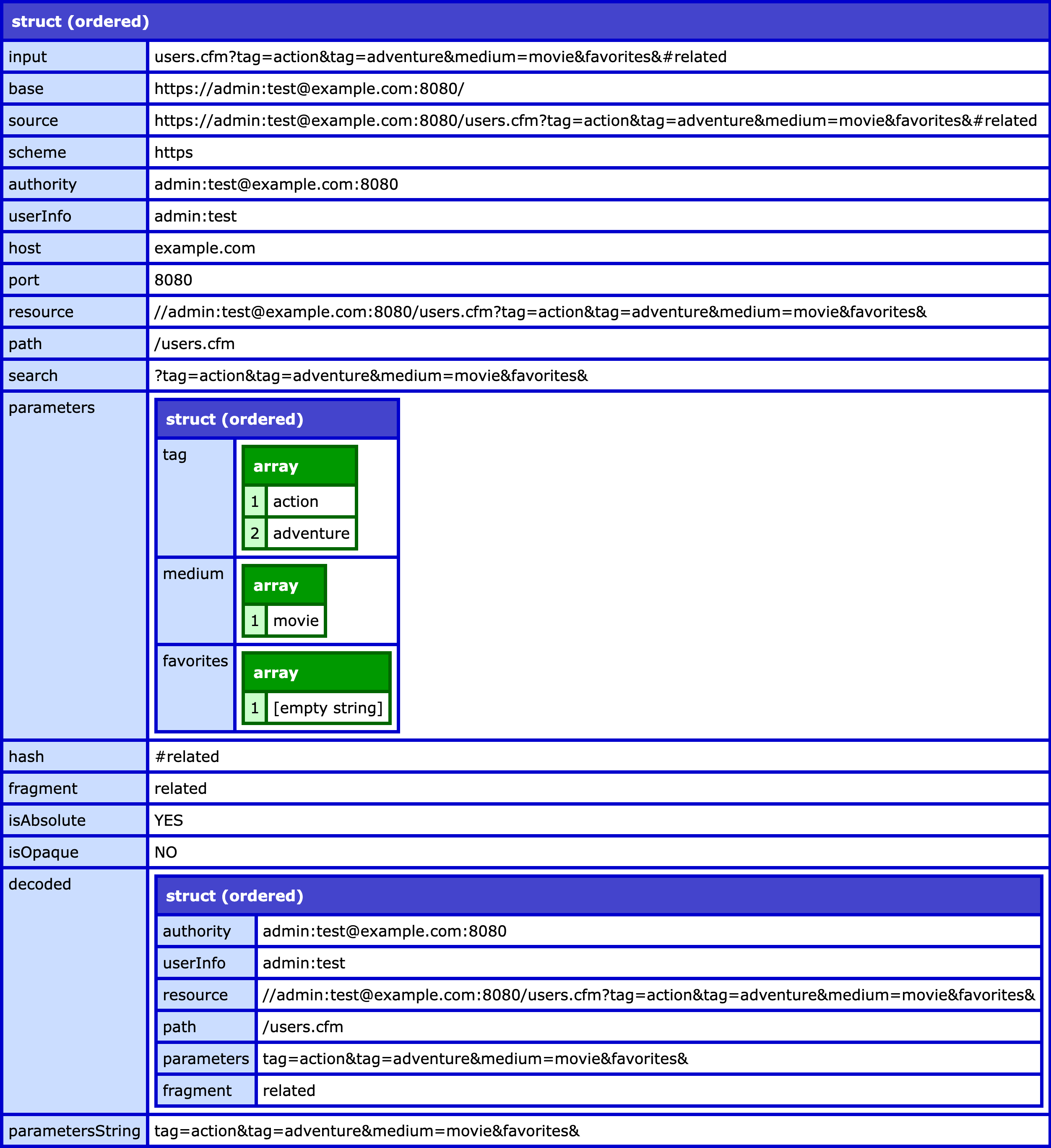
As you can see, the URI was parsed into all of its components parts; and, the .parameters property contains a fully-parsed query string. You might also notice that there's a .decoded sub-struct. At the root level, all of the values are the "raw" values. Meaning, they can contain encoded characters as provided in the source. The .decoded sub-struct contains the decoded versions of those values. Personally, I don't think these are helpful; but since they are provided by the java.net.URI class, I'm passing them along.
I absolutely love the fact that ColdFusion is built on top of Java - it just gives us CFML'ers so much freaking power and flexibility. I'll have a follow-up post about how I'm using this in my ColdFusion application.
Want to use code from this post? Check out the license.

Reader Comments
Here's a quick follow-up on how I'm actually using this in Big Sexy Poems — to do external link interception:
www.bennadel.com/blog/4882-routing-external-links-through-an-intermediary-page-in-coldfusion.htm
This proxies external links through an interstitial warning page, clearly showing the user that they are about to leave the current site.
Post A Comment — ❤️ I'd Love To Hear From You! ❤️
Post a Comment →