Exploring Event.isTrusted In JavaScript
Yesterday, in my post about making table rows clickable, part of my logic included checking the event.isTrusted property. This is a strange event property that I only just learned about. It allows the application to differentiate between events that are triggered programmatically and events that are triggered natively. Well, sort of. Sometimes. Actually, it's mostly just for click events.
Run this demo in my JavaScript Demos project on GitHub.
View this code in my JavaScript Demos project on GitHub.
Basically, if a user clicks on an element in the DOM (Document Object Model), the resultant event.isTrusted property is set to true — it was a native event. But, if I (as the developer) invoke element.click(), the resultant event.isTrusted property is set to false — it was a programmatic event.
You might be tempted to think that you can extrapolate that to mean that any programmatic event method sets isTrusted to false. LOL, no. To explore this event property, I've put together a demo where focusin, click, and submit events can be triggered both natively and programmatically. And for each, we will inspect the event and see the isTrusted state:
<!doctype html>
<html lang="en">
<body>

	<h1>
		Exploring Event.isTrusted In JavaScript
	</h1>

	<h2>
		Form
	</h2>

	<form id="demo" method="get" action="#">
		<button type="submit">
			Submit
		</button>
		<a href="#">
			Cancel
		</a>
	</form>

	<h2>
		Triggers on Form
	</h2>

	<p>
		<button id="triggerSubmit" type="button">
			Trigger Submit
		</button>
		<button id="triggerClick" type="button">
			Trigger Click
		</button>
		<button id="triggerFocus" type="button">
			Trigger Focus(in)
		</button>
	</p>

	<script type="text/javascript">

		var form = window.demo;
		var button = form.querySelector( "button" );
		var link = form.querySelector( "a" );

		// Listen for events that BUBBLE UP on the form (hence focusin, not focus).
		form.addEventListener( "focusin", handleFormEvent );
		form.addEventListener( "click", handleFormEvent );
		form.addEventListener( "submit", handleFormEvent );

		// Listen for and inspect form events.
		function handleFormEvent( event ) {

			console.group( event.type );
			console.log( `Target: ${ event.target.tagName }` );
			console.log( `isTrusted: ${ event.isTrusted }` );
			console.groupEnd();

		}

		// --------------------------------------------------------------------------- //
		// --------------------------------------------------------------------------- //

		// Programmatically trigger events on the form.
		window.triggerSubmit.onclick = () => form.requestSubmit( button );
		window.triggerClick.onclick = () => link.click();
		window.triggerFocus.onclick = () => button.focus();

	</script>

</body>
</html>
With this demo, let's first click on the submit button in the form itself (to trigger native events):
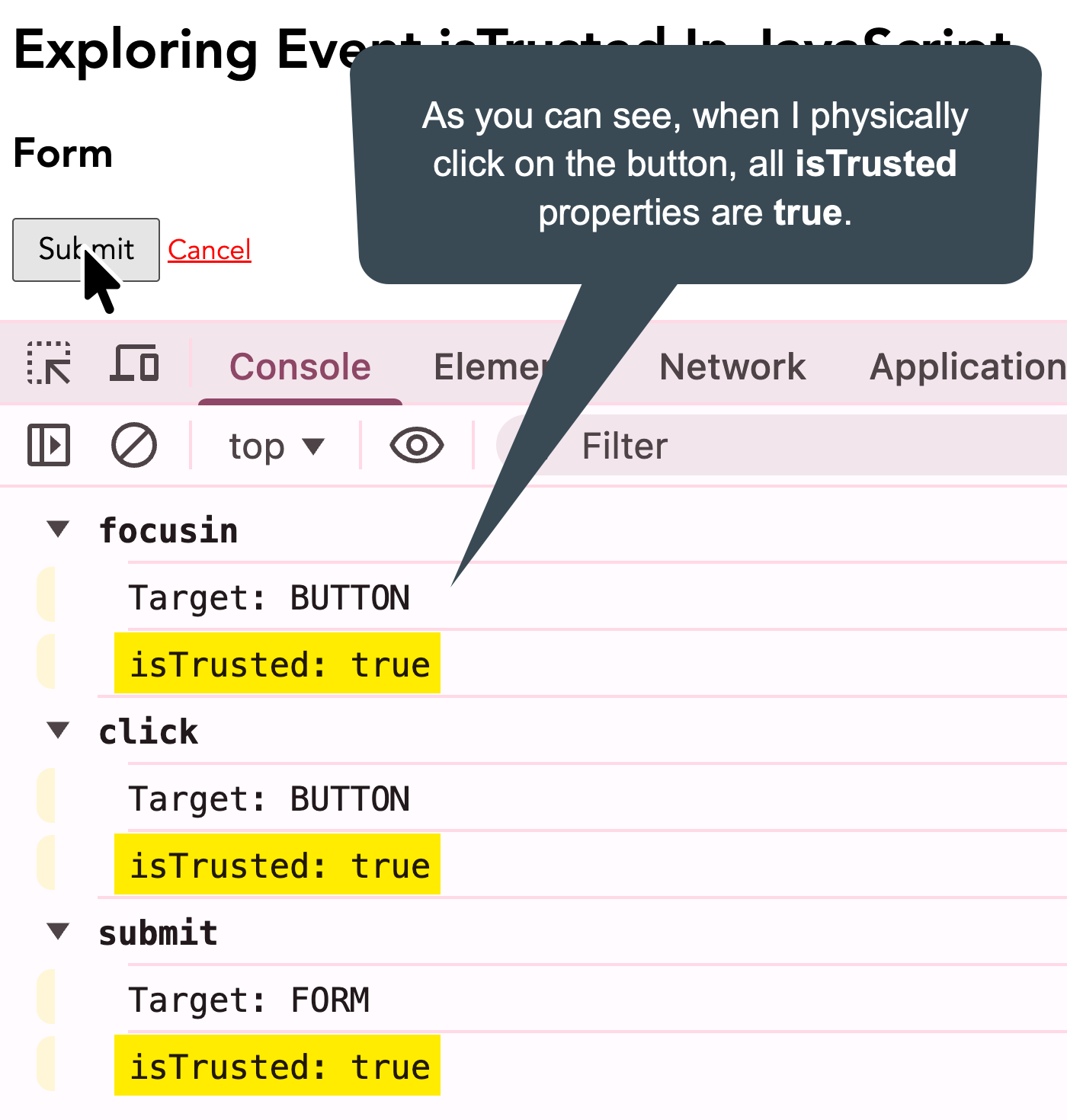
As you can see, when I click the submit button, the isTrusted property is set to true for all events (focusin, click, submit).
Now, let's programmatically trigger the events:
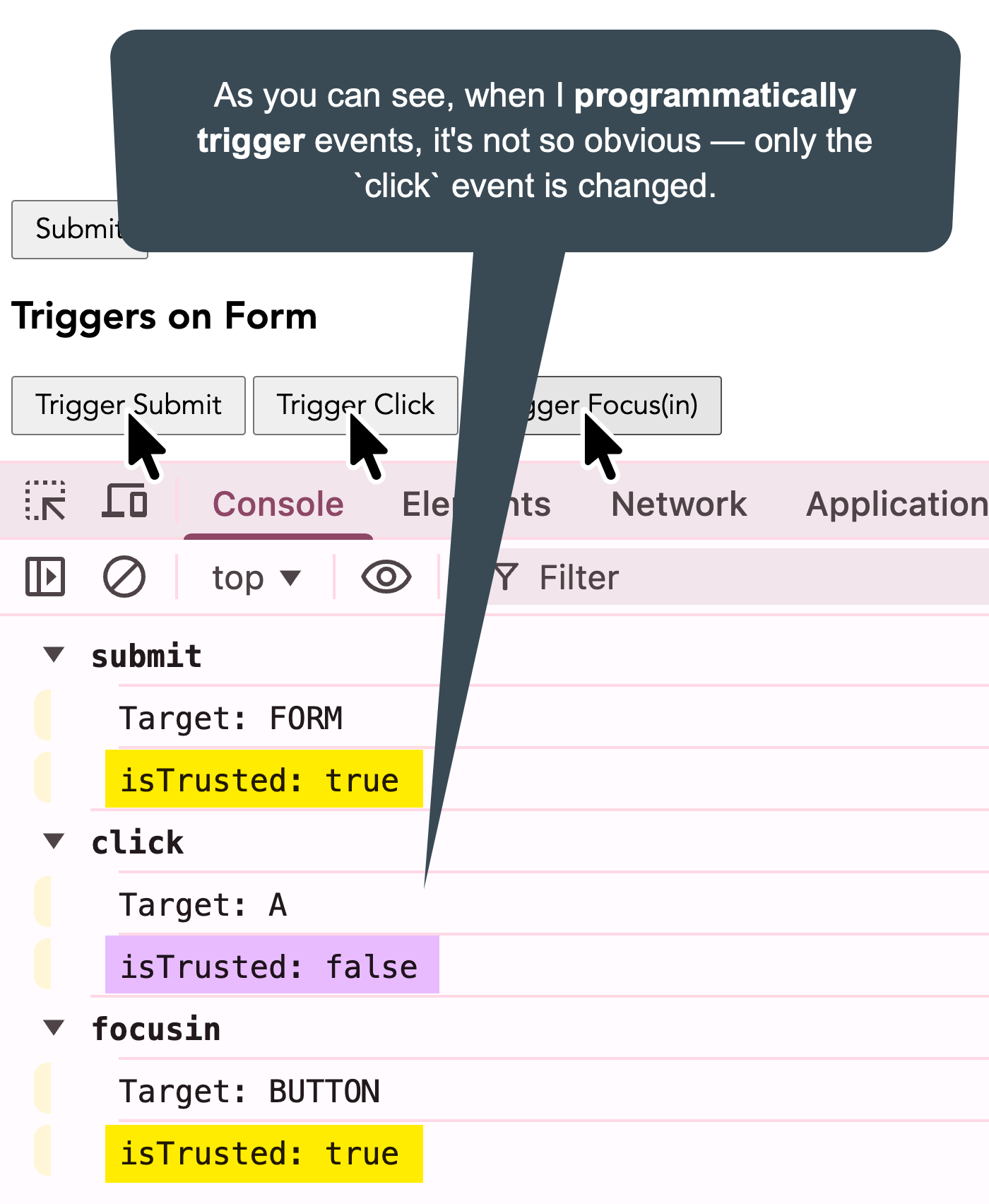
As you can see, the only event that's changed is the click event. Both the submit and focusin events are still set to isTrusted: true. This is for mechanical reasons (ie, the browser is still the source of the underlying events even though I asked for them programmatically).
Note: the
isTrustedproperty is set tofalsefor any event triggered through thedispatchEvent()method - not shown in this demo.
Ultimately, the only place this feels immediately helpful — outside of framework authoring — is preventing recursive event handling on click events (ie, your click handler responding to your own .click() invocations). That said, it's still helpful to me in that one narrow use case.
Aside: recursive event handling doesn't happen on form submissions because calling
.submit()on a form doesn't trigger asubmitevent. But, note from the demo that calling.requestSubmit()on the form will trigger asubmitevent.
Want to use code from this post? Check out the license.

Reader Comments
That's a good little nugget to keep in the junk drawer. Never know when it could come in handy. Cheers
Post A Comment — ❤️ I'd Love To Hear From You! ❤️
Post a Comment →