
For the last 14-years or so, I've been using GitHub Gists to apply syntax highlighting to the code blocks embedded on my blog. It's the one piece of this system that I don't mostly-own and I've always sort of thought of that as a failure. So over the weekend, I wanted to see if I could get Claude Code to "vibe code" me a syntax highlighting API using something like highlight.js, prism4j, pygments, or shiki.
I spent of most of Saturday working with Claude Desktop, drafting requirements documents, and then feeding those documents into Claude Code. We tried Cloudflare workers and AWS Lambda Functions. We kept hitting dead ends or solutions that didn't support CFML as a language (which is hugely problematic since like 50% of the code in my articles is CFML). And, the last thing that we tried implementing - Shiki (which is what Visual Studio Code is using) - worked; but just didn't look good (it was parsing "tags" as "strings", giving them the same CSS class).
At the end of the day yesterday, I was ready to admit failure. It seemed that building my own API that supported languages to the degree that GitHub supports languages was just a no-go. Which makes sense — they've spent years making sure that their code rendering is "best in class". I can't vibe code my way through 2 decades of focused excellence.
But, just as I was winding up my conversation with Claude Desktop, it suggested that I might try looking at the GitHub Markdown API if I didn't want the overhead of constantly creating, reading, and embedding Gists.
The Markdown API takes a text input and returns an HTML output. And, if the input contains a fenced code block, it will return a <pre>/<code> container with the GitHub syntax highlighting applied.
The applied highlighting is structurally different than the GitHub gist, which returns the code in an HTML table with each line of code residing in a numbered table row. But, the highlighting itself seems to be the same. Which means that the Markdown API approach is something to consider.
After some trial and error, it seems that if I post a "markdown file" that contains nothing but a fenced code block, what I get back is roughly equivalent to what the GitHub Gist might look like (less the table structure).
To demonstrate, I've created a ColdFusion (CFML) file that reads itself and then posts itself to the GitHub Markdown API as a fenced code block. It then renders the resulting syntax highlighting to the page. It's like the movie, Inception, but even cooler because it's using ColdFusion:
<cfscript>

	// Read THIS FILE for processing - so meta!
	code = fileRead( getCurrentTemplatePath(), "utf-8" ).trim();
	language = "cfm";

	// Run THIS FILE through the GitHub syntax highlighting process.
	codeWithHighlights = getGithubSyntaxHighlighting( code, language );

</cfscript>
<cfoutput>

	<!doctype html>
	<html>
	<head>
		<meta charset="utf-8">
		<meta name="viewport" content="width=device-width, initial-scale=1">
		<link rel="stylesheet" type="text/css" href="./main.css">
	</head>
	<body>

		<h1>
			Using The GitHub Markdown API For Syntax Highlighting
		</h1>

		<p>
			This code has been processed as <mark>"#encodeForHtml( language )#"</mark>:
		</p>

		<div class="markdown-body">
			#codeWithHighlights#
		</div>

		<!-- Demonstrating that nested script tags will color code. -->
		<script type="text/javascript">
			(() => {
				console.log( "woot woot!" );
			})();
		</script>

		<!-- Demonstrating that nested style tags will color code. -->
		<style type="text/css">
			body {
				font-family: Avenir, Montserrat, Corbel, URW Gothic, source-sans-pro, sans-serif ;
				tab-size: 4 ;
			}
		</style>

	</body>
	</html>

</cfoutput>
<cfscript>

	// ------------------------------------------------------------------------------- //
	// ------------------------------------------------------------------------------- //

	/**
	* I get the GitHub-powered syntax highlighting for the given code snippet.
	*
	* This works by wrapping the code in a transient Markdown block (embedded it as a
	* fenced code block) and then parsing it with GitHub's markdown API.
	*/
	private string function getGithubSyntaxHighlighting(
		required string code,
		string language = "txt"
		) {

		// Create a markdown payload that contains nothing by the fenced code block for
		// the given code. The fence we use will be larger than any embedded fence in
		// order to avoid any nested-code-block conflicts.
		var fence = buildFenceFor( code );
		var markdown = arrayToList(
			[
				"#fence##language#",
				code,
				"#fence#"
			],
			chr( 10 )
		);

		cfhttp(
			result = "local.httpResponse",
			method = "post",
			url = "https://api.github.com/markdown/raw"
			) {

			cfhttpparam(
				type = "header",
				name = "X-GitHub-Api-Version",
				value = "2022-11-28"
			);
			cfhttpparam(
				type = "header",
				name = "Content-Type",
				value = "text/x-markdown"
			);
			cfhttpparam(
				type = "body",
				value = markdown
			);
		}

		return httpResponse.fileContent;

	}


	/**
	* I build the fence that can safely wrap the given code block without conflicting with
	* any embedded fences in the same code block. The outer fences need to be longer than
	* any of the inner fences in order to remove ambiguity of the terminating fence.
	*/
	private string function buildFenceFor( required string code ) {

		var maxInnerLength = getMaxFenceLength( code );

		// If there are no inner fences, return the standard fence.
		if ( maxInnerLength < 3 ) {

			return "```";

		}

		// If there are inner fences, make the outer fence twice as long.
		return repeatString( "`", ( maxInnerLength * 2 ) );

	}


	/**
	* I return the max length of any fences (code blocks) embedded within the given code.
	*/
	private numeric function getMaxFenceLength( required string code ) {

		return code
			.reMatch( "`+" )
			.reduce(
				( maxLength, fence ) => {

					return max( maxLength, fence.len() );

				},
				0
			)
		;

	}

</cfscript>
As you can see in the getGithubSyntaxHighlighting() method, I'm simply taking the given code and then wrapping it in fences with a language identifier. So GitHub is parsing this payload like it would any markdown file; only, the one solitary piece of content is the code block.
When I run this self-consuming ColdFusion file, we get the following output:
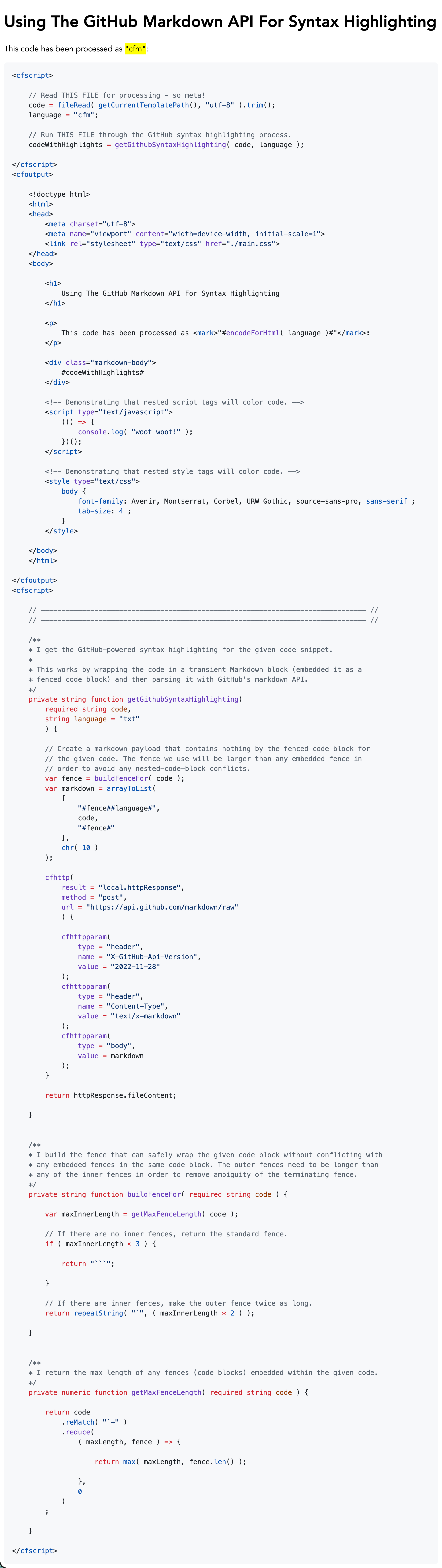
Note that I'm linking to the CSS file generated by Sindre Sorhus. The CSS file contains the CSS custom properties that apply the color theme for the syntax highlighting.
One of the nice things about this Markdown API is that it's resilient to unknown languages. If I were to, as an example, pass the language identifier as foobarbaz, the syntax highlighting would fallback to looking like a text file.
At the end of the day, I didn't have enough know-how to get Claude Code to generate me a GitHub-level syntax highlighter. From everything that I've heard in the pod-o-sphere, that's my fault for not giving it all the right specifications.
But, despite my failure, I'm glad that it pointed me to the Markdown API. I do think there's a path forward for me here. And while I'll still be dependent on an external API for a core feature of my blog, the markdown output is light-weight enough that I think I'll just embed it right within my persisted content. This would make the Markdown API a dependency, but not necessarily a point of failure (since it would be an author-time-only dependency).

Reader Comments
Post A Comment — ❤️ I'd Love To Hear From You! ❤️
Post a Comment →