Last week, when I performed the Gilded Rose Refactoring code kata in ColdFusion, my text-based testing gave me a binary result. That is, the test either passed or it failed; but, it didn't give me any obvious insight into which part of the text output was problematic. What I would have loved was something with more nuance — something akin to a GitHub code diff. As such, I wanted to explore the Myers Diff algorithm in ColdFusion.
Before this, I didn't know what a Myers Diff was; I just started Googling for "text diffing algorithms" and the Myers Diff was the one that I kept seeing. Myers Diff takes two sets of strings and finds the smallest number of operations that it would take to convert the Original string into the Modified string. The three possible operations include:
- Equals
- Insert
- Delete
To illustrate, let's look at two different chunks of text. First, the original text:
There Once Was A Man
by Ben Nadel

There once was a man from New York
Whose coding skills made him a dork
But he knew in his heart
That his code looked like art
Since ColdFusion is sexy as fork!
And the modified text:
There once was a man from New York
Whose coding chops made him a dork
But he knew in his heart
That his code read like art
Since ColdFusion is sexy as fork!

Viva la CFML!
This modified text has some very obvious changes: removing the title intro and appending a rally cry outro; but, it also has some more subtle text changes within the heart of the copy. Seeing those subtle changes isn't easy unless we can add some output-formatting to the diff; which is where the Myers Diff data structures really come to bear.
If I run these two blocks of text through my Myers Diff ColdFusion component and then output them to the page (with some more elbow grease), we get the following output:
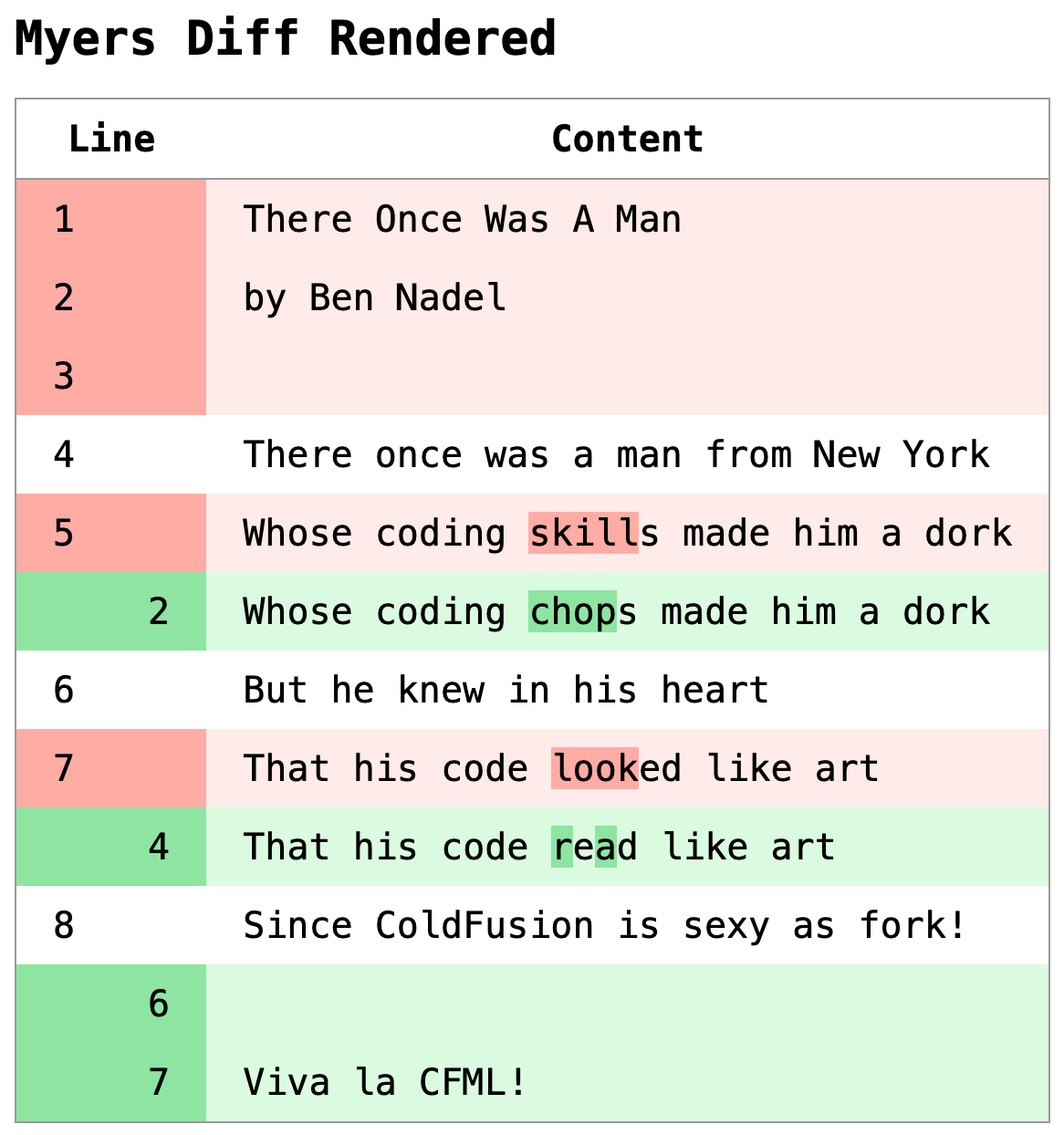
With the fancy output formatting of the Myers Diff results, we can clearly see the minor text changes within the main content block. This kind of results rendering would have made the Gilded Rose refactoring kata much easier to debug!
The Myers Diff algorithm runs in two phases:
-
Iterate through the cross-product of the original text and the modified text, using a running tally to identify the minimum number of steps it would take to get to the current iteration element.
-
Back-trace through the results to find the shortest path of operations (ie, the least number of steps) that can be-replayed in order to generate the modified text.
Each operation in (my implementation of) the Myers Diff results is represented by a simple data structure:
{
	"type": "insert",
	"value": "Whose coding chops made him a dork",
	"index": 2
}
Taking this result and generating the output that I shared above isn't a simple cfloop tag. I'm actually performing a nested diff on the relevant lines. As you can see in the screenshot above, some of the lines show sub-string deltas (ex, skills became chops). To do this, I'm:
-
Checking to see if two sibling deltas represent an isolated line change. Meaning, a "Delete" and an "Insert" are side-by-side and aren't part of a larger multi-line delta.
-
If so, run a character-based Myers diff on the values within each delta; and then render those changes inline within the row.
So basically I'm running a line-based diff on the main inputs; then, as needed, I'm running a character-based diff on two lines. The ColdFusion code for this isn't straightforward; but here's what I got:
<cfscript>

	myers = new MyersDiff();

	diff = myers.diffElements(
		original = fileReadLines( "./original.txt" ),
		modified = fileReadLines( "./modified.txt" )
	);

</cfscript>
<cfoutput>

	<h1>
		Myers Diff Rendered
	</h1>

	<link rel="stylesheet" type="text/css" href="./demo.css">
	<table class="difftastic">
	<thead>
		<tr>
			<th colspan="2">
				Line
				<!--- Original line index. --->
				<!--- Modified line index. --->
			</th>
			<th>
				Content
			</th>
		</tr>
	</thead>
	<tbody>
		<cfloop array="#diff.operations#" item="operation" index="operationIndex">
			<cfswitch expression="#operation.type#">
				<cfcase value="delete">

					<tr class="delete">
						<td>
							#e( operation.index )#
						</td>
						<td>
							<!--- No modified index for delete. --->
						</td>
						<td>
							<del class="line">
								<!---
									If this mutation is a single line (ie, a single delete
									followed by a single insert), then we can be more
									creative with the line details.
								--->
								<cfif isSingleLineMutation( diff.operations, operationIndex )>

									<!--- Run CHARACTER-based diff on the two lines. --->
									<cfset subdiff = myers.diff(
										original = operation.value,
										modified = diff.operations[ operationIndex + 1 ].value
									)>

									<cfloop array="#subdiff.operations#" item="subOperation">
										<cfswitch expression="#subOperation.type#">
											<cfcase value="delete">
												<em>#e( subOperation.value )#</em>
											</cfcase>
											<cfcase value="insert">
												<!---
													Don't render the inline insert since it
													will have already been rendered by the
													previous single-line mutation.
												--->
											</cfcase>
											<cfdefaultcase>
												<span>#e( subOperation.value )#</span>
											</cfdefaultcase>
										</cfswitch>
									</cfloop>

								<cfelse>

									<span>#e( operation.value )#</span>

								</cfif>
							</del>
						</td>
					</tr>

				</cfcase>
				<cfcase value="insert">

					<tr class="insert">
						<td>
							<!--- No original index for insert. --->
						</td>
						<td>
							#e( operation.index )#
						</td>
						<td>
							<ins class="line">
								<!---
									If this mutation is a single line (ie, a single insert
									preceded by a single delete), then we can be more
									creative with the line details.
								--->
								<cfif isSingleLineMutation( diff.operations, operationIndex )>

									<!--- Run CHARACTER-based diff on the two lines. --->
									<cfset subdiff = myers.diff(
										original = diff.operations[ operationIndex - 1 ].value,
										modified = operation.value
									)>

									<cfloop array="#subdiff.operations#" item="subOperation">
										<cfswitch expression="#subOperation.type#">
											<cfcase value="delete">
												<!---
													Don't render the inline delete since it
													will have already been rendered by the
													previous single-line mutation.
												--->
											</cfcase>
											<cfcase value="insert">
												<em>#e( subOperation.value )#</em>
											</cfcase>
											<cfdefaultcase>
												<span>#e( subOperation.value )#</span>
											</cfdefaultcase>
										</cfswitch>
									</cfloop>

								<cfelse>

									<span>#e( operation.value )#</span>

								</cfif>
							</ins>
						</td>
					</tr>

				</cfcase>
				<cfdefaultcase>

					<tr class="equals">
						<td>
							#e( operation.index )#
						</td>
						<td>
							<!--- No modified index for equals. --->
						</td>
						<td>
							<span class="line">
								<span>#e( operation.value )#</span>
							</span>
						</td>
					</tr>

				</cfdefaultcase>
			</cfswitch>
		</cfloop>
	</tbody>
	</table>

</cfoutput>
<cfscript>

	/**
	* I determine if the given operation is an isolated mutation (ie, not part of a larger
	* block of mutations). Single line mutations allow us to be more details in the line
	* rendering, showing sub-token replacements.
	*/
	private boolean function isSingleLineMutation(
		required array operations,
		required numeric operationIndex
		) {

		var noop = { type: "equals" };
		var minus2 = ( operations[ operationIndex - 2 ] ?: noop );
		var minus1 = ( operations[ operationIndex - 1 ] ?: noop );
		var operation = operations[ operationIndex ];
		var plus1 = ( operations[ operationIndex + 1 ] ?: noop );
		var plus2 = ( operations[ operationIndex + 2 ] ?: noop );

		if ( operation.type == "equals" ) {

			return false;

		}

		if (
			( operation.type == minus1.type ) ||
			( operation.type == plus1.type )
			) {

			return false;

		}

		if (
			( minus1.type != "equals" ) &&
			( minus1.type == minus2.type )
			) {

			return false;

		}

		if (
			( plus1.type != "equals" ) &&
			( plus1.type == plus2.type )
			) {

			return false;

		}

		return true;

	}


	/**
	* I read the given file into an array of lines.
	*/
	private array function fileReadLines( required string path ) {

		var lines = [];
		var file = fileOpen( path, "read", "utf-8" );

		try {

			while ( ! fileIsEOF( file ) ) {

				lines.append( fileReadLine( file ) );

			}

		} finally {

			fileClose( file );

		}

		return lines;

	}


	/**
	* I encode the given value for HTML.
	*/
	private string function e( required any input ) {

		return encodeForHtml( input );

	}

</cfscript>
Yeah, like I said, it's not the cleanest code. But, to be fair, it's only complicated because I want those inline deltas. If all I cared about was the top-level changes, this really would have been a simple cfloop and a cfswitch.
When reading about the Myers Diff algorithm, I came across many resources that left feeling no more prepared to implement it myself. Ultimately the two best resources were:
-
Diff Algorithm Explained by DevPal (YouTube)
-
How can I calculate the diff between two strings in JavaScript?
This latter link contains a JavaScript implementation of the Myers Diff algorithm which at least gave me something I could vaguely understand. Plus, it provided a simple scenario (kitten becomes sitting) that I could test against.
Of course, the JavaScript implementation - and every other implementation that I found - errs heavily on the side of optimization. And that's just not my style. As such, I did my best to make my ColdFusion implementation err on the side of readability.
Of course, beauty is always in the eye of the beholder.
Here's my ColdFusion implementation. It exposes two public methods:
diff( string, string )diffElements( array, array )
The string-based version simply plucks the characters of the string into an array (using reMatch()); and then calls the diffElements() internally. If you refer back to the CFML code above, I was using diffElement() on the overall text inputs. But then, I was using diff() on the inline deltas.
component hint="A ColdFusion implementation of the Myers Diffing algorithm." {

	/**
	* I initialize the differ.
	*/
	public void function init() {
		// ... no state needed at this time ...
	}

	// ---
	// PUBLIC METHODS.
	// ---

	/**
	* I perform a diff against the two strings.
	*/
	public struct function diff(
		required string original,
		required string modified,
		boolean caseSensitive = true
		) {

		return diffElements(
			original = original.reMatch( "." ),
			modified = modified.reMatch( "." ),
			caseSensitive = caseSensitive
		);

	}


	/**
	* I perform a diff against the two arrays of strings.
	*/
	public struct function diffElements(
		required array original,
		required array modified,
		boolean caseSensitive = true
		) {

		// To make the elements easier to work with (so that row/col indices align with
		// input indices), we're going to create local copies of the input arrays with a
		// front-loaded throw-away string. The diffing algorithm works by creating a
		// matrix of "steps" to get from the original string to the modified string; and
		// the whole situation is way easier if we can treat location (1,1) as a UNIQUE
		// value before the start of each string. This keeps all the indices simple!
		var originalInput = original;
		var modifiedInput = modified;
		var original = arrayMerge( [ createUuid() ], originalInput );
		var modified = arrayMerge( [ createUuid() ], modifiedInput );

		// In our matrix, the original text is represented horizontally (by columns) and
		// our modified text is represented vertically (by rows).
		var matrix = matrixNew(
			rowCount = modified.len(),
			columnCount = original.len()
		);

		// Flesh-out the "steps" that we MIGHT take to get from original to modified.
		matrix.each( ( row, rowIndex ) => {
			row.each( ( entry, columnIndex ) => {

				// PERFORMANCE TRADE-OFF: I'm storing a lot more data in each entry that
				// is actually needed because the stored data makes the algorithm easier
				// to think about. But, it also means the algorithm is slower and needs
				// more memory.
				entry.originalValue = original[ columnIndex ];
				entry.modifiedValue = modified[ rowIndex ];
				// Adjust indices to account for the empty string at (1,1).
				entry.originalIndex = ( columnIndex - 1 );
				entry.modifiedIndex = ( rowIndex - 1 );
				// Flag when original and modified content match at the given offsets.
				entry.match = caseSensitive
					? ! compare( entry.originalValue, entry.modifiedValue )
					: ! compareNoCase( entry.originalValue, entry.modifiedValue )
				;
				// Store the steps it took to get to the sibling locations of the matrix.
				// We'll use this in both the path identification and the back-tracing to
				// find optimal operations.
				entry.north = ( matrix[ rowIndex - 1 ][ columnIndex ].steps ?: 0 );
				entry.northWest = ( matrix[ rowIndex - 1 ][ columnIndex - 1 ].steps ?: 0 );
				entry.west = ( matrix[ rowIndex ][ columnIndex - 1 ].steps ?: 0 );

				// First row is based solely on index. As we move RIGHT across the matrix,
				// every step indicates a single "deletion" of the original text.
				if ( rowIndex == 1 ) {

					entry.steps = ( columnIndex - 1 );

				// First column is based solely on index. As we move DOWN across the
				// matrix, every step indicates a single "insertion" of the modified text.
				} else if ( columnIndex == 1 ) {

					entry.steps = ( rowIndex - 1 );

				// If the original / modified texts match at current location, we don't
				// have to increase the "steps" since only modifications count as a step.
				// As such, we'll copy the steps it took to get to the previous location.
				} else if ( entry.match ) {

					entry.steps = entry.northWest;

				// If the original / modified texts differ at the current location, add a
				// step to the smallest non-matching path it took to get to the siblings.
				} else {

					entry.steps = ( min( entry.north, entry.west ) + 1 );

				}

			});
		});

		// Now that we've populated the matrix with various step-paths, we're going to
		// start at the end of the matrix and back-trace through the steps to find the
		// smallest number of operations that get us from the original text to the
		// modified text (with an emphasis on "delete" operations - meaning we want the
		// final operations to list deletes before inserts wherever possible).
		var columnIndex = original.len();
		var rowIndex = modified.len();
		var operations = [];
		var counts = {
			equals: 0,
			insert: 0,
			delete: 0,
			total: 0
		};

		while ( true ) {

			// The origin (1,1) is just the throw-away placeholder that we added to make
			// all the sibling math easier (no null-reference errors). If we've traced
			// back to the placeholder, we can exit the tracing.
			if ( ( rowIndex == 1 ) && ( columnIndex == 1 ) ) {

				break;

			}

			var entry = matrix[ rowIndex ][ columnIndex ];

			// Note: since we're BACK TRACING from the end of the matrix and PREPENDING
			// steps, the operation priority is reversed from the following checks. By
			// checking for INSERTIONS before DELETIONS, it means that DELETIONS will
			// actually occur first when the operations are played-back in the correct
			// order (due to prepending of entries).
			if ( entry.match ) {

				operations.prepend({
					type: "equals",
					value: entry.originalValue,
					index: entry.originalIndex
				});
				counts.equals++;
				counts.total++;

				// Move diagonally for matches.
				columnIndex--;
				rowIndex--;

			} else if ( ( rowIndex > 1 ) && ( entry.steps == ( entry.north + 1 ) ) ) {

				operations.prepend({
					type: "insert",
					value: entry.modifiedValue,
					index: entry.modifiedIndex
				});
				counts.insert++;
				counts.total++;

				// Move vertically for insertions.
				rowIndex--;

			} else if ( ( columnIndex > 1 ) && ( entry.steps == ( entry.west + 1 ) ) ) {

				operations.prepend({
					type: "delete",
					value: entry.originalValue,
					index: entry.originalIndex
				});
				counts.delete++;
				counts.total++;

				// Move horizontally for deletions.
				columnIndex--;

			}

		}

		return [
			operations: operations,
			counts: counts
		];

	}

	// ---
	// PRIVATE METHODS.
	// ---

	/**
	* I create a matrix with the given dimensions.
	*/
	private array function matrixNew(
		required numeric rowCount,
		required numeric columnCount
		) {

		var row = [];
		row.resize( columnCount );

		for ( var i = 1 ; i <= columnCount ; i++ ) {

			row[ i ] = {};

		}

		var matrix = [];
		matrix.resize( rowCount );

		for ( var i = 1 ; i <= rowCount ; i++ ) {

			matrix[ i ] = duplicate( row );

		}

		return matrix;

	}

}
In typical fashion, I've taken a 35-line algorithm and turned it into 230-line component; but hey, that's just how my brain works. I can't stare at a bunch of array-index math and make sense of it. I need words and variables that help explain what is going on. To each their own.
Now that I have an implementation of the Myers Diff algorithm in ColdFusion, I'll see if I can go back and add it to my Gilded Rose refactoring kata.

Reader Comments
Woot woot! This has already proven useful — I just added the Myers Diff algorithm to my ColdFusion implementation of the Gilded Rose code refactoring kata:
www.bennadel.com/blog/4868-adding-myers-diff-rendering-to-the-gildedrose-kata-in-coldfusion.htm
Cross-pollination for the win!
I just added this diffing to Big Sexy Poems over the weekend - showing the delta between poem snapshots and the live content:
www.bennadel.com/blog/4871-adding-myers-diff-to-share-link-snapshots-in-big-sexy-poems.htm
Post A Comment — ❤️ I'd Love To Hear From You! ❤️
Post a Comment →