Most of my web forms have a single, primary submit button. Which means, anything the user does to trigger a form submission will "just work" as expected. But, every now and then, I'll provide a secondary, named submit button that allows the user to submit the form with a modified behavior. Unfortunately, this named submit button is often higher-up in the DOM (Document Object Model) than the primary submit button; which means, the browser uses the named submit button as the implied requestor during certain submissions. This is usually not what I want; but is something we can fix with the use of a hidden submit button.
Let's look at how this behavior manifests in the browser. In the following ColdFusion form, I have a single text input and two submission buttons. The primary submit button is unnamed because its sole purpose is to submit the form. The secondary submit button is named because we want it to modify the submission workflow.
<cfoutput>

	<form method="post" action="#cgi.script_name#">
		<p>
			<strong>Widget:</strong><br />
			<!---
				Caution: If the user hits ENTER while focused on this input, the browser
				will submit this form (this is to be expected). But, the browser will use
				the FIRST SUBMIT button in the form as the requestor. As such, the browser
				will end up using the SECONDARY submit button which is first in DOM order.
			--->
			<input name="name" size="30" />

			<!---
				If the user explicitly clicks on this button, the [name=value] will be
				submitted along with the form body.
			--->
			<button type="submit" name="modifier" value="secondary">
				Secondary Submit
			</button>
		</p>
		<p>
			<!---
				If the user explicitly clicks on this button, the secondary submit will
				not be included with the form body.
			--->
			<button type="submit">
				Primary Submit
			</button>
		</p>
	</form>

	<!--- Output the form scope so we can see what was submitted. --->
	<cfdump var="#form#" hide="fieldNames" />

</cfoutput>
I'm now going to submit this form using three different strategies:
- Explicitly click the primary submit bottom.
- Explicitly click the secondary submit button.
- Hit the
Enterkey while focus is in the text input.
When I do this, we can look at the CFDump of the form scope to see which inputs are being submitted with the request:
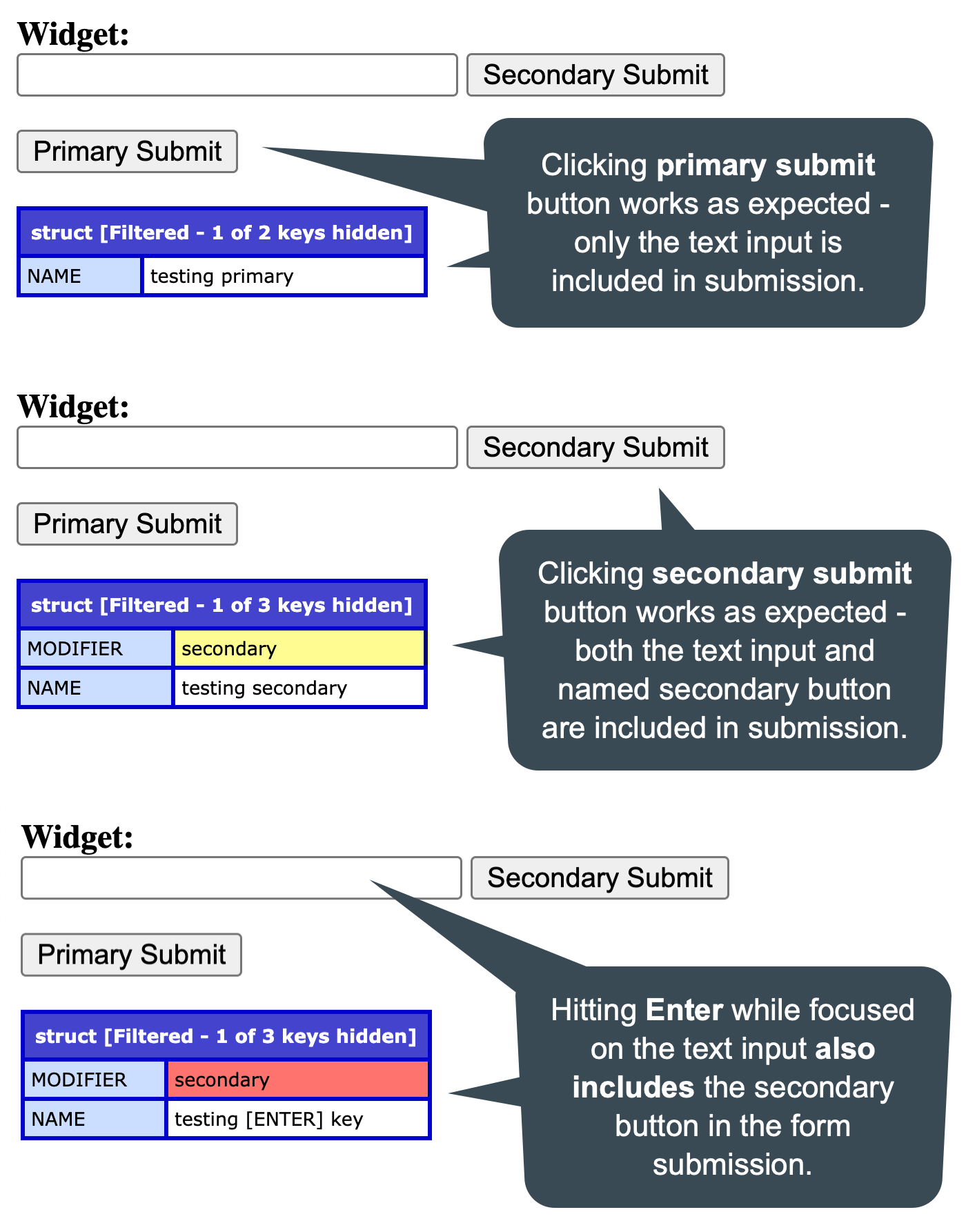
As you can see:
-
When clicking explicitly on the unnamed, primary submit button, the only value included in the form submission is the text input. This is to be expected.
-
When clicking explicitly on the named, secondary submit button, both the text input and the secondary submit button are included in the form submission. This is to be expected.
-
When hitting
Enterwhile focused in the text input, both the text input and the secondary submit button are included in the form submission. This is probably not what you expected / intended.
In the last scenario there, the secondary submit button is included because it is higher up in the DOM order. When you submit a form using the Enter key mechanics, the browser tries to figure out which button should act as the implied "requestor". It does this by scanning the form DOM branch for the first submit button. Which, in our case, is the secondary submit button.
To work with this behavior in order to achieve a more expected outcome, all we have to do is include a [hidden] submit button at the top of the form:
<cfoutput>

	<form method="post" action="#cgi.script_name#">
		<!---
			This hidden button ensures that a non-named submit is the first submit button
			in DOM-order. It will therefore be used by any ENTER-based submission.
		--->
		<button
			type="submit"
			hidden="I ensure that keyboard-based submission (enter key) use an unnamed submit.">
		</button>

		<p>
			<strong>Widget:</strong><br />
			<!---
				Caution: If the user hits ENTER while focused on this input, the browser
				will submit this form (this is to be expected).
			--->
			<input name="name" size="30" />

			<!---
				If the user explicitly clicks on this button, the [name=value] will be
				submitted along with the form body.
			--->
			<button type="submit" name="modifier" value="secondary">
				Secondary Submit
			</button>
		</p>
		<p>
			<!---
				If the user explicitly clicks on this button, the secondary submit will
				not be included with the form body.
			--->
			<button type="submit">
				Primary Submit
			</button>
		</p>
	</form>

	<!--- Output the form scope so we can see what was submitted. --->
	<cfdump var="#form#" hide="fieldNames" />

</cfoutput>
All we're doing here is including a hidden submit button as the first button element in the form. Now, we when we submit the form using the Enter key mechanics, we can see that only the input field is submitted (just as we intended):
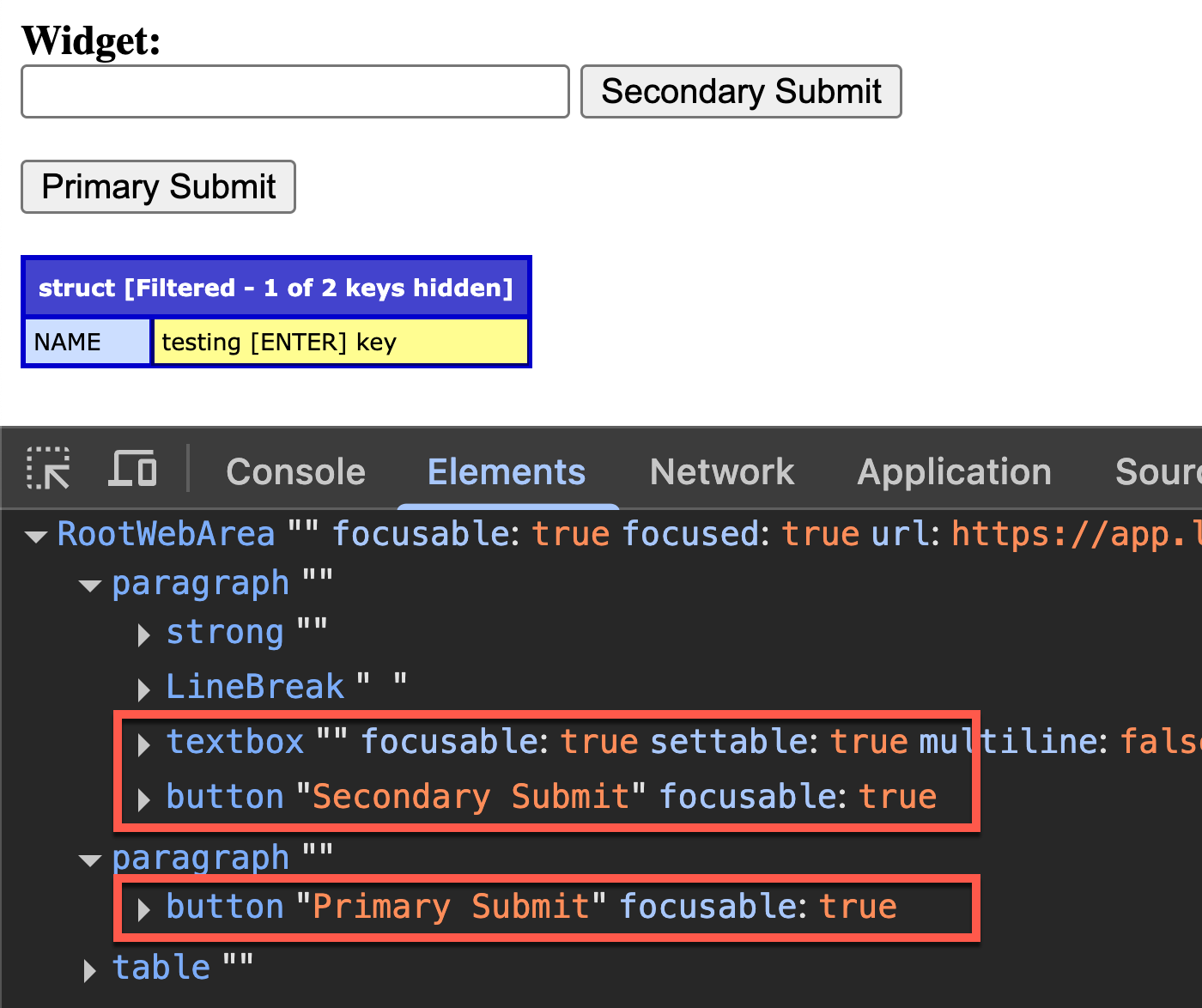
If you look at the Chrome Dev Tools accessibility tree, notice that our use of the [hidden] attribute on the button is hiding the button from any assistive technology. This is exactly what we want because this button isn't really an "actionable" element — it's here only to work around a quirky browser behavior. So, it fixed the problem, but it doesn't get in the way while doing it.

Reader Comments
Post A Comment — ❤️ I'd Love To Hear From You! ❤️
Post a Comment →