
After decades of staring at a screen, my eyes aren't what they used to be. In most digital contexts, I immediately increase the font-size by 10-20% before I do anything else. This "maturing" has made me acutely aware of how absurdly small the output from Adobe ColdFusion's CFDump and writeDump() functions are. I know that some developers use custom implementations of CFDump in order to exert more control. But for the moment, I'm trying to keep it simple. To that end, my approach to increasing the readability of the CFDump output is to inject a <style> tag that overrides Adobe's styles using CSS specificity.
When you run the writeDump() function or execute the CFDump tag, Adobe ColdFusion magically injects <style> and <script> tags into the <head> of your page. Normally, I don't like magic in my code; but, since they're using magic, I'm going to use magic as well, in the form of the CFHtmlHead tag.
Aside: I consider the
CFHtmlHeadtag to be an anti-pattern because it operates outside the visible universe of your code. Meaning, if you follow the processing of an incoming request, down through the routing and the layout selection, you'll never actually see howCFHtmlHeadgets code into the page output. Because it's magic — black magic.
In my Big Sexy Poems app, I have a CFML extensions file (cfmlx.cfm) that I use to polyfill functions. One of the functions that I polyfill is Lucee CFML's dump() method. As such, modifying the behavior of the dump() method can be completely transparent to the rest of my ColdFusion application because it's already something I'm proxying.
To improve the output of the dump() call, I'm going to check to see if the output is the "browser" (as opposed to the "console" or a "file"); and, if so, I'll use the CFHtmlHead tag to inject some overriding CSS.
Here's a snippet of my cfmlx.cfm file - it contains my dump() polyfill and the dumpStyles() helper method:
<cfscript>

	/**
	* I polyfill the dump() function in Adobe ColdFusion.
	*/
	private void function dump(
		required any var,
		boolean expand = true,
		string format = "html",
		string hide = "",
		numeric keys = 9999,
		string label = "",
		string output = "browser",
		string show = "all",
		boolean showUDFs = true,
		numeric top = 9999,
		boolean abort = false
		) {

		// Note: under the hood, Adobe ColdFusion seems to be compiling this down into an
		// instance of the CFDump tag (based on error messages). As such, it's much more
		// temperamental than a normal function invocation (include my attempts at using
		// the argumentCollection construct). We have to be much more explicit in our
		// argument pass-through; and, certain attributes CANNOT be passed in as NULL.
		writeDump(
			var = var,
			expand = expand,
			format = format,
			hide = hide,
			keys = keys,
			label = label,
			output = output,
			show = show,
			showUDFs = showUDFs,
			top = top,
			abort = abort
		);

		// If we're outputting to the browser (the default behavior), inject custom styles
		// for better readability for my aging eyes.
		if ( output == "browser" ) {

			dumpStyles();

		}

	}

	/**
	* I inject style tags that make the CFDump output easier to read.
	*/
	private void function dumpStyles() {

		// For better debugging on how these styles are being injected, we're going to
		// include the call-stack in the style tag content (as a comment).
		var stacktrace = callStackGet()
			.map( ( frame ) => "- #frame.template#:#frame.lineNumber#" )
			.toList( chr( 10 ) & repeatString( chr( 9 ), 4 ) & "* " )
		;

		// CAUTION: Normally, the use of cfhtmlhead() is considered an ANTI-PATTERN due to
		// its total lack of accountability. But, in this case, we're fighting fire with
		// fire. Meaning, the writeDump() tag is already injecting styles magically; and
		// now, we're also injecting styles magically to counteract their magical styles.
		cfhtmlhead( text = "
			<style type='text/css' data-source='Added by the dumpStyles().'>
				/**
				* ColdFusion Stacktrace:
				* #stacktrace#
				**/

				html body table[class^='cfdump_'] {
					border-collapse: separate ;
					border-spacing: 2px ;
					font-family: verdana, arial, helvetica, sans-serif ;
					margin-bottom: 1.5rem ;

					& table[class^='cfdump_'] {
						margin-bottom: 0 ;
					}

					& th,
					& td {
						font-size: 1rem ;
						padding: 0.4em 0.55em ;
					}
				}
			</style>
		");

	}

</cfscript>
Now, if I call the dump() method and look at the page output, I'll see several "magically injected" tags: two from Adobe ColdFusion and one from me:
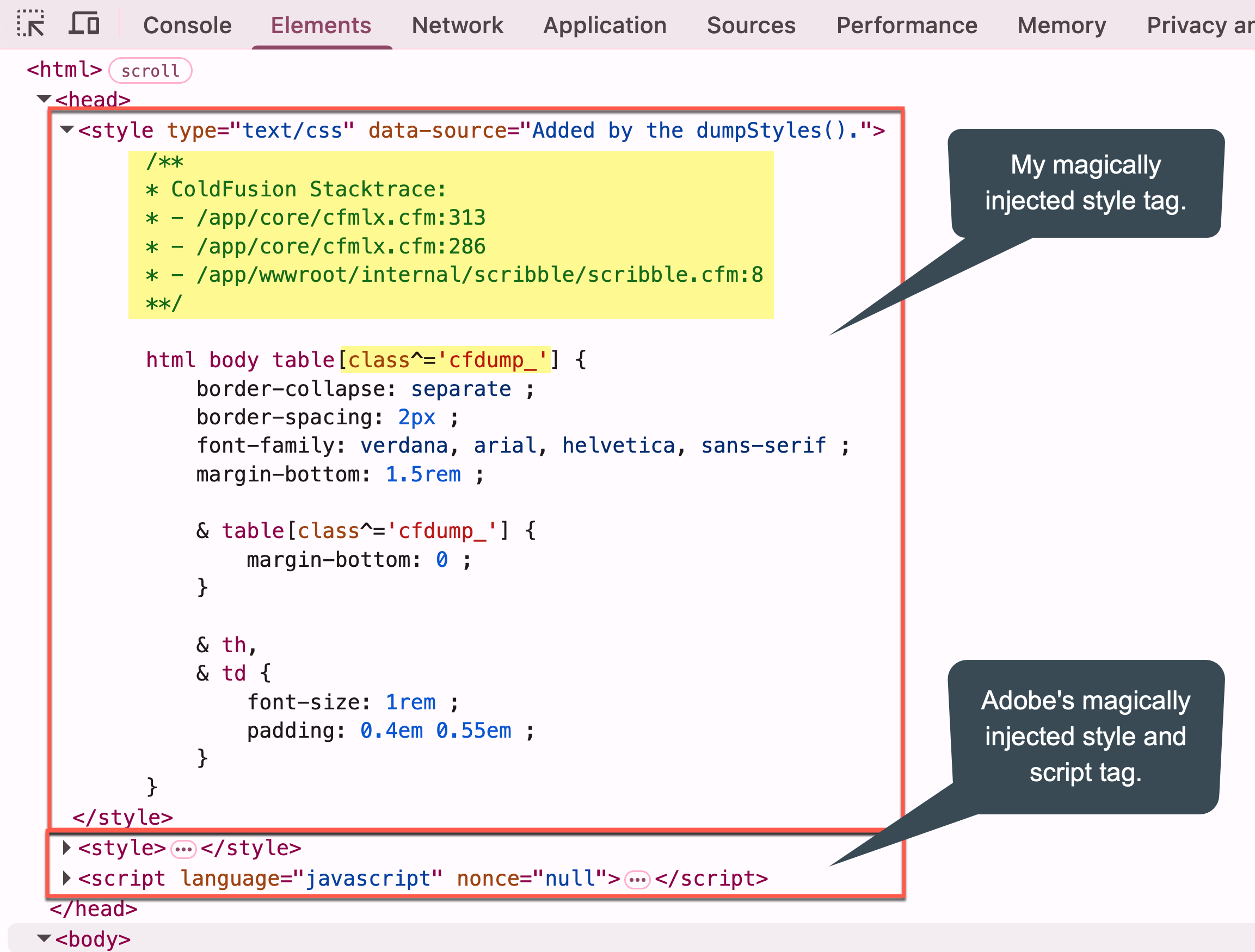
Instead of using the !important flag in my CSS, I'm simply increasing the specificity of my style blocks by including html body in my selectors.
To demonstrate the drastic different in font-size, I'm going dump-out an array-of-structs. First, using ColdFusion's native writeDump() method:
<cfscript>

	writeDump([
		{ id: 1, name: "Kim",  role: "Admin" },
		{ id: 2, name: "Jon",  role: "Engineer" },
		{ id: 3, name: "Kali", role: "Manager" },
	]);

</cfscript>
... and second, using my dump() polyfill with dumpStyles() side-effect:
<cfscript>

	// ColdFusion language extensions (global functions).
	include "/core/cfmlx.cfm";

	// Note: this is the dump() POLYFILL I've created in the CFMLX template.
	dump([
		{ id: 1, name: "Kim",  role: "Admin" },
		{ id: 2, name: "Jon",  role: "Engineer" },
		{ id: 3, name: "Kali", role: "Manager" },
	]);

</cfscript>
And now, the output of these two dumps rendered side-by-side:
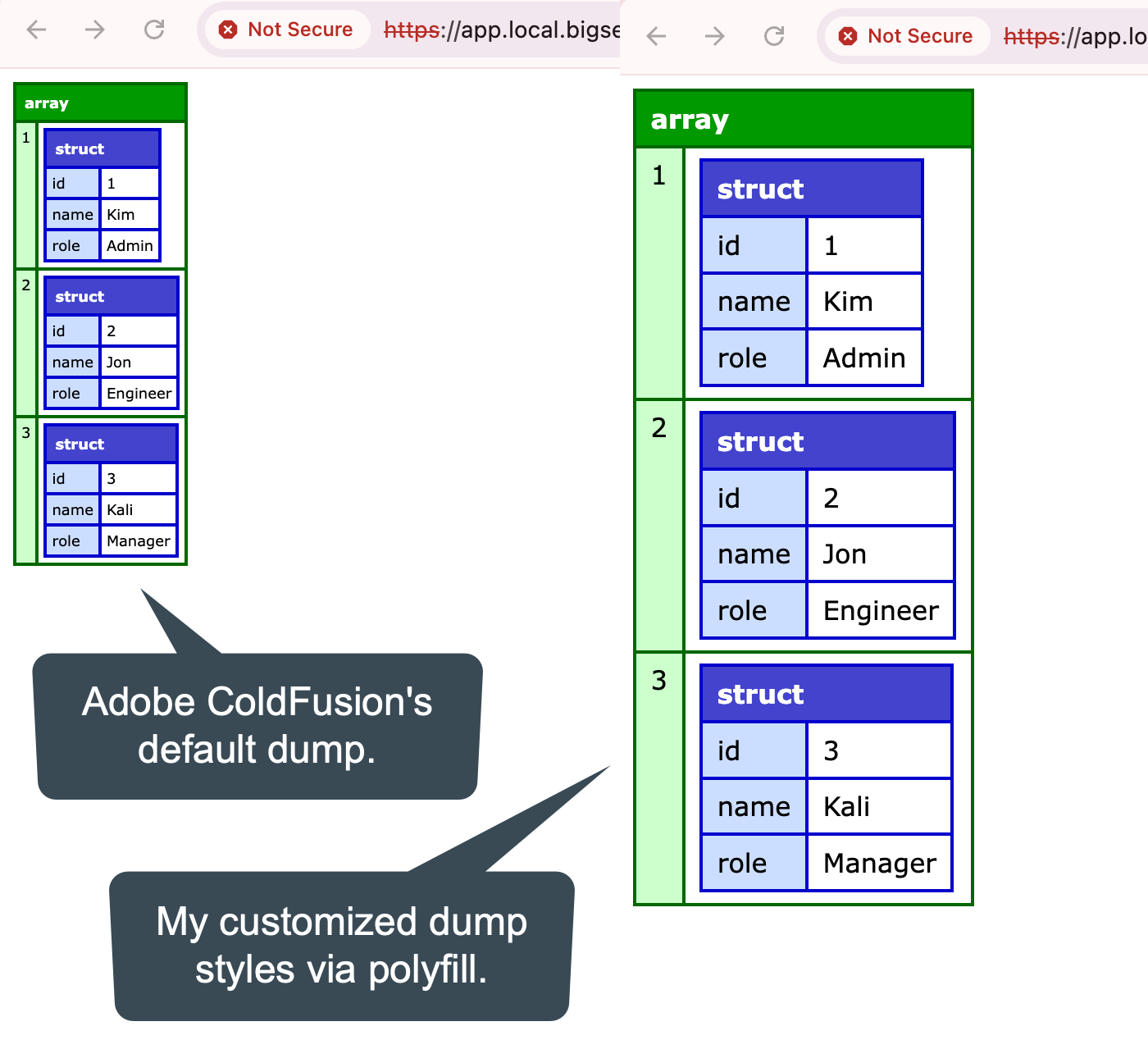
The one of the left looks like squiggles to me. The one on the right is readable.
This only works if I use my dump() polyfill. But, the nice thing about putting the style-injection into its own dumpStyles() function is that I can, in theory, use it alongside the native writeDump() function or CFDump tag, as long as I remember to call the dumpStyles() method at some point.

Reader Comments
Over on Facebook, James Moberg noted that calling
dump()multiple times will result in multiple<style>tags getting injected. This is true; but, at the very least, it shouldn't be an issue. Each CSS property block should just overwrite the previous one (or rather, since it has the same selector specificity, they will all apply).I use this locally, so I'm not too concerned about this.
Thank you so much Ben!
My eyes have been having a hard time reading the cfdumps for a while now, and I've had to resort to magnifying my window to 130%.
I'm glad to know I'm not the only one with this experience.
I'm going to try your solution, for sure!
Cheers!
@Bobby,
I think back to the early days in my career when people were all designing UIs with
11pxfonts. And then there were font families that were designed to be readable at even smaller sizes! What were thinking?!?!? 😱Hey Ben,
This is what I use :-) Makes my eyes happy.
My team refers to the cfdump tag with so many toilet jokes 😅
@Giancarlo,
I haven't heard of "JetBrains Mono" before. I've been a "Source Code Pro" person for years. And I see JetBrains even compares the two fonts. I'll give yours a try to see how it feels. Clearly they put a lot of thought into it.
@Jack,
Oh trust me, it took every ounce of restraint I had to not make the title of this post 1000% more snarky 😜
@ben,
Don't know how CFC's work in practice…Can you address the multiple STYLE tags by tracking how often dump has been called with a private variable within the CFC, and only output the STYLE tag the first time?
@Danilo,
Absolutely. I could just put some sort of flag in the
requestscope and then early-exit out of thedumpStyles()function it's already been set. I might add that. Then again, I might not since I'll only ever dump-out to the screen in development, never in production. So, a little extra cruft won't matter too much.As an aside, though, one thing I discovered when I was doing the ColdFusion 2025 Hackathon project is that if the new CSP (Content Security Policy) headers are enabled, then
CFDumpbreaks because the injected Style and Script tags don't include the propernonce. I'm only pointing that out here because my style tag will also break for the same reason.For as long as I can remember,
<cfdump>has added acfdumpinitedkey to therequestscope. My trick has been to check for that at the end of the request and drop a simple little<link>tag referencing a special CSS file. Because this CSS file occurs later in the request, it overrides styles previously set by the style tag with pretty high reliability. For the few I encountered that weren't as reliable or were potentially being overridden by site styles with higher specificity, I made careful use of!important.The relevant bit from my CSS file is:
Your trick of prepending html > body to make the rule more specific would work, too.
So I've actually changed up my technique a bit because it turns out that any content in the
cfhtmlhead()tag is cleared if you callcfcontent; which I do in most of my requests when I'm about to render the prepared page content:This clears the output buffer which, it turns out, includes the content being stored for
cfhtmlhead(). Just another reason I've grown to no like thecfhtmlheadtag (the main one being that it's hard to trace in the application logic).In the end, I've just baked the
CFDumpstyles into my main site's CSS file. It's tiny enough that it doesn't make a difference. The downside is that I no longer get the nicerCFDumpoutput font-sizing when I'm on a test page and I abort before the styles have a chance to render for the site.Post A Comment — ❤️ I'd Love To Hear From You! ❤️
Post a Comment →