Telling My ColdFusion Connector/J JDBC MySql Connection String To Use UTC
UPDATE, Oct 24, 2025: Ultimately, I ran into issues with this and couldn't get it to work the way I wanted. I was hoping to be able to let my server run in any timezone it wanted; but, I kept getting Connector/J behaviors that were converting with the dates either going into or coming out of the database. As such, I finally gave-in and changed my server to use UTC (Coordinated Universal Time). Now, the server, the JVM, and the MySQL process are all running in the same timezone.
There must be a way to get it done without having to worry about UTC; but, it's not something I have time to figure out now.
As I'm working on BigSexyPoems, I'm trying to share my code in public. And, this morning, when I posted about adding share-link tracking, I noticed that my date/time values were going into the MySql database incorrectly. I know that my VPS (Virtual Private Server) is running in Central Time; but, I'm using dateConvert("local2utc") prior to storing dates. So, I was surprised to see a +5 hour change on INSERT.
After trial and error, I was able to reduce it to a simple replication. In the following ColdFusion code, I'm showing my utcNow() shows in ColdFusion; and, what it shows in MySQL via a bound parameter:
<cfscript>

	// My global UDFs (ex, utcNow(), dump()).
	include "/core/cfmlx.cfm";

	dump([
		"now": now(),

		// Output UTC now, as seen by ColdFusion server.
		"utcNow": utcNow(),

		// Echo UTC now, as seen after transfer to MySQL server.
		"mysql": queryExecute(
			"
				SELECT
					UTC_TIMESTAMP(),
					:cfvalue AS utcNow_from_cf
				;
			",
			{
				cfvalue: {
					value: utcNow(),
					cfsqltype: "cf_sql_timestamp"
				}
			}
		)
	]);

</cfscript>
As you can see, I'm binding utcNow() to the :cfvalue parameter, which I'm then echoing back in the SELECT, alongside the MySQL UTC_TIMESTAMP() value (for reference). And, when we run this Adobe ColdFusion 2025 code, we get the following:
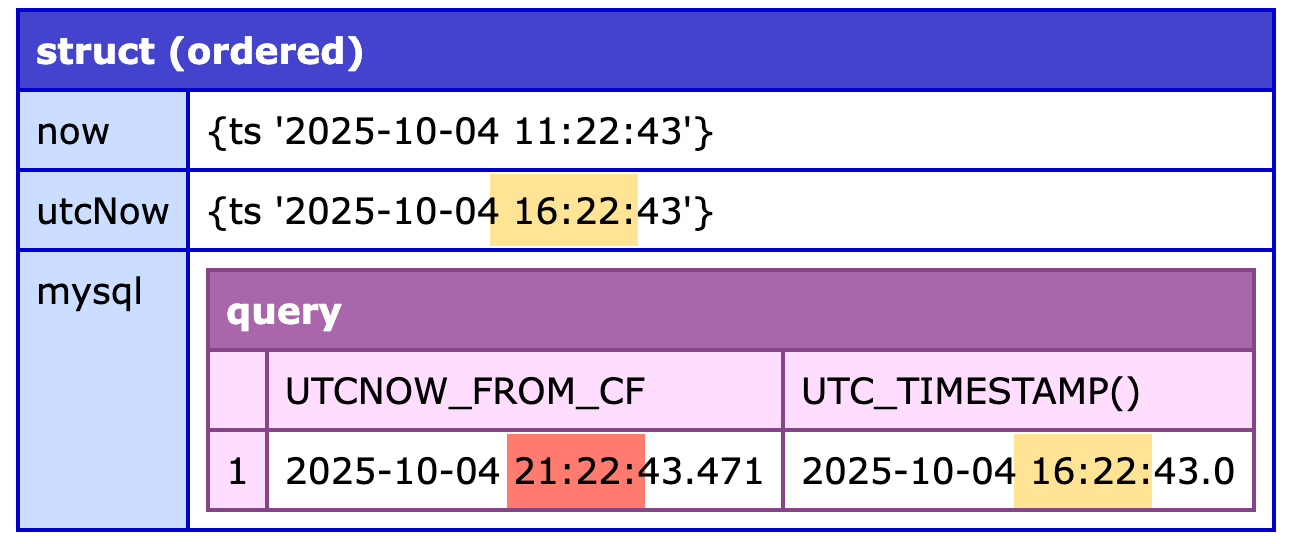
What we can see in this data is that the utcNow() in ColdFusion matches the UTC_TIMESTAMP() in MySql; but, the utcNow() data, after going through the JDBC connection, is now 5-hours off.
To be honest, I don't fully understand what's going on. It has something to do with the way the Dates are represented in Java (the layer under ColdFusion), in MySql, and the Connector/J's ability to covert between the two. Thankfully, ChatGPT was able to point me in the right direction. I was able to update my JDBC connection string from this (relevant parts only):
serverTimezone = UTC
... to:
serverTimezone = UTCconnectionTimeZone = SERVERpreserveInstants = true
Again, I don't fully understand the issue here. But, I think it means that if the JDBC driver believes it needs to convert the incoming date/time object to a string, it will use the MySql server's timezone as the point of reference — not the ColdFusion server's timezone (which is 5-hours off).
Aside: this Connector/J issue is documented on the MySQL blog article titled, Support for Date-Time Types in Connector/J 8.0. I tried to wrap my head around it, but it's just not sinking in.
Making this change fixed the issues. And now, the utcNow() values I generate in ColdFusion are being persisted in the MySql server as the same point-in-time value.
Why Not Just Update Server To Run In UTC
My first instinct was to just update the Windows / ColdFusion / JVM server to run in UTC. Then, "all the things" would be running in the same timezone. And, to be fair, that's probably a best practice.
But, here's the thing. Because I'm on a VPS (as opposed to deploying Docker containers), the timezone of the server isn't configured in the codebase. As such, I didn't want "the solve" to be something that wasn't tracked in the repository. By fixing this timezone issue in the connection string, the change is now a fundamentally-tracked part of how my ColdFusion application works. And that just removes a little bit of magic, which I like.
Want to use code from this post? Check out the license.

Reader Comments
@Ben on Lucee if you define your datasource in Application.cfc you can specify
timezone: "UTC"as one of the datasource options adjacent to the connectionString (not in it, but I do set serverTimezone in the connectionString). I also setthis.timezone="UTC";in my Application.cfc, with all this in place it appears to work well without worrying about the server/jvm timezone. Example:@Peter,
I really wish the datasources were better documented! There's an Adobe Tracker issue from 3 years ago that is still marked as "To Fix". I'll also look into the
Application.cfcvariable - never seen that before 🤣Whenever I have to dig into timezone issues, I generally procrastinate. I'm not usually a procrastinator, but the level of mind-f-ery that I experience when delving into the dark arts of timezone manipulation just makes me want to permanently bury my head in the sand.
@Chris,
Right? It took me a long time to just get on the "UTC all the way down" mindset. And now, people have the nerve to tell me there are cases where UTC doesn't help (like repeated event start times) 😱 I'm just happy that I've never had to build a calendar system.
@Ben Nadel — a calendar system is my worst nightmare! Haha! I too hope I'm never in those trenches, jumping on that particular grenade!
For a hilarious and frightening treatise on this, check out the Youtube video "The Problem with Time & Timezones - Computerphile".
I didn't include a link as that might be considered click-bait.🤪
@Laurence,
It's a classic! I've added the link to your comment. If anyone hasn't seen it, they should.
Ugggg, so this saga continues. I thought I had it all working properly, but it seems that even with the changes I made, the dates coming out of the database table are getting changed in transit. This is, for some reason, different than the dates that was merely echoing in the SQL request.
Meaning, I have a query that looks like this (simplified):
... which returns rows. However, when I get the record back from the database, the
nextRunAtis no longer less than theoverdueAt- it's 5-hours ahead!So, the date that I pass to MySQL is good, the comparison in the
WHEREis good, the date in the DB record is good... but, for some reason, when that date is read into the Java recordset, it messes it up.I'll report back when I have it solved.
Alright, I finally just caved and set my server to be running in UTC. I wanted to avoid this since it's not set in the code (ie, source control); and I hate having hidden dependencies. But, maybe running in UTC is just enough of a "best practice" that I don't mind.
That said, when I brought the server back up in UTC, I started getting ColdFusion errors:
I had to go back into the JDBC connection string and change it to be:
I don't understand this - I don't know why the server couldn't parse the UTC timezone.
I should also mention that the ColdFusion (JVM) and MySQL are configured to use the "system" timezone, so they both take-up the UTC setting from the server.
@Ben Nadel, Ugg...why does timezone coding sometimes feel like armoring up to go into battle? I feel for you! I have my MySQL server set to UTC as well...was the path of least resistance.
@Chris,
And, on top of that, I have some bugs that are showing up in production that don't show up in development (unrelated to the date-stuff), which makes debugging even all the harder — yes, I'm debugging in production 😱
I have to figure out why some of my bugs aren't getting logged to my bug-tracker. I suspect this will be some random nested
CFHttpbug or something. Or just a bug on my part. I need to see if I can reproduce locally.@Ben Nadel,
Yikes! Those have to be related to an environmental difference, right? Good luck!
Now that I have my server running in UTC, I'm change the
preserveInstants=truesetting to false:preserveInstants=falseEven after reading the docs and chatting with the GPT, I still don't fully understand what this means. But, I think it means that the Connector/J won't try to do any timezone-based conversions — it will just pass it through as-is (and assign the timezone property based on the
serverTimezone=UTCproperty.So now the current state of affairs is this:
(the relevant parts of the connection string).
Post A Comment — ❤️ I'd Love To Hear From You! ❤️
Post a Comment →