Exploring "previous" And "next" Mechanics In HTMX
In the htmx hx-target attribute, you can target peripheral elements by applying previous and next predicates to your CSS selectors. At first, I thought this was just scanning up and down the list of sibling nodes in the same way that the .prev() and .next() methods worked in jQuery. But, upon closer inspection of the source code, I discovered that it was using a technique I had never seen before: htmx was comparing the "document position" of relative nodes.
Run this demo in my JavaScript Demos project on GitHub.
View this code in my JavaScript Demos project on GitHub.
Under the hood, htmx defines these methods:
scanForwardQuery()scanBackwardsQuery()
These methods work by gathering up all of the DOM (document object model) nodes that match a given CSS selector. Then, they iterate over those nodes, either forwards or backwards depending on the method, and compare each node to the source node using the Node::compareDocumentPosition() method.
I've never seen this method before. It takes two nodes and returns a number that contains bit-wise flags that describe the relationship between the two nodes. For the purposes of this exploration, the two flags we're concerned with are represented by these constants:
Node.DOCUMENT_POSITION_PRECEDINGNode.DOCUMENT_POSITION_FOLLOWING
When htmx is looking for nodes that match the previous or next predicate, it short-circuits on the first node that matches the above position. In other words:
When matching on
previous, it iterates backwards over the DOM nodes and short-circuits on the first node that has aDOCUMENT_POSITION_PRECEDINGposition (ie, the closest node before the source node).When matching on
next, it iterates forwards over the DOM nodes and short-circuits on the first node that has aDOCUMENT_POSITION_FOLLOWINGposition (ie, the closest node after the source node).
To see this in action, I've created a small demo <table> in which I have buttons for adding a .selected class to relative td nodes. One button selects "forwards" in the same tr; one button selects "backwards" in the same tr.
In the following code, my selectNext() and selectPrev() methods are simplified translations of what htmx is doing with its scanForwardQuery() and scanBackwardsQuery() method, respectively.
<!doctype html>
<html lang="en">
<body>

	<table border="1" cellpadding="10" cellspacing="5">
	<template data-repeat="5">
		<tr>
			<td class="prevTarget">
				Prev
			</td>
			<td>
				<button
					onclick="selectNext( this, '.nextTarget' )"
					class="selectNext">
					Select Next
				</button>
			</td>
			<td>
				<button
					onclick="selectPrev( this, '.prevTarget' )"
					class="selectPrev">
					Select Prev
				</button>
			</td>
			<td class="nextTarget">
				Next
			</td>
		</tr>
	</template>
	</table>

	<script type="text/javascript">

		cloneRows();

		/**
		* I add the "selected" class to the "closest next" element that matches the given
		* selector.
		*/
		function selectNext( fromNode, cssSelector ) {

			resetSelection();
			// Find matching nodes using depth-first traversal of the DOM.
			// --
			// Note: I don't need Array.from() in this case, but I'm keeping it in order
			// to maintain some mechanical symmetry with the selectPrev() method.
			var matchingNodes = Array.from( document.querySelectorAll( cssSelector ) );

			// The querySelectorAll() method returns the matching nodes in a depth-first
			// order. Therefore, as we iterate FORWARDS over the collection, the first
			// node that identifies as coming AFTER the fromNode is the "next" matching
			// node in DOM-order.
			for ( var node of matchingNodes ) {

				if ( fromNode.compareDocumentPosition( node ) === Node.DOCUMENT_POSITION_FOLLOWING ) {

					node.classList.add( "selected" );
					break;

				}

			}

		}

		/**
		* I add the "selected" class to the "closest previous" element that matches the
		* given selector.
		*/
		function selectPrev( fromNode, cssSelector ) {

			resetSelection();
			// Find matching nodes using depth-first traversal of the DOM. Then, reverse
			// them so that our subsequent for-of loop is iterating over the nodes from
			// the end of the document's node list.
			var matchingNodes = Array.from( document.querySelectorAll( cssSelector ) )
				.reverse()
			;

			// The querySelectorAll() method returns the matching nodes in an depth-first
			// order. Therefore, as we iterate BACKWARDS over the collection (thanks to
			// the .reverse() call), the first node that identifies as coming BEFORE the
			// fromNode is the "previous" matching node in DOM-order.
			for ( var node of matchingNodes ) {

				if ( fromNode.compareDocumentPosition( node ) === Node.DOCUMENT_POSITION_PRECEDING ) {

					node.classList.add( "selected" );
					break;

				}

			}

		}

		/**
		* I remove the "selected" class from the currently-selected node.
		*/
		function resetSelection() {

			document.querySelector( ".selected" )
				?.classList
					.remove( "selected" )
			;

		}

		/**
		* I flesh-out the table rows using the template.
		*/
		function cloneRows() {

			var table = document.querySelector( "table" );
			var template = document.querySelector( "template" );
			var repeat = +( template.dataset.repeat ?? 5 );

			for ( var i = 1 ; i <= repeat ; i++ ) {

				var clone = template.content.cloneNode( true );

				clone.firstElementChild.dataset.id = i;
				table.append( clone );

			}

		}

	</script>

</body>
</html>
If we run this code and try to select the previous and next td elements, we get the following output:
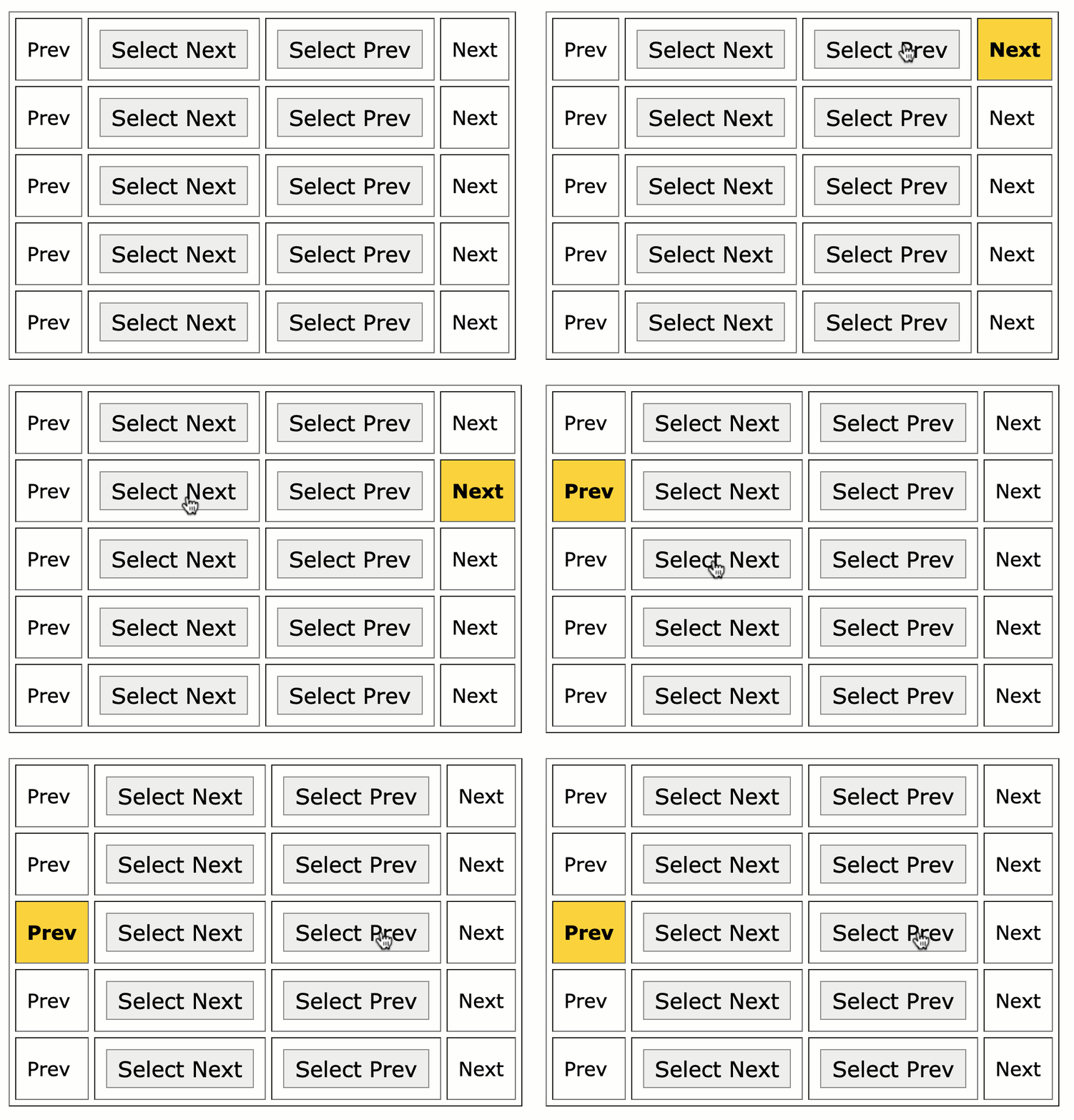
As you can see, by using the "node position" calculations provided by the Node::compareDocumentPosition() method, we were able to locate non-sibling elements based on proximity.
On that note, if you use previous and next predicates without a subsequent CSS selection query, htmx will directly consume the previousElementSibling and nextElementSibling properties, respectively, without going through the DOM iteration machinations.
This is some really interesting stuff! And, it's a great reminder at how much you can learn from reading the source code of battle-tested libraries.
Want to use code from this post? Check out the license.

Reader Comments
Post A Comment — ❤️ I'd Love To Hear From You! ❤️
Post a Comment →