Removing A CSS Stylesheet Removes Its Affect On The Document
When you load a JavaScript file using the <script> tag, the document's behavior is altered forever. Even if you programmatically remove said <script> tag, the parsed code is still present. This is not true for Stylesheets. Whether delivered with a <link> tag or a <style> tag, removal of (or disabling of) the relevant tag also removes the affect the stylesheet had on the document. This behavior can be used to apply temporary CSS properties to the active document.
Run this demo in my JavaScript Demos project on GitHub.
View this code in my JavaScript Demos project on GitHub.
To see this in action, let's create a simple page that has two buttons: one for adding a new stylesheet to the DOM; and, one for removing the first stylesheet from the DOM. Since each click of the "add" button will add a new, unique stylesheet, we might have to click the "remove" button several times to completely reset the document state:
<!doctype html>
<html lang="en">
<head>
	<meta charset="utf-8" />
	<link rel="stylesheet" type="text/css" href="./main.css" />
</head>
<body>

	<h1>
		Removing A CSS Stylesheet Removes Its Affect On The Document
	</h1>

	<button class="add">
		Add Stylesheet
	</button>
	<button class="remove">
		Remove Stylesheet
	</button>

	<script type="text/javascript">

		// Wire up button event-handlers.
		document
			.querySelector( ".add" )
			.addEventListener( "click", addStylesheet )
		;
		document
			.querySelector( ".remove" )
			.addEventListener( "click", removeStylesheet )
		;

		// Try removing the current script tag from the document. It WON'T have any affect
		// at all on the functionality of the document. Scripts don't "unload" the way a
		// Stylesheet can be removed / disabled.
		document.currentScript.remove();

		// --------------------------------------------------------------------------- //
		// --------------------------------------------------------------------------- //

		// I add a new stylesheet to the document head.
		function addStylesheet() {

			var node = document.createElement( "style" );
			node.setAttribute( "type", "text/css" );
			node.textContent = "body { color: red ; }";
			document.head.appendChild( node );

		}


		// I remove the FIRST stylesheet from the document head (in DOM order).
		function removeStylesheet() {

			document.head.querySelector( "style" )
				?.remove()
			;

		}

	</script>

</body>
</html>
As you can see, the addStylesheet() function always adds a new <style> tag, regardless of whether or not one already exists in the DOM (Document Object Model). This allows us to add multiple, dynamic stylesheets to the current document. The removeStylesheet() function then removes only the very first <style> tag that it can find.
Now, if we click the "add" button multiple times, we'll see that the font-color in the document turns red. However, once we start removing the dynamic stylesheets, the font-color only reverts back to black once the last of the stylesheets is removed:
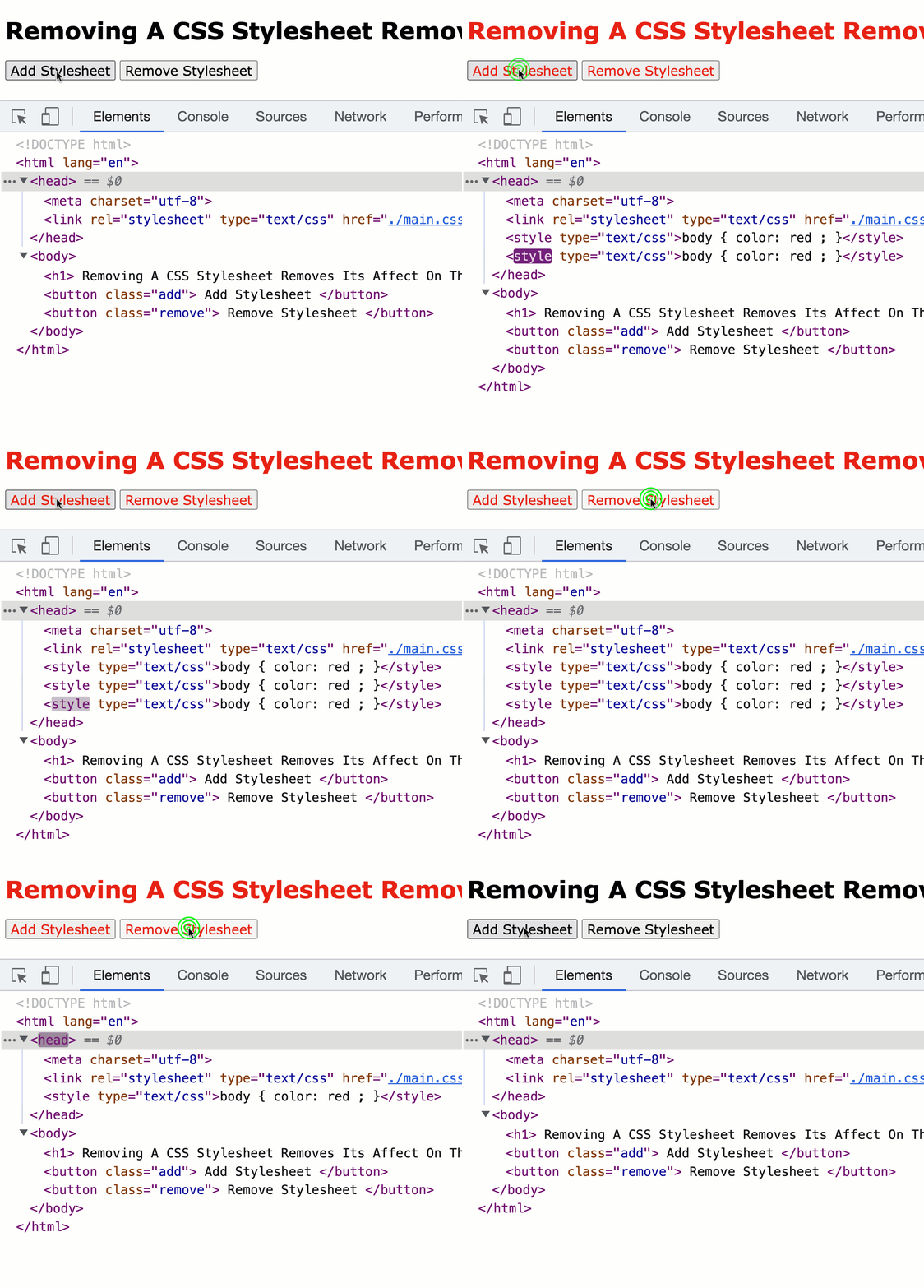
As you can see, once the last stylesheet is removed, the style of the document reverts back to its previous state. At InVision, I often use this kind of technique to dynamically disable the scrolling behavior of the <body> while a modal window is open. But, that's a demo for another post.
Epilogue: Stylesheets Can Be Disabled
It's worth mentioning that stylesheets can also be programmatically disabled with the .disabled property - they don't have to be removed from the live document. When you disable a stylesheet, it reverts any style properties that were applied to the document by said stylesheet.
Want to use code from this post? Check out the license.

Reader Comments
One way that I use this technique is to temporarily disable scrolling on the document while a modal window is open:
www.bennadel.com/blog/4442-using-a-transient-css-stylesheet-to-remove-scrolling-on-body-while-modal-is-open.htm