While this blog doesn't get very much human traffic anymore, I still get loads of bot and spam traffic. Years ago, I had to implement comment moderation due to the increasing portion of nefarious comments. In most cases, when I read a pending comment, it's immediately obvious to me whether the author is malicious or well-intented. But sometimes, I can't tell. And, with AI tooling getting better every day, it's becoming harder for me to discern malicious content from the slightly askew, quirky, and off-topic content often shared by my fellow humans. To help me in my efforts to keep the weird web alive, I started looking into the Pangram API for AI text detection.
Pangram has a simple API: you give it a block of text and it tells you — with explicit degrees of confidence — weather that text is human written, AI-assisted, or AI-generated. The only complexity stems from the fact that the API workflow is asynchronous. When you post your text, the result isn't immediately available. Instead, you're given a "Task ID"; which you then use to poll the Pangram API for the task status and evaluation outcome. The longer your text, the longer the Pangram evaluation takes, the longer you have to poll.
Luckily, the HTMX 4 framework has been built from the ground-up to make workflows like this easy. In fact, they have an HTMX patterns page dedicated to polling. For this exploration, I'm going to use the flavor they call, "Load Polling". This is where the ColdFusion response embeds an HTML element that uses the hx-trigger="load" attribute in order to initiate a subsequent fetch back to the ColdFusion server for more information. Which, in turn, responds with an element using the hx-trigger="load" attribute; which, in turn, makes another fetch back to the ColdFusion server; and so on until the workflow is done and the ColdFusion server stops embedding the hx-trigger fetch initiator.
Since the Pangram text detection API is both asynchronous and expensive ($0.05 per 100 words at the time of this writing) it's not suitable for the primary comment workflow. Instead, I'll either call it on-demand from within my comment moderation UI (user interface); or, I'll just build an internal tool for arbitrary Pangram consumption. This exploration is merely the proof-of-concept (POC) that whets my appetite.
With that said, let's explore the POC from the outside-in. This demo has two pages:
-
The HTMX-powered form where I enter the suspicious text.
-
The partial-page response that posts to the Pangram API and then implements the HTMX "Load Polling" pattern to refresh itself.
The landing page doesn't really do much — it just provides the form and then hijacks the POST submission to evaluate.cfm using fetch() and swaps / transcludes the ColdFusion response into the <aside> element:
<cfoutput>
	<!doctype html>
	<html lang="en">
	<head>
		<meta charset="utf-8">
		<link rel="stylesheet" type="text/css" href="./style.css">
		<script
			src="https://cdn.jsdelivr.net/npm/htmx.org@4.0.1/dist/htmx.min.js"
			crossorigin="anonymous">
		</script>
	</head>
	<body>

		<h1>
			Pangram, HTMX 4, and Adobe ColdFusion 2025
		</h1>

		<form
			hx-method="post"
			hx-action="./evaluate.cfm"
			hx-target=".results"
			hx-disable="findAll button">

			<textarea name="text"></textarea>
			<button type="submit">
				Evaluate Text
			</button>
		</form>

		<aside class="results">
			<!---
				Pangram results will be transcluded here
				by HTMX 4 and ColdFusion 2025.
			--->
		</aside>

	</body>
	</html>
</cfoutput>
Earlier, I mentioned that the Pangram API is expensive. And while the API is simple, it still took me a good deal of trial-and-error to mold my ColdFusion abstractions into the right shape. As such, what I'm not showing you in the CFML above is that I have a few debugging buttons at the bottom of the page that allow me to skip the task creation part of the workflow — ie, the expensive part — and proceed directly to the task status polling part of the workflow.
In order to do this, the evaluate.cfm page must accept two types of inputs:
- The text to evaluate.
- The task ID to inspect.
The landing page only provides the text. But the dual-nature of the evaluate.cfm page means that my debugging buttons can re-enter a previous AI detection workflow by calling the evaluate.cfm page with a previous task ID instead of a block of new text.
The following two buttons are included below the closing </html>; but thanks to the forgiving nature of the web, they still render fine and are picked up by the HTMX initialization algorithm. In the following CFML, notice that I'm including the ?taskID= search parameter in the hx-action attribute:
<!---
	DEVELOPER ONLY: This button allows me to "re-run" a previous Pangram text evaluation
	task without incurring the API cost. Essentially, I'm just skipping the text-
	submission step and going right to the polling step for the given task ID.
--->
<button
	hx-method="get"
	hx-action="./evaluate.cfm?taskID=b75490c0-57e4-49ee-938b-69bf306e98c8"
	hx-target=".results">
	Debug Earlier Task
</button>
<button
	hx-method="get"
	hx-action="./evaluate.cfm?taskID=90793d84-8a4b-4c9a-99c8-810b67b0a0c3"
	hx-target=".results">
	Debug Earlier Task
</button>
Just as with the form, these buttons swap the response into the same <aside> element (with class="results"). Which means that these buttons truly follow the same workflow, no smoke and mirrors. I'm doing exactly what the HTMX "Load Polling" pattern demands; only, I'm skipping the initial post and proceeding directly to the polling portion.
Caution: the text evaluation results are transient. They need to persist for the sake of polling; but the two buttons now result in a
404 Not Foundresponse 24-hours after I put the POC together.
The evaluate.cfm ColdFusion page accommodates both Pangram task creation and Pangram task polling. It does with the form.text and url.taskID parameters, respectively. Then, the rendering of the page handles three outcomes for each polling operation:
- Task is still pending.
- Task completed in error.
- Task completed in success.
In the pending state, the ColdFusion response includes a <button> that looks like the debugging buttons I had above. Only, in addition to the taskID and native click trigger, I'm also including load delay:1s, which is what drives the "polling" portion of the "Load Polling" pattern. The load delay:1s tells HTMX, "trigger this button's action on load (ie, when the button is rendered within the DOM), but wait 1-second between load and trigger."
In other words, every time the evaluate.cfm page renders in a "pending" state, it includes a button which waits a second and then re-fetches the evaluate.cfm content.
The following CFML code is laid-out in the three phases, following the order of the outcomes above. When Pangram is done with the text evaluation, it provides both a high-level overview and a low-level breakdown. In the success outcome, I'm rendering the high-level headline and prediction followed by a window-based, low-level evaluation. Each window (according to Pangram) is evaluated in isolation. Then, the totality of the text is evaluated as an aggregate of window evaluations. The longer the text — and the more windows it produces — the more accurate the evaluation.
<cfscript>

	// Define properties for dependency-injection.
	pangramClient = request.ioc.get( "core.lib.integration.pangram.PangramClient" );

	// ColdFusion language extensions (global functions).
	include "/core/cfmlx.cfm";

	// ------------------------------------------------------------------------------- //
	// ------------------------------------------------------------------------------- //

	param name="url.taskID" type="string" default="";
	param name="form.text" type="string" default="";

	// If the user didn't provide text, the Pangram call will be rejected. Ignore it.
	if ( ! url.taskID.len() && ! form.text.len() ) {

		echo( "Bruh, get serious." );
		exit;

	}

	// If the text was provided, create an AI detection task in Pangram. This gives us a
	// task ID which we can then use to poll for status. AI detection tasks are performed
	// asynchronously; and even short text can take SEVERAL SECONDS to evaluate.
	if ( form.text.len() ) {

		url.taskID = pangramClient.createTask( form.text );

	}

	// At this point, we can depend on the task ID existing - either we JUST created the
	// ID from a form post or we are refreshing the page with an explicit task ID in order
	// to poll the Pangram API for task status.
	task = pangramClient.getTask( url.taskID );

</cfscript>
<cfoutput>

	<!---
		When the Pangram task is still pending, we're going to continue posting back to
		the page using HTMX's load[delay] trigger. I'm attaching the trigger to a button
		so that the development of the page is easier (and I personally prefer it when
		triggers are anchored to interactive elements).
	--->
	<cfif ! task.isComplete>

		<p>
			<strong>Your request is being processed</strong>...
			<!--- Automatically reload the request every second to get latest status. --->
			<button
				hx-method="get"
				hx-action="./evaluate.cfm?taskID=#e4u( task.id )#"
				hx-trigger="click, load delay:1s"
				hx-target=".results"
				hx-sync="this:drop"
				hx-disable="this">
				Reload
			</button>
		</p>

	</cfif>

	<!---
		If the Pangram task failed, we don't have too much to go on - but Pangram still
		provides a headline that we can show to the user.
	--->
	<cfif ( task.isComplete && task.isError )>

		<p>
			<strong>Something went wrong</strong>:
			#e( task.headline )#
		</p>

	</cfif>

	<!---
		If the Pangram task was successful, we have both high-level evaluation data as
		well as a low-level information about how the text was broken up and evaluated as
		smaller sub-segments.
	--->
	<cfif ( task.isComplete && ! task.isError )>

		<h2 data-task-id="#e4a( task.id )#" class="headline">
			#e( task.headline )#
		</h2>

		<p class="prediction">
			#e( task.prediction )#
		</p>

		<h3>
			Content Breakdown
		</h3>

		<dl>
			<div>
				<dt><strong>Human:</strong></dt>
				<dd>#fix( task.humanFraction * 100 )#%</dd>
			</div>
			<div>
				<dt><strong>AI-Assisted:</strong></dt>
				<dd>#fix( task.aiAssistedFraction * 100 )#%</dd>
			</div>
			<div>
				<dt><strong>AI-Generated:</strong></dt>
				<dd>#fix( task.aiGeneratedFraction * 100 )#%</dd>
			</div>
		</dl>

		<h3>
			Window Breakdown
		</h3>

		<cfloop array="#task.windows#" item="window">
			<figure>
				<figcaption>
					<mark>#e( window.label )#</mark> with
					<strong>#e( window.confidence )#</strong> Confidence
				</figcaption>
				<blockquote>
					#e( window.text )#
				</blockquote>
			</figure>
		</cfloop>

	</cfif>

</cfoutput>
The other day, I received a comment that felt like it was spam, but I wasn't sure. In fact, this is the comment that inspired me to look at the Pangram API in the first place. As such, it's the perfect text for the demo:
I like that you separate statistical security from what looks random to a person. For a color palette, the UX question is a better fit than reaching for crypto by reflex; the side-by-side demo makes that distinction concrete. It also makes me wonder how much the chosen color space and sampling method shape the impression before the generator itself gets any credit.
Let's call this text the "sample". And as in every good experiment, we need both a "sample" and a "control". As a confirmed human, I'll write a second paragraph as the control, giving us a more robust input for the Pangram API:
[SAMPLE] I like that you separate statistical security from what looks random to a person. For a color palette, the UX question is a better fit than reaching for crypto by reflex; the side-by-side demo makes that distinction concrete. It also makes me wonder how much the chosen color space and sampling method shape the impression before the generator itself gets any credit.
[CONTROL] But, it's also worth considering how the human eye works. We don't see "all colors" with the same clarity; and, "all people" don't see colors with the same fidelity. Which means that it isn't just about choosing random colors - it's about choosing random colors from within a color space that people can effectively experience. Without considering the human element, you might end up rendering green text on a red surface. Which is tantamount to getting up in the morning and choosing violence.
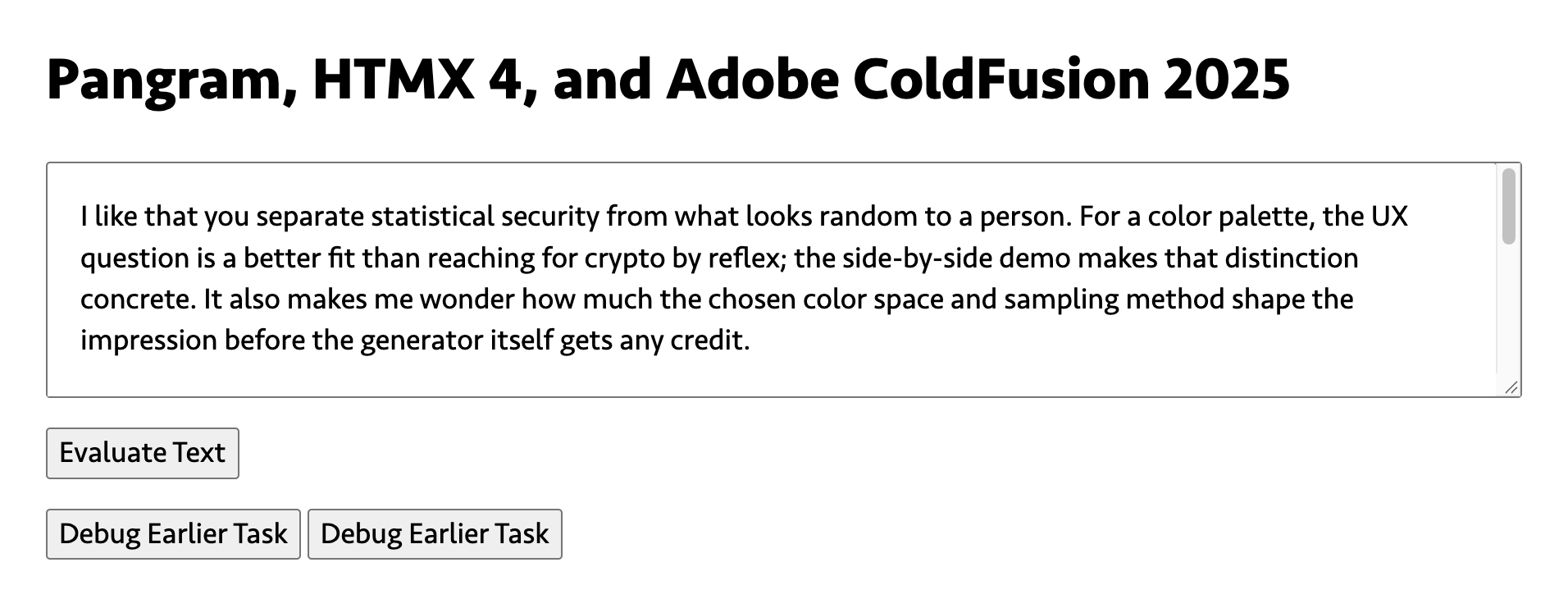
I'll try to capture the full text detection workflow here in screenshots (assuming I can do the screen capture fast enough for the polling phase). First, our form and input:
When I hit "Evaluate Text", HTMX will submit the form and transclude the contents into the <aside> element. The first rendering of the response will almost certainly contain a "pending" state — I've included a snippet of the network activity in the screenshot so you can see the "Load Polling" in action:
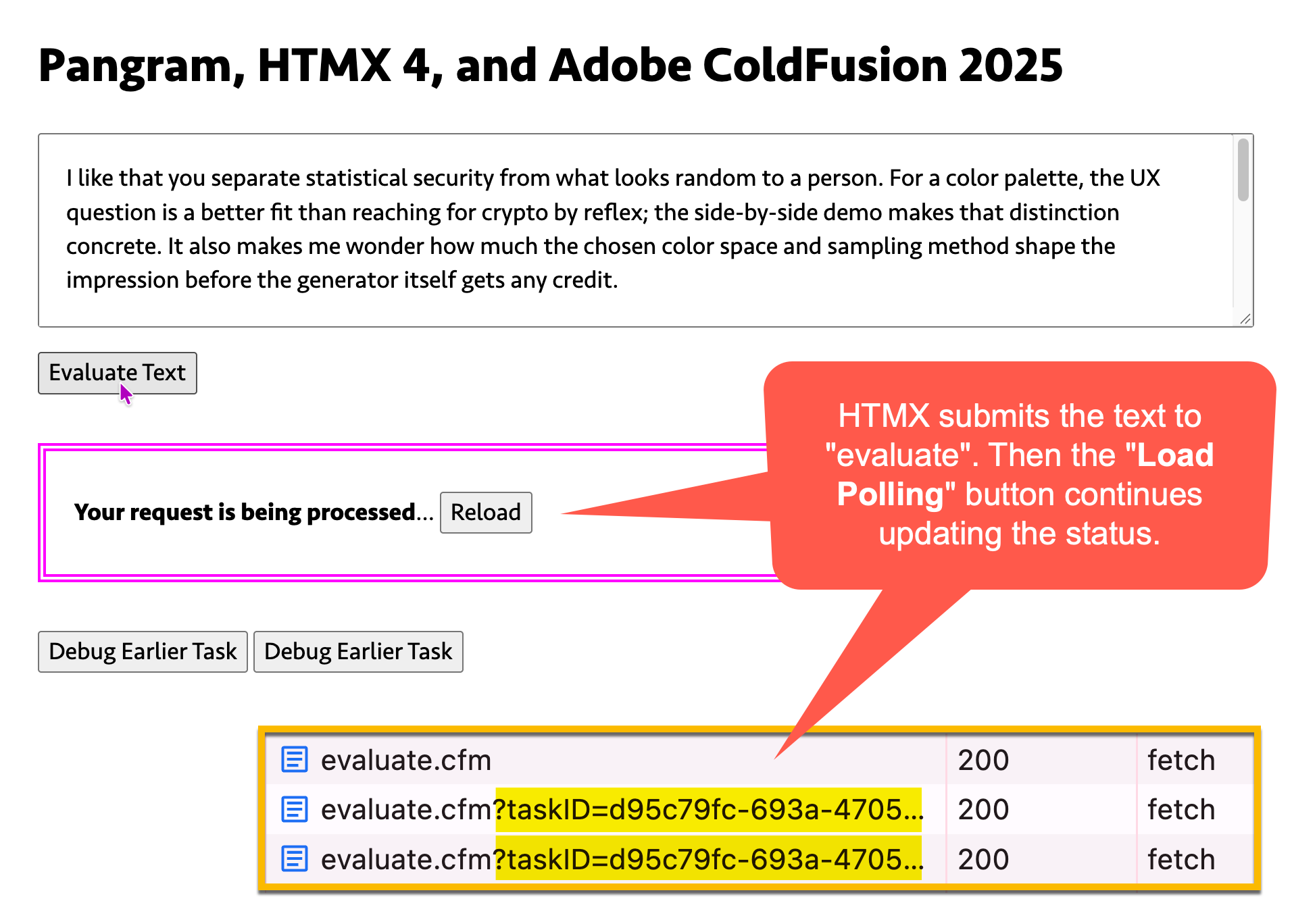
In this pending / polling state, the "Reload" button isn't really intended for human consumption. I could attach the hx-trigger="load" to any type of element. But, I prefer to attach triggers to interactive elements because I think it helps keep me focused on the intention of the workflow; and, it gives me something that I, as the developer, can click if I need to re-trigger the action.
But that's completely subjective. The key point here is that the button will continue self-triggering, and re-fetching from the ColdFusion server, until the Pangram text evaluation task is complete:
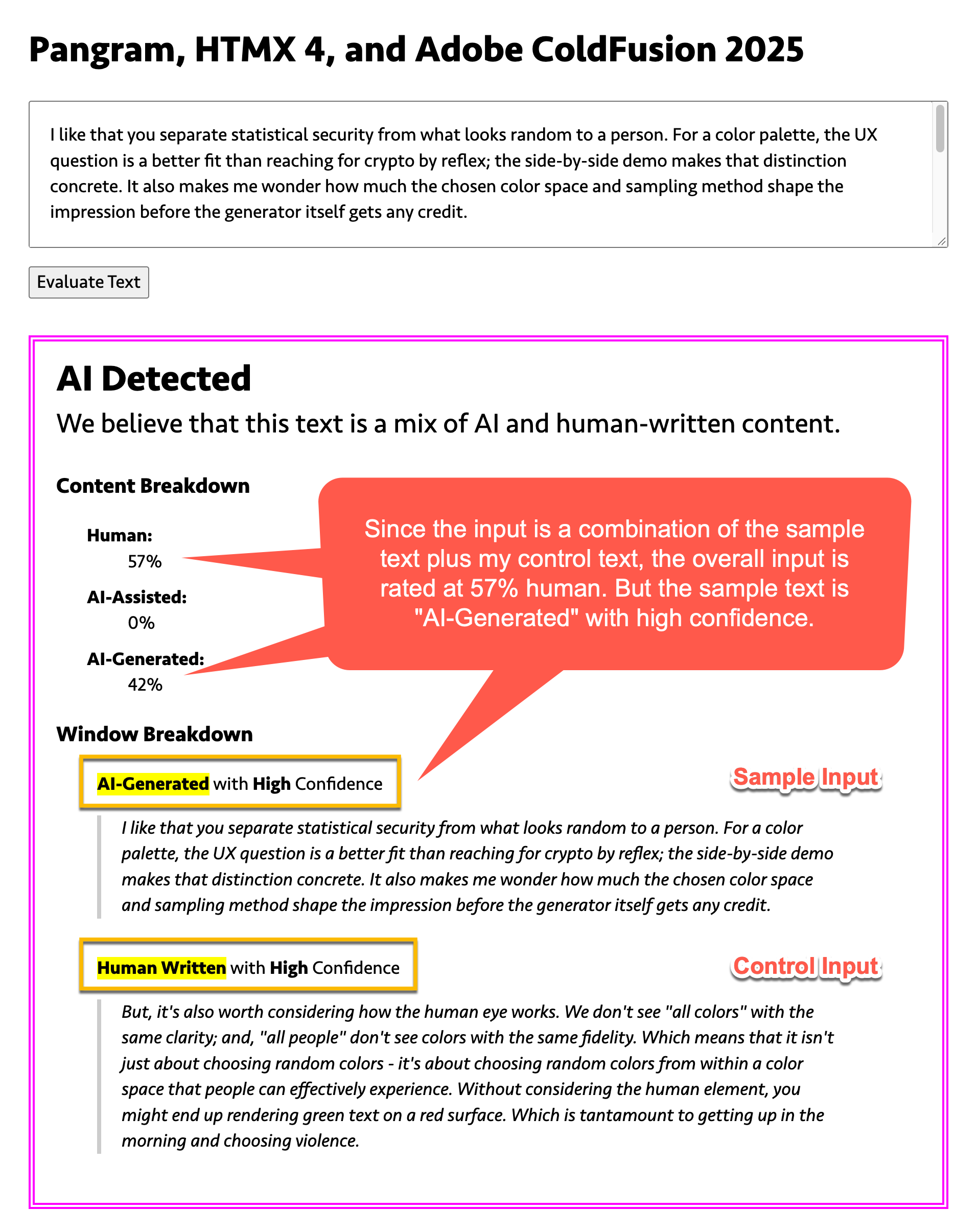
As you can see in the screenshot, Pangram has classified the text as "AI Detected" (as opposed to fully "Human" or fully "AI-Generated"). This means that the submitted text contains both human text (57%) and AI-generated text (42%).
However, if you look farther down at the low-level window evaluations, you'll see that the "sample text" was rated as "AI-Generated with high confidence"; and that my "control text" was rated as "Human Written with high confidence".
In other words, the suspicious comment submission that spawned this whole exploration is likely to be AI-generated.
Of course, AI-detection isn't completely accurate. And, it works better on long text, which most comments are not. Plus, people are developing "anti-AI-detection" tools in order to humanize the vibe of generated text. So, it's becoming an arms race for those of us trying to keep the web alive.
Aside: the Pangram response contains a "humanize score", which attempts to surface AI-generated text that has been cleaned up by another AI tool.
It's also worth noting that some people straight-up sound like bots. Just as the Turing Test classified some humans as machines, tools like Pangram will classify some humans as AI. As I like to say, "Peopling is hard".
ColdFusion Pangram Client
This ColdFusion client doesn't support all of the Pangram API, just enough for me to get the AI text detection workflow working. As with most of my external integrations, I break the ColdFusion code up into two layers:
- Client - handles high-level semantics.
- Gateway - handles low-level HTTP mechanics.
In my PangramClient.cfc, I'm not blindly passing the Pangram response through to the calling context. Instead, I'm explicitly translating the Pangram response into a series of ColdFusion structs and arrays. This manual labor serves several purposes:
-
It provides some sort of in-app documentation. Instead of having to go to the Pangram docs to see what the API returns, I just look in my translation code to see what my side of API contract looks like.
-
It translates their semantic style into my style. For example, I prefer camel-case over Pangram's snake-case. And there's no need for me to live under the tyranny of other people's stylistic choices.
-
It increase the chances that my ColdFusion code will throw an error when the API contract changes. Normally, you want to write code that's resilient to change. But when it comes to an external API, I'd rather fail early and loudly than later and quietly. By translating all the API response keys explicitly, it means that any key changes or omissions will result in a null-reference error; which I can then debug and fix.
With that said, here's my PangramClient.cfc. It uses dependency-injection (DI) to make the PangramGateway.cfc available:
component {

	// Define properties for dependency-injection.
	property name="gateway" ioc:type="core.lib.integration.pangram.PangramGateway";

	// ColdFusion language extensions (global functions).
	include "/core/cfmlx.cfm";

	// ---
	// PUBLIC METHODS.
	// ---

	/**
	* I create an AI detection task for the given text. Returns the Pangram task ID.
	*/
	public string function createTask(
		required string text,
		string model = "default",
		numeric timeoutInSeconds = 10
		) {

		var apiResponse = gateway.createTask(
			text = text,
			model = model,
			timeoutInSeconds = timeoutInSeconds
		);

		return apiResponse.task_id;

	}


	/**
	* I get the AI detection task with the given ID. Pangram tasks are executed using an
	* asynchronous workflow. As such, the return value may represent a pending evaluation
	* or a completed evaluation.
	*
	* The Pangram documentation is incomplete regarding stages. As such, I'm translating
	* the various stages into two exposed flags: isComplete / isError. The full set of API
	* response keys is only available when [isComplet=true][isError=false].
	*/
	public struct function getTask(
		required string id,
		numeric timeoutInSeconds = 10
		) {

		var apiResponse = gateway.getTask(
			id = id,
			timeoutInSeconds = timeoutInSeconds
		);

		// Since the documentation doesn't fully outline the stages (ex, it doesn't tell
		// you that "STAGE_INFERENCE" is possible), I'm going to assume all non-terminal
		// stages to be "pending".
		if (
			( apiResponse.stage != "STAGE_SUCCESS" ) &&
			( apiResponse.stage != "STAGE_FAILED" )
			) {

			return [
				id: id,
				isComplete: false,
				isError: false,
				stage: apiResponse.stage,
			];

		}

		if ( apiResponse.stage == "STAGE_FAILED" ) {

			return [
				id: id,
				isComplete: true,
				isError: true,
				stage: apiResponse.stage,
				text: apiResponse.text,
				headline: apiResponse.headline,
			];

		}

		return [
			id: id,
			isComplete: true,
			isError: false,
			stage: apiResponse.stage,
			text: apiResponse.text,
			version: apiResponse.version,
			// Human-friendly classification of the overall text of a successful task.
			// Short-form options: "AI", "Human", or "Mixed".
			headline: apiResponse.headline,
			prediction: apiResponse.prediction,
			predictionShort: apiResponse.prediction_short,
			// Fractional breakdown of text classification, each is 0...1, totaling 1.
			humanFraction: apiResponse.fraction_human,
			aiAssistedFraction: apiResponse.fraction_ai_assisted,
			aiGeneratedFraction: apiResponse.fraction_ai,
			// Lower-level, windowed evaluation of long text blocks.
			humanWindowCount: apiResponse.num_human_segments,
			aiAssistedWindowCount: apiResponse.num_ai_assisted_segments,
			aiGeneratedWindowCount: apiResponse.num_ai_segments,
			// Longer blocks of text are broken up into smaller (possibly overlapping)
			// windows that are evaluated in isolation. The more text made available to
			// Pangram, the more windows are created, the more accurate the overall AI
			// scoring is. Start index is inclusive, end index is exclusive.
			windows: apiResponse.windows.map(( window ) => [
				text: window.text,
				startIndex: window.start_index,
				endIndex: window.end_index,
				wordCount: window.word_count,
				tokenLength: window.token_length,
				// Label options: "AI-Generated", "AI-Assisted", or "Human Written".
				label: window.label,
				// Confidence options: "High", "Medium", "Low"
				confidence: window.confidence,
				// A continuous score from 0...1, where 0 means entirely human-written and
				// 1 means fully AI-generated. Values in between indicate varying degrees
				// of AI assistance.
				aiAssistanceScore: window.ai_assistance_score,
				// Humanizing is the process of taking AI-generated content and then
				// running post-processing on it in an attempt to evade AI-detection. I'm
				// assuming that that's what this means in this context. Score is 0...1.
				isHumanized: window.is_humanized,
				humanizerScore: window.humanizer_score,
				// Pangram posterior probabilities for different classifications of text.
				// The following gives a 0...1 score of each classification.
				humanProbability: window.class_probabilities[ 1 ],
				aiAssistedProbability: window.class_probabilities[ 2 ],
				aiGeneratedProbability: window.class_probabilities[ 3 ],
			]),
		];

	}

}
And here's my low-level PangramGateway.cfc. Sometimes, with an HTTP-based gateway, I'll include a "retry" method. In this case, since we're already polling for a response, I decided it wasn't immediately necessary for the HTTP layer to manage retries. Keep is simple!
component {

	// Define properties for dependency-injection.
	property name="apiKey" ioc:skip;
	property name="apiOrigin" ioc:skip;
	property name="config" ioc:get="config";
	property name="httpUtilities" ioc:type="core.lib.util.HttpUtilities";

	// ColdFusion language extensions (global functions).
	include "/core/cfmlx.cfm";

	/**
	* I initialize the Pangram gateway.
	*/
	public void function initAfterInjection() {

		variables.apiOrigin = "https://text.external-api.pangram.com";
		variables.apiKey = config.pangram.apiKey;

	}

	// ---
	// PUBLIC METHODS.
	// ---

	/**
	* I create an AI detection task.
	*/
	public struct function createTask(
		required string text,
		required string model,
		required numeric timeoutInSeconds
		) {

		return makeRequest(
			method = "post",
			resource = "/task",
			body = {
				text: text,
				model: model,
				public_dashboard_link: false,
			},
			timeoutInSeconds = timeoutInSeconds
		);

	}


	/**
	* I get an AI detection task.
	*/
	public struct function getTask(
		required string id,
		required numeric timeoutInSeconds
		) {

		return makeRequest(
			method = "get",
			resource = "/task/#id#",
			timeoutInSeconds = timeoutInSeconds
		);

	}

	// ---
	// PRIVATE METHODS.
	// ---

	/**
	* I make the HTTP request to the origin.
	*/
	private struct function makeRequest(
		required string method,
		required string resource,
		struct body,
		required numeric timeoutInSeconds
		) {

		cfhttp(
			result = "local.httpResponse",
			method = method,
			url = "#apiOrigin##resource#",
			getAsBinary = "yes",
			timeout = timeoutInSeconds
			) {

			cfhttpparam(
				type = "header",
				name = "x-api-key",
				value = apiKey
			);

			if ( ! isNull( body ) ) {

				cfhttpparam(
					type = "header",
					name = "content-type",
					value = "application/json; charset=utf-8"
				);
				cfhttpparam(
					type = "body",
					value = serializeJson( body )
				);

			}
		}

		var statusCode = httpUtilities.parseStatusCode( httpResponse );
		var fileContent = httpUtilities.getFileContentAsString( httpResponse );

		if ( ! statusCode.ok ) {

			throw(
				type = "Pangram.Gateway.StatusCode.NotOk",
				message = "Pangram API status code error.",
				detail = "Returned with status code: #statusCode.original#",
				extendedInfo = fileContent,
				// Embed the status code as an accessible property on the error so it can
				// be read during a retry loop (if wanted).
				errorCode = statusCode.code
			);

		}

		return deserializeJson( fileContent );

	}

}
As you can see, the PangramGateway.cfc is just a thin wrapper around the CFHttp tag that bakes-in the API key. In theory, you could mock this ColdFusion component for testing.

Reader Comments
This was especially interesting for me. I've just recently finished developing a workflow to identify whether an image is AI modified. At FrogQuest Photo Scavenger Hunts, we review every photo submission we receive to validate that they've actually done the silly things we've asked, sometimes awarding bonus points when deserved. Lately, I've been seeing a ton of AI augmented photo submissions (which kinda ruins the fun in my opinion), and it's not always totally obvious especially for a few of my less technical judges.
So now I use sightengine to pre-screen every submission and alert my judges whenever a photo appears to be AI enhanced. It's not perfect, but has been very helpful.
You would think this would be pretty expensive too, but I was impressed by how affordable it actually is for my use case.
@Chris,
It's it so frustrating! Like, why can't people just be good and do the right thing. Instead, we have to waste time (and money) trying to keep the bad people out so the good people can just have a nice time. Where did we all go so wrong!? 😆
I'll have to look at the service you're using. Pangram also has Image/Video evaluation at all, but I haven't even looked at the docs - nothing I do deals with images. Mostly I'm just curious to see if they explain how it works at all.
Post A Comment — ❤️ I'd Love To Hear From You! ❤️
Post a Comment →