
Last week, after applying the Adobe ColdFusion 2025 Update 14 patch, many developers — myself included — discovered that our scheduled tasks quietly stopped working. This is because, as Gregory Alexander explained, the latest update started blocking internal HTTP requests due to an enhanced security feature. And for many of us CFML developers, internal HTTP requests are the backbone of the scheduled task system.
Using Gregory's (and Charlie Arehart's) advice, I went into the security-settings.json file and allow-listed my local URLs. This got my scheduled tasks up-and-running again. But it left me wondering how I might be more proactive in catching this type of issue in the future?
The problem with this particular breaking change is that it took place outside of my ColdFusion application (within the foundations of the platform itself). Which means that all of the error handling in the world wasn't going to catch it. Furthermore, it demonstrates the bifurcated nature of scheduled tasks, and underscores the point that scheduled task can't be used to monitor scheduled task health.
So Who Watches the Watchers?
After considering several different approaches, I decided that it would be a perfect time to bring StatsD metrics back into my life. It's been over a decade since I've written about emitting StatsD metrics from ColdFusion; but StatsD — and DogStatsD (Datadog's enhancements) — were a huge part of InVision's culture of observability. And I'm excited to bring some of that magic back.
From a user experience (UX) and design perspective, Datadog is the best-in-class platform for observability. But, for my blog, I'm not prepared to pay Datadog's best-in-class pricing. Thankfully, Grafana Cloud has a super generous free tier, affording me 10k active metric series — more than enough to identify scheduled task failures on my server.
The Metrics-Based Workflow
The workflow for metrics-based observability is simple:
-
My application publishes metrics when certain events take place. Such as when the scheduled task ingress script executes. These metrics are published over UDP to a locally-running instance of Alloy.
-
On an ongoing basis, the Alloy service / sidecar pushes those metrics up to the remote Grafana cloud service.
-
Monitoring of and alerting for those metrics are configured in the remote Grafana cloud service.
-
When a metric rate drops below a given threshold — ex: no scheduled task executions in the last 5-minutes — Grafana sends me an alert. I'm using email; but I believe other alert channels, such as Slack, are available.
Alloy can also communicate systems-level information to Grafana, like CPU saturation, RAM utilization, and free disk space — all of which can receive monitoring and alerting. But for now, all I care about is getting my scheduled task observability in place.
Publishing Metrics From ColdFusion
In my ColdFusion application architecture, each application has a single scheduled task that acts as the task runner. This centralized runner executes every 60 seconds; and looks in the database for overdue tasks. It then iterates over those overdue tasks, and spawns a subsequent CFHttp request (back into the application) for each task that needs running.
To start with, all I want to do is make sure that the single ingress script is working. For that, I'm incrementing a StatsD counter every time the main scheduled task route is invoked.
Here's a truncated view of my TaskService.cfc, showing just the main handler. Note that I'm using dependency-injection (DI) to make my StatsDClient.cfc available to my task service.
component {

	// Define properties for dependency-injection.
	property name="logger" ioc:type="core.lib.util.Logger";
	property name="statsDClient" ioc:type="core.lib.integration.statsd.StatsDClient";
	property name="taskModel" ioc:type="core.lib.model.system.task.TaskModel";

	// ColdFusion language extensions (global functions).
	include "/core/cfmlx.cfm";

	// ---
	// PUBLIC METHODS.
	// ---

	/**
	* I execute any overdue scheduled tasks.
	*/
	public void function executeOverdueTasks(
		required string username,
		required string password
		) {

		testCredentials( username, password );

		statsDClient.increment( "system.task.all.invocation.total" );

		taskModel
			.getByFilter( overdueAt = utcNow() )
			.each(
				( task ) => {

					try {

						makeTaskRequest( task );

					} catch ( any error ) {

						logger.logException( error, "Error making scheduled task request." );

					}

				},
				true // Parallel iteration.
			)
		;

	}

	// ... truncated ...

}
The main line to notice here is:
statsDClient.increment( "system.task.all.invocation.total" );
This call is incrementing the given metric (counter) by 1 every 60-seconds (this is how often my main scheduled task ingress executes). The name of the metric isn't important; but Prometheus — the underlying datasource that stores the metrics in Grafana cloud — recommends suffixing counters with total in order to help distinguish them from other types of metrics (such as gauges and histograms).
This metric is being published over UDP (User Datagram Protocol) to a locally-running Alloy service. UDP doesn't block-and-wait for a response. So we can consider metrics publishing to be an "instantaneous action" from the perspective of the ColdFusion application.
Querying For Failing Scheduled Tasks In Grafana
A StatsD counter goes up (or down) indefinitely. So when we think about the health of the scheduled tasks, we're not actually interested in the absolute value of the counter. Instead, we want to know about the relative increase of the counter in a given time period.
Once this ColdFusion code was deployed and had time to start emitting metrics, I went into my Grafana cloud monitoring and setup an alerting rule that looks at the following PromQL query (note that . characters in the metric names are automatically converted to _ somewhere in the Alloy/Grafana pipeline):
increase(bennadel_system_task_all_invocation_total{env="prod"}[5m])
This PromQL query looks at the relative increase in the counter over a 5-minute window. It limits the readings to those tagged with env:prod — ie, metrics emitted in production, not in development.
Since my scheduled task ingress executes every minute, the 5-minute window should show us an increase of 5. However, Grafana does some metrics extrapolation over the 5-minute window; so instead of a straight line, we get a jagged line tightly clustered around 5:
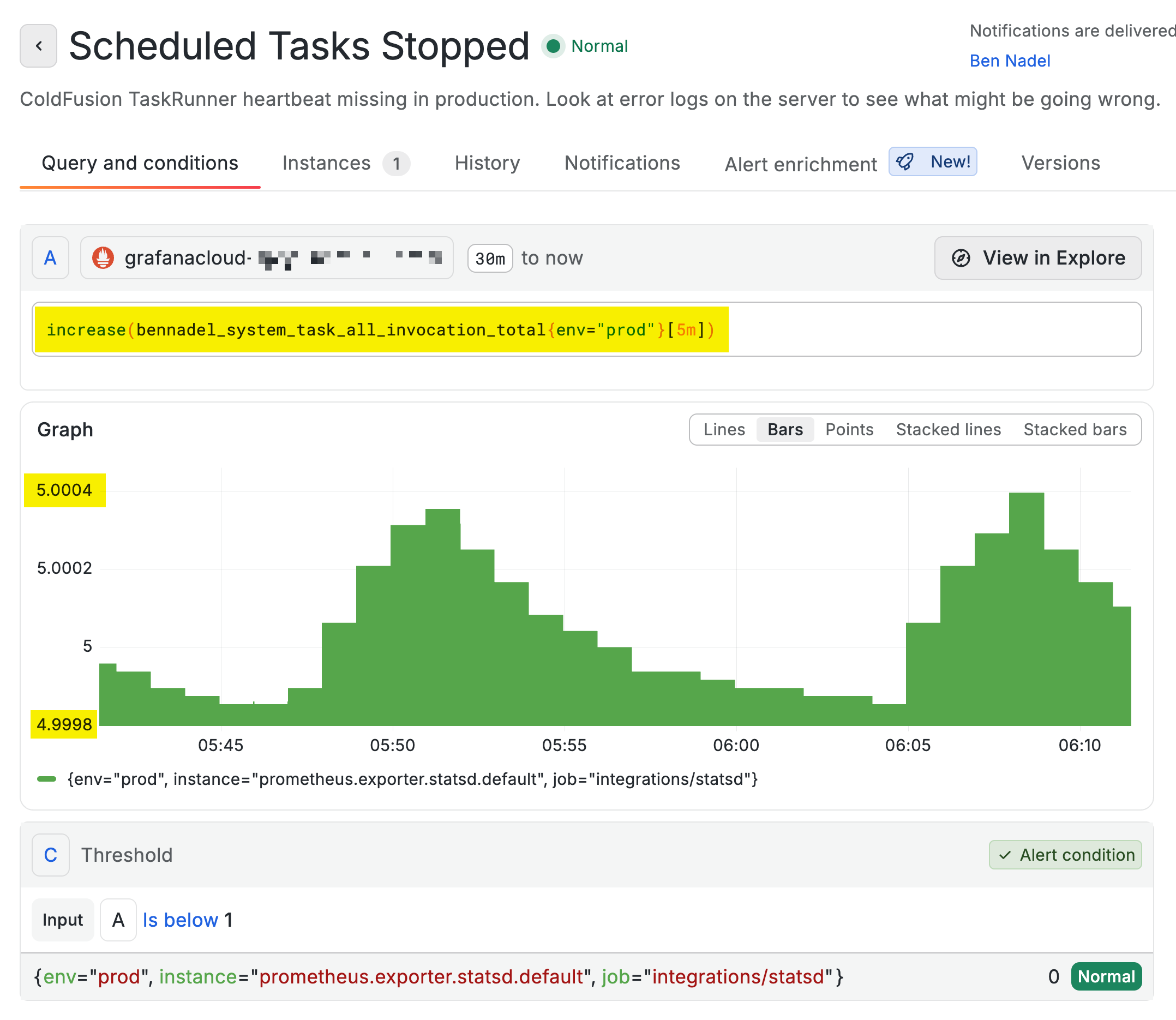
At the bottom of the screenshot, note that I have the threshold set to is below 1. Since my PromQL query looks at a 5-minute window, a failing scheduled task will have to fail for a full 5-minutes before the increase() reading from "now" drops below 1.
Tuning alerts is as much an art as it is a science. By using a 5-minute window, there's going to be some lag in the alerting. But, on the flip-side, it means running updates and restarting the ColdFusion server doesn't trigger false-positives (since the ColdFusion server can often recover within that 5-minute window).
Alerting is always a set of trade-offs. Noise vs. accuracy vs. actionability. There's no "one way" to do this; and alerting rules often have to be tweaked over time.
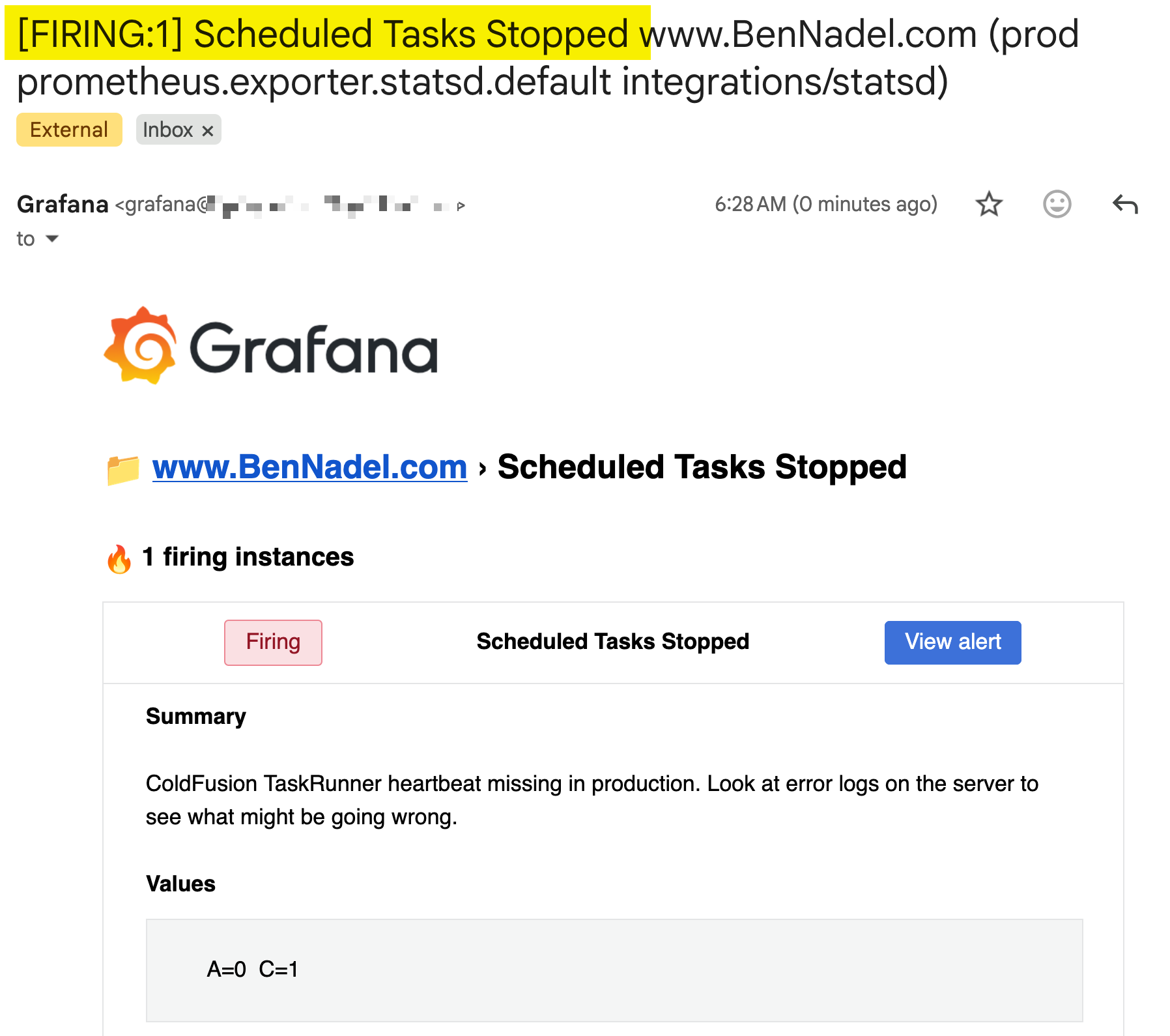
To make sure that this alert rule and the target contact information were working, I went into my VPS (Virtual Private Server) and I stopped the Alloy service. Since ColdFusion is emitting the metrics over UDP with a "fire and forget" mechanic, shutting down Alloy doesn't disrupt the ColdFusion server; but it does mean that metrics stop getting shipped to Grafana.
After a 5-minute window passed, and the "below 1" threshold was reached, I received my alert email:
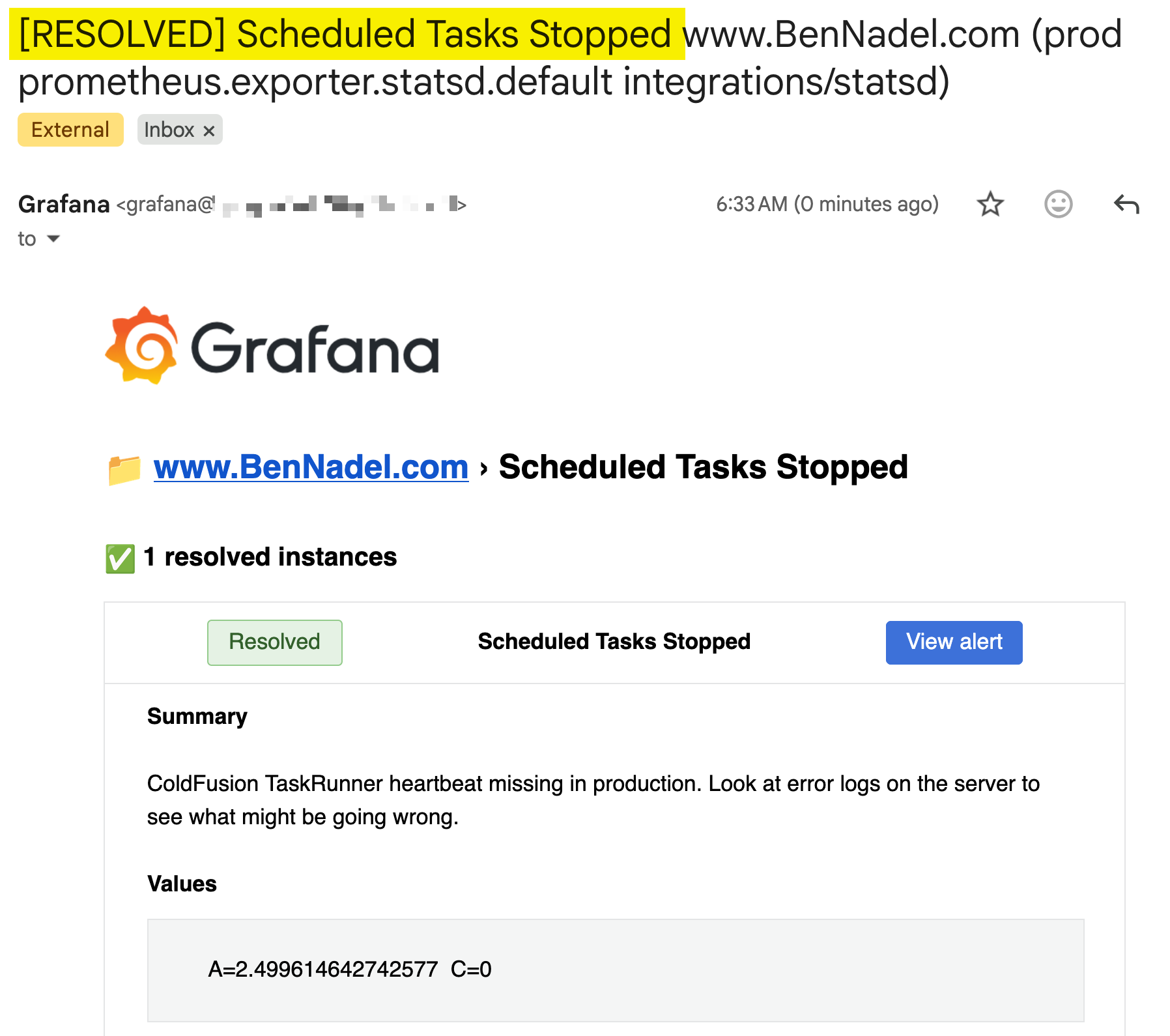
Then, I restarted the Alloy service on my VPS. And within a few minutes, I received a subsequent email showing me that the alert rule was no longer firing (ie, the issue had been resolved):
And now, I have an external service monitoring my ColdFusion scheduled task health. Woot woot!
The StatsD Client
As I mentioned above, I've talked about publishing StatsD metrics in ColdFusion before. But, as with most things "code", when you look at what you implemented a decade ago, it either feels overly janky or overly complicated. In this case, my earlier StatsD client just felt too robust. So, I recreated a much simpler version of it for my ColdFusion blog.
The StatsD client is composed of two ColdFusion components:
-
StatsDGateway.cfc- this handles the low-level UDP publication over the bound socket. -
StatsDClient.cfc- this exposes a developer-friendly API for emitting metrics.
Emitting metrics needs to be an instantaneous, fire-and-forget, no error workflow. It should be something you can tack-on to an existing application without adding too much stress.
At first, I went back-and-forth over where the guardrails should live. My first instinct was to keep the StatsD client "agnostic" of the application; and then wrap it in another component that adds the try/catch and the logging. But then I remembered that I was already recreating the StatsD client because my original implementation was too robust. So, in the end, I just added the error handling directly to the StatsDClient.cfc.
That said, there's a difference between infrastructure failures and developer failures. The StatsD client needs to protect the application from intermittent infrastructure problems; but it should never protect the application from developer bugs. A bug should fail loudly and a bug should fail fast. Which is why my try/catch wraps the gateway communication only. And allows all of the metric and tag validations to raise exceptions that bubble up into the calling context.
component {

	// Define properties for dependency-injection.
	property name="appPrefix" ioc:skip;
	property name="appTags" ioc:skip;
	property name="config" ioc:get="config";
	property name="gateway" ioc:type="core.lib.integration.statsd.StatsDGateway";
	property name="logger" ioc:type="core.lib.util.Logger";

	// ColdFusion language extensions (global functions).
	include "/core/cfmlx.cfm";

	/**
	* I initialize the statsD client.
	*/
	public void function initAfterInjection() {

		variables.appPrefix = config.statsD.prefix;
		// Note: the only metrics tagged with `env` are the metrics emitted from the code.
		// Every other metric, such as machine-level CPU and Memory readings, will only
		// ever be emitted in production; and will, therefore, have an implicit `env`
		// value (that's never needed in any metrics query).
		variables.appTags = config.statsD.tags;

		testMetricKey( "#appPrefix#example" );
		testTags( appTags );

	}

	// ---
	// PUBLIC METHODS.
	// ---

	/**
	* I record the given reading (positive, absolute values only - no relative deltas).
	*/
	public void function gauge(
		required string key,
		required numeric value,
		array tags = []
		) {

		sendMessage(
			type = "g",
			key = key,
			value = value,
			tags = tags
		);

	}


	/**
	* I increment the given key.
	*/
	public void function increment(
		required string key,
		numeric delta = 1,
		array tags = []
		) {

		sendMessage(
			type = "c",
			key = key,
			value = delta,
			tags = tags
		);

	}

	// ---
	// PRIVATE METHODS.
	// ---

	/**
	* I build and send the message for the given configuration. I/O errors are caught and
	* logged and will not raise an exception.
	*/
	private void function sendMessage(
		required string type,
		required string key,
		required numeric value,
		required array tags
		) {

		testMetricKey( key );
		testMetricValue( value );
		testTags( tags );

		var message = "#appPrefix##key#:#value#|#type#";
		var allTags = arrayMerge( appTags, tags );

		if ( allTags.len() ) {

			message &= ( "|##" & allTags.toList() );

		}

		// Recording stats is meant to be a fire-and-forget BEST EFFORT. Which means that
		// we don't want infrastructural errors to bubble up to the calling context and
		// increase the complexity of the calling code. We want this code to be guaranteed
		// not to error (except for development-time bugs which is why the only part of
		// the code that's inside the try-catch is the I/O touch-point).
		try {

			gateway.send( message );

		} catch ( any error ) {

			logger.logException( error );

		}

	}


	/**
	* I test the given metric key, ensuring that it conforms to both application and stats
	* naming conventions and constraints. If the given key is invalid, an error is thrown -
	* invalid (and non-conventional) values are never quietly cleaned-up.
	*/
	private void function testMetricKey( required string key ) {

		if ( ! key.reFind( "^[a-z][a-z0-9_.]+$" ) ) {

			throw( type = "StatsD.Client.MetricKey.Invalid" );

		}

	}


	/**
	* I test the given metric value, ensuring that it conforms to both application and
	* stats content conventions and constraints. If the given value is invalid, an error
	* is thrown - invalid (and non-conventional) values are never quietly cleaned-up.
	*/
	private void function testMetricValue( required numeric value ) {

		if ( value < 0 ) {

			throw( type = "StatsD.Client.MetricValue.Invalid" );

		}

	}


	/**
	* I test the given tag `key:value`, ensuring that it conforms to both application and
	* stats naming conventions and constraints. If either the given key or the given value
	* is invalid, an error is thrown - invalid (and non-conventional) values are never
	* quietly cleaned-up.
	*/
	private void function testTag( required string tag ) {

		var KEY_PATTERN = "[a-z][a-z0-9_]+";
		var VALUE_PATTERN = "[a-z0-9_.-]+";

		if ( ! tag.reFind( "^#KEY_PATTERN#:#VALUE_PATTERN#$" ) ) {

			throw( type = "StatsD.Client.Tag.Invalid" );

		}

		// The following are reserved keys in our Prometheus / Alloy setup.
		switch ( tag.listFirst( ":" ) ) {
			case "instance":
			case "job":
			case "le":
			case "quantile":
				throw( type = "StatsD.Client.Tag.Reserved" );
			break;
		}

	}


	/**
	* I test the given set of tags, ensuring that both keys and values are valid. See the
	* testTag() method for details.
	*/
	private void function testTags( required array tags ) {

		for ( var tag in tags ) {

			testTag( tag );

		}

	}

}
Every line of code becomes a choice. As I was writing this StatsDClient.cfc, I chose to enforce strict naming conventions so that the calling context defines metrics and tags in a way that more closely aligns with how they show up in Grafana. So, instead of automatically lower-casing the keys, for example, I'm enforcing that all keys are defined as lowercase in my application.
But, I'm not even consistent with myself. I allow keys to be defined with dot-notation even though I know they show up as snake-case in Grafana. What can I say — I'm still a very fallible human. And, I'll probably hem-and-haw of this for a while before I got back and relax some of the restrictions.
The StatsDGateway.cfc, that the above sendMessage() method is consuming does nothing more that setup the socket and emit the message:
component {

	// Define properties for dependency-injection.
	property name="config" ioc:get="config";
	property name="host" ioc:skip;
	property name="port" ioc:skip;
	property name="socket" ioc:skip;

	// ColdFusion language extensions (global functions).
	include "/core/cfmlx.cfm";

	/**
	* I initialize the statsD gateway.
	*/
	public void function initAfterInjection() {

		variables.host = config.statsD.host;
		variables.port = config.statsD.port;
		variables.socket = new java( "java.net.DatagramSocket" ).init();

	}

	// ---
	// PUBLIC METHODS.
	// ---

	/**
	* I send the statsD / DogstatsD formatted message.
	*
	* Caution: an error is thrown if the host can't be resolved or there's a socket I/O
	* failure.
	*/
	public void function send( required string message ) {

		var bytes = charsetDecode( message, "utf-8" );
		var bytesLength = javaCast( "int", arrayLen( bytes ) );
		var address = new java( "java.net.InetSocketAddress" )
			.init( host, javaCast( "int", port ) )
		;
		var packet = new java( "java.net.DatagramPacket" )
			.init( bytes, bytesLength, address )
		;

		socket.send( packet );

	}

}
From Zero-to-One And Beyond
The nice thing about adding metrics and observability to a ColdFusion application is that the zero-to-one step is the hard part. Signing up for Grafana, installing Alloy, getting my Docker containers working locally, writing the StatsD client — all of that is a cost paid once. And now, I can start adding other metrics and observing other parts of my ColdFusion application for next to no effort.

Reader Comments
Post A Comment — ❤️ I'd Love To Hear From You! ❤️
Post a Comment →