Now that I've migrated my blog off of Hotwire (with Turbo and Stimulus) and onto HTMX 4 and Alpine.js, I'm working out a few long-tail issues. One that I ran into this morning is that HTMX has trouble looping-back to the same page after form-processing if the URL resource of the target page matches the URL resource of the current page.
Consider my blog's commenting workflow:
-
Blog detail loads at
123-my-post.htm. -
The Comment form
POSTs the comment to the ColdFusion server. -
The ColdFusion server validates and saves the new comment.
-
The server then redirects the user back to the same detail page with an additional URL fragment that jumps the user down to the newly-rendered comment:
123-my-post.htm#comment-456.
Note that the original page and the "success" page are the same URL resource, less the appended fragment. When the redirect is performed via the ColdFusion-native location() function, this "just works" — the browser performs a full navigation regardless of how the from/to URLs relate.
But when transitioning this workflow to HTMX — via the HX-Redirect HTTP header — the redirect is being performed by JavaScript, on the client, by updating the href property:
window.location.href = nextUrl
In this context, the relationship of the from/to URLs matter. If both URLs differ by their fragment alone, the browser performs an in-page navigation only. Essentially, it tries to jump the user down to the id attribute matching the new fragment.
Consider this ColdFusion demo in which I "boost" a <form> element, posting it back to itself; and then having the server redirect yet again back to itself as the "success" page:
<cfscript>

	param name="form.submitted" type="boolean" default=false;

	headers = getHttpRequestData( false ).headers;
	isHtmx = ( headers?[ "HX-Request" ] == "true" );
	timestamp = now();

	if ( form.submitted ) {

		// The "success" page just loops back to itself as a GET request.
		nextUrl = "./index.cfm?##success";

		// Note: since HTMX uses `fetch()` under the hood, it can't see redirects - they
		// are followed internally by the `fetch()` abstraction. As such, if we want HTMX
		// to perform a full page redirect, we have to signal the next location via the
		// `HX-Redirect` HTTP header (instead of the native `Location` header).
		if ( isHtmx ) {

			cfheader(
				name = "HX-Redirect",
				value = nextUrl
			);
			cfcontent(
				type = "text/plain; charset=utf-8",
				variable = charsetDecode( "HTMX Redirecting...", "utf-8" )
			);

		}

		location(
			url = nextUrl,
			addToken = false
		);

	}

</cfscript>
<cfoutput>

	<!doctype html>
	<html>
	<head>
		<meta charset="utf-8">
	</head>
	<body>
		<h1>
			Using HTMX "HX-Redirect" Header
		</h1>

		<!--- HTMX will "boost" this form, submitting it via `fetch()`. --->
		<form method="post" action="./index.cfm"
			hx-boost="true"
			hx-push-url="false">

			<p>
				Form Rendered: <strong>#timestamp.timeFormat( "HH:mm:ss" )#</strong>
			</p>

			<button type="submit" name="submitted" value="true">
				Submit Form
			</button>
		</form>

		<script
			type="text/javascript"
			src="https://cdn.jsdelivr.net/npm/htmx.org@4.0.0/dist/htmx.min.js"
			crossorigin="anonymous">
		</script>
	</body>
	</html>

</cfoutput>
Note that this code loads at: index.cfm.
Then it posts back-to-self: index.cfm.
Which then redirects back-to-self: index.cfm?#success.
The base URL resource is always the same — the only thing that differs is the fragment. And when we try to run this in ColdFusion and HTMX 4, we get the following behavior:
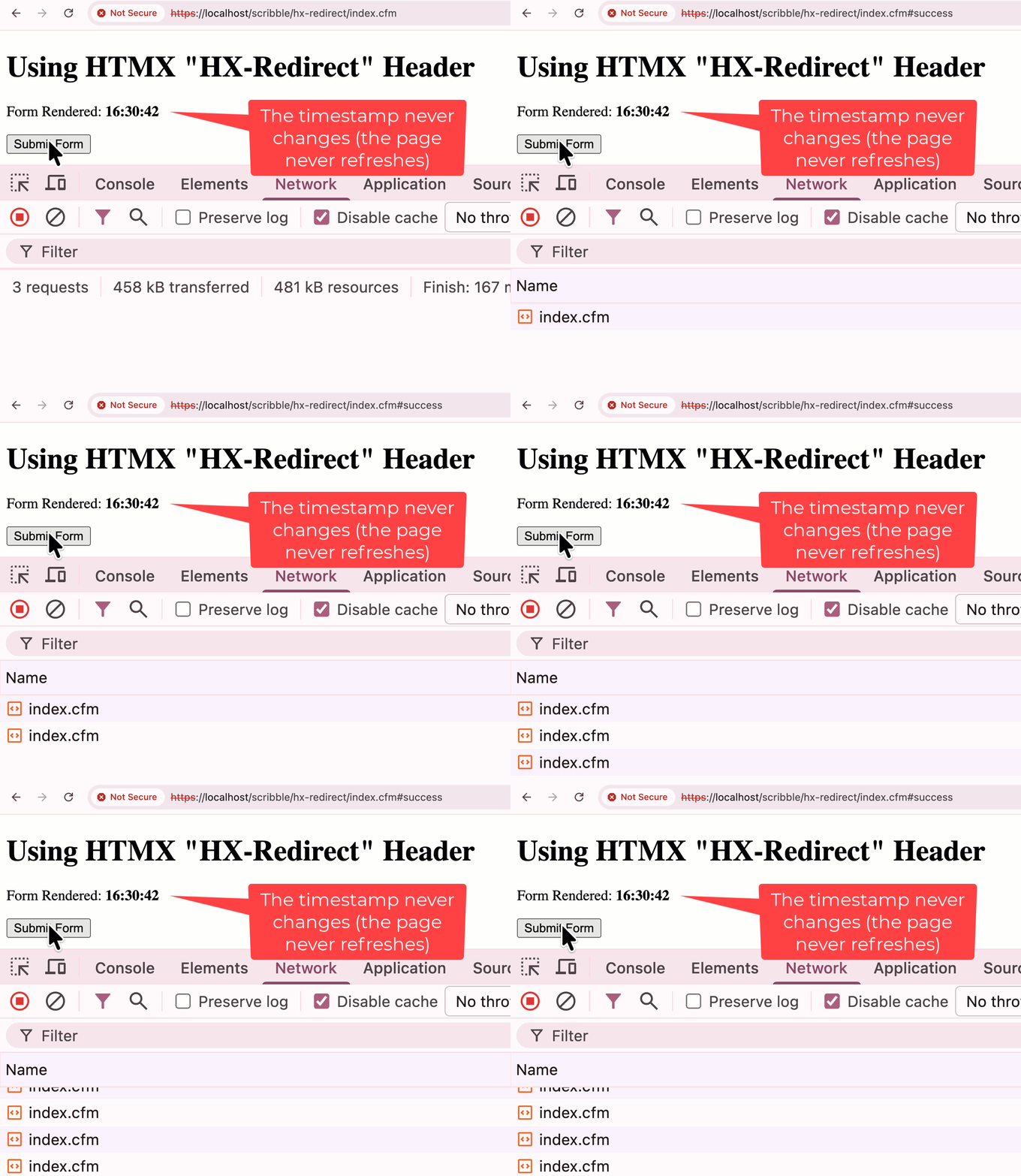
Notice in this GIF recording that the "form rendered" timestamp never changes. This is because HTMX never actually performs the navigation to the subsequent page (index.cfm#success). Or rather, it requests the navigation, but the browser fulfills it by merely setting the new fragment (#success) on the current URL.
To fix this functional gap, we have to make sure that the from/to URLs differ in a substantive way so that the browser understands that it has to perform a round-trip request back to the server. The easiest way to do this is to add a throw-away query string parameter to the RX-Redirect HTTP header value:
<cfscript>

	// Note: adding `_` throw-away parameter.
	nextUrl = "./index.cfm?_=#getTickCount()###success";

</cfscript>
In practice, the throw-away query string parameter for my blog post comment form will just be the id of the new comment. But for the sake of the ColdFusion demo, the current timestamp is fine. And now that we have this _ query string value, re-running the same demo yields better results:
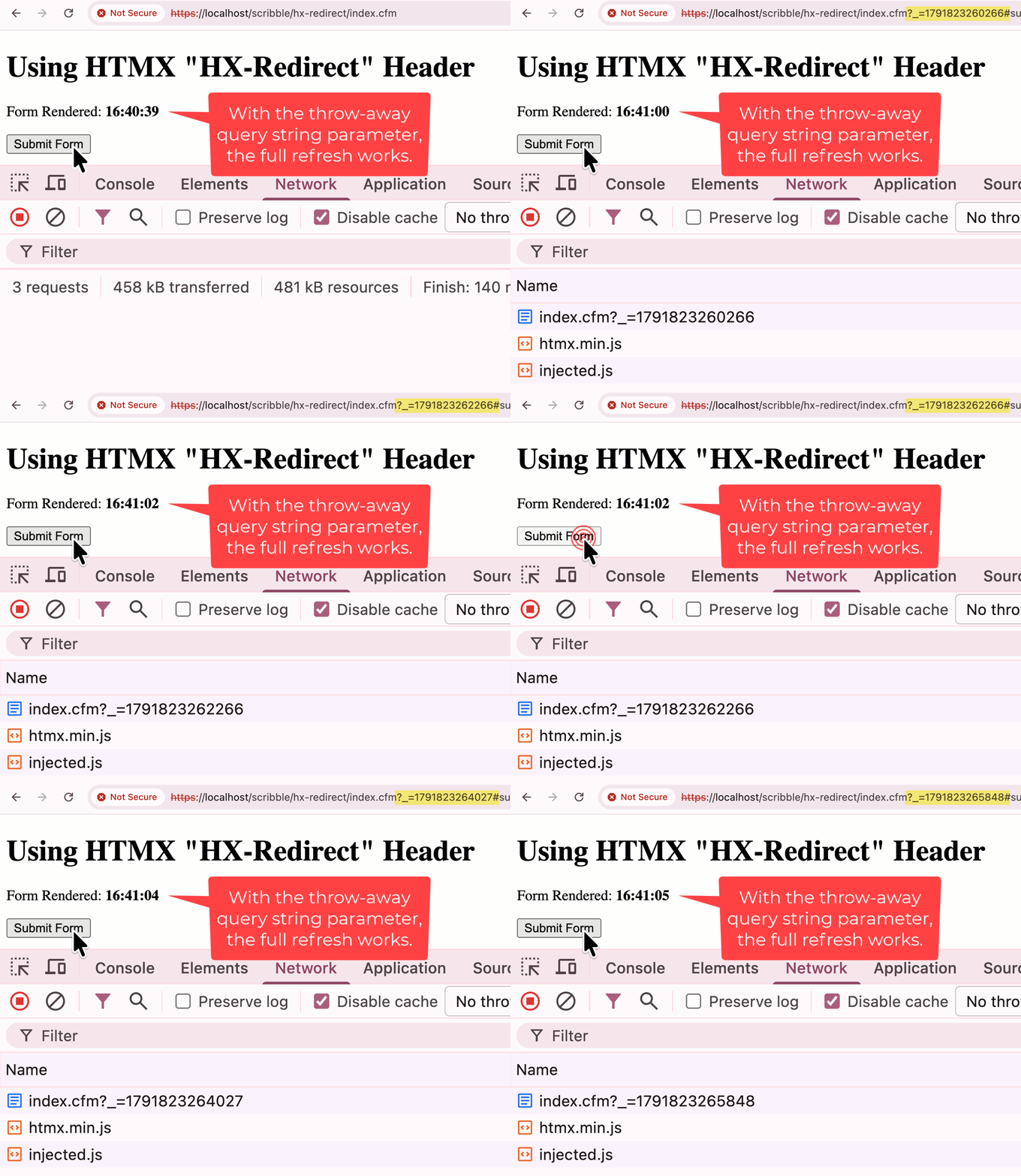
As you can see in the GIF recording, every time the form submits, the "form rendered" timestamp is updated. The throw-away query string parameter creates a unique URL resource which forces the href assignment to perform a round-trip navigation back to the server, just like we originally intended.

Reader Comments
Post A Comment — ❤️ I'd Love To Hear From You! ❤️
Post a Comment →