
Using The Docker Compose "name" Attribute For Asset Clarity
As much as I love Docker, and I can't imagine doing ColdFusion development without it, I'm not that great at it. I know just enough to get my work done; and the rest I'm learning bit-by-bit as needed. And one thing that I just learned about is the top-level name: attribute in the docker-compose.yaml file. This name: attribute can be used to bring consistency and clarity of ownership to the list of Docker images, containers, volumes, and networks.
By default, Docker Compose will derive the name of the assets from the parent folder. At first, this was "fine". But, as my project needs continued to evolve, and my projects tended to take-on multiple docker-compose.yaml files for various purposes, the folder-based derivation ended up creating docker asset names that felt meaningless and detached when I looked at them in Docker for Mac (Desktop).
By adding the name: attribute at the top of the docker-compose.yaml file(s), you tell Docker Compose to use that <name> as the asset prefix instead of trying to derive one from the parent folder.
Docker images become: <name>-<service-name>
Docker containers become: <name>-<service-name>-<N>
Docker volumes become: <name>_<volume-name>
This is particularly helpful for my front-end-build-related docker-compose.yaml files that reside in generically-named folders like main and utils. In Big Sexy Poems, for example, I have two compose files:
./docker-compose.yaml./cfml/app/build/main/docker-compose.yaml
The one in the repo root is responsible for spinning up the run-time services (ColdFusion and MySQL); and the one in the build folder is for compiling the JavaScript and CSS assets. The latter only gets up'd when I'm actively doing front-end development.
In my root compose file, I have name: "appbigsexypoems" (note that I've removed some properties to make this easier to read):
name: "appbigsexypoems"

services:

  cfml:
    build:
      context: "./cfml/"
      dockerfile: "docker/Dockerfile"
    ports:
      - "80:8080"
      - "443:8443"
      - "8080:8080"
    volumes:
      - "./cfml/app:/app"

  mysql:
    build:
      context: "./mysql/docker/"
      dockerfile: "Dockerfile"
    ports:
      - "3306:3306"
    volumes:
      - "./cfml/app/db:/docker-entrypoint-initdb.d"
      # Allow docker to manage the data persistence folder.
      - "mysql_data:/var/lib/mysql"

  mail:
    build:
      context: "./mail/docker/"
      dockerfile: "Dockerfile"
    ports:
      - "8025:8025"

volumes:
  mysql_data:
In my nested compose file, in the cfml/app/build/main subdirectory, I have name: "appbigsexypoems-build-main". This file bakes the appbigsexypoems prefix into a longer prefix so as to disambiguate it from the root project while still collocating it under the same "project umbrella":
name: "appbigsexypoems-build-main"

services:

  app:
    build: "."
    image: "appbigsexypoems-build-main:local"
    pull_policy: "never"
    command: [ "npm", "run", "build" ]
    volumes:
      - "./:/app"
      - "../../client:/app/client"
      - "../../wwwroot/static:/app/static"
      # Allow docker to manage the node modules.
      - "node_modules:/app/node_modules"

  # Provides a "watch" execution for the light-weight build above.
  dev:
    extends: "app"
    profiles:
      - "dev"
    command: [ "npm", "run", "watch" ]

# Using docker volumes to manage node_modules ensures that we don't overwrite the
# node_modules folder when we mount our source code. It also helps performance.
volumes:
  node_modules:
Now if we look at the list of images, containers, and volumes (respectively) in Docker Desktop for Mac, we see:
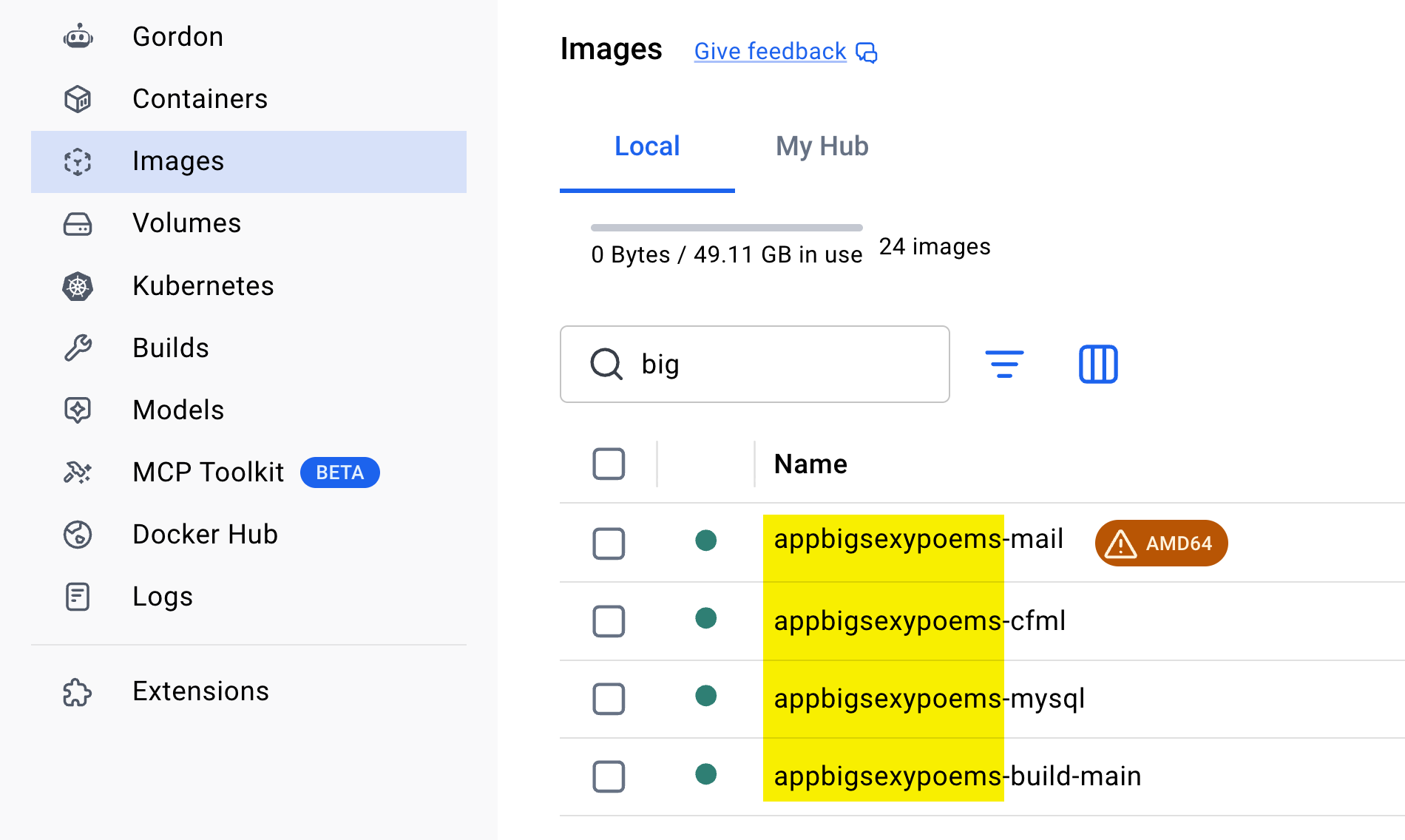
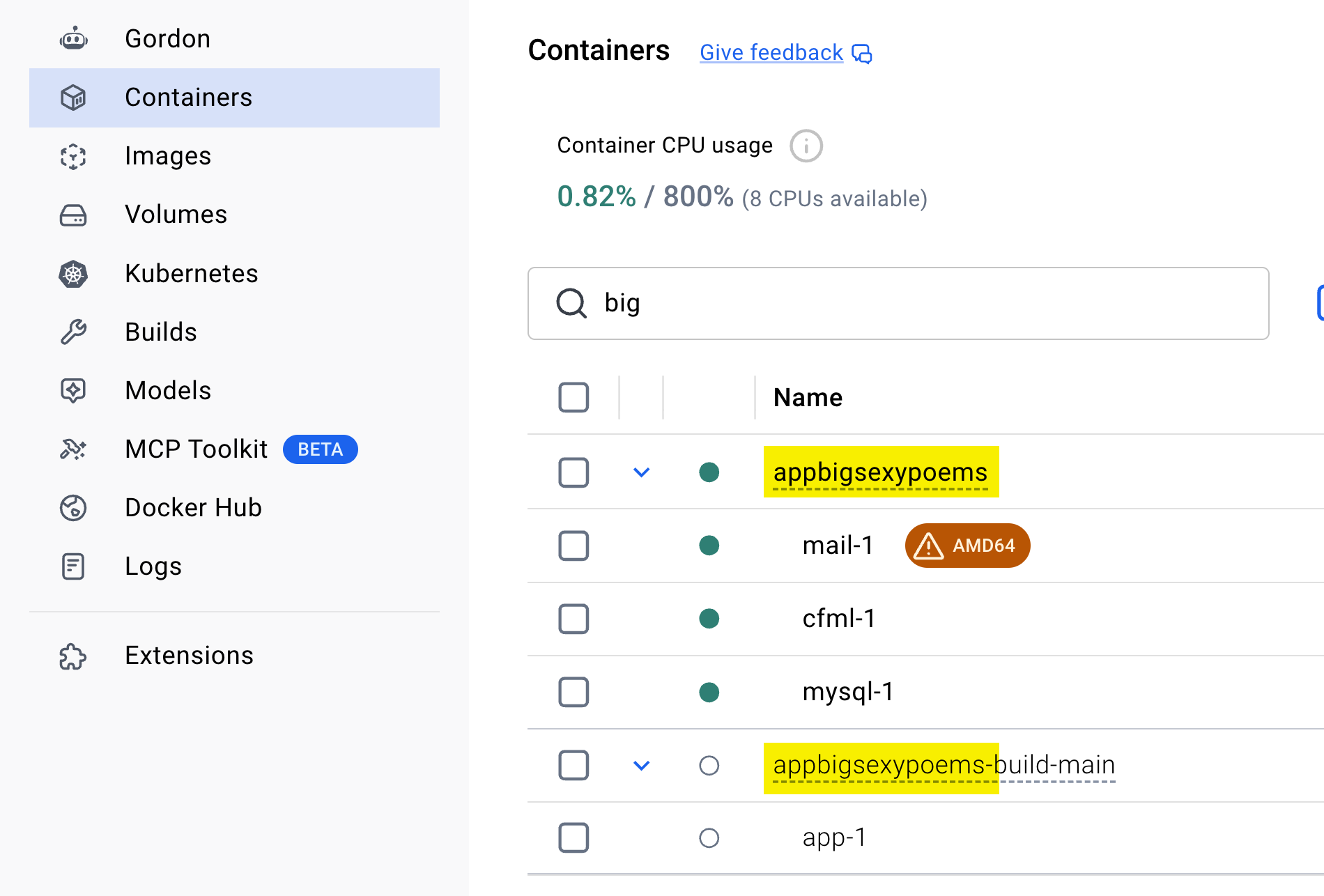
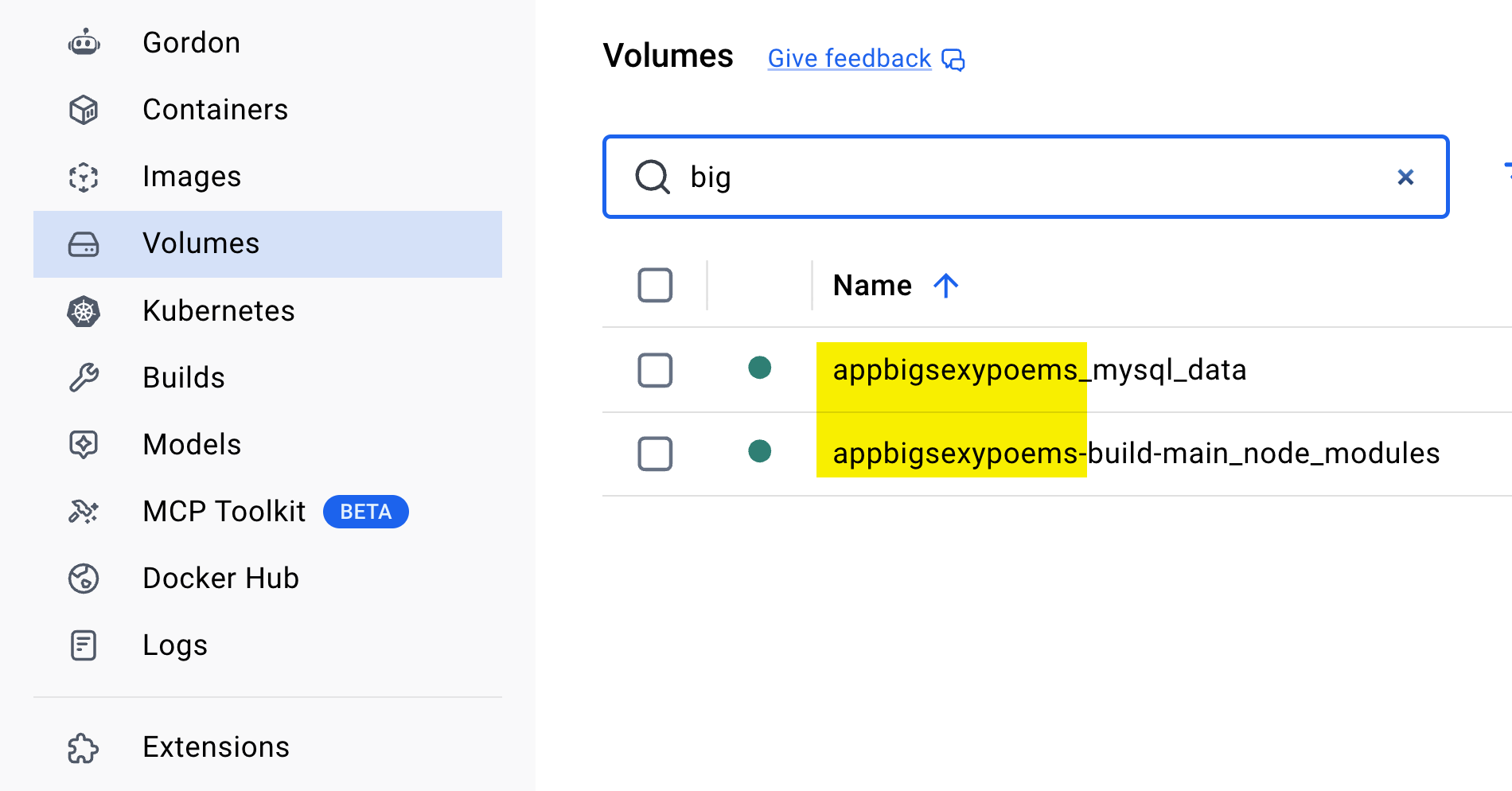
With the name: attribute in place in my Compose files, every docker asset related to this project is now prefixed with appbigsexypoems. No confusion. No generically named images or volumes — despite the fact that the docker-compose.yaml files do contain generic names like node_modules and mysql_data. Every image, container, volume, and network (not show in screenshot) is clearly owned and resides under a single project umbrella.
Epilogue On Image Names
In my front-end asset build docker-compose.yaml file, you might have noticed that I'm explicitly naming my image:
image: "appbigsexypoems-build-main:local"
I don't technically need to do this. However, that build project has two services, app and dev; and the dev service does nothing more than extend the app service and change the command property. If I didn't name the image, each of these services would build their own image.
That said, since Docker builds use a layered cache, the cost of this would — I believe — be essentially zero since both images would be composed of exactly the same layers.
Once the name: changes have a chance to soak in my current workflow, I'll probably remove the explicit image: attribute so that it's one less thing to think about.
Want to use code from this post? Check out the license.

Reader Comments
@ Ben
I've not yet ever seen the need for it myself, so I'm curious what this gives you. I use commandbox, so to spin up my dev environment I just
boxthenstart, which is pretty easy. All my config lives in the server-config.json.It's pretty simple and it feels like adding docker would just add complexity without adding benefit.
What am I missing out on?
@Chris,
To be fair, I don't know much about CommandBox. I have some "testing" boxes, where I have a
server.jsonfile and I spin up a version for CFML/Boxlang to just test something. But I don't know enough about CommandBox to get anything more than that working.For me, this big value-add of Docker comes when:
You need multiple services running together, such as CFML + MySQL.
You need to build assets with a certain version of Node.js + some rando CLI tools installed and you don't want to deal with things like
nvmto get the right versions running.It just creates a nice boundary around functionality. It's very very possible that CommandBox can do some/all of this - but like I said, I just know like 5% of what CommandBox can do.
That said, my base CFML Docker image is the CommandBox Docker image. So, even with Docker, I'm still leaning on CommandBox for some of this 🙃
@Ben Nadel,
Ah, I understand. Thanks for explaining this. I don't have a lot of that complexity in coordination with my setup, so I never felt the pains that Docker is solving for you.
Yeah, I think CommandBox gets you like 80% of the way there - if it ain't broke, don't fix it.
Post A Comment — ❤️ I'd Love To Hear From You! ❤️
Post a Comment →