Over on Big Sexy Poems, I have a number of data grids in the user interface (poems, collections, share links, revision, etc). Each one of these data grids has a "primary link" and zero-or-more secondary links. To help with the user experience (UX) of these tables, I've created an Alpine.js directive to wire-up the entire table row as a click-target. This way, if the user clicks anywhere within the table row (given some exceptions), the "primary link" will be activated.
Run this demo in my JavaScript Demos project on GitHub.
View this code in my JavaScript Demos project on GitHub.
Linking-up a table row isn't as simple as it sounds. There's nuance to when the user's click event should translate into programmatic execution of the DOM's (Document Object Model) .click() method. This nuance involves subjective trade-offs. When I detect the click event on the table, here are the decisions and trade-offs that I've made:
-
Listen for
clickevent. At first, I was listening for themousedownevent in order to make the interaction feel snappier. However, themousedownevent was causing misfires when I went to highlight text in the table (the initiation of thedragevent was triggering navigation). -
Ignore "untrusted" events. When an event is fired in the document, the
isTrustedproperty determines whether the event was fired programmatically by the application or naturally by the user(agent). I only wanted to respond toisTrustedevents (those fired naturally). -
Ignore right-click events. A mouse event can pertain to any of the buttons on the mouse. This includes right-clicking on an element in order to copy it. I only want to listen for primary mouse button events (those used for navigation).
-
Ignore "default prevented" events. If another directive has already intercepted the event and prevented its default behavior, I don't want to interfere with that workflow.
-
Ignore events that originate outside of a
td(table cell). This directive works though event-delegation. I bind theclickevent handler to thetableand then monitor allclickevents that bubble up. Since I'm trying to facilitate navigation, I only care aboutclickevents that come from table cells. -
Ignore events that originate from an actionable element such as an
aorbutton. If the user is already clicking on something that will trigger a natural behavior, there's no need to do anything fancy. -
Ignore events if there's a non-empty selection. If the user highlights text in the data grid, the compound act of mousing-down, dragging, and then mousing-up will register as a "click". As such, I'm ignoring clicks if there's a selection. I'm being very course-grained in this calculation.
-
Ignore events if they originate from a
tdthat contains multiple actionable elements. In that case, it won't be clear if the user simply miss-clicked? Or if they intended for the row to be clicked. -
If the event originated from a
tdwith a single link, programmatically click that link. -
If all else falls-through, programmatically click the "row linker" link (ie, the primary link).
You may not agree with all of my decisions here. But, at least you can see that this isn't an obvious one-path solution. I'm trying to strike a balance between usability improvements and overly opinionated behaviors.
To demonstrate this Alpine.js directive, I've put together a data grid that is representative of many of the data grids in Big Sexy Poems. It has one "primary link"; a cell with some text-only data; and, another cell with some calls-to-action. Each of the links updates the URL fragment (so that I don't navigate away from the demo). I highlight the link associated with that fragment so you can see which link is activated programmatically (or naturally).
Notice that the Alpine.js directive x-table-row-linker is attached to the table and uses event delegation to capture all the click events. All of the decisions that I discussed above are codified in the handleMouseEvent() directive method. Internally, it looks for a link with the CSS class .isRowLinker in order to determine which link is the "primary link". I prefer having explicit associations.
<!doctype html>
<html lang="en">
<body x-data> <!-- Note: you need the x-data directive to "activate" the document. -->

	<h1>
		Table Row Linker Directive In Alpine.js
	</h1>

	<table x-table-row-linker>
	<thead>
		<tr>
			<th>Name</th>
			<th>Info</th>
			<th>Category</th>
			<th>Actions</th>
		</tr>
	</thead>
	<tbody>
		<template x-for="i in 10">
			<tr>
				<td>
					<a :href="`#row-${i}-link-1`" class="isRowLinker">Row Link</a>
				</td>
				<td>
					More row info here...
				</td>
				<td>
					<a :href="`#row-${i}-link-2`">Another Anchor</a>
				</td>
				<td>
					<a :href="`#row-${i}-action-1`">Action 1</a> -
					<a :href="`#row-${i}-action-2`">Action 2</a>
				</td>
			</tr>
		</template>
	</tbody>
	</table>

	<script type="text/javascript" src="../../vendor/alpine/3.13.5/alpine.3.13.5.min.js" defer></script>
	<script type="text/javascript">

		/**
		* I make the rows in the table clickable. The primary gesture is to make the
		* `isRowLinker` anchor the one that is activated on row-click. But, a secondary
		* gesture, a whole cell will be make clickable if it contains a single link and no
		* other actionable elements (such as buttons).
		*/
		function TableRowLinkerDirective( element, metadata, framework ) {

			var attribute = "x-table-row-linker";
			var selector = ".isRowLinker";

			init();

			// ---
			// LIFE-CYCLE METHODS.
			// ---

			/**
			* I setup the directive.
			*/
			function init() {

				framework.cleanup( destroy );
				element.addEventListener( "click", handleMouseEvent );

			}


			/**
			* I tear down the directive.
			*/
			function destroy() {

				element.removeEventListener( "click", handleMouseEvent );

			}

			// ---
			// PRIVATE METHODS.
			// ---

			/**
			* I handle the mouse event on the table.
			*/
			function handleMouseEvent( event ) {

				// If the event was fired programmatically, ignore it.
				if ( ! event.isTrusted ) {

					return;

				}

				// Only process the main mouse button (ie, not if right-clicking).
				if ( event.button !== 0 ) {

					return;

				}

				// Since we're using event delegation in this directive, it's possible
				// that another directive or event binding will have already been applied
				// (and should take precedence). If the event's default behavior has been
				// canceled, we don't want to interfere with that control flow.
				if ( event.defaultPrevented ) {

					return;

				}

				var target = event.target;
				var cell = target.closest( "td" );

				// If the event didn't originate from within a table cell interaction,
				// ignore. It must have come from a header or a caption.
				if ( ! cell ) {

					console.warn( "IGNORE: Click outside TD." );
					return;

				}

				// If the event originated from an actionable element, ignore - the given
				// element already has a native behavior associated with it.
				if ( target.closest( "a, button" ) ) {

					console.warn( "IGNORE: Target is an actionable element." );
					return;

				}

				var selection = window.getSelection();

				// If the user highlights text in the table, it will often trigger a click
				// event. Let's ignore events in which a non-empty selection exists.
				if ( selection && ! selection.isCollapsed ) {

					console.warn( "IGNORE: Selection detected." );
					return;

				}

				var linkNodes = cell.querySelectorAll( "a" );
				var actionableNodes = cell.querySelectorAll( "a, button" );

				// If there's only a SINGLE LINK in the cell and NO OTHER actionable
				// elements, let's activate the link regardless of whether or not it's the
				// row-linker. This allows for slight miss-clicks on an isolated link.
				if (
					( linkNodes.length === 1 ) &&
					( actionableNodes.length === 1 )
					) {

					console.info( "EXECUTE: Auto-clicking isolated link." );
					linkNodes[ 0 ].click();
					return;

				}

				// If there are any actionable elements in the cell, don't do anything at
				// this point since this event represents a miss-click in a non-isolated
				// context. We don't want to activate the wrong link or button.
				if ( actionableNodes.length ) {

					console.warn( "IGNORE: Multiple miss-click targets available." );
					return;

				}

				var row = cell.closest( "tr" );
				var rowLinker = row.querySelector( selector );

				// If there's no row linker, then no further action can be taken.
				if ( ! rowLinker ) {

					return;

				}

				// Translate row event into link event.
				console.info( "EXECUTE: Auto-clicking row-linker." );
				rowLinker.click();

			}

		}

		// --------------------------------------------------------------------------- //
		// --------------------------------------------------------------------------- //

		// Register Alpine.js directive.
		document.addEventListener(
			"alpine:init",
			function setupAlpineBindings() {

				Alpine.directive( "table-row-linker", TableRowLinkerDirective );

			}
		);

		// For the UX of the demo, I want to highlight whichever link matches the hash.
		// This way, as the user clicks around, it will be clear which link has been
		// activated (either naturally or programmatically).
		window.addEventListener( "hashchange", ( event ) => {

			for ( var node of document.querySelectorAll( "a[href]" ) ) {

				if ( location.hash === node.getAttribute( "href" ) ) {

					node.classList.add( "active" );

				} else {

					node.classList.remove( "active" );

				}

			}

		});

	</script>

</body>
</html>
If we run this demo and click on some links, you can see by the highlighting which clicks lead to which link activation:
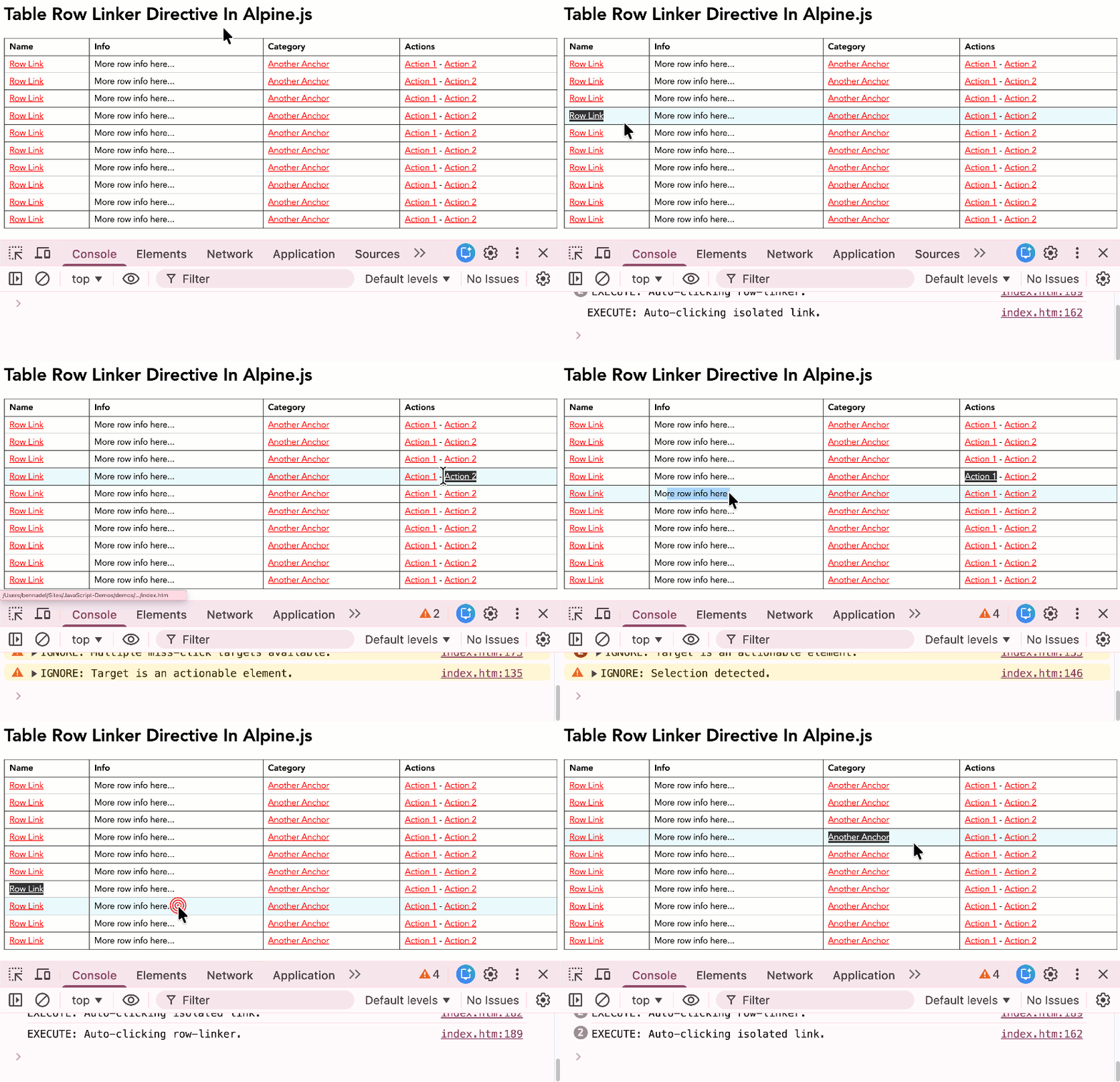
There are other refinements I could make to this Alpine.js directive. For example, instead of completely ignoring any event that originates from a td with multiple links, I could instead check the getBoundingClientRect() of each link and see if the miss-click was in close proximity. But that adds a lot of complexity. Like I said, it's all about trade-offs. And for now, this implementation is working well.

Reader Comments
I'm not really understanding what the UX benefits of this behavior is. Maybe because it's a demo rather than the actual use case, but if the objective is to elevate a user's attempt to navigate, when there's multiple links... maybe present a pop-up menu they can select from?
I did something exactly like this using jQuery. I add the record's ID to the
TRelement as adataattribute so I don't have to output it to every link. (It's easy to fetch the row's TR & extract the ID rather than have multiple 32 character GUIDs in every link.)When it comes to marketing elements, we have a special className that we add to containers. It adds a "cursor:pointer" style to the entire element and then triggers the first AHREF link if any part of the element is clicked (or right-clicked).
@Chris,
The main goal is to allow the click to get a little bit "sloppy" and still work. Meaning, the user can slightly miss-click on the link and it many cases, it will still work (since it will either find the link in the same
tdor it will find the main.isRowLinkerlink in the row).Consider the Gmail inbox (or whatever email client you use). Usually, you can click anywhere on the inbox row item and it will open the link. Mail clients are a slightly different context since they really only have a single "gesture" per row, so the mental model is less complicated. But it's the same idea.
@James,
I went back-and-forth on whether to add the
cursor:pointer. Part of me liked it; but then part of me wanted it to be more of a "delighter" (that it works) rather than a "promise" (that it will work).Re:
data-*attributes, that's another I go back-and-forth on. In this case, I went withclass="isRowLinker"but I could just have easily went withdata-row-linker. One thing that I really appreciate about using thedataattributes is that I think it's a better signal to the developers that this is being used for something and isn't just some left-over CSS class that was never cleaned up.@Ben Nadel,
Got it! That's what I was meant by "elevate a user's attempt to navigate" but said far less articulately than you did.
Post A Comment — ❤️ I'd Love To Hear From You! ❤️
Post a Comment →