In my continued effort to catch up on recent(ish) additions to the "Widely Available" web platform baseline features, I wanted to play with the Broadcast Channel API. This API provides a publish and subscribe (PubSub) paradigm that allows messages to be posted across browser windows and tabs on the same domain and origin context (on the same device - it doesn't share messages over the network).
Run this demo in my JavaScript Demos project on GitHub.
View this code in my JavaScript Demos project on GitHub.
Broadcast Channel API vs window.postMessage()
The browser has long had the window.postMessage() API, which gave us the ability to post messages across window contexts; and across origins. This provided flexibility but also incurred a number of security burdens. The Broadcast Channel API is a more focused, more secure version of the .postMessages() API.
The Broadcast Channel API also allows us to post messages across browser tabs without having to have a target reference. One limitation of the window.postMessage() API is that you needed a window reference (or something akin to window.parent, window.opened) in order to know who you were posting messages to. The Broadcast Channel API, on the other hand, can effortlessly publish messages to any subscriber of a given channel in any window or tab in the same origin.
The Broadcast Channel API doesn't wholly replace window.postMessage(); but, it does feel like a nicer fit for any cross-tab communication that can happen within the bounds of a domain.
Pew Pew Pew Laser Demo
The Broadcast Channel API is rather small and easy to use. You just instantiate an instance of the BroadcastChannel(name) constructor and either send messages with .postMessage() or listen for messages via the message event. To demonstrate, I've created a top-level page with 6 <iframe> elements. Each of the frames is loading the same page. And, each of the frames both announces local mouse coordinates and mirrors mouse coordinates emitted from one of the other frames.
The mouse coordinates are represented as a laser pointer dot. So as you move the mouse across the frames, the laser pointer dot should move to the same relative location within each frame.
<!doctype html>
<html lang="en">
<body>

	<h1>
		Sending Messages Across Documents With The Broadcast Channel API
	</h1>

	<div class="frame-list">
		<iframe src="./frame.htm"></iframe>
		<iframe src="./frame.htm"></iframe>
		<iframe src="./frame.htm"></iframe>
		<iframe src="./frame.htm"></iframe>
		<iframe src="./frame.htm"></iframe>
		<iframe src="./frame.htm"></iframe>
	</div>

</body>
</html>
Within the frame, I'm creating a BroadcastChannel() instance with the name pewpew. I then send and receive messages with a .type = lasermove discriminator property. Example:
channel.postMessage({
	type: "lasermove",
	clientX: 100,
	clientY: 75,
});
This was a personal choice. I could have just as easily created a broadcast channel with the name, lasermove, and then not include any discriminator property at all.
I don't have an instinct yet for which approach makes more sense. Is it better to have one big communication pipe with lots of different message types? Or is it better to have lots of little communication pipes each with a single message type? Or something in between. No idea.
That said, the code for this demo is straightforward. I'm listening to the mousemove event and then broadcasting the clientX/clientY coordinates. The laser pointer dot is implemented as a fixed-position <mark> element:
<!doctype html>
<html lang="en">
<body class="frame-body">

	<!--
		I'll follow the mouse location within each frame. Or I'll move according to the
		Broadcast API messages sent from frame-to-frame.
	-->
	<mark class="laser">
		<!-- Pew pew pew! -->
	</mark>

	<script type="text/javascript">

		var laser = document.querySelector( ".laser" );

		// Create a named channel that all the frames can bind-to for sending and
		// receiving messages.
		var channel = new BroadcastChannel( "pewpew" );

		// As the mouse moves, broadcast {x,y} coordinates to other frames for mirroring.
		window.addEventListener( "mousemove", ( event ) => {

			// Note: the message is automatically serialized using the structured clone
			// algorithm. As such, we can pass complex messages (within reason) and not
			// have to worry about serializing the data. Winning!
			channel.postMessage({
				type: "lasermove",
				clientX: event.clientX,
				clientY: event.clientY,
			});

			// Note: a broadcast context subscriber will NOT RECIEVE ITS OWN messages.
			// As such, we don't have to worry about adding logic to ignore reflected
			// messages. But it means that we also have to update the laser position
			// locally to the broadcasting window.
			moveLaser( event.clientX, event.clientY );

		});

		// Listen for broadcast message events.
		channel.addEventListener( "message", ( event ) => {

			// The broadcast message data is transparently deserialized using structured
			// clone algorithm and is presented in its original format. That said, we
			// might receive any number of messages (even on a named channel). As such,
			// I'm including a differentiator (type) to focus on relevant messages. This
			// is merely a convention, not a requirement.
			if ( event.data.type === "lasermove" ) {

				moveLaser( event.data.clientX, event.data.clientY );

			}

		});

		// I move the laser point to the given location.
		function moveLaser( left, top ) {

			laser.style.left = `${ left }px`;
			laser.style.top = `${ top }px`;

		}

	</script>

</body>
</html>
If I run this demo and then move my mouse across the frames, I get the following output:
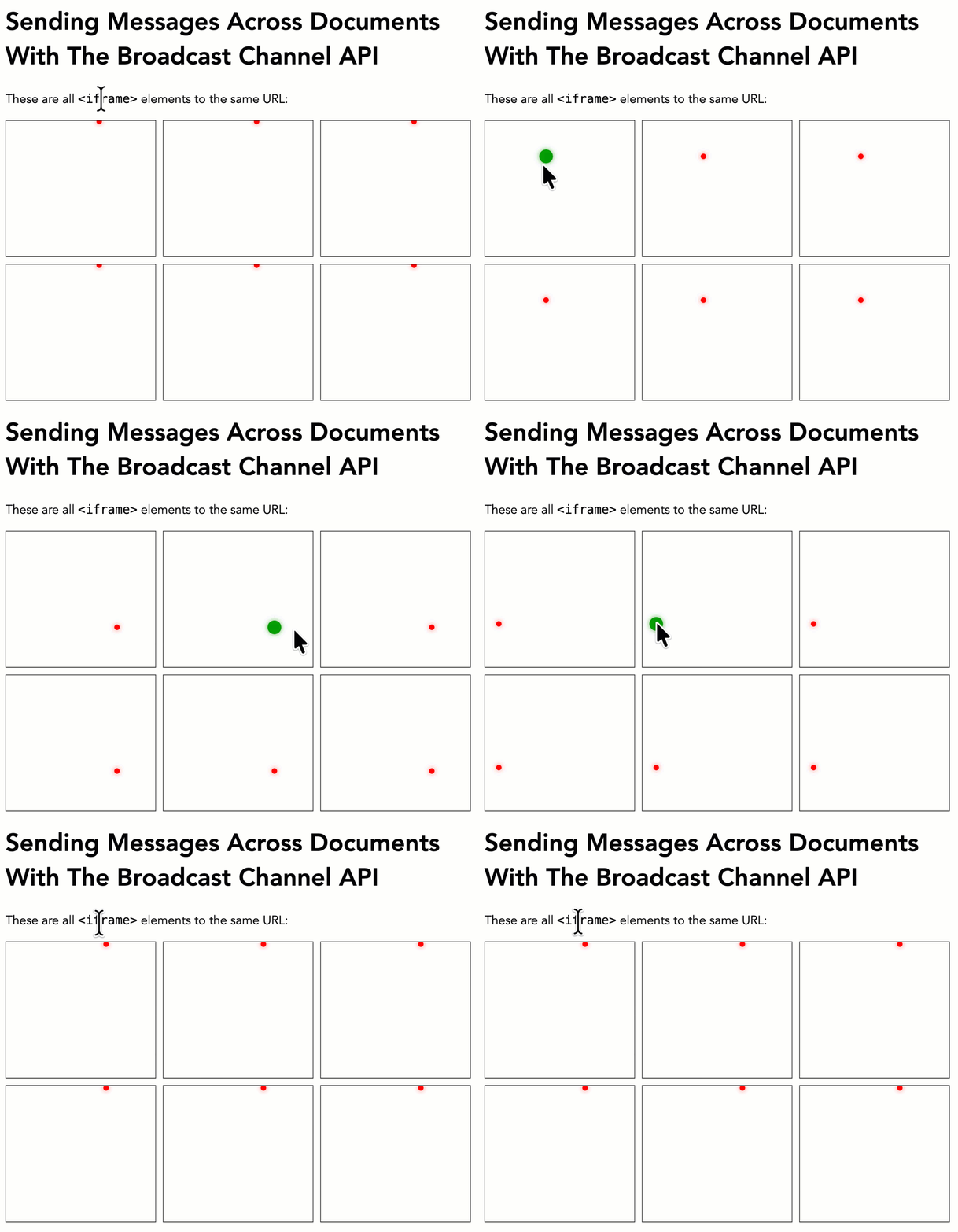
As you can see, when I move the mouse across one iframe, the relative location of that mouse is mirror across the other 5 iframe elements.
Note that the frame that broadcasts the event also has to explicitly position the laser pointer dot within its own frame. That's because events are not echoed back to the broadcaster.
Aside: when working with WebSockets, "loop back" events were an issue I always had to deal with. When a browser would publish an event to the Pusher API, I included a "client UUID" that would be included with the subsequent broadcast event; and then ignored by the browser that emitted it. It's nice to see that the
BroadcastChannel()API side-steps this issue entirely.
I imagine the BroadcastChannel() API will be good for keeping browser tabs in sync. At least from the perspective of a single user. In order to synchronize experiences across users and devices, something more akin to WebSockets or Server Sent Events (SSE) will need to be used.

Reader Comments
Post A Comment — ❤️ I'd Love To Hear From You! ❤️
Post a Comment →