Opening The Dialog Element As A Fly-out Sidebar
Yesterday, as part of my 2026 learning journey, I looked at the <dialog> element for the first time. The dialog element is the browser's native implementation of the modal window that we've all been hand-coding for decades. By default, the dialog element renders in the center of the viewport and shrinks to fit its content. As a follow-up experiment, I wanted to see if I could get the dialog to render as a fly-out sidebar.
Run this demo in my JavaScript Demos project on GitHub.
View this code in my JavaScript Demos project on GitHub.
At first, none of the CSS that I was applying to the dialog element seemed to do anything. Luckily, I came across a post by Simon Willison on styling the height of the dialog. In that post, Willison points out that the browser's user-agent stylesheet applies a number of CSS properties that have to be overridden.
When I look in my Chrome Dev Tools, the user-agent styles show at the bottom of the styles pane. In Chrome, here are the default styles as of this writing:
/* user agent stylesheet */
dialog:-internal-dialog-in-top-layer {
    inset-block-end: 0px;
    inset-block-start: 0px;
    max-height: calc(100% - 2em - 6px);
    max-width: calc(100% - 2em - 6px);
    overflow: auto;
    position: fixed;
    user-select: text;
    visibility: visible;
}
dialog {
    background-color: canvas;
    border-color: initial;
    border-image: initial;
    border-style: solid;
    border-width: initial;
    color: canvastext;
    height: fit-content;
    inset-inline-end: 0px;
    inset-inline-start: 0px;
    margin: auto;
    padding: 1em;
    position: absolute;
    width: fit-content;
}
As you can see, there are a number of internal, default styles relating to inset, max-height, height, etc. These were all preventing me from styling the dialog element as the sidebar. Since the C in CSS stands for "cascading", my attempt to style the dialog was merely inheriting the user-agent styles and merging them with my own — it wasn't overriding the styles that wanted the dialog to render in the center of the viewport.
Once I realized this, "fixing" it was a matter of adding my own unset styles:
/*
  The default user-agent styles for dialogs position the dialog in the
  center of the screen and have it render to fit the content. In order to
  get the dialog to render as a fly-out sidebar, we need to unset the CSS
  properties that force it into the middle.
*/
height: auto ;
inset: 0 ;
left: auto ;
max-height: 100vh;
padding: 0 ;
Once I had these unset styles in place, my <dialog> element rendered like a champ. Which is to say, I was able to position it as a fly-out sidebar on the right side of my viewport. Here's my full demo:
<!doctype html>
<html lang="en">
<body id="top">

	<h1>
		Opening The Dialog Element As A Fly-out Sidebar
	</h1>

	<button type="button" class="triggerSidebar">
		Open Sidebar
	</button>

	<dialog closedby="any">

		<h2 id="sidebarTop">
			Dialog As Sidebar
		</h2>

		<p>
			Lorem ipsum dolor sit amet nuntius, inde cum cor, supero ferus difficilis
			poena. Ipse intro longe incido ex pauci culpa. Tu moneo quidam, ego magnus
			consul. Ego timeo quis virtus que quis numen. Idem patior forte augeo ultra
			caecus poena.
		</p>

		<button type="button" class="close">
			Close
		</button>

		<div style="margin-block-start: 150vh ;">
			<a href="#sidebarTop">Back to Top</a>
		</div>

	</dialog>

	<!-- Adding large spacer to force body scrollbar for a more comprehensive test. -->
	<p style="margin-top: 150vh ;">
		<a href="#top">Back to Top</a>
	</p>

	<style type="text/css">

		/* When a modal window is open, remove scroll from body. */
		:is( html, body ):has( :modal ) {
			overflow: hidden ;
		}

		/* Note: backdrop only shows for MODAL experiences (not non-modal). */
		dialog::backdrop {
			backdrop-filter: blur( 0.5px ) ; /* Not widely available yet. */
			background-color: #99999933;
		}

		dialog {
			/*
			 	The default user-agent styles for dialogs position the dialog in the
			 	center of the screen and have it render to fit the content. In order to
			 	get the dialog to render as a fly-out sidebar, we need to unset the CSS
			 	properties that force it into the middle.
			*/
			height: auto ;
			inset: 0 ;
			left: auto ;
			max-height: 100vh;
			padding: 0 ;
			/*
				Once we unset the default user-agent style, we can add our own styles to
				fine-tune the sidebar experience.
			*/
			border: 2px solid #999999 ;
			border-width: 0 0 0 2px ;
			box-shadow: 0 0 5px #00000022;
			padding: 2rem ;
			scrollbar-gutter: stable ; /* Not widely available yet. */
			width: 450px ;
		}

		/* We can use [open] DOM state to animate-in the sidebar using CSS keyframes. */
		dialog[ open ] {
			animation-duration: 200ms ;
			animation-fill-mode: forwards ;
			animation-iteration-count: 1 ;
			animation-name: dialogEnter ;
			animation-timing-function: ease-out ;
		}
		@keyframes dialogEnter {
			from {
				translate: 100% ; /* Widely available (as independent of "transform"). */
			}
			to {
				translate: 0% ;
			}
		}

	</style>
	<script type="text/javascript">

		var triggerSidebar = document.querySelector( ".triggerSidebar" );
		var dialog = document.querySelector( "dialog" );
		var closeSidebar = document.querySelector( "dialog .close" );

		// Open the sidebar.
		triggerSidebar.onclick = ( event ) => {

			dialog.showModal();

		};

		// Close the sidebark.
		closeSidebar.onclick = ( event ) => {

			dialog.close();

		};

	</script>

</body>
</html>
Aside: in this demo, I'm using CSS keyframe animations to enter the sidebar in from the right side of the viewport. My
@keyframesspecification usestranslateas a top-level CSS property. This is one of the web platform features that only became "Widely Available" last year (2025). Previously, it had to be defined as part of atransformvalue. Very exciting!
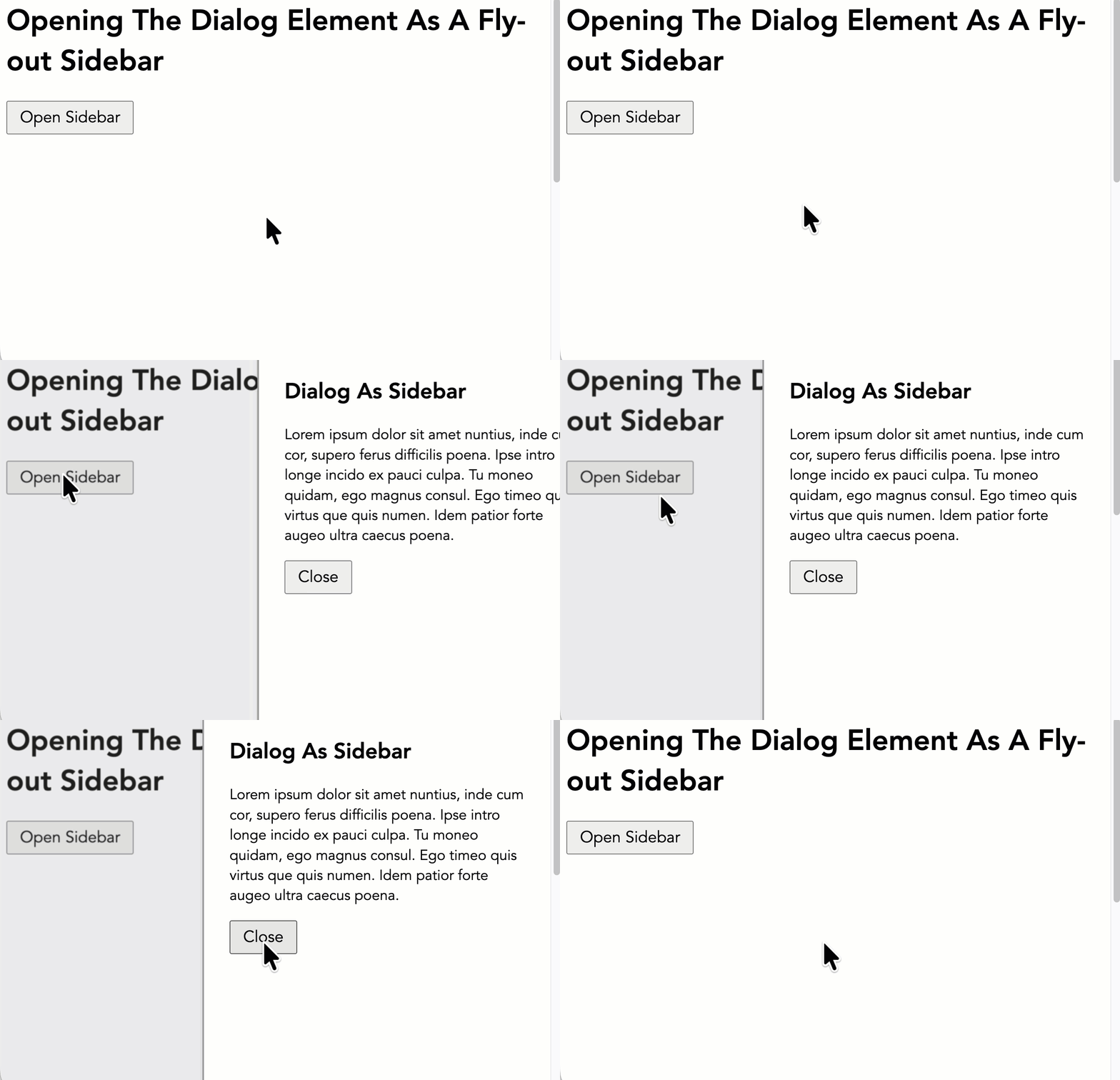
If we run this demo and trigger the dialog element, we get the following output:
As I demonstrated yesterday, I could have wrapped the "Close" button in a <form> and set the [method=dialog] attribute. This would have allowed me to close the dialog without wiring-up the click handler. In this case, however, I had no other use for the form element (ie, I wasn't collecting any data from the user). As such, I opted for the JavaScript route.
The HTML <dialog> element continues to be one of the things I'm most keen to start using. Having this built into the platform is going to make life much easier. And now that I see where I might stumble on the CSS styling, I feel confident that I can have the dialog element do whatever I want it to do.
Want to use code from this post? Check out the license.

Reader Comments
Hi Ben!
Note that are also the Popover API and the (even newer) related Invoker Commands API, which can be used very similarly.
Using those two in combination, you can achieve the same without any JavaScript at all.
You only have to add the
popoverattribute to the element that should be the popover, in your case the sidebar. And the button gets acommandforreferencing the ID of the popover and acommand="show-popover". Your close button then gets acommandforattribute, again holding the ID of the popover and acommand="hide-popover".And that's basically it.
Though there are also some gotchas when using a
<dialog>or the Popover API for sidebars:Cheers,
Sebastian
@Sebastian,
I'm very excited about the pop-over and invoker commands. I've heard them get discussed quite a bit on the Syntax.fm podcast. That said, they are quite new. At least for the the first few months of 2026, I'm trying to focus on the web features that are new(ish), but not super fresh 😛
But yeah, the invoker command especially is something I am very much looking forward to.
As a path for my learning, I'm using Google Baseline project. And it looks like invoker commands only became "Newly Available" last month (December 2025). Which sadly means they won't be classified as "Widely Available" till like 2028 😭
At work though, we'll have some more control over which browsers we use, so maybe I can take a look sooner.
Post A Comment — ❤️ I'd Love To Hear From You! ❤️
Post a Comment →