
Base Tag HREF Doesn't Affect Document Root-Relative URLs
At work, one of the things that our platform does is generate an offline version of a prototype. The code for generating this offline prototype has to jump through a lot of hoops in order to adjust file-paths for various images, CSS, and JavaScript files. I briefly wondered if I might simply this process by including a <base href=""> tag in the offline template. However, after some experimentation, it seems that the base tag's href property does not affect "Root-Relative" URLs.
Run this demo in my JavaScript Demos project on GitHub.
View this code in my JavaScript Demos project on GitHub.
When you include a src or href attribute, you can use various formats of URL:
Absolute URL: These URLs are fully-qualified and start with a protocol (ex,
https://) and include a domain and an optional resource.Relative URL: These URLs typically start with
./and are resource-only paths that are relative to the current document location.Root-Relative URL: These URLs start with
/and are resource-only paths that are relative to the root of the site.
What I wanted to see is if this last format - those root-relative URLs that start with / - might be "remapped" using a <base> tag. To test this, I created a JavaScript file that queries for itself in the DOM (Document Object Model) and then logs-out its own URL "version".
This tag expects to be loaded with a ?v= in its own query-string. As in:
loader.js?v=relative
It will split the string on ? and log out the last item:
// Since the document is going to block-and-wait for this Script tag to load, it means
// that the last <script> element on the page is currently THIS ONE. As such, let's grab
// all of the script tags and then take the one in the last index.
var nodes = document.querySelectorAll( "script" );
var thisNode = nodes[ nodes.length - 1 ];

// Log the "?v=" portion of the SRC attribute.
console.log( "Loaded:", thisNode.src.split( "?" )[ 1 ] );
I then put this JavaScript in an assets folder and attempted to load it using both a relative URL and a root-relative URL in conjunction with a base tag that points the base-HREF to the assets folder:
<!doctype html>
<html lang="en">
<head>
	<meta charset="utf-8" />
</head>
<body>

	<h1>
		Base Tag HREF Doesn't Affect Document Root-Relative URLs
	</h1>

	<!--
		Our "loader.js" script is stored within the "/assets/" folder. Let's see if we can
		load this file using different forms of SRC URLs in conjunction with a BASE tag
		HREF that places the current page context inside the assets folder. We're going to
		try using both a RELATIVE and a DOCUMENT ROOT-RELATIVE path.
	-->
	<base href="./assets/" />
	<script src="./loader.js?v=relative"></script>
	<script src="/loader.js?v=root-relative"></script>

</body>
</html>
What I was hoping for is that both of the src attributes would resolve to:
./assets/loader.js
However, when we run this in the browser, we get an error on the root-relative script load:
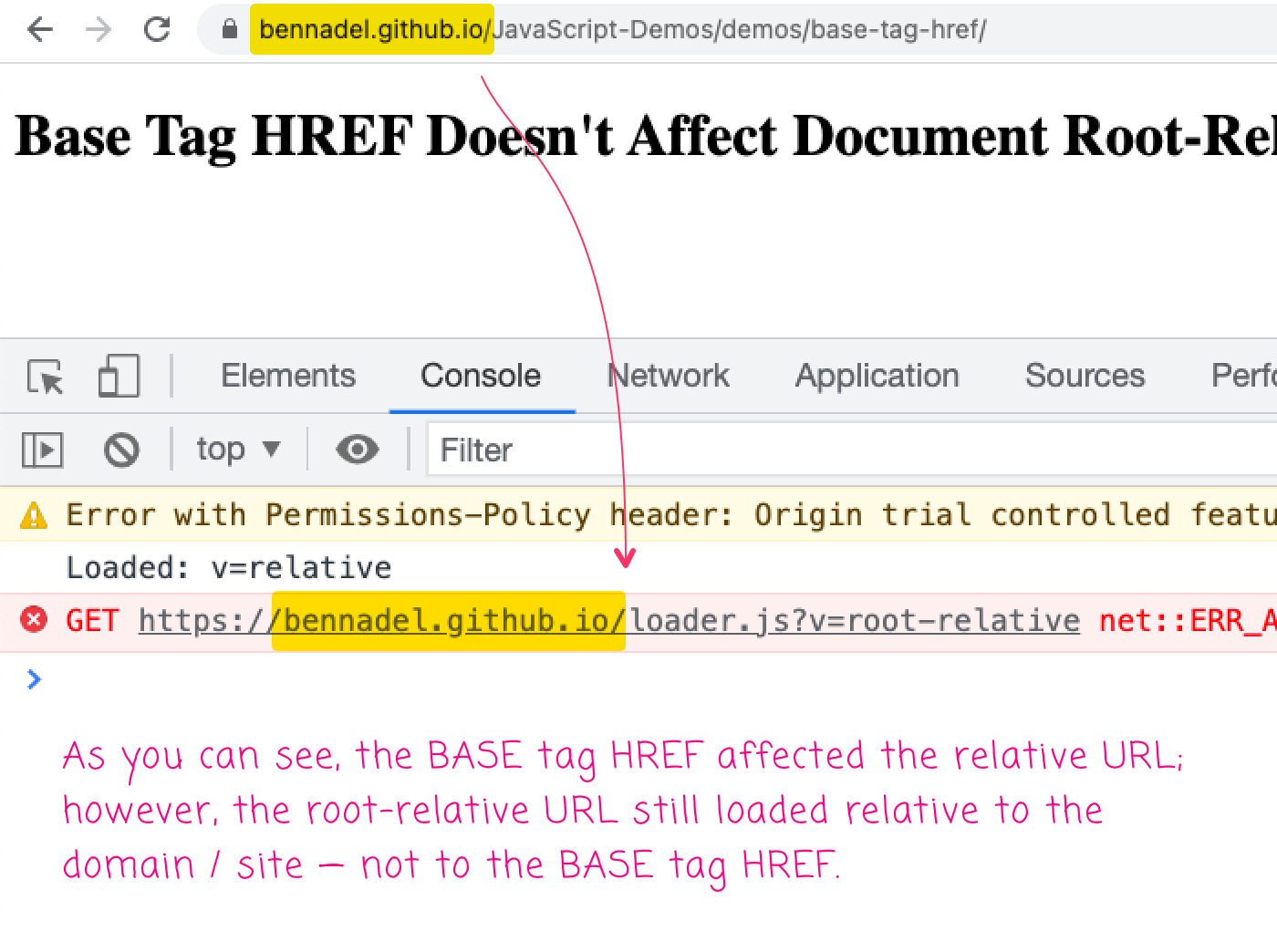
As you can see, the ?v=relative script tag loaded fine - its src attribute was affected by the base tag's href property. The root-relative script, with ?v=root-relative, failed load. Its src attribute still resolved relative to the domain, and was unaffected by the base tag.
Oh well! Nothing ventured, nothing gained. I was hoping that I might use the base tag's href property to "rewrite" some incorrect root-relative paths. But, it looks like that's not going to be an option.
Want to use code from this post? Check out the license.

Reader Comments
What you call root-relative, the spec calls path-absolute https://url.spec.whatwg.org/#path-absolute-url-string
/foo= path-absolute URL string./fooand foo = path-relative URL string@Šime,
Oh, interesting. I've never heard that term before. That said, when I tried to Google for "root-relative", it's not like a ton of matches came up. It was hard to find the right language.