
CFSaveContent Trim And Append Attributes In Lucee CFML 5.3.7.47
The other day on the Lucee Dev forum, I proposed that we add a file attribute to the CFSaveContent tag in Lucee CFML. And, as I was writing that proposal, I pulled up the docs page for the CFSaveContent tag; which is when I was surprised to see that Lucee actually offers two additional attributes on that tag: trim and append. I had no idea that these existed. So, I wanted to put together a quick demo (for myself) in Lucee CFML 5.3.7.47.
The names of these two attributes are mostly self-explanatory: trim will remove the leading / trailing whitespace of the generated content; and, append will add the content to an existing variable rather than just overwriting it. In the following demo, you'll see that I have 4 CFSaveContent instances, but they are all writing to the same variable:
<!---
	In Lucee CFML, the CFSaveContent tag offers two additional attributes:

	* trim - removes leading / trailing whitespace.
	* append - adds the content to an existing variable.
--->
<cfsavecontent variable="data" trim="true">
	Roses are red,
</cfsavecontent>

<cfsavecontent variable="data" trim="true" append="true">
	Violets are blue,
</cfsavecontent>

<cfsavecontent variable="data" trim="true" append="true">
	Lucee is insanely powerful,
</cfsavecontent>

<cfsavecontent variable="data" trim="true" append="true">
	Deal with it!
</cfsavecontent>


<cfset comma = "," />
<cfset commaWithLinebreak = ",#chr( 10 )#" />

<cfoutput>
	<pre>#data.replace( comma, commaWithLinebreak, "all" )#</pre>
</cfoutput>
All of the CFSaveContent tags are appending values to the data variable. And so, when I go to output the data variable at the end, we get this:
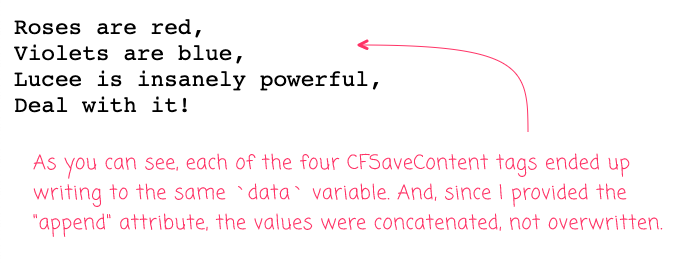
I think this could be pretty cool. I'm almost certain that I've wanted something to this effect in the past. I'm loving discovering these tiny little hidden gems in Lucee CFML.
Want to use code from this post? Check out the license.

Reader Comments
Yet another fine example where Lucee shines over ACF, which does not support these attributes. (sad trombone 🎵)
@Chris,
Ha ha, yeah, they have some cool stuff :)