
Learning ColdFusion 8: CFDirectory Improvements
In addition to all the new tags and functions that ColdFusion 8 has added to the already amazing language that we have come to love, ColdFusion 8 has also made very nice improvements to the existing feature set. Among those are updates to the CFDiretory tag. While the ColdFusion CFDirectory can Create, Rename, Delete, and List directories, the ColdFusion 8 updates were made only to the listing action.
New to the CFDirectory tag are the attributes ListInfo and Type. ListInfo determines what columns are returned in the CFDirectory query object. The valid values for this attribute are "all", the default, and "name". When the ListInfo attribute is set to "all", all the directory and file names are returned in the query just like a CFMX 7 CFDirectory tag. So for instance, a ColdFusion 7 CFDirectory tag:
<!---
	List out all directories and images in
	the data directory.
--->
<cfdirectory
	action="list"
	directory="#ExpandPath( './data/' )#"
	recurse="true"
	name="qFile"
	/>

<!--- Dump out file query. --->
<cfdump
	var="#qFile#"
	label="CFDirectory - CFMX 7 Compliant"
	/>
... will return a query that looks like this:
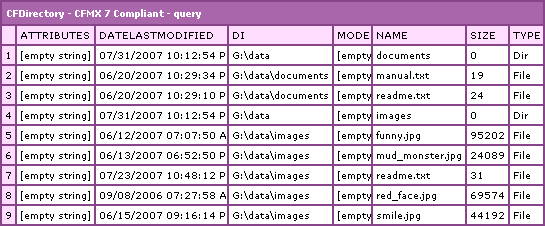
The above query is the equivalent of running the CFDirectory with ListInfo="all"; however, now, if we run the same CFDirectory tag, but this time, tell it to only list out the "name":
<!---
	List out all directories and images in the data
	directory. This time, however, only list out the
	names of the files and directories.
--->
<cfdirectory
	action="list"
	directory="#ExpandPath( './data/' )#"
	recurse="true"
	listinfo="name"
	name="qFile"
	/>

<!--- Dump out file query. --->
<cfdump
	var="#qFile#"
	label="CFDirectory - Name Only"
	/>
... we will get a query that looks like this:
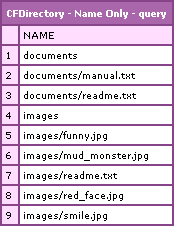
Notice here that we are getting only the Name column of the query. However, also notice that the data in the Name column is not exactly the same of the name column in the CFMX 7 compliant query. While the CFMX 7 CFDirectory query put only the file name or directory name in the Name column, the ColdFusion 8 CFDirectory name-only query basically includes the path of the files relative to the root directory we are targeting.
This demo was run during the ColdFusion 8 beta. I have not had a chance to install the official ColdFusion 8 Developer edition yet. It is possible that this may have changed in the official release. My guess, however, is that this was a design decision that was made to make the name-only query more useful. Afteral, a name-only query that had non sense of path structure would not be all that useful with any kind of recursive CFDirectory action. And, think about it - if it wasn't recursive, then you wouldn't have the directory structure at all since all files would be in the root of the target directory. Good call Adobe!
Listing only the name column can have significant performance increases and should be used whenever you don't need the rest of the information returned in CFDirectory.
The Type attribute of the ColdFusion 8 CFDirectory tag determines what type of items are returned in the resultant query. The valid values for this attribute are "file", "dir", and "all. All, the default value, means that both files and directories will be returned. The value "File" means that only files will be returned in the query. The value "Dir" means only directories will be returned in the query.
Running this code with the Type="file" attribute:
<!--- List out all files in the data directory. --->
<cfdirectory
	action="list"
	directory="#ExpandPath( './data/' )#"
	recurse="true"
	listinfo="name"
	type="file"
	name="qFile"
	/>

<!--- Dump out file query. --->
<cfdump
	var="#qFile#"
	label="CFDirectory - Files Only"
	/>
... we will get a query that looks like this:
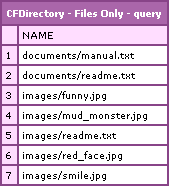
Notice that the "images" and "documents" entries we saw earlier are no long present. These were directories and are being excluded from the resultant query. To me, this is an awesome feature because it saves us from having to run a ColdFusion query of queries, checking Type columns during output, or using Filter attribute hacks (*.*).
Similary, running this code with the Type="dir" attribute:
<!--- List out all directories in the data directory. --->
<cfdirectory
	action="list"
	directory="#ExpandPath( './data/' )#"
	recurse="true"
	listinfo="name"
	type="dir"
	name="qFile"
	/>

<!--- Dump out file query. --->
<cfdump
	var="#qFile#"
	label="CFDirectory - Directories Only"
	/>
... we will get a query that looks like this:

Notice that now, the only entries we have are the two directories, "documents" and "images".
ColdFusion 8 is so awesome, not only for all the new tags and functions, but also for all these little updates to existing features that are going to make our lives as developers so much easier.
Want to use code from this post? Check out the license.

Reader Comments
Just a heads up Ben that listinfo is available in CF7 but was an undocumented feature. I'm not sure though if its available in any earlier release than CF7. It's a great attribute if you just need filenames since thats all I've ever used cfdirectory for so the performance boost is very nice.
So they still don't have the created date information. I think this was request ages ago.
@Javier,
Yeah, I have seen it used unofficially in ColdFusion MX7, but I never used it personally. But, now that it is documented and publicly known, I am sure I will start to make use of it.
@Tony,
Sorry :(
One more thing that I was expecting to be there in CF8 is the folder/directory size
but it seems that still I need to use java to do that.
:(
Awesome post Ben!
I tested this in CF8 and my cfdirectory query is giving me just the filename, rather than the relative path to the file from the calling page like in your example... it's behaving just like you showed CF7 used to handle the "name" at the top of your post. And this is with listinfo="name" set in the cfdirectory tag.
Is this just happening for me, or have you had a chance to test in the official version of CF8?
Cheers, Fitz
How may I utilize <cfdirectory> to list all the files in a directory as well as provide links to the files?
@Adam,
You can use the recurse="true" attribute on CFDirectory to get it to list all the files and sub-directory files. Then, you can loop over that and provide links.
Thanks Ben -
I seem to have an issue with the expandPath method and the directory it references. If I may expand upon this issue, I am trying to reference a directory of files visitors have uploaded. Those files reside in a path like this:
site/awards/chancellorsProfessors/nominationUploads/#fname#_#lname#>
#fname#_#lname# is a directory created when the person uploads the files. The directory is named after the person who is nominated for the award using their firstname_lastname.
I have created a page for a committee to review the submissions in a path like this:
site/awards/login/chancellorsProfessors/details.cfm
In the details.cfm file, I show all the details from the nomination and have encountered the issue of displaying the files that are uploaded as well as a link to them for the committee to review.
With cfdirectory, I am using the expandPath method and the path
/awards/chancellorsProfessors/nominationUploads/firstname_lastname/ and
recurse="true"and name="nomineeFiles">
Next, I output the query "nomineeFiles" with a hyperlink of "#nomineeFiles.name#" within the output
This does display the files in the directory, but the link to the file is not correct. Is the expandPath method not being utilized correctly? Might you suggest how I may link to the files correctly?
Thanks in advance and I'm sorry for the long explanation, but I wanted to be clear and concise.
@Adam,
When you link to the file, you have to make sure that the link is either relative to the current page (details.cfm) or absolute to the web root.
Given that your your upload directory is here:
site/awards/chancellorsProfessors/nominationUploads/#fname#_#lname#
... and your details page is here:
site/awards/login/chancellorsProfessors/details.cfm
... your link needs to travel back up the directory structure and then back down to the right upload folder:
../../chancellorsProfessors/nominationUploads/#fname#_#lname#
Hope that helps.
@Ben -
Thank you for the reply. I understand that I can directly link to the files, but is using cfdirectory in conjunction with expandPath not possible?
I am using expandPath within cfdirectory to read the files. I name it "nomineeFiles."
I then output the query "nomineeFiles" and reference "#nomineeFiles.name#" as the link. Is this not the correct usage? Should I just link to each individual file instead of using cfdirectory to go through the directories, find the files and display them?
Thanks again,
Adam
@Adam,
nomineeFiles.name gives you only the name of the file, NOT the full or even web-relevant path to the file. If you CFDump out the directory query, you'll see that it should have a Directory and a Name column which contain, respectively, the full directory path of the parent folder and the name of the file.
i'm on a linux box using cf8 and was wondering if anyone had reached this error before. I'm doing a recursive listing of files from the web root. it throws this error from the root, but if i go into a sub-directory, i'm able to list them fine (and recursively). anyone else have this issue before or would know why this occurs?
----------------------------
The system has attempted to use an undefined value, which usually indicates a programming error, either in your code or some system code.
Null Pointers are another name for undefined values.
The error occurred in /opt/app/bizcomp/web_content/dir.cfm: line 27
27 : <cfdirectory action="LIST" directory="/opt/app/sites/web_content/" name="Test_Dir" recurse="true" type="file">
28 : <cfdump var="#Test_Dir#">
@Tony,
Hmm, that's very odd. Is it possible that the ColdFusion service does not have "read" permissions on that root directory (but it does have it on the sub-directories)?
Hi Ben,
This article came of good use!
I just got a similar challange on a As400. Do you have any idea how to list contents in a IFS dir on os400?
Do you have any reference or snipplet..
@Marco,
What is AS400? I don't know what "things" you are referring to in your question.
How can the size of the directory be determined?