
For a long time, this blog has supported both "Light mode" and "Dark mode". And, it kind of, sort of supported "match system settings" as well; but not explicitly. If you happened to select a theme that matched the current system settings, the JavaScript would delete your theme selection, instead of persisting it, allowing the system settings to take over going forward. As part of my ongoing efforts to improve this platform, I moved the theme selection down into the footer, giving it room to offer three explicit states. I also used this as an opportunity to move the theme preference from LocalStorage to browser cookies using Alpine.js, HTMX 4, and ColdFusion.
From LocalStorage To Cookies
I've always had mixed feelings about the LocalStorage API. It's certainly a helpful API in some scenarios. But I believe that the Microservice / JSON Web Token (JWT) craze of the 2010s drove much higher adoption of the LocalStorage API than was warranted. A lot of what developers put in LocalStorage could — and should — be stored in cookies.
Theme preference is one of those data points. In fact, a defining benefit of using cookie storage in this case is that you can code the theme preference hook directly into the server-rendered template. There's no need to do on-the-fly HTML mutation within the <head> tag; or — even worse — risk the dreaded FOUC (Flash of Unstyled Content).
Cookies also allow you to side-step some of the limitations inherent to LocalStorage. For a variety of reasons, LocalStorage may not be available in a given browser; or, writing to it may be denied. Though some of these concerns are less relevant on the most modern browsers, MDN (Mozilla Developer Network) still recommends using robust feature detection for LocalStorage.
From JavaScript To HTMX and ColdFusion
My initial migration from LocalStorage to cookies used the document.cookie property assignment to persist the user's theme selection directly within the client-side JavaScript. But, after using Claude Code to perform an adversarial review of my implementation, I learned about an important storage cap mandated by Apple's Intelligent Tracking Prevention (ITP) protocol.
Under ITP adherence, Safari and WebKit automatically purge JavaScript-written cookies and LocalStorage entries within 7-days. Which means, if a user stores their theme preference today and then comes back in 2-weeks, their theme preference will be reset. This is clearly a sub-par experience.
To get around this ITP limitation, I need to store the theme preference cookie using the ColdFusion server's Set-Cookie HTTP response header. This needs a round-trip to the server upon theme selection. Which means network latency. But, I can counterbalance some of that latency with an optimistic UI update.
Now, when a user selects a theme, the workflow is as follows:
-
Alpine.js optimistically updates the
data-themeattribute on the root HTML element. The user then sees their theme selection applied instantaneously to the page. -
HTMX 4 "boosts" a form in order to
POSTthe theme selection to the ColdFusion server. -
ColdFusion responds with a
Set-Cookieheader, persisting the theme selection back to the user's browser, side-stepping the ITP restrictions.
In my intro, I mentioned that I historically implemented the "match system settings" mode by deleting the preference when it aligned with the selected theme. In this workflow, I'm still implementing "match system settings" by deleting the cookie; only now, instead of that mode being coincidental, it's going to be an explicit theme choice:
- Match System - the default
- Light UI
- Dark UI
Implementation Details
To explore my implementation, let's start from my blog's footer, where the new theme preference widget is rendered; and then follow the user's request to select a theme. The collection of themes is defined in a ThemePreference.cfc, which we'll look at later; but, for the moment, know that each theme has a name, shown the user, and a value, stored in the cookie.
Here's the isolated portion of my main site layout that renders the theme options. Things to note in this code:
-
A
<form>wraps the options and posts to athemeroute. Which means that the theme-picker works even in the case that JavaScript fails to load. As much as I can, I'm trying to make JavaScript optional for the blog. -
HTMX is being used to progressively enhance the form with the
hx-boostattribute. However, there is no HTML swap or URL update. I'm relying on the Alpine.js@clickhandler to apply the necessarydata-themeattribute changes. -
The options are all submit buttons with a unique
valueattribute. And since the buttons all share the samename, each one submits the parent form with a unique theme identifier. This theme identifier is what gets reflected back to the browser in the subsequentSet-CookieHTTP response header. -
The options each have an
@clickhandler for optimistic UI updates. These optimistically update thedata-themeattribute before the HTMX response performs the round-trip to the server.
There's a lot going on there, but the ColdFusion code is relatively short:
<div x-data="podt7m_Theme"  class="links">
	<div class="links__title">
		Theme Preference
	</div>

	<form
		method="post"
		action="#ui.urlForParts( 'theme' )#"
		hx-boost="true"
		hx-push-url="false"
		hx-swap="none"
		hx-sync="this:replace">

		<ul class="links__items">
			<cfloop array="#themePreference.getThemes()#" item="theme">
				<li class="links__item">

					<button
						name="theme"
						value="#e4a( theme.value )#"
						@click="setTheme"
						class="links__theme">
						#e( theme.name )#
					</button>

				</li>
			</cfloop>
		</ul>
	</form>
</div>
Each of these theme-selection buttons posts back to the server (either by native form mechanics or, progressively, by way of the HTMX-enhanced form); but, the @click handler immediately updates the user's theme experience without waiting for the form submission to be processed. Here's the Alpine.js JavaScript, attached via x-data:
// Import vendor modules.
import Alpine from "@alpinejs/csp";

// ----------------------------------------------------------------------------------- //
// ----------------------------------------------------------------------------------- //

Alpine.data( "podt7m_Theme", Theme );

function Theme() {

	return {
		setTheme,
	};

	// ---
	// PUBLIC METHODS.
	// ---

	/**
	* I optimistically update the UI to record the theme selection. The actual theme
	* persistence is performed on the server (as a Set-Cookie HTTP header) via HTMX.
	*/
	function setTheme( event ) {

		var root = document.documentElement;
		var name = "data-theme";
		var value = event.currentTarget.value;

		if ( value ) {

			root.setAttribute( name, value );

		} else {

			root.removeAttribute( name );

		}

	}

}
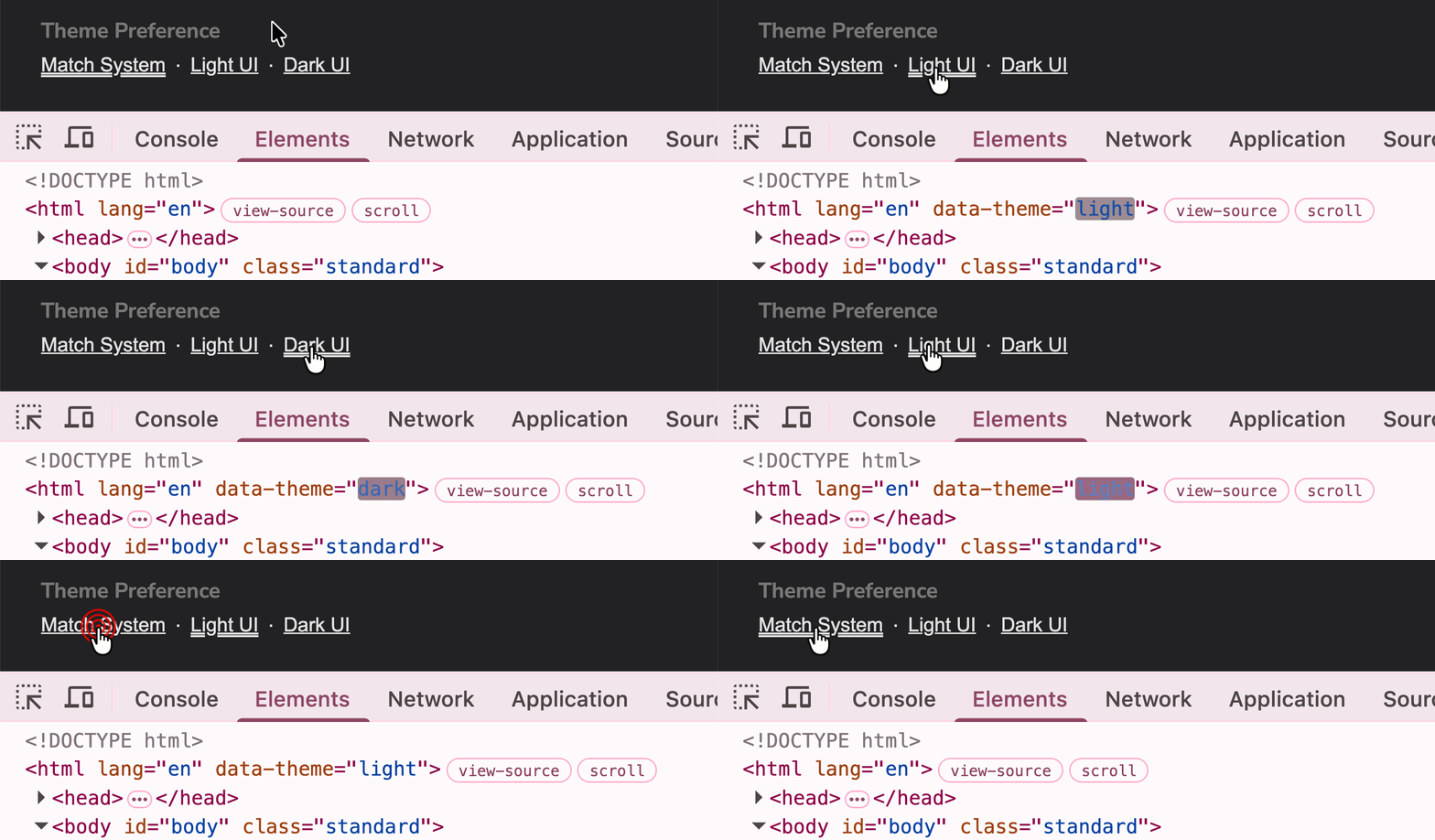
I mentioned earlier that the "match system settings" theme option works by deleting the cookie. On the JavaScript side, I'm mirroring that intent by removing the data-theme attribute when no explicit theme is selected. Otherwise, for either light or dark theme identifiers, I add the data-theme attribute to the root element. This renders the desired theme experience in the browser as soon as the user clicks the button.
Caution: if the user rapidly clicks several theme selection buttons, I'm doing my best to use the
hx-sync="this:replaceattribute to make sure that only the most recent selection "wins". However, since the browser — not HTMX — applies theSet-Cookieheader off thefetch()response, I'm not sure if HTMX can fully resolve every out-of-order-arrival issue for every possible scenario. I think we're good here; but I'm leaving open the notion that an edge-case / race condition exists wherein the stored cookie and the optimistically rendered theme don't match.
We can see the Alpine.js / HTMX in action by looking at both the DOM markup:
And at the network activity:
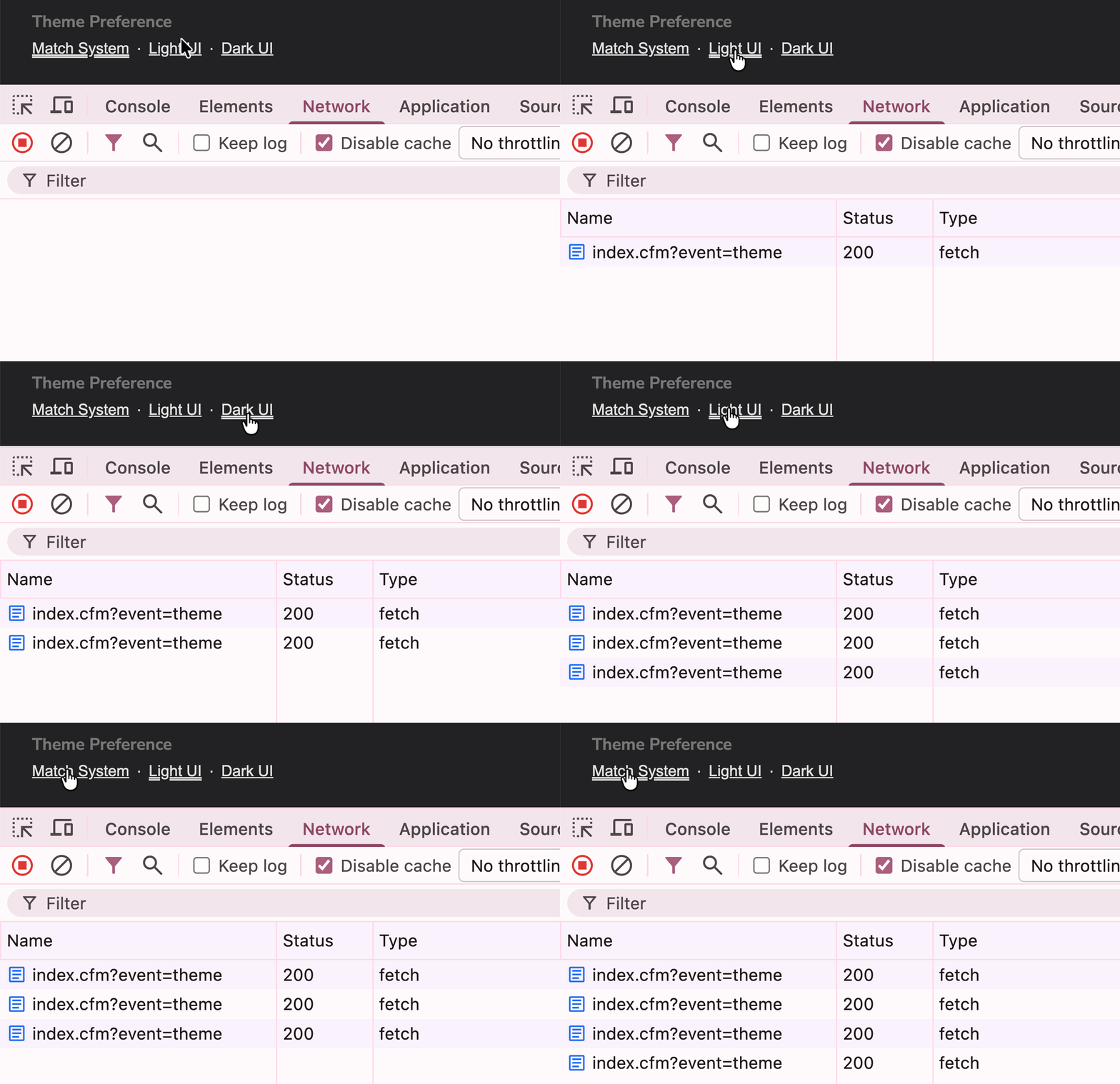
This network activity shows the theme selection being posted to my theme route. In the above GIFs, this route is being consumed by HTMX; but remember, earlier, I said that HTMX is progressively enhancing the form. Which means that this route has to accept both HTMX-initiated and FORM-initiated requests.
Both types of request send the Set-Cookie header in their response; the difference is that HTMX requests yields a blank response (since there's no corresponding hx-swap on the client-side); and a traditional form request is redirected back to the homepage (a sub-par user experience, provided only as a fail-safe fallback).
<cfscript>

	// Define properties for dependency-injection.
	router = request.ioc.get( "core.lib.web.Router" );
	themePreference = request.ioc.get( "core.lib.web.ThemePreference" );

	// ColdFusion language extensions (global functions).
	include "/core/cfmlx.cfm";

	// ------------------------------------------------------------------------------- //
	// ------------------------------------------------------------------------------- //

	param name="form.theme" type="string";

	// Persist the given theme into the user's cookie.
	// --
	// Note: we're jumping through all these hoops to set the theme cookie via the server
	// and saving it to the browser with the `Set-Cookie` HTTP header, as opposed to just
	// setting it on the client via JavaScript, because Safari limits persistence to
	// 7-days for cookies that are written via JavaScript. This is part of Apple's
	// Intelligent Tracking Prevention (ITP) protocol. By persisting the cookie by way of
	// the server round-trip, we have no such persistence cap.
	themePreference.setTheme( form.theme );

	request.layout.type = "blank";
	request.layout.primaryContent = "ok";

	// This route is only intended to be consumed by HTMX. I'm including a redirect for
	// non-HTMX requests as a fallback for a non-boosted form submission. Both approaches
	// yield a `Set-Cookie` header, which is the main gesture of the request.
	if ( ! request.htmx.boosted ) {

		location(
			url = router.urlForParts( "blog.recent" ),
			addToken = false
		);

	}

</cfscript>
This route brings us to the .setTheme() call on the ThemePreference.cfc component. This ColdFusion component is messy; and takes on several responsibilities:
- Defines the list of themes.
- Gets the currently-selected theme (with fallback).
- Sets the newly-selected theme.
- Cleans-up corrupted cookies on read.
I say this is "messy" because it blurs the boundaries of responsibility. It's reading in-memory data, reading and writing cookie data, and causing HTTP response headers to be written behind the scenes. I could tease aspects of this apart. But I fear that trying to create better separation for such a small feature would end up making the feature harder to understand and maintain. As such, I'm blessing the mess for the time-being.
/**
* Caution: this service reads from and writes to the COOKIE scope; which in turn, applies
* HTTP response headers to the response.
*/
component {

	// Define properties for dependency-injection.
	property name="cookieName" ioc:skip;
	property name="themes" ioc:skip;
	property name="themesIndex" ioc:skip;

	// ColdFusion language extensions (global functions).
	include "/core/cfmlx.cfm";

	/**
	* I initialize the theme preference.
	*/
	public void function init() {

		variables.cookieName = "uiTheme";
		variables.themes = [
			[
				name: "Match System",
				value: "",
			],
			[
				name: "Light UI",
				value: "light",
			],
			[
				name: "Dark UI",
				value: "dark",
			]
		];
		variables.themesIndex = arrayIndexBy( themes, "value" );

	}

	// ---
	// PUBLIC METHODS.
	// ---

	/**
	* I get the selected theme.
	*/
	public struct function getTheme() {

		var value = ( cookie[ cookieName ] ?: "" );

		if ( themesIndex.keyExists( value ) ) {

			return themesIndex[ value ];

		}

		// If the persisted theme wasn't in the set of available themes, it's either
		// corrupted or it represents an old theme. Either way, let's delete the cookie
		// in order to clean up the user's browser.
		cookie[ cookieName ] = buildCookieSettings({
			value: "",
			expires: "now",
		});

		return themesIndex[ "" ];

	}


	/**
	* I get the list of available themes.
	*/
	public array function getThemes() {

		return themes;

	}


	/**
	* I set the given theme as the persisted preference.
	*/
	public void function setTheme( required string value ) {

		if ( ! themesIndex.keyExists( value ) ) {

			return;

		}

		var theme = themesIndex[ value ];

		// For a non-system theme, we store the cookie.
		if ( theme.value.len() ) {

			cookie[ cookieName ] = buildCookieSettings({
				value: value,
				expires: "never",
			});

		// For the system theme, we delete the cookie. We treat the "matches system" the
		// same as the default "no theme selected" scenario.
		} else {

			// Caution: we can't use `cookie.delete()` since it won't preserve the key-
			// casing of the cookie name (it will send "UITHEME"). Since cookies are case-
			// sensitive in the browser, we MUST send down the case-sensitive `Set-Cookie`
			// HTTP header instead.
			cookie[ cookieName ] = buildCookieSettings({
				value: "",
				expires: "now",
			});

		}

	}

	// ---
	// PRIVATE METHODS.
	// ---

	/**
	* I build the theme cookies using the given overrides.
	*/
	private struct function buildCookieSettings( required struct overrides ) {

		var payload = [
			name: cookieName,
			encodeValue: false,
			httpOnly: true,
			secure: true,
			sameSite: "lax",
			preserveCase: true,
		];

		return payload.append( overrides );

	}

}
In ColdFusion, when you update the cookie scope (weather adding, editing, or deleting a key), the ColdFusion platform automatically appends a Set-Cookie header to the HTTP response. So, when we select the light theme in the browser and then inspect the HTMX-initiated network activity, we can see the Set-Cookie header right in the response headers:
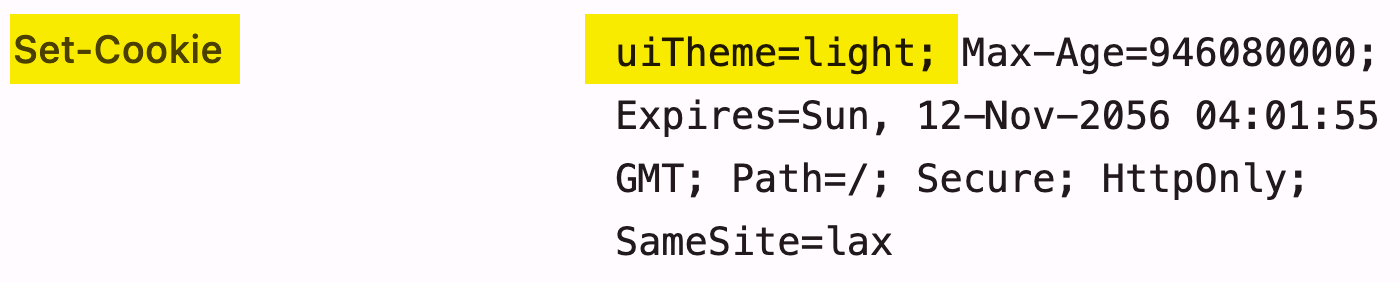
For the "current page", we don't need to consume this header since the Alpine.js @click handler optimistically updates the DOM to contain the necessary data-theme attribute. The cookie-based value only comes into play when the user navigates to a different page; or, leaves the site entirely only to return at a later time.
In that case, we need to apply the data-theme attribute on the ColdFusion server to make sure the next page is rendered with the correct theme. And for that, we go full-circle back to the main site layout. Earlier, we looked at the footer, where the theme options are rendered. Now, we look at the very first chunk of the same template:
<cfoutput>

	<!doctype html>
	<html lang="en" #ui.attrTheme()#>

	<!--- ... rest of CFML template ... --->
</cfoutput>
This ui.attrTheme() call is provided by a User Interface (UI) helper component that makes my front-work easier. Internally, the attrTheme() method is consuming the ThemePreference.cfc component that we looked at earlier. Here's a truncated look at my UI.cfc component:
component {

	// Define properties for dependency-injection.
	property name="themePreference" ioc:type="core.lib.web.ThemePreference";

	// ColdFusion language extensions (global functions).
	include "/core/cfmlx.cfm";

	// ---
	// PUBLIC METHODS.
	// ---

	/**
	* I return the data-theme attribute based on the current cookie settings.
	*/
	public string function attrTheme() {

		var theme = themePreference.getTheme();

		if ( theme.value.len() ) {

			return 'data-theme="#e4a( theme.value )#"';

		}

		return "";

	}

	// ... rest of file ... //

}
Note that if the currently selected theme is the "match system settings" theme, I omit the data-theme attribute altogether. This mirrors what my @click handler is doing on the client-side; and how my Set-Cookie header deals with theme persistence.
Theme Selection Is Necessary Complexity
There's a lot of code in this theming solution. Logic exists on both the client-side and the server-side across multiple files; and the logic only works if all facets align in non-trivial ways (ex, key-casing of the cookie name, omission of the data-theme attribute, progressive enhancement of the selection form, CSS attribute selectors). But, I'm calling this "necessary complexity" — as opposed to "incidental complexity" — because I'm not sure how I can reduce the complexity without compromising on some aspect of the user experience (UX).
The nice thing about this approach, however, is that it makes it relatively easy to add entirely new themes to the site. When all you could do was toggle between light mode and dark mode, future evolution of themes was limited. But now that I'm listing out all the themes, adding a new theme just means selecting a value and new set of CSS custom properties.
Though, to be clear, coming up with a set of CSS custom properties for a theme is far from easy. Just getting this site to dark mode was an uphill slog for me. Adding additional themes — well that sounds like something that AI will need to help with.

Reader Comments
I am on the fence about this one.
I know most sites have a light and dark theme now and it is trivial to default to the browser preference (I still have a theme switcher in the menu bar on most of my sites, although those will soon be phased out).
It feels like extra work for something that could be handled client side, but you could argue that handling the theme preferences rendering on the server shaves a few lines of javascript in the client to apply the theme (or set the theme in the cookie and apply to the layout to prevent reloading the page and the change will be picked up on the next refresh).
It did get me thinking though 😃
@Robert,
I mean, you're talking to someone who does everything in light mode (except my SublimeText editor). So the idea of having a theme picker is 100% theater as far as I'm concerned 😛 I'd be shocked if anyone actually uses it on this site. I added it back when everyone was adding theme pickers. I only just moved it down to the footer because it was a step shy of removing it altogether.
I would have kept it completely client-side until freakin' Claude Code told me about the Apple tracking issue with client-side cookies. Meh!
Post A Comment — ❤️ I'd Love To Hear From You! ❤️
Post a Comment →