
The Adobe ColdFusion 2025 update 14 was a big security update. And with the tightening of the screws, we've seen a number of breaking changes to the way our ColdFusion applications work. My scheduled tasks broke; my \U and \L RegEx replacements broken; and now, it seems that my empty-line RegEx matching has also broken. But, just as with all the previous breaking changes, once we notice the failure, we can come up with a workaround.
In my Big Sexy Poems application, I break the poem into separate lines in order to count the number of syllables per line. The format of a poem is often structured around stanzas separated by a blank line. To make sure that I map the correct syllable count to the correct line, my reMatch() regular expression extraction intended to extract both populated lines and blank lines.
The following RegEx pattern had been working fine for this use-case:
[^\n]*
This pattern says "find non-newline ([^\n]) character sequences of zero-or-more (*) length".
To demonstrate the breaking change, here's a standalone example. I'm constructing the "input string" programmatically to make it obvious where the blank lines are; and what the structure of the underlying character data is:
<cfscript>

	inputLines = [
		"AAA",
		"BBB",
		"", // Blank line.
		"", // Blank line.
		"EEE",
		""  // Blank line.
	];

	// Collapse array of lines into a newline-delimited string.
	newline = chr( 10 );
	input = inputLines.toList( newline );

	// In previous versions (before ColdFusion 2025 Update 14), this regular expression
	// pattern used to be able to extract each line, even the blank ones, with the `*`
	// operator (zero-or-more). As of update 14, this "breaks" in a very strange way.
	extractedLines = input.reMatch( "[^\n]*" );
	writeDump( extractedLines );

</cfscript>
I don't have any earlier versions of ColdFusion running on my machine; so I'm using TryCF.com to run this example through Adobe ColdFusion 2021 and 2025. Here's a side-by-side comparison of the behavior:
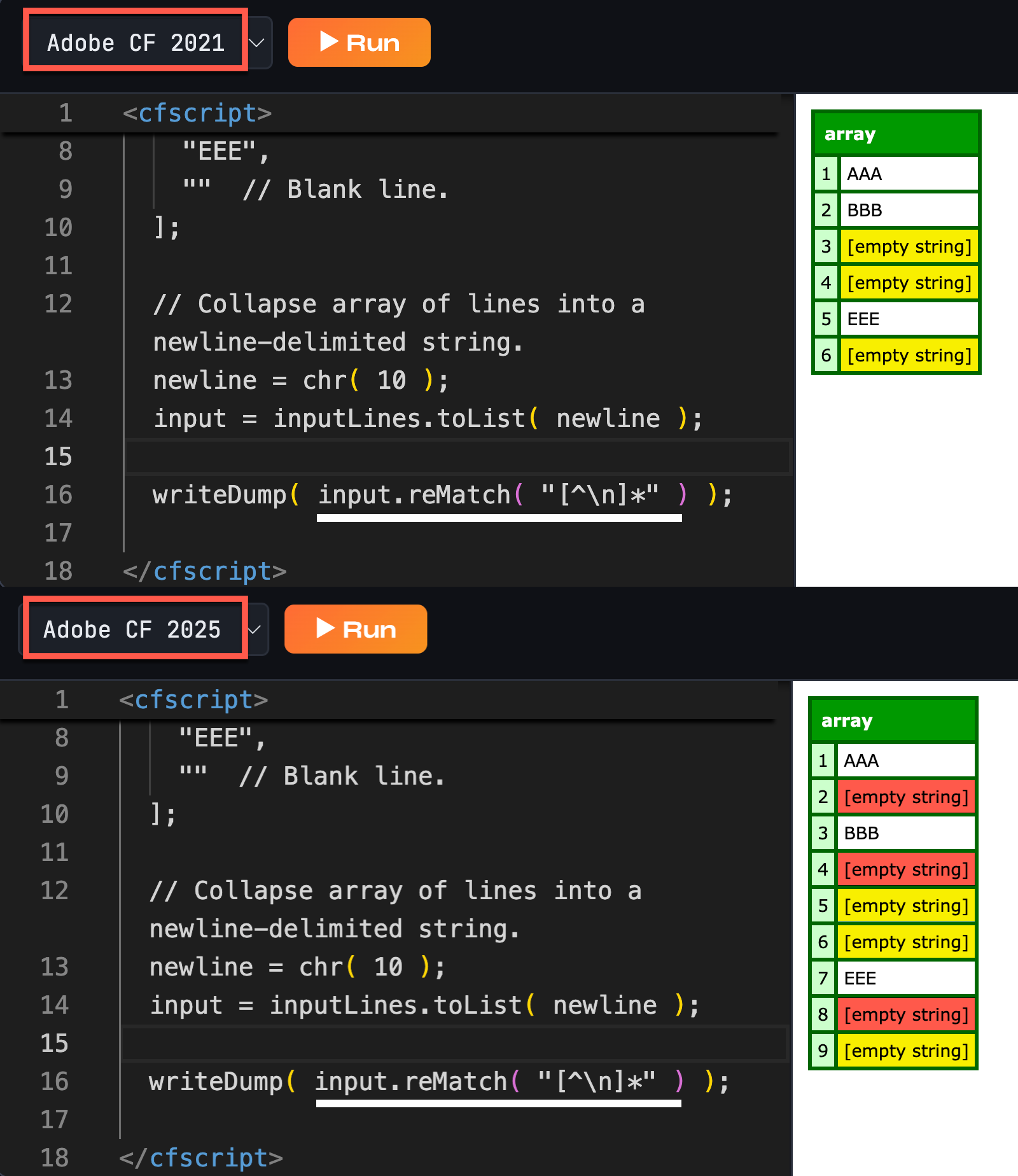
As you can see, Adobe ColdFusion 2025 is now including several phantom empty strings in the regular expression extraction.
So, how do we work around this? One way is to just be more explicit in the RegEx pattern. We can use the multiline flag (?m) to better articulate what shape of lines we're looking for. When the multiline flag is enabled, ^ means "start of line":
<cfscript>

	inputLines = [
		"AAA",
		"BBB",
		"", // Blank line.
		"", // Blank line.
		"EEE",
		""  // Blank line.
	];

	// Collapse array of lines into a newline-delimited string.
	newline = chr( 10 );
	input = inputLines.toList( newline );

	// Use the multiline flag to anchor the pattern to the start of each line (^); and
	// then match zero-or-more (*) character. In POSIX patterns, we know that `.` never
	// consumes the newline, so we don't need an end-of-line anchor.
	extractedLines = input.reMatch( "(?m)^.*" );
	writeDump( extractedLines );

</cfscript>
Here, I'm anchoring the regular expression pattern to the start of each line; and then I'm matching any sequence of zero-or-more characters. And when we run this in Adobe ColdFusion 2025 update 14, we get the following output:
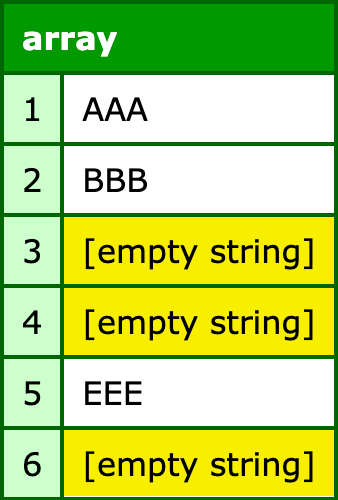
This is exactly the output we were hoping to get. And since the dot (.) doesn't match newline characters, we know that our .* sequence won't accidentally go past the end of the line.
Aside: after I saw that the multiline flag was helpful, I tried to simplify it even more with
(?m).*(removing the start-of-line anchor); but that reverts the behavior back to the breaking change (ie, extra empty lines).
Another workaround is forego regular expressions altogether and just parse the input string as a newline-delimited list. The trick to using a list-approach, however, is to flag that ColdFusion must include empty list items in the result. Otherwise, two delimiters around an empty line - \n\n - will be skipped-over:
<cfscript>

	inputLines = [
		"AAA",
		"BBB",
		"", // Blank line.
		"", // Blank line.
		"EEE",
		""  // Blank line.
	];

	// Collapse array of lines into a newline-delimited string.
	newline = chr( 10 );
	input = inputLines.toList( newline );

	// To parse the input as a newline-delimited list, we MUST include the second argument
	// (true) which tells ColdFusion to include empty items in the result. Without this
	// flag, the resultant array would ONLY contain the POPULATED lines.
	extractedLines = input.listToArray( newline, true );
	writeDump( extractedLines );

</cfscript>
Lists are truly the unsung heroes of ColdFusion. Once you get used to seeing data as delimited lists, you start to see lists everywhere, with all kinds of delimiters. And, when we run this list-parsing code in Adobe ColdFusion 2025 update 14, we get the following output:
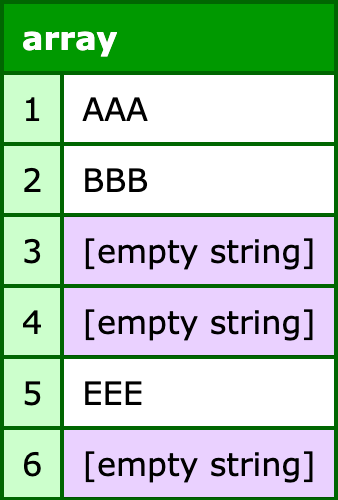
Again, we get the output we were hoping - both the populated and empty lines extracted.
Of course, list-parsing is only so flexible when it comes to delimiters. You can provide multiple delimiters; and you can define a multi-character delimiter; but you can't define a mixture of delimiter formats. This can be problematic with line-breaks because Mac and Windows still differ in standard line-breaks:
- Mac:
\n - Windows:
\r\n
If our input contained the Windows pattern, and we attempted to include both the carriage return (\r) and the newline (\n) as list delimiters, we'd end up with a lot of extra empty lines in the result. This is because ColdFusion would see the line-break sequence - \r\n - as two delimiters delineating an empty list item.
This is why I consider it a best practice to normalize line-breaks when accepting input (and especially before persisting data to the database). When you know that the only line delimiter you're ever going to work with is the newline (\n), life just gets a lot easier.
And while list-parsing doesn't give us the flexibility that we need for the Windows/Mac duality, regular expressions do. Let's revisit our earlier RegEx example; but instead of joining the input lines on \n, we'll join it on \r\n, and adjust our multiline pattern matching as needed:
<cfscript>

	inputLines = [
		"AAA",
		"BBB",
		"", // Blank line.
		"", // Blank line.
		"EEE",
		""  // Blank line.
	];

	// Collapse array of lines into a WINDOWS line-break-delimited string.
	windowsBreak = ( chr( 13 ) & chr( 10 ) );
	input = inputLines.toList( windowsBreak );

	// Use the multiline flag to anchor the pattern to the start of each line (^); and
	// then match zero-or-more non-line-break characters, accounting for both Windows and
	// Mac variations.
	extractedLines = input.reMatch( "(?m)^[^\r\n]*" );
	writeDump( extractedLines );

</cfscript>
Now, instead of using .* for our line consumption, we're using [^\r\n]*. The reason we can't use .* for Windows-based inputs is because the \r character gets consumed into the line extraction. And when we run this CFML, we get the same output as above.
Breaking changes are never fun; but sometimes Adobe has to break things in name of security. In the age of AI, with new devastating vulnerabilities being disclosed weekly, I guess we all have to learn to roll with the punches. The good news is, there's always a workaround.

Reader Comments
Post A Comment — ❤️ I'd Love To Hear From You! ❤️
Post a Comment →