
Recently, I've been seeing a few errors in my ColdFusion logs for malicious requests that are trying to post file uploads with a form field named, upload[]. The [] notation is Lucee CFML's way of grouping like-named fields into an array (as opposed to the traditional comma-delimited list). It's a fantastic feature; and for the last few years in Adobe ColdFusion, I've been using a polyfill to provide that same behavior in my applications.
But I only tested my polyfill with URL-encoded form submissions. And it seems that once you change the form's enctype to multipart/form-data, the polyfill breaks. To get around this, we can use an undocumented feature of Adobe ColdFusion — the form.getPartsArray() method.
I've never seen this method before; and there's only a handful of references to it on Google, none of which explains where the author learn about it:
- Adobe Forum, "Send input from client as array of objects "
- Adobe Forum, "Form/URL scope variables with same names. Inconsistencies across Java and ColdFusion."
- Ray Camden's post, "Determining the original case of form fields in ColdFusion"
- Stack Overflow, "Coldfusion Form.getPartsArray function"
Caution: the following paragraph is Claude Code's best guess as to what this method is and when it was introduced to Adobe ColdFusion. I have not been able to verify these facts.
Apparently, ColdFusion has been using Jason Hunter's com.oreilly.servlet (COS) library and its MultipartParser since maybe ColdFusion MX (ie, ACF 6, some 20 years ago). When a form is submitted with multipart/form-data, this parser kicks in and exposes its results on the form.getPartsArray() method; which returns a collection that contains a mixture of "param" and "file" parts:
When there's no form submission, or when the form has been submitted with URL-encoded parameters, the form.getPartsArray() method returns null.
Since I've never used this undocumented method before, I wanted to put together a little proof-of-concept (POC) before I attempted to weave it into my existing polyfill. In this POC, I have three <form> tags that each submit a different type of request:
method="GET"method="POST"method="POST"withenctype="multipart/form-data"
Each form submits most of its data using [] bracket notation to group like-named fields into an array. And each form submission includes a v ("version"), which let's me isolate the different contexts for server-side processing. But let me show you the HTML before we look at the ColdFusion processing:
<cfscript>

	// ... in separate code block later ...

</cfscript>

<!doctype html>
<html>
<head>
	<meta charset="utf-8">
	<title>ColdFusion's FORM.getPartsArray() Method</title>
	<link rel="stylesheet" type="text/css" href="./styles.css">
</head>
<body>

	<!--- V(1) - URL only. --->
	<!--- Caution: FORM[GET] will drop search parameters in the ACTION attribute. --->
	<form method="get" action="./index.cfm">
		<input type="hidden" name="v" value="1" />
		<input type="hidden" name="ids[]" value="1" />
		<input type="hidden" name="ids[]" value="2" />
		<input type="hidden" name="ids[]" value="3" />
		<button type="submit">
			URL ONLY
		</button>
	</form>

	<!--- V(2) - FORM + URL, url-encoded parameters. --->
	<form method="post" action="./index.cfm?v=2&ids[]=1&ids[]=2&ids[]=3">
		<input type="hidden" name="sort[]" value="4" />
		<input type="hidden" name="sort[]" value="5" />
		<input type="hidden" name="sort[]" value="6" />
		<button type="submit">
			URL + FORM
		</button>
	</form>

	<!--- V(3) - FORM + URL, multipart-encoded parameters. --->
	<form
		method="post"
		action="./index.cfm?v=3&ids[]=1&ids[]=2&ids[]=3"
		enctype="multipart/form-data">

		<input type="hidden" name="sort[]" value="4" />
		<input type="hidden" name="sort[]" value="5" />
		<input type="hidden" name="sort[]" value="6" />

		<input type="file" name="filename[]" />
		<input type="file" name="filename[]" />
		<input type="file" name="filename[]" />

		<button type="submit">
			URL + FORM / Multipart
		</button>
	</form>

	<cfdump label="URL Scope" var="#url#" />
	<cfdump label="FORM Scope" var="#form#" />

</body>
</html>
Note that at the bottom of the page, I'm dumping-out the url and form scopes. These scopes are going to be modified by the ColdFusion server-side processing based on the v value that is submitted. Let's walk through each v separately.
Processing method="GET"
My polyfill already works for GET requests, grouping like-named URL parameters together. But I'm showcasing it here with explicit processing in order to create a robust exploration. Since this is a POC, I'm hard-coding all the URL and FORM keys since I know what's been submitted.
<cfscript>

	// GET request.
	if ( url.v == 1 ) {

		// Note: Converting the underlying param map into a case-insensitive struct.
		rawUrlScope = {}
			.append( getPageContext().getRequest().getParameterMap() )
		;
		url.ids = []
			.append( rawUrlScope[ "ids[]" ], true )
		;
		url.delete( "ids[]" );

	}

</cfscript>

<!--- ... rest of the demo (seen above)... --->
If the v=1 form is submitted, we get the following page output:
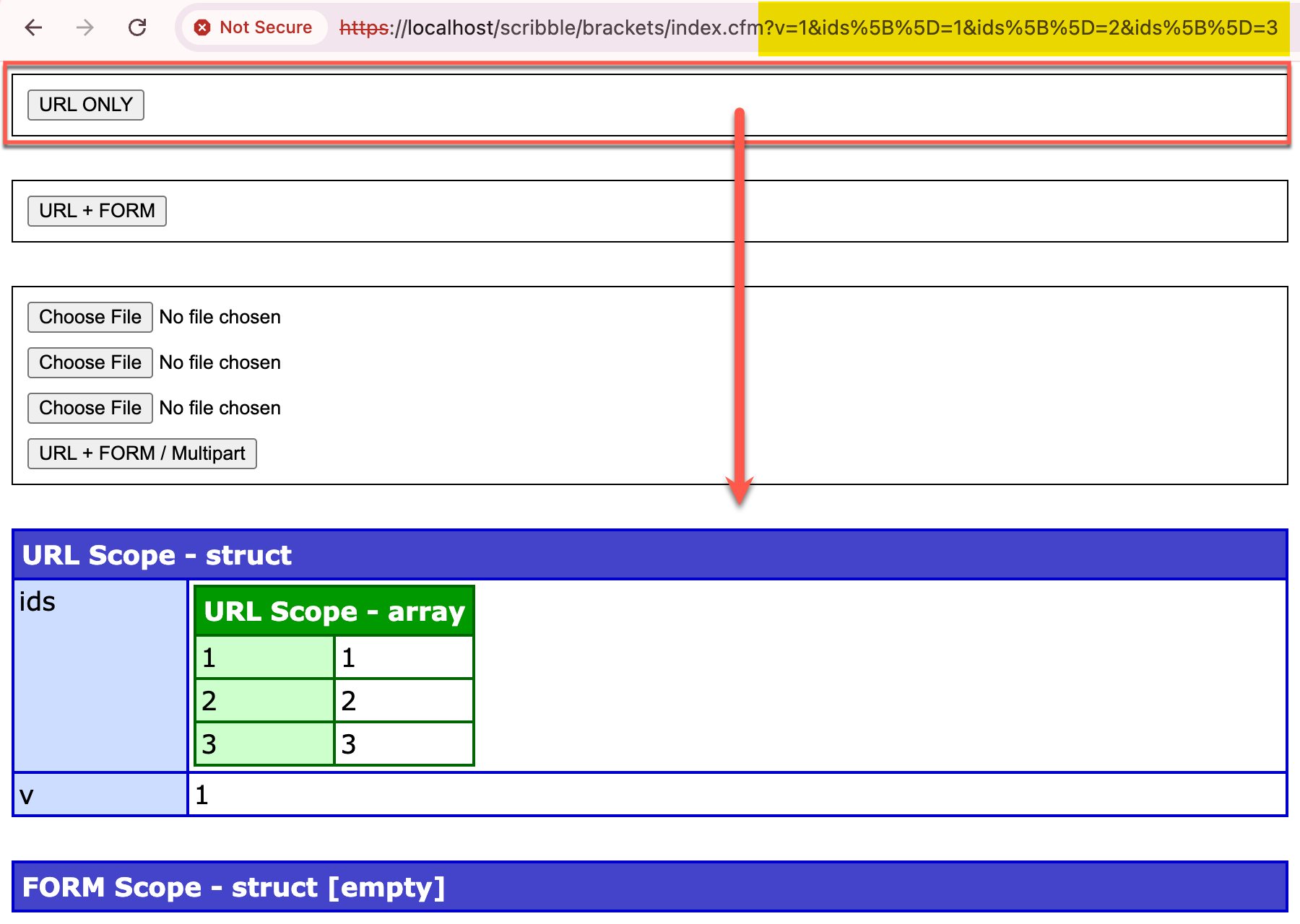
As you can see, we translated the ids[] form fields into a url.ids entry, as an array, less the [] suffix.
Processing method="POST"
My polyfill already works for "normal" POST requests, grouping both like-named URL parameters and like-named FORM parameters together. But I'm showcasing it here with explicit processing in order to create a robust exploration. Since this is a POC, I'm hard-coding all the URL and FORM keys since I know what's been submitted.
Note that in a POST, the source of the url parameters changes:
<cfscript>

	// POST request (with URL parameters as well).
	if ( url.v == 2 ) {

		// Caution: when the request is a POST, the raw URL scope comes out of a different
		// parameter map. In a POST, the previous parameter map now contains the FORM.
		// --
		// Note: Converting the underlying param map into a case-insensitive struct.
		rawUrlScope = {}
			.append( getPageContext().getRequest().getRequest().getParameterMap() )
		;
		url.ids = []
			.append( rawUrlScope[ "ids[]" ], true )
		;
		url.delete( "ids[]" );

		// Note: Converting the underlying param map into a case-insensitive struct.
		rawFormScope = {}
			.append( getPageContext().getRequest().getParameterMap() )
		;
		form.sort = []
			.append( rawFormScope[ "sort[]" ], true )
		;
		form.delete( "sort[]" );
		// form.delete( "fieldnames" );

	}

</cfscript>

<!--- ... rest of the demo (seen above)... --->
If the v=2 form is submitted, we get the following page output:
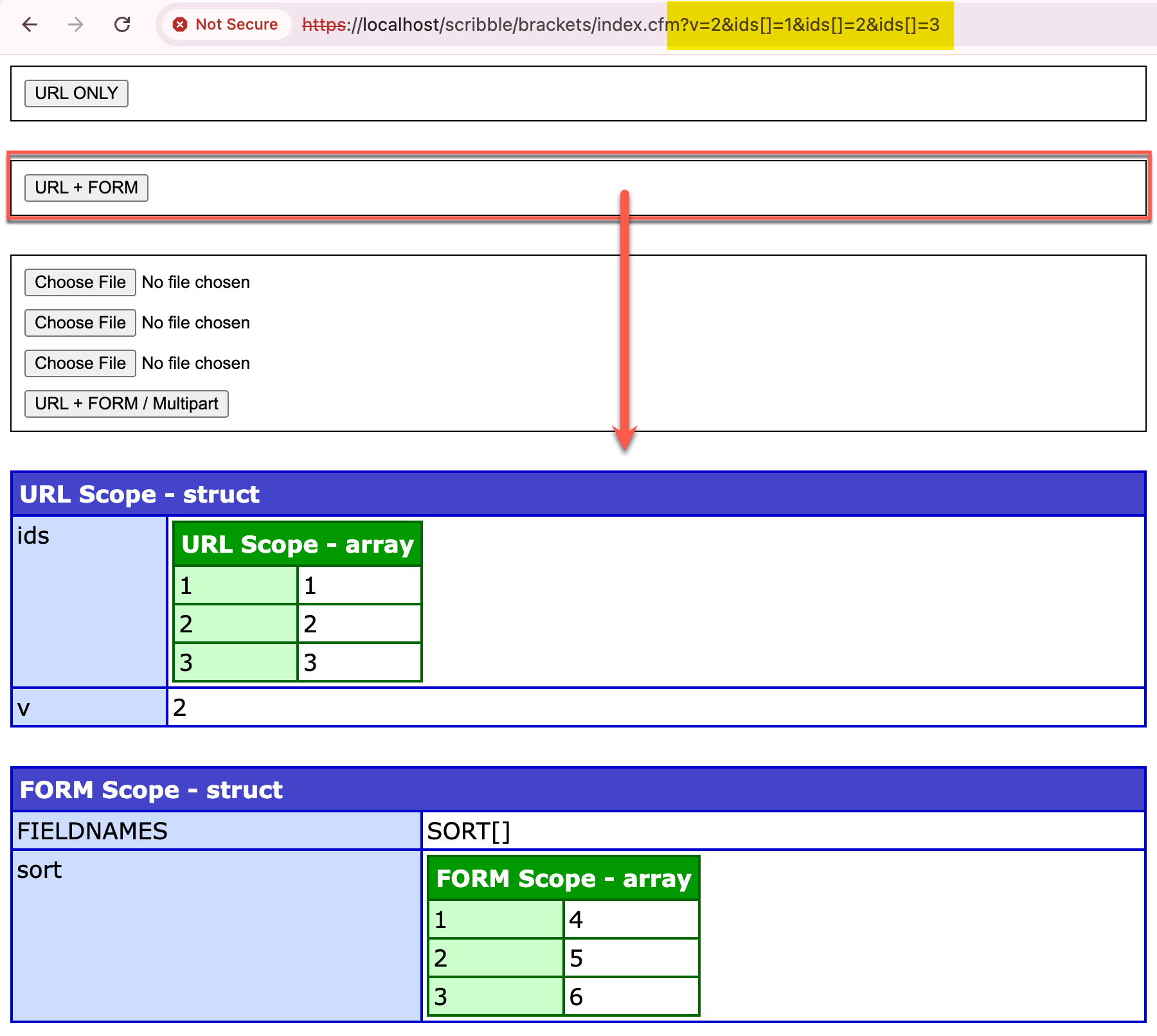
As you can see, we translated the ids[] form fields and the sort[] form fields into a url.ids entry and a form.sort entry, each as an array, less the [] suffix.
Processing method="POST" and enctype="multipart/form-data"
Ok, now the main focus of the POC. When a form is submitted with multipart/form-data encoding, we can still use the getParameterMap() method, on the page context, to get the url parameters. But, the other method:
getPageContext().getRequest().getRequest()
... is now undefined. Which is where the undocumented form.getPartsArray() comes into play.
Before we look at the code though, let's talk about file uploads in ColdFusion. When a user selects a file and posts it to the ColdFusion server, the form value that shows up in the form scope is the temporary file location at which ColdFusion has stored the uploaded file on the ColdFusion server. So when you — the ColdFusion developer — go to call something like fileUpload(), all you're really doing is moving the file from the temporary location over to the permanent location.
To complicate this, when you call fileUpload(), you don't give ColdFusion the temp file path, you give it the form field name. Then the fileUpload() BIF (built-in function) does some magic behind the scenes to introspect the form field and, presumably, extract the temp file location and process it.
If we start using bracket notation ([]) to group file form fields together, ColdFusion still goes through the temporary file machinations; but, because we're in polyfill territory here, ColdFusion combines those temp file locations into a single comma-delimited list. Which means that using [] notation basically rules-out the use of ColdFusion's native fileUpload().
But, since we now know that fileUpload() is little more than a fileMove() call with some additional security checks (vis-a-vis mime-type restrictions), we can re-implement that logic in our own code.
The leap of faith that we have to make, though — because all of this is undocumented — is that the order of the temp file paths in the combined comma-delimited list shows up in the same order as the form.getPartsArray() collection. This then allows us to consume the comma-delimited list of temp file paths, one at a time, and map them on to the pre-ColdFusion-processing data provided by the getPartsArray() method.
Hopefully this makes more sense when we look at the ColdFusion code:
<cfscript>

	// POST request with `multipart/form-data` (with URL parameters as well).
	if ( url.v == 3 ) {

		// Caution: when the request is a POST AND WE'RE USING MULTIPART FORM-DATA, the
		// raw URL scope comes out of the same parameter map as a when we're using a GET.
		// Because consistency would be silly!
		// --
		// Note: Converting the underlying param map into a case-insensitive struct.
		rawUrlScope = {}
			.append( getPageContext().getRequest().getParameterMap() )
		;
		url.ids = []
			.append( rawUrlScope[ "ids[]" ], true )
		;
		url.delete( "ids[]" );

		form.sort = [];
		form.filename = [];

		// With file-parts, things get tricky. The parts that we're looking at are the
		// underlying parts of the incoming servlet request. But, ColdFusion developers
		// are accustomed to seeing TEMPORARY FILE PATHS in the file-upload form fields
		// (ie, where ColdFusion has placed the uploaded file, outside of the current
		// application and within the the directory). Which the underlying request doesn't
		// know about because it prepares its data before ColdFusion consumes it. As such,
		// this is the one place where we have to look in the form scope to see which
		// `.tmp` files ColdFusion has made available. And then map those back onto the
		// array of fields. Which is extra tricky, because ColdFusion only includes paths
		// for populated file form fields, not empty file form fields. Which means we may
		// have fewer TMP paths than filename[] parts. We therefore have to keep track of
		// how many file paths we've consumed as we construct our data.
		consumedFileCount = 0;

		// Get the collection of `com.oreilly.servlet.multipart.*` instances. This is an
		// UNDOCUMENTED feature. But apparently ColdFusion has been shipping with Jason
		// Hunter's com.oreilly.servlet (COS) library and its MultipartParser since maybe
		// ColdFusion MX (ie, ACF 6, 20 years ago). There's only a few references of this
		// on Google. This returns UNDEFINED except when `multipart/form-data` requests
		// are made to the server.
		for ( part in form.getPartsArray() ) {

			// Non-file values (ie, form-scoped simple values).
			// --
			// https://www.servlets.com/cos/javadoc/com/oreilly/servlet/multipart/ParamPart.htm
			if ( part.isParam() ) {

				key = part.getName().left( -2 ); // Remove the brackets (`[]`) from the key.
				form[ key ].append( part.getStringValue( "utf-8" ) );

			}

			// File-upload values (ie, form-scoped binary values).
			// --
			// https://www.servlets.com/cos/javadoc/com/oreilly/servlet/multipart/FilePart.html
			if ( part.isFile() ) {

				key = part.getName().left( -2 ); // Remove the brackets (`[]`) from the key.

				// If the filename is empty, the user didn't select a file. Which means
				// that ColdFusion won't have a `.tmp` file for it. But we still need to
				// populate the array-based form polyfill. For that, I'm going to provide
				// a "null struct" with empty values.
				if ( ! len( part.getFileName() ?? "" ) ) {

					form[ key ].append({
						filepath: "",
						filename: "",
						contentType: "",
					});
					continue;

				}

				form[ key ].append({
					filepath: form[ "filename[]" ].listGetAt( ++consumedFileCount ),
					filename: part.getFileName(),
					// CAUTION: Do not trust this user-provided content-type. This could
					// be altered in a malicious request. You will need to validate the
					// content-type on the server-side processing part.
					contentType: part.getContentType(),
				});

			}

		}

		form.delete( "sort[]" );
		form.delete( "filename[]" );
		// form.delete( "fieldnames" );

		// CAUTION: Once we start using `[]` notation to group FILE UPLOAD FIELDS, we're
		// basically opting out of being able to use ColdFusion's fileUpload() BIF (as far
		// as I can tell). As such, we have to consume the `.tmp` filepath directly,
		// moving and renaming files with our own logic.
		for ( entry in form.filename ) {

			if ( ! entry.filepath.len() ) {

				continue;

			}

			// Don't trust the content-type provided by the user - we need to verify that
			// we have the expected types on the server.
			switch ( fileGetMimeType( entry.filepath ) ) {
				case "image/jpeg":
				case "image/png":

					// Note: I'm hard-coding `.png` of the sake of debugging.
					fileMove(
						source = entry.filepath,
						destination = expandPath( "./uploads/#createUuid()#.png" )
					);

				break;
			}

		}

	}

</cfscript>

<!--- ... rest of the demo (seen above)... --->
This is a lot of code. I've tried to comment it well enough, so I won't reiterate what it's doing here. I'll only show you that when I select two files, leaving one form field blank, and then submit v=3, we get the following output:
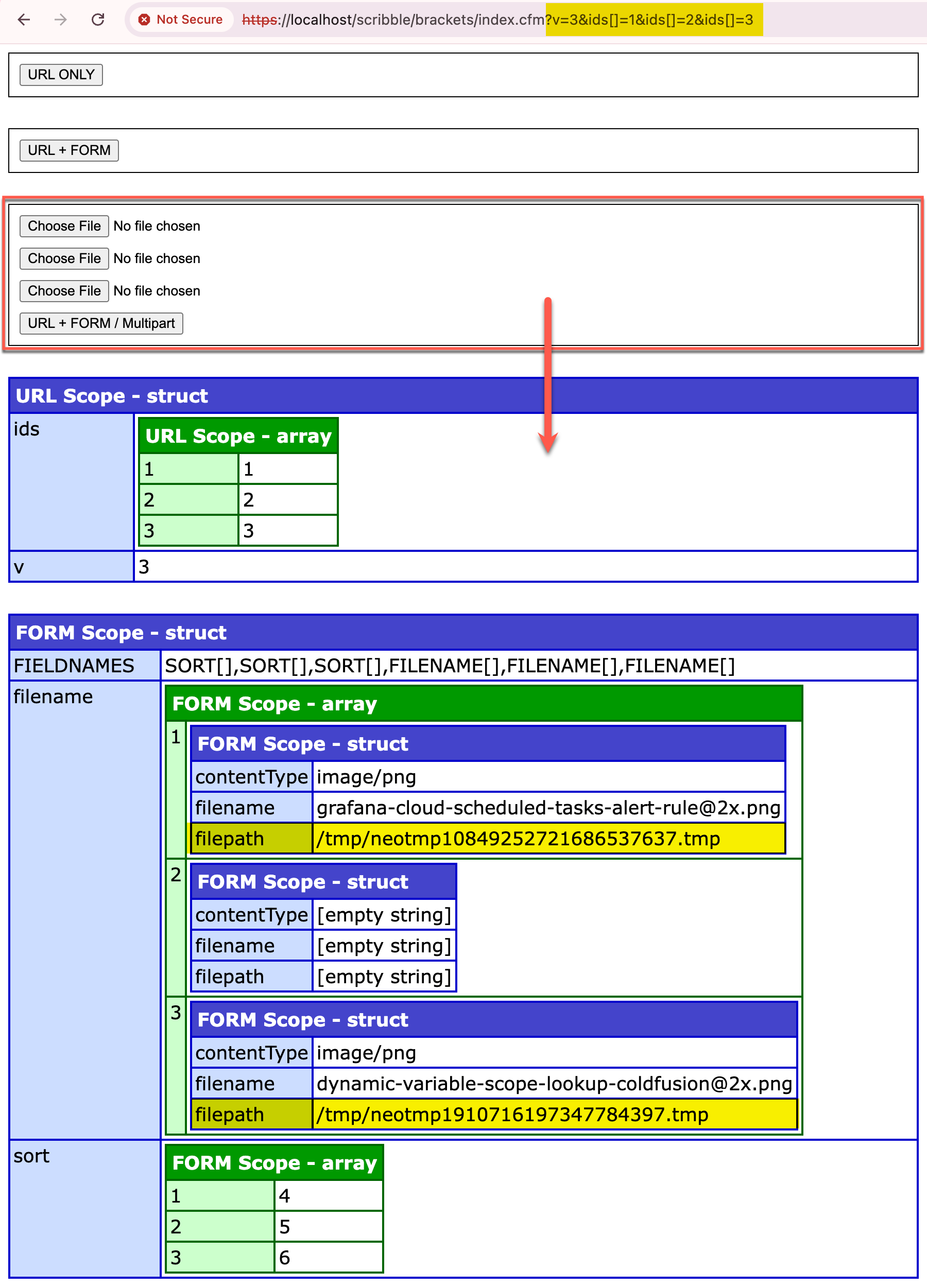
As you can see, we translated the ids[], sort[], and filename[] form fields all into their array-based counterparts, less the [] suffix. And since we've already forgone the use of fileUpload(), I've decided to make the "file upload result" structures a bit more robust, using some of the data that form.getPartsArray() has provided.
Processing the upload then becomes a matter of performing any desired security check (such as mime-type validation) and then using fileMove() to move the file from the part.filepath temporary location into the permanent location for my application.
But Maybe Don't Use This
So we have a path forward for using bracket notation [] for multipart form-data submissions. But, maybe don't use this? This is one of the most undocumented features I've ever seen in ColdFusion. It's probably best just to name file uploads fields uniquely. As in:
file_1file_2file_3
... etc. and then use older-school ColdFusion techniques for processing the form submission.
The problem, though — as I'm thinking this through — is that you can't mix-and-match approaches. Meaning, when you submit a form as multipart/form-data, the form fields are only available via the form.getPartsArray() method — no longer on the page context. So even if you give file fields unique names, you still can't use bracket notation for non-file-fields since the polyfill no longer has access to any of the form fields on the page context .getParameterMap() method.
So... maybe do use this. Quite the head-scratcher!
Life would just be better if Adobe supported bracket notation on form fields, AMIRIGHT?!

Reader Comments
Post A Comment — ❤️ I'd Love To Hear From You! ❤️
Post a Comment →