
In Lucee CFML, the arrayMerge() method takes two arrays and merges them together into a brand new array. Now that all the CFML engines (can) pass arrays-by-reference, the "merge" method is great when you need to collect values without corrupting an array that's still referenced in a calling context. Over the weekend, I went to use the arrayMerge() method in Adobe ColdFusion (ACF) 2025 only to be reminded — by a runtime error — that this method doesn't yet exist in ACF. As such, I thought it would be a fun code kata to create a polyfill for my blogging platform.
Using A Variadic Function With Reduce
While my weekend code only needed to merge two arrays together, my first instinct for the kata was to use a variadic function to allow N-number of arrays to be merged together. I could easily enforce a minimum of two arrays via the required keyword; and still leave room for more. Then, I could use the .reduce() method over the arguments collection to merge all the arguments into a reduction array:
<cfscript>

	merged = arrayMerge(
		[ "A-1", "A-2", ],
		[ "B-1", "B-2", ],
		[ "C-1", "C-2", ]
	);

	writeDump(
		label = "Merge 1",
		var = merged
	);

	// ------------------------------------------------------------------------------- //
	// ------------------------------------------------------------------------------- //

	/**
	* I merge all of the given arrays into a new array.
	*/
	private array function arrayMerge(
		required array input1,
		required array input2
		/* [, input3 ] */
		/* [, input4 ] */
		/* [, input5 ] */
		) {

		return arrayMap( arguments, ( input ) => input )
			.reduce(
				( reduction, input ) => reduction.append( input, true ),
				[]
			)
		;

	}

</cfscript>
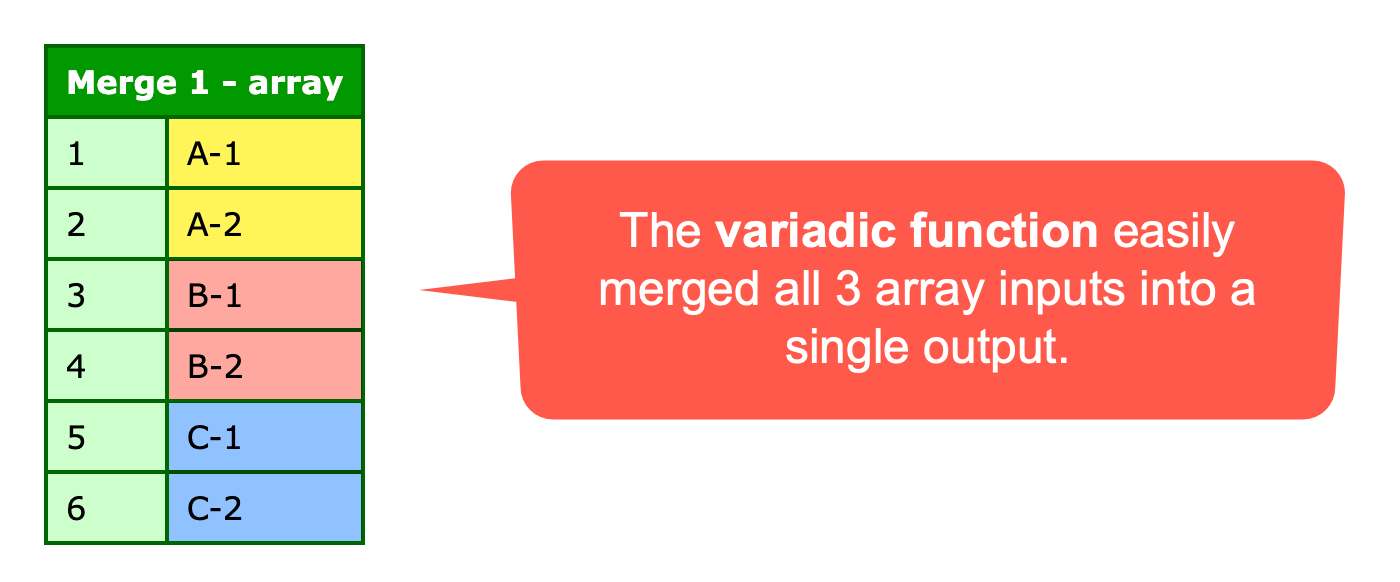
This works, and it gives me the expected output — all three input arrays merged into a single resultant array:
The problem is, I just hate the way this reads. This is the problem with .reduce(). 90% of the time, I get to the end of writing reduction code, look at it, feel gross, take pity on my future self, and then rewrite it as a for-loop. To be clear, this is completely subjective — my eyes just never got the hang of reading this code.
Using A Variadic Function With A FOR-Loop
And so, I took the variadic concept and pulled it apart, creating some intermediary variables and using a simple for-loop:
<cfscript>

	merged = arrayMerge(
		[ "A-1", "A-2", ],
		[ "B-1", "B-2", ],
		[ "C-1", "C-2", ]
	);

	writeDump(
		label = "Merge 2",
		var = merged
	);

	// ------------------------------------------------------------------------------- //
	// ------------------------------------------------------------------------------- //

	/**
	* I merge all of the given arrays into a new array.
	*/
	private array function arrayMerge(
		required array input1,
		required array input2
		/* [, input3 ] */
		/* [, input4 ] */
		/* [, input5 ] */
		) {

		var inputs = arrayMap( arguments, ( input ) => input );
		var reduction = [];

		for ( var input in inputs ) {

			reduction.append( input, true );

		}

		return reduction;

	}

</cfscript>
This approach is clearly more verbose; but, at least to me, this reads better. It's more obvious what each line is doing without having to employ a mental compiler.
But, much of the complexity here stems from the fact that I'm creating a variadic function. And I didn't actually need one — I just thought it would be cool.
Using Array Append
If we limit the arrayMerge() call to the two arguments, things become super simple. And, since we can now call member methods directly on array literals (as of Adobe ColdFusion 2025), our entire polyfill becomes two .append() calls:
<cfscript>

	merged = arrayMerge(
		[ "A-1", "A-2", ],
		[ "B-1", "B-2", ]
	);

	writeDump(
		label = "Merge 3",
		var = merged
	);

	// ------------------------------------------------------------------------------- //
	// ------------------------------------------------------------------------------- //

	/**
	* I merge the given arrays into a new array.
	*/
	private array function arrayMerge(
		required array input1,
		required array input2
		) {

		return []
			.append( input1, true )
			.append( input2, true )
		;

	}

</cfscript>
Here, each .append() call returns the parent array reference, which allows us to perform this entire merge operation in a single return statement.
Using the Spread Operator
Once I decided to limit the polyfill support to just two inputs, it further allowed me to simplify the solution with a more modern operator: namely, the spread operator. Instead of appending the two input arrays to a new array, I can spread the two input arrays into a new array:
<cfscript>

	merged = arrayMerge(
		[ "A-1", "A-2", ],
		[ "B-1", "B-2", ]
	);

	writeDump(
		label = "Merge 4",
		var = merged
	);

	// ------------------------------------------------------------------------------- //
	// ------------------------------------------------------------------------------- //

	/**
	* I merge the given arrays into a new array.
	*/
	private array function arrayMerge(
		required array input1,
		required array input2
		) {

		return [ ...input1, ...input2 ];

	}

</cfscript>
Here, the array literal is supplying the new array instance; then the spread operator (...) is implicitly iterating over each input array and is merging its (input) elements into the resultant array.
This is both readable and concise. So concise that it begs the question: do I even need the arrayMerge() polyfill if I can just do this in the calling context?
I still think the polyfill is nice for semantic clarity. The real bummer is that even with the polyfill, I don't get to call .merge() as a member method on a source array. Which is, in turn, a reason to use arrayMerge() - it gives me something to search for and replace once Adobe ColdFusion implements it natively.

Reader Comments
Post A Comment — ❤️ I'd Love To Hear From You! ❤️
Post a Comment →