As of Adobe ColdFusion 2025 (update 8), you can now pass ColdFusion functions into the Java layer as long as they conform to one of the Java SAM (Single Abstract Method) signatures. This applies to both built-in functions and custom functions / closures. And now when I go to write CFML/Java interop code, I try and take a moment to think about how this code might be "modernized". Over the weekend, I was able to do just that with Java's regular expression pattern Matcher class.
For years, I've been using the Java Matcher class to drive my JRegEx.cfc logic. But if you look at the code behind this ColdFusion component, you'll see that there are a lot of moving parts. For example, if I want to use a closure to drive string replacement, I have to create a string buffer, I have to use the appendReplacement() and appendTail() methods to build up that string buffer, and then I have to translate captured groups into something the closure can consume.
With the newly enhanced Java interop logic, however, I might be able to replace or simplify some of that logic with the Matcher::replaceAll() method. The .replaceAll() method takes an abstract function:
Function< MatchResult, String >
The Matcher instance will loop over the pattern matches found in the input string and invoke this function for each match. The function then returns the replacement text to be interpolated back into the resultant string. Much in the same way that JavaScript's String::replace() method works.
To see a practical example of this, I'm using regular expressions to match incoming requests to this blog against a set of route definitions. Part of how this works is that I have a set of simplified route definitions that have parameterized placeholders. Like:
/blog/:id-:slug.htm
Then, when a user requests a URL like:
/blog/123-hello-world.htm
... I need to be able to map 123 onto id, and hello-world onto slug.
There are multiple ways that this can be done. But for the sake of this article, I'm going to start by translating the "simple route definition" into one that uses named capture groups. What I want, therefore, is to turn the above route into something like this that uses the (?<name>) notation:
/blog/(?<id>[0-9]+)-(?<slug>[\w-]+).htm
And to do this, I'm going to use the Matcher::replaceAll() method.
In the following ColdFusion 2025 code, I'm looking for route parameter patterns starting with : and ending with an optional (. I then take the parameter name matches and translate them into the named capture group syntax:
<cfscript>

	// ColdFusion language extensions (global functions).
	include "/core/cfmlx.cfm";

	// ------------------------------------------------------------------------------- //
	// ------------------------------------------------------------------------------- //

	// In this route definition, you can have two kinds of parameterized placeholders:
	// those with an implicit pattern of "[0-9]+" (ie, an integer); and those with an
	// explicit pattern wrapped in a trailing parenthesis. In the following route, the
	// `id` is an implicit integer and the `slug` is an explicit "word".
	route = "/blog/:id-:slug([\w-]+)\.htm";

	// We're going to transform the route pattern into one with NAMED CAPTURE GROUPS. As
	// of Adobe ColdFusion 2025, you can now pass COLDFUSION FUNCTIONS into the Java layer
	// as long as they conform to one of the standard Java SAM (Single Abstract Method)
	// function signatures. In this case, we're going to pass a Function<Matcher,String>
	// instance that takes the matcher and returns the replacement value.
	patternText = new java( "java.util.regex.Pattern" )
		// Note that the trailing `(` is optional, allowing us to see if the matching sub-
		// string is using an explicit pattern that we have to honor.
		.compile( ":([a-zA-Z0-9]+)\(?" )
		.matcher( route )
		.replaceAll(( matcher ) => {

			var match = matcher.group();
			var captureName = matcher.group( 1 );

			// If the captured substring ends with a parenthesis, then the route provided
			// a pattern that we have to uphold. In that case, just interpolate the name
			// for the capture group.
			if ( match.right( 1 ) == "(" ) {

				return "(?<#captureName#>";

			}

			// Otherwise, the pattern will be an implicit integer.
			return "(?<#captureName#>[0-9]+)";

		})
	;

	dump([
		route: route,
		patternText: patternText,
	]);

	// ------------------------------------------------------------------------------- //
	// ------------------------------------------------------------------------------- //

	// Now that we have our route pattern translated into a named capture group pattern,
	// we can use it to extract incoming route parameters.
	matcher = new java( "java.util.regex.Pattern" )
		.compile( patternText )
		.matcher( "/blog/1234-coldfusion-can-haz-awesome.htm" )
	;

	// Note: the lookingAt() method is like find(), but it anchors the pattern to the
	// start of the target string.
	if ( matcher.lookingAt() ) {

		dump([
			id: matcher.group( "id" ),
			slug: matcher.group( "slug" ),
		]);

	}

</cfscript>
In this case, I'm using the Matcher::replaceAll() method to generate a regular expression pattern from a pseudo pattern. Then, I use the generated pattern in a test against a real URL (to see if the parameters can be extracted). And when we run this ColdFusion 2025 code, we get the following output:
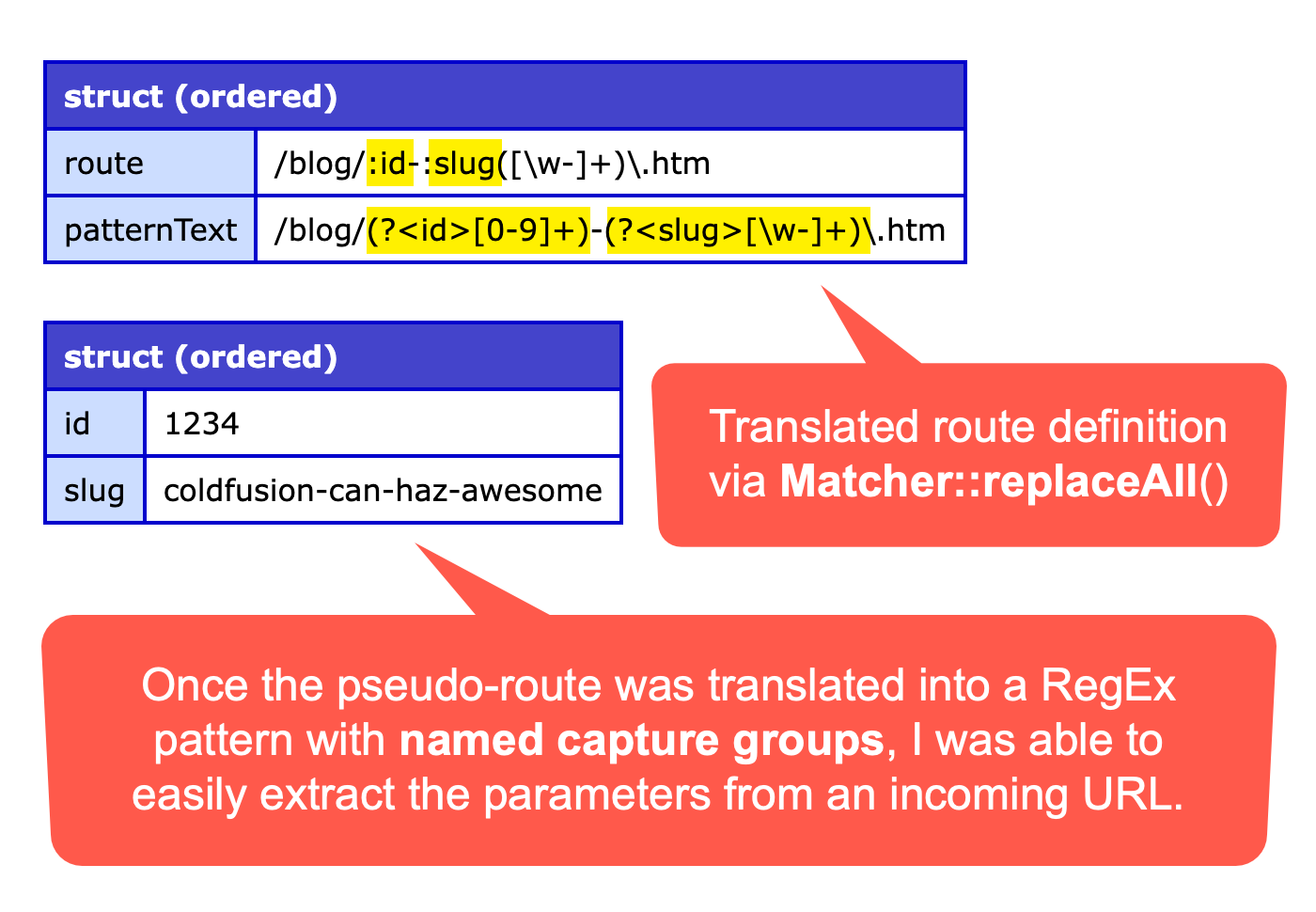
As you can see, I was able to use a ColdFusion closure to translate the simplified route definition (with slugs) into a complex regular expression pattern with named capture groups. Then, I was able to use that complex regular expression to parse a URL and extract the captured parameter values.
One of ColdFusion's super powers has always been the ability to dip down into the Java layer. But the ability to pass ColdFusion closures into the Java layer to act as "operators" is just taking that ease-of-use to the next level. What a joyful language!

Reader Comments
Post A Comment — ❤️ I'd Love To Hear From You! ❤️
Post a Comment →