New round() Precision In Adobe ColdFusion 2025 Update 8
This is a super minor improvement in the recent releases of Adobe ColdFusion 2025, but the need has come up in my code enough to merit a quick mention. The round() function now accepts a number of decimal places for rounding precision. Historically, the round() function has only rounded to the nearest integer. Which meant that if you wanted to round to, for example, 2 decimal places, you had to jump through some hoops to get there. But now, you can just pass a second argument with the number of decimals places desired.
Here's a quick demo:
<cfscript>

	value = 123.45678;

	writeDump([
		"Original Value": value,

		// OLD: Using number format.
		"Number Format": numberFormat( value, ",0.000" ),

		// OLD: Using decimal shifting.
		"Decimal Shifting": ( round( value * 1000 ) / 1000 ),

		// NEW: Using new round precision.
		"Round Precision": round( value, 3 ),
	]);

</cfscript>
In the call to round(), I'm passing in 3, which will round the decimal value to the 3rd decimal point:
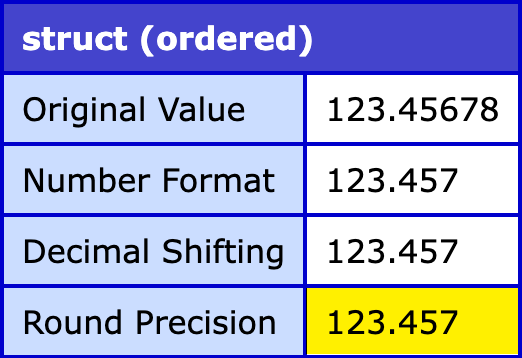
One thing to note is that only the numberFormat() approach will include the commas if the integer portion is larger than 1,000. The round() approach simply truncates the decimal portion to the given number of decimal places; but it doesn't apply any other formatting.
Epilogue On Significant Digits
Having nothing to do with the round() function itself, one thing worth noting is that when doing maths, you sometimes have to contend with "significant digits". I'm a little rusty here — I first learned about significant digits in my middle school "Natural Science" class; but the idea is that the outcome of your calculations needs to be limited by the input with the least number of significant digits.
As a simple example, imagine that we're calculating the area of a piece of wood:
- Width: 8.3 inches
- Length: 6.5 inches
In this set of measurements, both numbers have 2 significant digits. Which means that while the calculator math works out to be 53.95 (4 significant digits), the outcome that we can most confidently report is really 54. If we left in the .95 decimal place significant digits, we would merely be pretending that we had such precise confidence!
Yay for science!
Want to use code from this post? Check out the license.

Reader Comments
Hey Ben, thanks for sharing. You know I love such hidden gems. :-) But I'm curious how you learned of it.
Most important, it's not mentioned in the what's new doc page for update 8, nor even in the acf docs page for round, nor https://cfdocs.org/round.
Was it maybe mentioned in the cfsummit talk on language enhancements Monday? Either way, we'd want to get them to document it. I just wanted to share/ask this first.
@Charlie,
It's funny you ask because as I was writing this post, I wasn't sure if I was making it up, so I went to try and find the documentation and I couldn't. I think it must have been mentioned in the CFSummit presentation, "Level Up Your CFML with new Language Enhancements". I feel like it was on a slide that just had two lines on it that they very quickly glossed-over:
directoryCreate()with the new "create path" argument.round()with the new "precision" argument.Ironically, it seems that neither of those methods have had their documentation updated yet 😆
If it's not from there, though, then I'm not sure where I saw it. But I confirmed in CFFiddle that this breaks in 2023 and works in 2025.
Hi guys,
yes I thought I saw it too and found it in my pictures, it was in the presentation by Nikhil and Vikas from Adobe on the 22nd where they mentionned this and more update/fix related to QoQ for example.
For this: Slide photo
Forget the link to presentation : https://cfsummit.adobeevents.com/attendease/networking/experience/4f6017bd-29f8-4505-a505-839ecb1f9fc3/6490916c-a74c-414b-adb8-91416bbbb6b4
@Yann,
Oooooh, there it is! Thanks for the photo; I couldn't remember all the details of the
directoryCreate()either. Nice!Hi @Ben,
you're welcome. They also share a repo on their last slide it seems (but I dont see the round() in the readme: Day7 - Language and Feature Enhancements
But, but, just saw that there is a full ppt in there (not sure if it's the same as at the Summit) and this slide I capture is the 47th :D
Post A Comment — ❤️ I'd Love To Hear From You! ❤️
Post a Comment →