
Internet Explorer (IE) has had a different CSS box model than the Mozilla based browsers for a long time - or so I thought. As a hold-over from the "browser wars", I have come up with techniques to deal with the fact that CSS padding gets added to Mozilla's explicitly defined box widths, while in IE padding gets absorbed by the width of the box model. I still thought this was true today.
I was just reading about the Internet Explorer Box Model Bug over on Wikipedia, and I was blown away to read that this box model bug only affects IE 6 and later if the doc type is not present (defaulting to quirks mode) or the doc type is not web standards compliant. Could this be true? Is it possible that in the last few years, I simply didn't notice that my XHTML Transitional doc type removed this cross-browser compatibility issue?
To test, I set up a simple page that has one Div with padding and one Div without padding. The Div without padding will be my "control" group which will always have the proper width:
<html>
<head>
	<title>IE Box Model Bug Doc-Type Test</title>

	<style type="text/css">

		div#test {
			background-color: #FAFAFA ;
			border: 1px solid #666666 ;
			height: 50px ;
			line-height: 50px ;
			margin: 50px auto 20px auto ;
			padding: 0px 20px 0px 20px ;
			text-align: center ;
			width: 200px ;
			}

		div#control {
			background-color: #FAFAFA ;
			border: 1px solid #666666 ;
			height: 50px ;
			line-height: 50px ;
			margin: 0px auto 0px auto ;
			text-align: center ;
			width: 200px ;
			}

	</style>
</head>
<body>

	<!-- Here is the box with added padding. -->
	<div id="test">
		Padding: 20px ;
	</div>

	<!-- "Control" box with no padding. -->
	<div id="control">
		Ruler - 200px
	</div>

</body>
</html>
Notice that the above code has NO doc type at all. When this happens (no doc type is declared) Internet Explorer defaults to Quirks Mode, which has the IE box model bug. Here is the above page in FireFox and IE:
FireFox - No Doc Type Declared
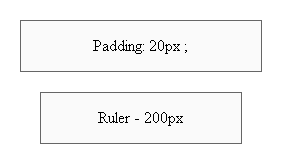
Internet Explorer - No Doc Type Declared
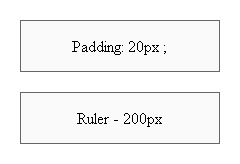
Notice that in FireFox, the padding on the first box is added to the explicit width of the Div and in IE, the padding is incorporated into the Div.
Now, let's throw in the XHTML Transitional Doc Type (Note: A good list of doc types is available in HomeSite if you hit CTRL+J):
<!DOCTYPE html PUBLIC "-//W3C//DTD XHTML 1.0 Transitional//EN" "http://www.w3.org/TR/xhtml1/DTD/xhtml1-transitional.dtd">
Now, running the Internet Explorer page again (FireFox does not change), we get the following output:
Internet Explorer - XHTML Transitional Doc Type Declared
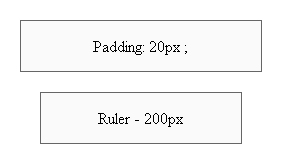
Notice that now, with the XHTML Transitional doc type, IE properly renders the box (with added padding) just as FireFox does. I can't believe I didn't know about this! Finally, one less thing to worry about.

Reader Comments
Nice post.
Anyone dealing with cross-browser layout issues should also read this article:
http://www.alistapart.com/articles/doctype/
Using a proper Doctype is CRITICAL for predictable results.
@Doug
I second that!
@Ben
There are a lot of articles out there on a technique referred to as DOCTYPE switching. If you get a chance check it out. It's definitely critical as Doug says to have a valid DOCTYPE defined.
Don't get me wrong - I use Doc types all the time. I pretty much stick to the XHTML Transitional one (you will see it in most of code examples). I just didn't know that IE actually changed the box model with it :)
It also changes the way it implements margin: auto as well, which I found out when I was testing the above... sweeet!
Sweet. Works with strict also. Is it just me, or is there STILL a slight discrepancy.
THANKS!
Never mind. I zeroed out the body tag and it's perfect. Thanks again Ben.
No worries. I am glad to finally know this stuff.
One more point,
Firefox also has has differences between "standard" and "quirks mode" layout - not nearly as, ahem, "quirky" as IE6, but it's good to keep in mind.
Here's a good link that covers the differences in various browsers based on the mode:
http://www.quirksmode.org/css/quirksmode.html
I applaud the moves towards standard compliance by MicroSoft.
I applaud more the moves to get a common platform without quirks!
Long Live Flex! Long Live AIR.
DW
I've used the XHTML Transitional doc type for a long time now and I was always curious why other folks were using box model hacks, or substitute style sheets when I was only using one. Of course, I've had to roll other workarounds, but the box model was never a problem.
Now I know why!
Off-topic, but Ben should see this:
http://www.dcooper.org/blog/client/index.cfm?mode=entry&entry=047DA95F-4E22-1671-574185DDEC5BA374
Ah, nevermind, I just saw that you saw it. ;)
Yeah, I just saw it a bit ago. Good stuff :)
Not bad buddy. Not bad at all. Rickey enjoys your website and will be returning here often.
I just finished a table-less pure css site and used html strict doctypes for it. That cleared up a ton of headaches trying to position stuff for IE.
Couple of points:
1) Try and make sure your doctype is the *very first thing* on the page - i.e. no newlines or spaces before it. So you might have to fiddle with <cfsilent> or whatever to make sure you've got no whitespace.
2) I've started using the yahoo reset / font and grid css code, which helps to keep things predictable:
http://developer.yahoo.com/yui/grids/
@Geoff,
Good point re: the first thing in the content. I like to put in my:
<cfcontent type="text/html" reset="true" />
Right before the Doc Type in order to clear the content buffer prior to page flushing. I have not seen the Grid CSS before. I will take a look at it, thanks.
Hi Ben, you're never to old to learn a new trick ;-)
Luckily with IE 7 most of the bugz with IE in Quirks mode have gone away. I still create my markup in Firefox first and then add a IE specific stylesheet thru conditional comments to treat those darn IE quirks. Usually with IE6 that was a whole bunch of extra markup, but with IE 7 it's enough with just a few extras. Anyways, I won't start the discussion here, just mention that if you want to use XHTML you strictly speaking need to serve your pages as application/xml+xhtml - which renders IE useless... The safer bet is to make use of the HTML 4.01 Strict Doctype.
Good luck with the switch ;-)
The tip from Geoff (below) is actually false.
"1) Try and make sure your doctype is the *very first thing* on the page - i.e. no newlines or spaces before it. So you might have to fiddle with <cfsilent> or whatever to make sure you've got no whitespace."
IE doesn't care about whitespace before the doctype; whitespace doesn't cause quirks mode.
It's actually anything *but* whitespace that causes quirks mode in IE6, and anything but whitespace or the xml prolog that causes it in IE7.
@Ben
If you want a good read that explains what doctypes cause what behavior check out http://hsivonen.iki.fi/doctype/.
Hi Ben,
about that whole GRID thingy, I find that it (like most libraries) causes a lot off overhead I'm not gonna use or not gonna need - but it's there and can cause my design to do strange thingz...
To make sure you beat the root of all evil (margins and paddings in browsers - always different defaults), set the following rule in your css:
* { margin:0; padding:0; }
And to make sure that your font-sizes are the same in all browsers on all operating systems do this (http://thenoodleincident.com/tutorials/box_lesson/font/index.html):
body { font-size:76%; }
all_other_html_tags_you_wanna_use { font-size:1.0em; }
And use conditional comments to serve IE X.x the right stuff.
@Sebastiaan,
I do something similar with regards to the margin and padding. As one of the first rules in my "content" style sheet, I set all the H, P, UL, and OL tags to have only a bottom margin and no padding.
Thanks for passing that link. That number of screen shots is just insane! That's what I call dedication to solving a problem.
A question though, about the EM usage. Let's say you have a client who has the content text one size and the navigation text another size. These are side-by-side and easy to compare. To get that sort of thing working such that the client is happy, do you just play with the EM value? EM doesn't mean anything to me, pixels do, so I have no idea who EM values will relate to pixels. Like, will 1em and .9em result in different size text? Or is that too close to translate to different pixel sizes?
Ben, usually I increase or decrease the text-sizing with 0.1em's to play with text-sizes. And yes, they do differ. Standards compliant browsers usually detect differences in 0.05em's, but as IE doesn't play ball increments of 0.1em's is the "safest" to use.
Some people will say that em's aren't really Web, but it has proven to be the best way of making sure your text-sizing is consistent over OS's and browsers. Usually an in-/decrease of 0.1em will correlate to a 2px in-/decrease, but don't pin me down on that, as I don't have 264 happy little screenshots ;-) !
@Sebastiaan,
I certainly see EM popping up all over the place. One of the places that I see it a lot is in margins and paddings. I don't really understand this so much. Well, maybe margin-bottom I can understand, but I see it on things like column widths and left margins... I am not sure how these relate to font-size. Ok, on the one hand, yeah, I can see that a large font-size *shoud* maybe have a larger column widths, but to me, column widths are more closely tied to monitor size, NOT font size.
But, I am still learning all this web standards stuff.
I'm sure a lot of you already know this but <cfcache /> can be a real pain with this...
The tag adds a HTML comment to the top of the cached results with the URL in. Unfortunately this kills IE's recognition of the DOCTYPE causing the following to be seen:
1st view of a page (uncached) renders in standards mode
2nd view of a page (cached) renders in quirks mode.
This means if you're using cfcache then you need to write your CSS to cope with both situations which is near impossible. Especially when you factor in FF, Opera and Safari on PC and Mac.
My suggestion would be to write your own cacheing mechanism rather than relying on cfcache wherever feasible.
Many inexperienced web developers often skip over or miss-understand the importance of DOCTYPE declarations. It is of crucial importance in today's web development world to properly define your markup. I have also addressed this issue on my blog, as many CSS tricks and demos will not work if people use the wrong DOCTYPE declarations.
Too bad you didn't know about this sooner, it could have saved you a lot of headache. I know I felt that way when I discovered it too!