Nylon Technology Presentation: Introduction To XPath And XmlSearch() In ColdFusion
As some of you might know, I give the occasional presentation here at our Nylon Technology staff meetings. After attending an XML session at CFUNITED, I thought it would be cool to give a presentation about XPath as it is something that I am starting to use more and more both in ColdFusion and in Javascript. I am by no way a master of XPath, and in fact, I was learning as I wrote this. It's really cool stuff, thought, and with a fairly simple syntax, you can really explore XML documents in a very powerful way.
So, sorry if there is any misinformation in here :)
The more recent releases of ColdFusion have really made great strides in XML document modelling and XML manipulation. With these innovations, the explosion of XML-based web services (SOAP, XML-RPC, etc), the use of styled XML web sites (VisualJQuery.com, World of Warcraft Armory), and Javascript libraries that can traverse the DOM using XPath (jQuery), it is becoming more an more valuable to really know how to leverage all the XML features that ColdFusion puts at our disposal.
ColdFusion's XmlSearch() function allows us to easily search XML documents using XPath:
<cfset arrNodes = XmlSearch( XML_DOCUMENT, XPATH_QUERY ) />
XPath is a syntax for defining parts of an XML document that might consist of one node or multiple node sets. XmlSearch() always returns an array of nodes. If the XPath argument does not result in any matching nodes, XmlSearch() will return an empty array. So long as your XPath syntax is valid, XmlSearch() will never throw an error.
For this tutorial, let's build a ColdFusion XML document that will be used in all of our examples:
<!---
	Let's create an XML document. For simplicities sake,
	we are NOT going to use any name spaces because that
	just complicates our lives. We are going to create
	an xml tree of Movie data that will be used in the
	rest of our examples.
--->
<cfxml variable="xmlData">

	<?xml version="1.0" encoding="utf-8" ?>
	<movies>
		<movie
			imdbtitle="tt0399146"
			dateadded="07/12/2007">

			<name>A History of Violence</name>
			<releasedate>09/30/2005</releasedate>
			<genres>
				<genre>Action</genre>
				<genre>Crime</genre>
				<genre>Drama</genre>
				<genre>Thriller</genre>
			</genres>

		</movie>
		<movie
			imdbtitle="tt0265349"
			dateadded="07/06/2007">

			<name>The Mothman Prophecies</name>
			<releasedate>01/25/2002</releasedate>
			<genres>
				<genre>Drama</genre>
				<genre>Horror</genre>
				<genre>Mystery</genre>
				<genre>Thriller</genre>
			</genres>

		</movie>
		<movie
			imdbtitle="tt0166924"
			dateadded="07/01/2007">

			<name>Mulholland Dr.</name>
			<releasedate>11/26/2001</releasedate>
			<genres>
				<genre>Drama</genre>
				<genre>Mystery</genre>
				<genre>Thriller</genre>
			</genres>

		</movie>
	</movies>

</cfxml>
This XML document contains movie data including IMDB lookup IDs, titles, release dates, and genres. I am trying to keep it simple, but at the same time use a good mix of tags, attributes, and node nesting.
While we might traditionally think of a Node as tag within the XML document object (or within the XHTML document object model), technically, just about everything contained in an XML document is some form of node. In fact, in XPath, there are seven kinds of nodes:
- Element (a tag)
- Attribute (name-value pair inside of a tag)
- Text
- Namespace
- Processing-instruction (such as style sheet or doc type)
- Comment
- Document (root element)
The Document element is always the first Element node within the XML document and is the Ancestor of all other nodes in the XML document (with the exception of the processing instruction nodes). In our XML document, the movies node is our Document element.
Now that we have our XML document set up and a basic understanding of the XML node structures, let's take a look at how XPath can help us search for nodes or node sets.
If your XPath contains just the name of the root element, XmlSearch() will select the root element and all children of the root element's children. Running this query:
<!--- Select the root node and all its children. --->
<cfset arrNodes = XmlSearch(
	xmlData,
	"movies"
	) />

<!--- Dump out resultant nodes. --->
<cfdump
	var="#arrNodes#"
	label="Named Node Selection"
	/>
... will result in the following CFDump output:
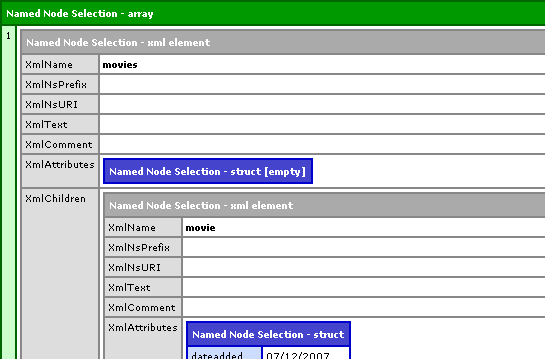
As you can see, the resultant array contains one element, the root XML node, which, in turn, contains the rest of the XML document. This is the least useful of any type of XPath search. In fact, the same root element can be accessed directly through the XML object via xmlData.movies.
Selecting a named node only works for the root element; you cannot select child nodes by using just the node name. If you want to select child elements of a node within the XML document, you can provide a file-system-like path to that node, starting with the root element. For example, if we wanted to select all movie nodes, our XPath would look like this:
movies/movie
This can also be written with a leading slash:
/movies/movie
When starting with a fresh XML document, the leading slash makes no difference. This will come into play when we are searching a sub-section of an XML document. In that case, the leading slash is always an absolute path from the root element, just as a leading slash in a URL is always an absolute path to the web root (but, more on that later).
Running the following XPath on the root element:
<!--- Select all the movie nodes. --->
<cfset arrNodes = XmlSearch(
	xmlData,
	"movies/movie"
	) />

<!--- Dump out resultant nodes. --->
<cfdump
	var="#arrNodes#"
	label="XPath: movies/movie"
	/>
... will result in the following CFDump output:
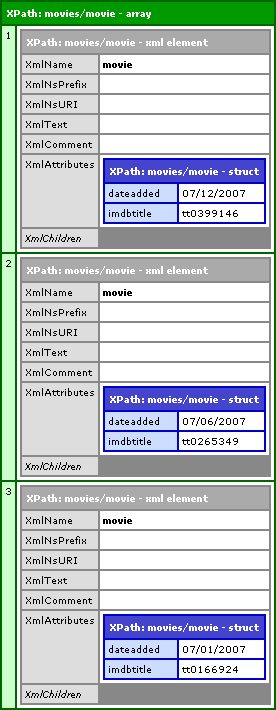
I have collapsed the XmlChildren so that you could easily see that each of the three movie nodes is returned as a separate index of the resultant nodes array. However, just so there is no confusion, the XmlChildren, at this point, do contain all the child node information for each of the movie nodes.
Also, our XPath can end in a trailing slash:
movies/movie/
This will result in the same exact node array; it is still selecting all movie nodes that are direct children of the movies node. To me, the trailing slash seems like more of a personal preference than anything else.
The XPath can be more than one level deep. Just like a file path, the XPath can search many levels of node nesting using the slash. The following XPath would select all movie genre tags:
movies/movie/genres/genre/
When we use that as our XPath:
<!--- Select all the genre tags. --->
<cfset arrNodes = XmlSearch(
	xmlData,
	"movies/movie/genres/genre/"
	) />

<!--- Dump out resultant nodes. --->
<cfdump
	var="#arrNodes#"
	label="XPath: movies/movie/genres/genre/"
	/>
... we get the following CFDump:
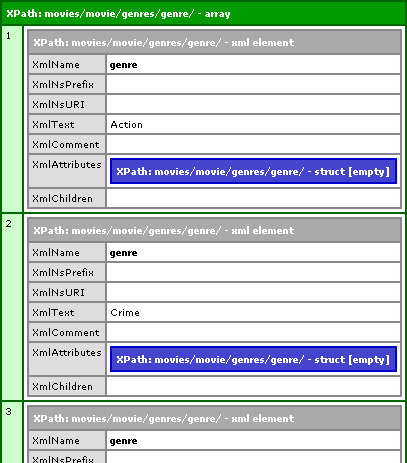
As you can see, each genre tag is returned in its own index of the resultant node array. And, while we have not touched on this yet, it is important to know that nodes are added to the return array in the order in which they are encountered in the XML document. XPath / XmlSearch() searches the XML document in a depth-first, top-down approach such that XML nodes will be searched in the order that they appear in the original XML document.
Using long XPaths to get to deeply nested nodes can get burdensome. To help deal with this, you can use the // XPath construct. The // has two different behaviors depending on where it is use in the XPath. If you use it at the beginning of the path, it will find the trailing path on matter where it exists in the XML document. If you use // in the middle of an XPath, it does not require the trailing path to be a direct child of the leading path but rather any sort of descendant.
So for example, to get all genre nodes in our XML document (no matter where they are nested), our XPath could simply be:
//genre/
Therefore, running:
<!--- Select all the genre tags. --->
<cfset arrNodes = XmlSearch(
	xmlData,
	"//genre/"
	) />
... will result in the exact same node array shown above.
The thing you have to be careful of here is that the path to the resultant nodes may not always be the same. For instance, if our XML document had books and author nodes, both of which contained child "name" nodes, the XPath //name would return all name nodes including those that were children of the book node or the author node.
When used in the middle of the XPath, // requires an ancestor-descendant relationship, but this does not need to be a direct parent-child relationship. For instance, the following XPath requires that our genre nodes be descendants of the movie tag, but not necessarily direct children:
movies/movie//genre/
In English, this is searching for all genre nodes that are some sort of descendant of all movie nodes that are the direct child of the movies root node. Therefore, running this code:
<!--- Select all the genre tags. --->
<cfset arrNodes = XmlSearch(
	xmlData,
	"movies/movie//genre/"
	) />
... will also result in the exact same node array show above.
The // construct can be used in both capacities within the same XPath, so, for example, the following XPath:
//movie//genre/
... would find all genre nodes that are some sort of descendant of all the movie nodes which can be anywhere within the XML document.
Up until now, we have been doing all of searches using the root XML document. XmlSearch() can take, not only an XML document, but any XML node. For the next few examples, we are going to be using XmlSearch() with the first movie node in the XML document. In order to get that movie node, we are doing this:
<!--- Get all of the movie tags. --->
<cfset arrMovieNodes = XmlSearch(
	xmlData,
	"movies/movie/"
	) />

<!--- Get the first returned movie node. --->
<cfset xmlMovie = arrMovieNodes[ 1 ] />
This is getting all movie nodes and then creating a short hand variable, xmlMovie, to point to the first XML node that was returned in the results array. Since XML nodes are passed around by reference, any pointer to that XML node is actually pointing to the XML node within the context of the original document.
Now that we have our first movie node, let's get all the genre nodes for that movie:
<!--- Get all genre nodes for this movie. --->
<cfset arrNodes = XmlSearch(
	xmlMovie,
	"genres/genre/"
	) />

<!--- Dump out the resultant nodes. --->
<cfdump
	var="#arrNodes#"
	label="XPath: genres/genre/"
	/>
As you can see, we are passing in our movie XML node pointer to XmlSearch() (as opposed to the entire XML document). Additionally, our XPath is now relevant to the current node, NOT to the root node. Running the above code, we get the following CFDump output:
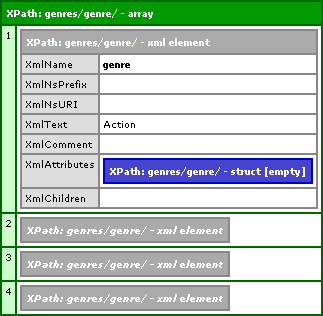
I am collapsing the last 3 genre nodes so you can see the full CFDump, but it is clear that we are only getting the 4 genre nodes that are descendants of the first movie node (the one we passed into XmlSearch()).
Now that we are searching relevant to sub-node of the XML document, understanding the leading / and // constructs becomes more important. A leading / starts a path that is always relevant to the root node. Therefore, even though we are searching a sub-node, the XPath:
/movies/movie/
... will still return every movie node in our XML document even though they are not descendants of the first movie node. Likewise, the XPath:
//genre/
... will still return every genre node in our XML document, not just the 4 descendants of our first movie node.
XPath can also traverse node relationships using the standard path constructs "./" and "../". ./ just refers to the current node, not that special. ../ refers to the parent node of the current node. Therefore, if we wanted to select all the movie nodes starting from the first movie node, we could use the XPath:
../movie/
This would go up one node to the parent node (movies) and then select all movie nodes that are its child. Therefore, running this code:
<!---
	Get the all the movie nodes that are sibling
	to this node (including itself).
--->
<cfset arrNodes = XmlSearch(
	xmlMovie,
	"../movie/"
	) />

<!--- Dump out the resultant nodes. --->
<cfdump
	var="#arrNodes#"
	label="XPath: ../movie/"
	/>
... will result in the following node array:
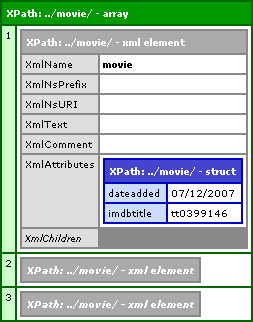
While I have collapsed some of the children, you can see that all three movie nodes were returned from a search that was relevant only to the first movie node we passed in.
If you ever want to return all nodes at a given level, regardless of their name, you can use the wild card, *. If we wanted to get all child nodes of the movie element, including name, releasedate, and genres, we could use the XPath:
//movie/*/
This will return 9 nodes (3 child nodes for each of the 3 movie elements).
Up till now, we have been searching for element (tag) nodes. However, remember that just about everything in the XML document is a node of some type and therefore we can search for it. By using the @ symbol, we can search for attribute nodes in just about the same way. Each of our movie nodes has an attribute, dateadded. If we wanted to return all those attribute nodes, we could use the XPath:
movies/movie/@dateadded/
This would select all "dateadded" attribute nodes that are a child of all movie nodes that are a child of the movies root element node. Running the following code:
<!---
	Get all date dateadded attribute nodes
	that are children of the movie nodes.
--->
<cfset arrNodes = XmlSearch(
	xmlData,
	"movies/movie/@dateadded/"
	) />

<!--- Dump out the resultant nodes. --->
<cfdump
	var="#arrNodes#"
	label="XPath: movies/movie/@dateadded/"
	/>
... we get the following CFDump output:
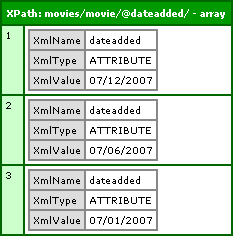
As you can see, these node structures are different than the element node structures that we got before, but they get returned in a results array just the same.
Just as with the element nodes, the wild card also works with attributes. If we wanted to select all attributes of the movie nodes, we could use the following XPath:
movies/movie/@*/
The @* is the wild card as it applies to attribute nodes. Therefore, running the code:
<!---
	Get all the attribute nodes that are children
	of the movie nodes.
--->
<cfset arrNodes = XmlSearch(
	xmlData,
	"movies/movie/@*/"
	) />

<!--- Dump out the resultant nodes. --->
<cfdump
	var="#arrNodes#"
	label="XPath: movies/movie/@*/"
	/>
... we get the following CFDump output:
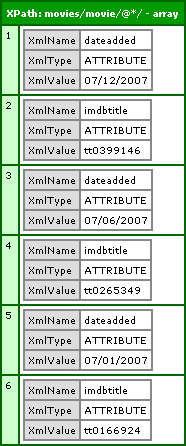
Now that we understand the basic XPath structures, we can start to make things more dynamic and powerful. Instead of returning all nodes at a given path, we can start to narrow down our search results based on tag and attribute properties. To do so, we can use Predicates. Predicates are always enclosed in square brackets and come directly after the node that they are modifying.
Since we should have a solid understanding of both the results array and the XML document structure, I am going to show less code and CFDump outputs and concentrate mostly on the XPath syntax itself.
We can get a node based on its position within the node set. For example, if we wanted to get the first movie node, we could use the XPath:
movies/movie[ 1 ]/
Here, the 1 inside of the brackets is the index of the node. To get the second movie node, we could have used 2, and 3 for the third node and so-on.
If we wanted to get the last movie node, we could use the built-in last() function and the XPath:
movies/movie[ last() ]/
If we wanted to get the second to last movie node, we could use some math in conjunction with the last() function:
movies/movie[ last() - 1 ]/
If we wanted to get all movies before or after a given position, we could use the built-in position() function. The position() function is a contextual function that returns the index of the node currently being examined. The following XPath will get all movie nodes that are not first:
movies/movie[ position() > 1 ]/
These built-in functions are very cool and what's cooler is that they can be used in conjunction with each other. If we wanted to get all movie nodes except for the last one, we could get all nodes whose position is not the last index. This XPath would look like this:
movies/movie[ position() != last() ]/
Now, we have to be careful here. The results of the movie nodes can be a bit misleading since there is only one set of movie nodes in our XML document. The positions above are relevant to the node position as it falls within its sibling set of the same node name. The positions are NOT relevant to the results array returned by XmlSearch().
This can be more clearly explained when we look at the genre tags. Each movie has its own set of genre tags so things get a bit more complicated. You might expect the following XPath:
//genre[ 1 ]/
... to return an array with only one node - the first genre node encountered. This however, is not correct. The [1] here refers to the node's position amongst its siblings. Since each movie has its own genre nodes, the above XPath will result in array that has three nodes. Each of the three nodes will be the first genre node found within each movie node. It might help to think of the predicates as being the HAVING clause of a GROUP BY in SQL. In that case, the HAVING condition modifies the group, not the overall result set.
We can also select nodes based on attribute properties. Just like the node positional filters, attribute predicates also go in the square brackets. And, just like selecting attribute nodes, attribute predicates are denoted by the @ symbol. With the attribute filtering, we can check for attribute existence as well as attribute values.
If we wanted to select all movie nodes that have any attribute, our XPath would be:
//movie[ @* ]/
In this case, we don't care what the attributes are or how many are in the node, we just want to get nodes that have at least one attribute.
If we wanted to select all movie nodes that have the imdbtitle attribute, our XPath would be:
//movie[ @imdbtitle ]/
Again, here we are not caring about the value of the attribute, we only care that the attribute exists within all matching movie tags. This would return all three movie nodes since all three movie nodes have the imdbtitle attribute.
If we wanted to select all movie nodes that have the imdbtitle attribute with a given value, our XPath would be:
//movie[ @imdbtitle = 'tt0265349' ]/
This will return just the single movie node for The Mothman Prophecies.
All of the above predicates have been filtering nodes based on properties of the current node and its attributes. Predicates, however, can also refer to the current node's descendants and their properties. In fact, you can even have nested predicates.
If we wanted to get all movie nodes that have at least one genre node, our XPath would be:
//movie[ genres/genre ]/
Here, we are saying that we want all movie nodes, no matter where they are in the XML document, but only so long as they have a direct child genres node that, itself, has as a direct genre child node. This of course, will return all three movies since they all have nested genre tags.
You will notice that the predicate path does NOT end in a slash. Earlier, I said that to select a node using XPath, the trailing slash was optional. This is not the case for predicate paths; a predicate path cannot end in a trailing slash - otherwise, ColdFusion would be expecting another navigational element (ie. a nested node name) on which to validate.
We just checked general descendant existence, but what if we wanted to get only the movie nodes that are in the Action genre? This is where some cool, nested predicates come into play:
//movie[ genres/genre[ text() = 'Action' ] ]/
Here, we are saying that we only want the movie nodes that have a descendant genre tag whose Text node is "Action". This, of course, will return an array with only one move node - A History of Violence.
We could even create compound tests. If we wanted to get all movies that are classified as EITHER Action or Drama, our XPath would be:
//movie[ genres/genre[ ( text() = 'Action' ) or ( text() = 'Drama' ) ] ]/
Are you beginning to see how powerful XPath can be? There is much more that can be done with XPath, especially when it is applied to things like XSLT. But for the purposes of XPath for use within ColdFusion's XmlSearch() function, I think this is a pretty good beginning.
Want to use code from this post? Check out the license.

Reader Comments
Great stuff. I've done quite a bit of XML manipulation in CF. However, I've run into performance issues with large (20mb+-) files. It could be the server CF is on, but I have started using our database (Oracle) to do the parsing of these files.
@Frank,
Dang! A 20MB XML file :) That's huge. I can certainly imagine that taking a while to parse.
thanks! this post helped me get ramped up on ColdFusion & XML in a hurry.
My pleasure. This stuff is pretty cool.
Have you tested XPath searching of retrieved nodes in 8.1? e.g., in your example, you cfset xmlMovie = arrMovieNodes[ 1 ] , then proceed to cfset arrNodes = XmlSearch(xmlMovie, "genres/genre/"). This does not seem to work any longer in 8.1.
In my example, I am using http://sportsfeeds.bodoglife.com/basic/AFL.xml to get the Line nodes for each Competitor. cflooping through Event nodes and Competitor nodes, with the current one marked as "competitor", XmlSearch(competitor, "//Line") references the root node of the entire document - not the current competitor node as would be expected - hence retrieving a large array of Line nodes, every Line node in the document, instead of just the 1 or 2 beneath that competitor.
Once again, Ben to the rescue :) Just started working with HRXML at my job and haven't really had to mess with XPath too much up to this point. Your stuff really is a life/time saver. Thanks.
@Gareth,
Glad to help. XPath is a truly awesome tool. If you have any questions, hit me up anytime.
Cool! Thanks. Now I'm running into the high ascii value problems you had at one point. We're dynamically generating the fields using javascript and the single quote is giving me grief. I'm trying to use replace to escape it, but no luck yet.
@Gareth,
High ascii values always seem to be a pain in all walks of technology!
Just in case you were wondering...it turns out that it was related to the carriage returns and line feeds (low ascii values :) ). I replaced chr(10) and chr(13) with \n and it worked like a charm.
@Gareth,
Ahh nice. Glad you got it working.
Okay, so how about this one. (BTW I love that I found this site and can ask all my stupid questions).
I am bringing in an RSS feed in XML and parse it. Now I want to pull only the articles that pertain to some keyword. Like oh say COLDFUSION. :)
The xml structure looks like :
<item>
<title>A title</title>
<description>A description</description>
<pubdate>A date</pubdate>
<link>A link</link>
</item>
What I want to do is pull only the articles with the search term in the title. I can do this of course by looping over the xml but is it possible with XPATH? I'm betting it is but I have just started into XPATH, XSLT, XSQL for Oracle. Does "IN" or "CONTAINS" work?
Ooooooh. I just tried it and it works like a champ. Now I have to see if I can do it so it doesn't worry about the case of the words. Or do I have to put an OR in there? Like
Title[contains(.,"ColdFusion") OR contains(.,"coldfusion")]
until I get all variations?
Dang. Yes, I'm back again. You are tuned into the manic programmer channel.
Okay, so I do that and I get all the TITLE nodes, how about getting all the NODES with children that meet the criteria? So I can get the link and description too?
@Don,
I'll whip up a quick demo.
@Don,
Unfortunately, there no super clean way to do this, but here are my thoughts on the subject:
www.bennadel.com/index.cfm?dax=blog:1491.view
I'm all green with cf and..
I can't figure out how to save the result of an xmlSearch to an xml file, this:
<cfset a = XmlSearch(xml, "/item[@name = 'someName']") />
<cfset xml = XmlParse(a)/>
<cffile action="write" file="file.xml" output="#xml#" />
obviously doesn't work ("complex object cannot be converted to values")
knowing #a# will always contain only one item,
what would be the straightest way to get the XmlSearch result back to "proper" xml ?
@Thibaud,
If you know that it will only return one XML node, then you can slightly update the CF:
<cfset a = XmlSearch(xml, "/item[@name = 'someName']") />
<cffile action="write" file="file.xml" output="#a[ 1 ]#" />
The a[ 1 ] will return the first XML node returned in the search. Then, when you use it in the output attribute, CF will automatically convert the XML node to an XML document (complete with doctype).
thanks for the quick reply.
I finally figured it all out in the mean time.
I was using :
/item[@name = #someName#]
which strangely - to me at least - needed to be:
/item[@name = '#someName#']
All working fine now just as you said.
Thanks again for the quick reply.
@Thibaud,
My pleasure. Let us know if you have any other roadblocks.
I've got some xml, that I can't quite figure out how to get the text() comparison to work with.
Basically, here it is:
<rss>
<channel>
<item>
<title>some title</title>
<category>catname1</category>
<category>catname2</category>
<category>catname3</category>
</item>
<item>
<title>some title2</title>
<category>catname1</category>
<category>catname3</category>
</item>
</channel>
</rss>
<cfset allNonWoWEntries = XmlSearch(xml_obj, "//item[category [ text() != 'catname2'] ]" ) />
Unfortunately, I get back both items. I know this is because it is only checking the first category. Any idea how I modify this XmlSearch/XPath string to have it search all the category children of each item element?
Thank you! Very informative post. It helped a lot!
@Pen,
It is not *just* searching the first category. That is actually the problem you are experiencing. You're asking for all item nodes that have a category child who's text is not "catname2". But, both items have at least one category that do not have that name.
The trick is that you want to get all item categories that do NOT have a category who's name is "catname2". Slightly different request, but huge difference in outcome.
Try this XPATH:
//item[ not( category[ text() = 'catname2' ] ) ]
To break it down quickly, the inner search:
category[ text() = 'catname2' ]
... says, make sure it DOES have a category with name "catname2". This is exactly what you don't want! So then, we take that search and wrap it in a not() command:
not( category[ text() = 'catname2' ] )
... This returns false if the inner search returns true. As such, we will NOT use any item that has a child category with name "catname2".
Hope that helps.
All I want to find out is the name of the root node. It feels like I'm going the long way around, but here's what I did... Is there a better way?
given:
<?xml version="1.0" encoding="iso-8859-1"?>
<b1700>
<common>
<opr value="" />
<email value="" />
<dsn value="" />
<commercial value="" />
</common>
<events>
<event name="">
<body value="" />
<opr value="" />
</event>
</events>
</b1700>
I'm trying to pluck the "b1700" using the following:
<cfset root=XmlSearch(configXML,"/*/") />
<cfset facility=root[1].XmlName />
It works, but is it proper?
Thanks
@Brian,
You don't have to search for the root node; if you have an XML document, it will always be at XmlRoot:
configXML.XmlRoot.XmlName
@Ben,
I was going to make a post here, but it got a bit long so I posted it over at my blog
http://flexoop.com/2009/07/xmlsearch-in-coldfusion-unusual-behavior/
Is this normal or a bug?
@Gareth,
Sorry for the late response - I just left a comment on your blog.
@Ben,
No problem...there are only so many hundreds of comments + posts + tweets + gym + actual paying work you can do a day :). I posted a quick follow up response. I guess I had another node in there and the dot notation (./property) has to have all nodes, as you said, like getting to a folder. I added ./properties/property and it worked.
I didn't know if there was a way to specify "anywhere within the subdocument" something like the //, but within the subdocument.
Hi Ben,
Sorry to drag up this thread again but I have a problem that's driving me nuts!
I have my XML object which has the following levels (I have trimmed some of the irrelevant text to simplify):
<?xml version="1.0" encoding="utf-8"?>
<soap:Envelope xmlns:soap="http:/....." >
<soap:Body>
<VillaSearchV2Response xmlns="http://...">
<VillaSearchV2Result>
<NumberOfRecords>354</NumberOfRecords>
<Villas>
<Villa>
..........
etc...
I am simply trying to extract the NumberOfRecords node. I have tried using
<cfset abc =xmlSearch(myXml, "//VillaSearchV2Result/NumberOfRecords") />
<cfset abc =xmlSearch(myXml, "/VillaSearchV2Response/VillaSearchV2Result/NumberOfRecords") />
<cfset abc =xmlSearch(myXml, "//NumberOfRecords") />
<cfset abc =xmlSearch(myXml, "//VillaSearchV2Response//NumberOfRecords") />
and a few more but each time I dump abc I just get an empty array.
I would be really grateful for any help with this. BTW, love the site and all your dedicated hard work that goes into it.
@Paul,
Sorry for never getting back to you on this; I am sure you have figured this out, but it's the name-spacing in the root node that is messing you up. You have to either strip out the names paces (in the XML string) or query based on the "local-name()" of the node:
www.bennadel.com/blog/1809-Making-SOAP-Web-Service-Requests-With-ColdFusion-And-CFHTTP.htm
Anyway, mostly just cross-linking this here in case other people hit the same problem.
@Ben
Thanks for the reply. I did manage to sort it out eventually. The link that you posted just took care of another issue I had been having and hadn't gotten around to investigating yet so thanks for that too :-)
Paul.
@Paul,
Ha ha, awesome - score one for Teamwork!
My XML:
<root>
<item label="hello">
<name>
hello
</name>
</item>
</root>
<cfdump var="#XMLSearch(myXML.xmlRoot, "item[@label = 'hello']")#" />
Returns the Array with length 1.
<cfdump var="#XMLSearch(myXML.xmlRoot, "item[name[text() ='hello']]")#" />
Returns an empty array.
What am I doing wrong? Why can't I get the item with the node value I am specifying, even though I can get it when searching an attribute??
@Eric,
It's probably a white-space issue. Are there line breaks in the NAME node? If so, those line breaks have to be reflected in the text comparison. You might try the normalize-space() function - I am not sure if it is supported. It's basically a trim() method in XPath:
item[ name[ normalize-space(text()) = 'hello' ] ]
See if that helps?
@Ben,
That was exactly the issue. I scoured the W3C docs to find this:
http://www.w3.org/TR/xpath/#function-normalize-space
Thanks!
@Eric,
I had run into the same exact problem a while back. Glad to help.
Ben, I've looked around and I'm not sure this is even supported, so here goes:
Given a deeply nested document is it possible to get the full path to the elements searched?
For example (trimmed for brevity):
<databases>
<database id="d">
<tables>
<table id="t">
<columns>
<column id="c">
<column_header>I have a value
when I search, I really want to return the table/column pairs that have value in the column_header, but using this search, I get the full array of a table (including the columns that have no value):
XmlSearch(theXMLStream,"//table[ columns/column/column_header[ string-length(text()) != 0 ] ]")
What I really want get us just the path
(like /databases/database/tables/table/columns/column)
Probably more than search can do, but before I roll my own solution I'm hoping there's a magic button (aren't we all)
@Brian,
Very interesting question. I don't think there's a way to get XPath searches to return anything other than XML nodes. If you are going to write your own solution to this, just don't forget that ColdFusion exposes an XmlParent node:
www.bennadel.com/blog/1493-Use-XmlParent-To-Get-The-Parent-Node-In-An-XML-Document-In-ColdFusion.htm
That will make converting the resultant node-set back into a path.
@Brian,
I was intrigued by the concept of reverse engineering an XPath query. I took a crack at it:
www.bennadel.com/blog/2048-Finding-The-XPath-Of-A-Given-XML-Node-In-A-ColdFusion-XML-Document.htm
This won't blindly take an array of nodes - it works on a single-node basis; but, I think it could be expanded to work with an array.
Thanks for the great info, your examples on iterating over xml in cold fusion were very helpful. Just one comment: your webpage takes over a minute to load, every time.
@Mike,
Glad you like the post. Sorry about the load time, there must have been strain on the Database server at the time. The site loads very quickly for me. Hopefully next time you'll have a more efficient experience :)
Hello,
thank you for the very useful information and your precious time.
I am looking to find XML elements using OR for the attribute.
Example :
<track type="general">
</track>
<track type="video">
</track>
<track type="audio">
</track>
I am trying to find track having type to Audio OR Video, so far I have tried lot of things without success, including google ;)
<cfset tempNode = XMLSearch(result,"//track[@type='Video|Audio']")>
0 result
I could do it in 2 statements, but you know how it is, I really need to crack this :)
Regards,
Philippe
Thanks Ben!
Fantastic cheat sheet for xmlSearch() this is !
Ben,
Is there any way to get XMLSearch() to return the full node tree that the searched item was found under, when using the "//WHATEVER" search method?
I am attempting to automate the conversion of some old very inconsistent SGML into XML, and am picking and choosing which tags to convert/replace.
My problem is that because the source structure is completely arbitrary, and the tag(s) I'm looking for could be virtually anywhere in the structure hierarchy (inside and/or below the node I am searching in,) I have to use the "//WHATEVER" search method. Unfortunately, because the results of the XMLSearch() don't include the node structure indicating where each item was found, I can't easily recreate the source structure or replace the found content correctly in the resulting XML.
Any ideas?
Thanks,
David
P.S. Enjoyed meeting talking to you at cfObjective in MN this past April. I still owe you the beverage of your choice.
Apologies, Ben.
It looks like Brian asked essentially the very same question (10/28/2010) as mine, and I missed it in the comments.
Let me know if anything has changed since your answer, otherwise it seems I am SOL on easily getting the node tree path of a searched for element.
Thanks again,
David
SOL apparently means "So Overly Lucky". Just saw the:
www.bennadel.com/blog/2048-Finding-The-XPath-Of-A-Given-XML-Node-In-A-ColdFusion-XML-Document.htm
post.
D'oh!
Ben, I just wanted to convey my gratitude for a fantastic XPath tutorial. You covered examples for just about everything and made it look easy. An old post but a timeless one.
Once again, your tutorial made my life a lot easier. Thanks so much!!!
Hello,
I am trying to find out what XML tags are present in a given XML structure. I need to find out what tags are missing from a set of 6 and the ones that are missing I need to skip some steps in my database insert.
I can dump out a list of existing tags under Email Preferences using
selectedAttributes = XmlSearch(myxmldocupper, "/EmailPreference");
I see in the dump I have the XmlChildren with each having the XmlName of the tags I need to check. I just don't know what the syntax is to get the value out of the XmlName field so I can do the compare with the 6 possible tags that could be contained in the XML structure.
Any help would be great.
Thanks,
Dawn