Learning ColdFusion 8: Javascript Object Notation (JSON) Part III - AJAX Demo
Thanks to ColdFusion 8's support of JSON, we can easily convert ColdFusion objects to and from JSON using SerializeJSON() and DeserializeJSON(). In conjunction with this explicit JSON serialization, ColdFusion 8 has also added the ability for remote access ColdFusion functions to return ColdFusion objects as JSON data when they are invoked as web services (using the ReturnFormat = "JSON" CFFunction attribute). Now that we have covered all basics, let's take a look at an example of how ColdFusion 8 remote access functions can be used as JSON serving web services in an AJAX application.
To demonstrate this, I have created a web service ColdFusion component, TextUtility.cfc, which has one remote access method, GetWords(). This method takes a string and breaks it up into an array of words, which it then returns:
<cfcomponent
	output="false"
	hint="Handles some text utility functions.">


	<cffunction
		name="GetWords"
		access="remote"
		returntype="array"
		returnformat="json"
		output="false"
		hint="Returns an array of the words in the given string.">

		<!--- Define arguments. --->
		<cfargument
			name="Text"
			type="string"
			required="true"
			/>

		<!--- Define the local scope. --->
		<cfset var LOCAL = {} />

		<!---
			Get the words by splitting on non-word characters.
			This is not the best way to do this, but this is
			easy for the purposes of our demo.
		--->
		<cfset LOCAL.Words = ARGUMENTS.Text.Split(
			"[^\w]+"
			) />


		<!---
			ASSERT: Our words array here is not a traditional
			ColdFusion array. The String::Split() method gives
			us a Java string array which is not what a
			ColdFusion array actually is. Be CAREFUL!
		--->


		<!--- Create a standard ColdFusion array. --->
		<cfset LOCAL.Array = [] />

		<!---
			Add our Java string array to this ColdFusion
			array. To do this, we must convert the string
			array into a list.
		--->
		<cfset LOCAL.Array.AddAll(
			CreateObject( "java", "java.util.Arrays" ).AsList(
				LOCAL.Words
				)
			) />


		<!--- Return the ColdFusion array. --->
		<cfreturn LOCAL.Array />
	</cffunction>

</cfcomponent>
Notice that the function returns the actual ColdFusion array - we are not using the SerializeJSON() method. By setting the ReturnFormat CFFunction attribute to "JSON," we are getting ColdFusion to convert the array into Javascript object notation when it is returning the array as a remote method call. This is sooo awesome because, remember, a remote-access function can be called locally as well as remotely; by controlling the format using ReturnFormat rather than through explicit conversion, we don't have to worry about data issues when used locally.
Also notice that we are taking the array of words returned from the String::Split() method and converting that into a ColdFusion array. This is necessary since the Java string array (String[]) returned from Split() is not a true ColdFusion array and if you tried to return it from the method, ColdFusion would throw the following error when trying to create the serialized JSON data:
Could not convert a value of type class [Ljava.lang.String; to an Array.
Now that we have the remote web service in place, we can create an AJAX application that will consume it. For our demo, we are going to keep it really simple; our application will take a phrase from one text input, pass it to the web service, and then output each of the returned words on a new line of a textarea:
<!DOCTYPE html PUBLIC "-//W3C//DTD XHTML 1.0 Transitional//EN" "http://www.w3.org/TR/xhtml1/DTD/xhtml1-transitional.dtd">
<html>
<head>
	<title>ColdFusion 8 JSON / AJAX Demo</title>

	<!-- Include jQuery library. -->
	<script
		type="text/javascript"
		src="jquery-latest.pack.js"
		></script>
	<script type="text/javascript">

		// This calls the AJAX function, passing in the phrase
		// that the user has entered in the form.
		function GetWords(){
			$.getJSON(
				// Invoke the TextUtility.cfc as a web service.
				// Be sure to include WSDL for web service.
				"TextUtility.cfc?wsdl",

				// Send the method name and the phrase that the
				// user has entered in the form.
				{
					method : "GetWords",
					text : $( "#phrase" ).val()
				},

				// When the JSON data has returned, fire this
				// callback function and pass in the JSON data
				// as it's argument.
				ShowWords
				);
		}


		// Once the AJAX call has come back, this function will
		// enter the words into the text area.
		function ShowWords( arrWords ){
			var jTextArea = $( "#words" );

			// Clear the text area.
			jTextArea.val( "" );

			// Iterate over the array of words returned from
			// our remote web service.
			$.each(
				arrWords,
				function( intI, strWord ){
					jTextArea.val(
						jTextArea.val() +
						strWord +
						"\r"
						);
				}
				);

		}


		// When the body is ready to load, hook up the
		// on click event for the submit button.
		$(
			function(){
				$( "#submit" ).click( GetWords );
			}
			);

	</script>
</head>
<body>

	<form>

		<p>
			<input
				type="text"
				id="phrase"
				name="phrase"
				size="40"
				/>

			<input
				type="button"
				id="submit"
				value="Get Words"
				/>
		</p>

		<p>
			<textarea
				name="words"
				id="words"
				cols="50"
				rows="20">
			</textarea>
		</p>

	</form>

</body>
</html>
We are using jQuery to make the AJAX / JSON calls. By doing so, we are hiding the fact that the JSON data returned by the web service is being converted to a Javascript array, but rest assured, that is what $.getJSON() is doing. Take a look at the $.getJSON() method call and you will see that it has three arguments. The first is the URL that we are invoking as a web service. For our demo, that web service URL is the TextUtility.cfc with the WSDL flag. The Second argument is the parameters struct; our parameters consist of the method name, GetWords, and the argument that we are passing in, Text. The third argument is the call back method that gets fired when the AJAX call returns. This is the method to which the JSON data (turned Javascript Array) is sent.
The call back method just loops over the passed in array and puts each index of the array on its own line of the page's textarea input. If we run the above page and enter the phrase:
Hold me close and hold me fast, the magic spell you cast, this is La Vie en Rose
... we get the following output:
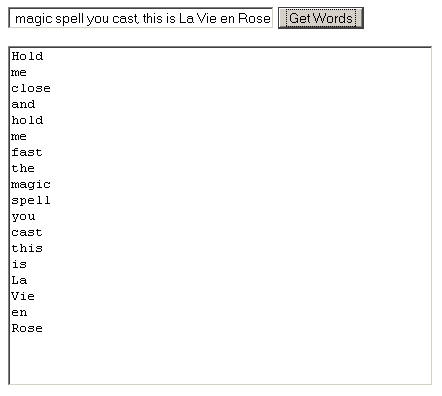
As you can see, ColdFusion 8's ability to return ColdFusion objects as JSON data is going to make interacting with AJAX application much easier. This will hold especially true when those web services also have to interact with other ColdFusion-based modules (in which case, returning JSON data would not be a valid option).
Want to use code from this post? Check out the license.

Reader Comments
Ben, Thanks a lot for this great article. I enjoy reading your articles very much.
@Siby,
Thanks a lot for the kind words. If you ever want to see an article on something specific, please do not hesitate to ask.
Very nice article, Ben! Just a note - you don't need the wsdl flag when invoking CFCs as JSON web services. These are REST web services, rather than SOAP.
@Ashwin,
Thanks for the tip. My web service understanding is a bit fuzzy. So, you only need WSDL when using CFInvoke to call the web services?
Ben,
You should at least be using cfajaxproxy! The whole application can be written with the new ColdFusion 8 AJAX tags, right? :-)
Something for another entry perhaps?
Keep up the great postings.
Ben,
The ?wsdl URL param is only used for GET requests when you are in fact getting WSDL for your web service client software. For instance cfinvoke gets the WSDL and generates Java artifacts (via Apache Axis) that it then compiles and invokes to consume the service.
For AJAX, the access="remote" CFC functions are invoked in an entirely different way. The HTTP request contains URL parameters (?method=GetWords) which then indicates which method to call with what arguments.
Cfajaxproxy can take care of this all for you for AJAX.
Hope this clear it up a little.
@Tom,
I will definitely be checking on the CF8 AJAX stuff. I figured one topic per post... plus Ray Camden seems to be exploring a lot of the layout / AJAX stuff and I don't want to deal with his Jedi mind tricks - next thing you know I am showing up to work wearing a tutu :)
Yeah, my web service understanding is the sketchy part of my understanding. Web services, SOAP, etc... all get grouped under stuff I have used but don't fully understand.
From your comments above, are you saying that CFInvoke does not need the WSDL flag all the time? Or are you saying that since CFInvoke is totally different from AJAX that is actually does need the WSDL flag?
Thanks for all the clarification.
Hi,
I installed the snippets on Coldfusion 8. But for some unknown reason, the words don't get display after I press 'Get Words' button. Nothing happens.
The GetWords function gets indeed called. The returned Response is shown below (retrieved using Firedebug). I am running Coldfusion 8 with Cumulative Hot Fix 1.
I really don't understand what's happining. The getJSON flickr example (http://docs.jquery.com/Ajax/jQuery.getJSON) on the jquery.com works fine for me.
I will greatly appreciate any help/suggestions.
Thank you very much!
Alex
Note: The only change of code I made is to replace the line that loads jquery.js with the following
<script src="http://code.jquery.com/jquery-latest.js"></script>
-----------------------------------------------------
<!DOCTYPE html PUBLIC "-//W3C//DTD XHTML 1.0 Transitional//EN" "http://www.w3.org/TR/xhtml1/DTD/xhtml1-transitional.dtd">
<html xmlns="http://www.w3.org/1999/xhtml">
<head>
<meta http-equiv="Content-Type" content="text/html; charset=iso-8859-1" />
<title>Untitled Document</title>
</head>
<body>
</body>
</html>
["abc","def","ghi"]
-----------------------------------------------------
@Alex,
If the words array is coming back from the JSON request, it must be something wrong with the ShowWords() method. My suggestion is to start putting some alerts() in there to see where the code is actually going wrong.
However, if there are no errors, then I have heard that JSON might be messing up. Apparently when a JSON request fails, it fails quietly. Try alerting the returned JSON data as the first thing in the ShowWords() method.
Hey Ben...
I'm having an issue with the getJSON jQuery method and calling a CFC directly. I posted it about it on the jQuery list, but since you're a CF guy, you might be a better person to ask.
http://groups.google.com/group/jquery-en/browse_thread/thread/21a68cea4bb11e84
Have any input?
@Andy,
Unfortunately, I do not know. I have not done any cross-domain JSON calls yet. Hmmm. Weird.
Just a thought for those of you who are having trouble returning JSON data directly from your CF8 CFC...You might want to check to see if you have cfdebug output appending itself to the bottom of your JSON return data.
@ben first off thanks for another great article. Always so useful and clearly stated. I got your example working and modified it to return JSON from a coldfusion query, using the optional serializeQueryByColumns attribute, just fine and I wish to do something a bit more practical with the returned data, such as create a table of data. Maybe its just my lack of understanding on how to loop, in jquery, over the returned JSON, but I have had no real luck in my google searches for practical examples of how to take the returned JSON and create nice displays out of the data. Whether it's in a table or some other element I'm sure I can experiment if I could better understand how to pinpoint the data. I've tried all types of things like: myArray.DATA[i] and myArray['DATA'][i] (inside a jquery $.each iteration). Any help with this would be greatly appreciated. Thanks in advance.
@Tim,
You can either create actual HTML that gets returned in the AJAX call; or you can create templates based on the returned JSON data:
www.bennadel.com/index.cfm?dax=blog:1393.view
Hey Ben
Is there any video tutorials on JSON and coldfusion together that you know of? I really appreciate this Blog but JSON is a new concept to me... It seems like it can do almost ANYTHING, well sort of...
Is it still possible for the serializeQueryByColumns attribute to be set to false without explicitly using the serializeJSON function? How would you even pass that attribute?
ooops. I mean set serializeQueryByColumns = true (Which is a column-oriented JSON Object)
@Simon,
I am not sure what you are asking? How can you use the column flag without explicitly calling the function that uses it?
@Jody,
JSON is just a notation for representing objects. Just like WDDX is an XML-style format for representing data, JSON is another plain text format for representing data.
Objects / Structs are defines using curly braces:
{ name: value, name: value }
... and arrays are defined using square brackets:
[ value1, value2, value3 ]
On their own, they don't do anything - you need to deserialize them back into native objects (whether that is Javascript or ColdFusion or whatever types of objects).
ColdFusion has a lot of functionality these days for helping us serialize (turn objects into JSON) and deserialize (turn JSON into objects) data structures. The ReturnFormat on remote methods even does this implicitly for us if we choose ReturnFormat="json".
I can't make this work across-domain.
Assuming you are using javascript to consume the webservice, the json would need to be converted to jsonp by coldfusion, and your javascript would need to look for jsonp instead of json.
I'm still stuck with coldfusion MX 6, so I'm not sure how you would modify Ben's code to return jsonp instead.
After posting, I decided to google around a little. Here's what I came up with: http://www.coldfusionjedi.com/index.cfm/2009/3/11/Writing-a-JSONP-service-in-ColdFusion
@Kevin,
That works
Thanks