
Learning ColdFusion 8: Javascript Object Notation (JSON) Part II - Remote Method Calls
ColdFusion 8 has introduced the use of JSON, a light weight data exchange standard commonly used in conjunction with AJAX. ColdFusion 8 has introduced not only the conversion to and from JSON using the SerializeJSON() and DeserializeJSON() methods, it has added the ability to return remote method call values as JSON data. Previously, we talked about the data conversion aspect of JSON; now, let's take a look at these remote method calls.
Up until now, when dealing with the ColdFusion CFFunction tag, we have only had to think about the ReturnType. ColdFusion 8 has introduced the ReturnFormat attribute. This attribute can have the following values:
- WDDX
- Plain
- JSON
For this post, we are going to concentrate on returning values as serialized JSON data. ReturnFormat only applies to remote access calls; if called locally, ReturnFormat is ignored and the standard ColdFusion data type is returned.
To test this, we need to set up a ColdFusion component with a remote-access method. I have created a Date Utility ColdFusion component that has one method, GetWeekDates(), which takes a single date and returns a struct containing the date of each day of the given week:
<cfcomponent
	output="false"
	hint="Date/time utility functions.">


	<cffunction
		name="GetWeekDates"
		access="remote"
		returntype="struct"
		returnformat="JSON"
		output="false"
		hint="Given a date, it will return all dates in that week in a day-keyed struct.">

		<!--- Define arguments. --->
		<cfargument
			name="Date"
			type="date"
			required="false"
			default="#Now()#"
			/>

		<!--- Define the local scope. --->
		<cfset var LOCAL = {} />

		<!--- Get first day of week. --->
		<cfset LOCAL.Sunday = (
			Fix( ARGUMENTS.Date ) -
			DayOfWeek( ARGUMENTS.Date ) +
			1
			) />

		<!--- Create week object. --->
		<cfset LOCAL.Week = {
			Sunday = LOCAL.Sunday,
			Monday = (LOCAL.Sunday + 1),
			Tuesday = (LOCAL.Sunday + 2),
			Wednesday = (LOCAL.Sunday + 3),
			Thursday = (LOCAL.Sunday + 4),
			Friday = (LOCAL.Sunday + 5),
			Saturday = (LOCAL.Sunday + 6)
			} />


		<!---
			At this point, we have the Week object filled with
			numeric date (data conversion caused from the date
			math we are using. Let's loop over the struct and
			convert these back to actual dates). This is vital
			since we might be returning this remotely to a
			system that has a differen "Zero Date" on which our
			numeric date conversions are based.
		--->
		<cfloop
			item="LOCAL.Day"
			collection="#LOCAL.Week#">

			<!---
				Convert back to standard, ColdFusion date/time
				formatting (that can be parsed by remote system.
			--->
			<cfset LOCAL.Week[ LOCAL.Day ] = CreateDate(
				Year( LOCAL.Week[ LOCAL.Day ] ),
				Month( LOCAL.Week[ LOCAL.Day ] ),
				Day( LOCAL.Week[ LOCAL.Day ] )
				) />

		</cfloop>

		<!--- Return week. --->
		<cfreturn LOCAL.Week />
	</cffunction>


</cfcomponent>
There is nothing shocking going on here other than the CFFunction tag of GetWeekDates() has access="remote" and returnformat="JSON".
Now, we need to invoke this CFC method. Before we start messing around with anything remote, I want to invoke this method locally just to show you that it works quite normally:
<!--- Create date utility instance. --->
<cfset objDateUtility = CreateObject(
	"component",
	"DateUtility"
	) />


<!---
	Invoke the GetWeekDates() as a local function
	and dump out the returned struct.
--->
<cfdump
	var="#objDateUtility.GetWeekDates()#"
	label="Local Call To GetWeekDates()"
	/>
When we run that code, we get the following CFDump output:
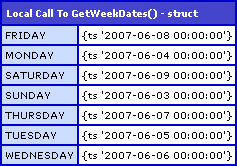
As you can see, everything works normally; in a local call, the ReturnFormat has no bearing on the functionality of the invoked method.
Ok, now let's take a look at a remote method call using CFInvoke to call the GetWeekDates() method as a web service:
<!---
	Create the URL at which we can access our
	DateUtility.cfc as a WSDL style web service.
	Notice that we are appending "?wsdl" to signify
	that we are accessing this function as a
	remote web service.
--->
<cfset strURL = (
	"http://#CGI.server_name#" &
	GetDirectoryFromPath( CGI.script_name ) &
	"DateUtility.cfc?wsdl"
	) />


<!---
	Invoke GetWeekDates() as webservice. We are going to
	pass in today's date as the argument (even though we
	did not passed in the date previously - I dislike
	dealing with optional arguments in web services).
--->
<cfinvoke
	webservice="#strURL#"
	method="GetWeekDates"
	refreshwsdl="true"
	returnvariable="objDates">

	<cfinvokeargument
		name="Date"
		value="06/08/2007"
		/>

</cfinvoke>


<!---
	Dump out the value returned from the web service call.
	Remember, our return format was specified as JSON.
--->
<cfdump
	var="#objDates#"
	label="Remote Call to GetWeekDates()"
	/>
There's a few things to notice here; for starters, my CFInvoke tag has the attribute RefreshWSDL="true". This attribute is new to ColdFusion 8 and will refresh the ColdFusion component's WSDL file before attempting to invoke the remote method. In previous version of ColdFusion, making changes to a remote method meant flushing the WSDL file in the ColdFusion Administrator (or by using some hacky Admin API code). Now, changes to remote methods are a piece of cake.
Now, I would NOT recommend putting that in there all the time; I am only using it because I was testing this as I built it. Once I was ready to write this post, I could have easily removed that from the CFInvoke tag and things would have worked nicely. But, as a good point of discussion (and since we are not done yet) I have left it in.
I am also passing in the date argument. You will notice that in my first demo, I did not pass in the argument; I let the GetWeekDates() use Now() as the default. Web services don't play so nicely with optional arguments, and so, I find it easier to pass in all expected methods.
That being said, running the above code with JSON as the ReturnFormat, we get the following CFDump output:
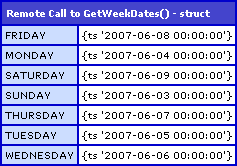
As you can see, we just CFDump'ed out a ColdFusion struct. ColdFusion is smart enough (I think) to take the JSON data and convert it into ColdFusion data types for use within ColdFusion code. So, is JSON data really being returned? To test this, we can call the remote method directly from a URL. This will bypass ColdFusion (as the recipient) and really show us how it gets returned:
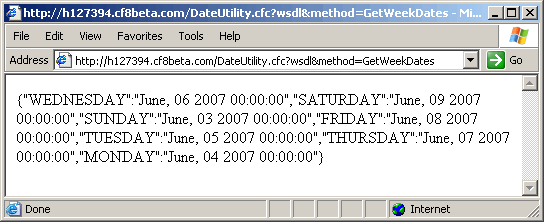
As you can see, calling the GetWeekDates() method directly from a URL does indeed return us the ColdFusion struct as serialized JSON data:
{"WEDNESDAY":"June, 06 2007 00:00:00", "SATURDAY":"June, 09 2007 00:00:00", "SUNDAY":"June, 03 2007 00:00:00", "FRIDAY":"June, 08 2007 00:00:00", "TUESDAY":"June, 05 2007 00:00:00", "THURSDAY":"June, 07 2007 00:00:00", "MONDAY":"June, 04 2007 00:00:00"}
So, it seems that ColdFusion, when calling a remote web service is assuming that you want to work with ColdFusion data types and will, on the fly, convert returned JSON data into ColdFusion data types. However, as we see from the direct URL method invocation, ColdFusion does indeed return the ColdFusion struct as JSON data.
This is pretty cool, I have to say, and will make writing some AJAX things much easier.
As a final note, if the return type is a query, ColdFusion serializes it into a JSON struct that has two members: an array of column names and an array of row-arrays. In each of the row-arrays, the order of the values is returned in the same order as the columns. If you recall from the previous post, SerializeJSON() can take an optional second argument when dealing with query conversions. When ReturnFormat is set to JSON and a query is returned, this is the equivalent of ColdFusion calling SerializeJSON() with only the first argument, leaving the Serialize Query By Columns optional argument as false.
This complicates the issue a bit. Let's update the DateUtility.cfc ColdFusion component to have a method that returns a query so we can test this functionality. In addition to the GetWeekDates() method, we are going to add this method, GetWeekDateQuery() that returns a query rather than a struct:
<cffunction
	name="GetWeekDateQuery"
	access="remote"
	returntype="query"
	returnformat="JSON"
	output="false"
	hint="Given a date, it will return all dates in that week in a single row query.">

	<!--- Define arguments. --->
	<cfargument
		name="Date"
		type="date"
		required="false"
		default="#Now()#"
		/>

	<!--- Define the local scope. --->
	<cfset var LOCAL = {} />

	<!--- Get first day of week. --->
	<cfset LOCAL.Sunday = (
		Fix( ARGUMENTS.Date ) -
		DayOfWeek( ARGUMENTS.Date ) +
		1
		) />

	<!--- Create week query. --->
	<cfset LOCAL.Week = QueryNew(
		"Sunday, Monday, Tuesday, Wednesday, Thursday, Friday, Saturday",
		"VARCHAR, VARCHAR, VARCHAR, VARCHAR, VARCHAR, VARCHAR, VARCHAR"
		) />

	<!--- Add a single row to the query. --->
	<cfset QueryAddRow( LOCAL.Week ) />

	<!--- Set each cell value. --->
	<cfset LOCAL.Week[ "Sunday" ][ 1 ] = DateFormat(
		LOCAL.Sunday,
		"mm-dd-yyyy"
		) />

	<cfset LOCAL.Week[ "Monday" ][ 1 ] = DateFormat(
		(LOCAL.Sunday + 1),
		"mm-dd-yyyy"
		) />

	<cfset LOCAL.Week[ "Tuesday" ][ 1 ] = DateFormat(
		(LOCAL.Sunday + 2),
		"mm-dd-yyyy"
		) />

	<cfset LOCAL.Week[ "Wednesday" ][ 1 ] = DateFormat(
		(LOCAL.Sunday + 3),
		"mm-dd-yyyy"
		) />

	<cfset LOCAL.Week[ "Thursday" ][ 1 ] = DateFormat(
		(LOCAL.Sunday + 4),
		"mm-dd-yyyy"
		) />

	<cfset LOCAL.Week[ "Friday" ][ 1 ] = DateFormat(
		(LOCAL.Sunday + 5),
		"mm-dd-yyyy"
		) />

	<cfset LOCAL.Week[ "Saturday" ][ 1 ] = DateFormat(
		(LOCAL.Sunday + 6),
		"mm-dd-yyyy"
		) />


	<!--- Return week. --->
	<cfreturn LOCAL.Week />
</cffunction>
Now that we have that in place, let's call it remotely (we don't need to call it locally as we have already established that ReturnFormat is ignored for local calls):
<!---
	Create the URL at which we can access our
	DateUtility.cfc as a WSDL style web service.
	Notice that we are appending "?wsdl" to signify
	that we are accessing this function as a
	remote web service.
--->
<cfset strURL = (
	"http://#CGI.server_name#" &
	GetDirectoryFromPath( CGI.script_name ) &
	"DateUtility.cfc?wsdl"
	) />


<!---
	Invoke GetWeekDateQuery() as webservice. We are going to
	pass in today's date as the argument (even though we
	did not passed in the date previously - I dislike
	dealing with optional arguments in web services).
--->
<cfinvoke
	webservice="#strURL#"
	method="GetWeekDateQuery"
	refreshwsdl="true"
	returnvariable="qDates">

	<cfinvokeargument
		name="Date"
		value="06/08/2007"
		/>

</cfinvoke>


<!---
	Dump out the value returned from the web service call.
	Remember, our return format was specified as JSON.
--->
<cfdump
	var="#qDates#"
	label="Remote Call to GetWeekDateQuery()"
	/>
Calling that we get the following CFDump output:

As you can see, ColdFusion automatically interprets the JSON value as a ColdFusion query and converts the data into a query object. This is basically like having DeserializeJSON() called on the JSON data with the optional Strict Mapping argument set to false which is NOT its default value.
As with the other function, we can call this directly from the URL to see what the returned JSON data is:
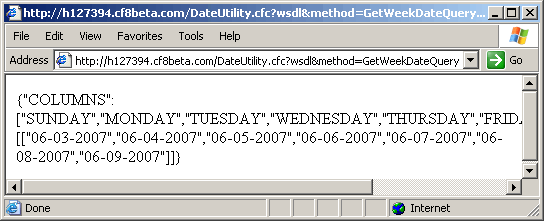
As you can see, calling the GetWeekDateQuery() method directly from the URL does given us the two-entry serialized JSON data:
{"COLUMNS":["SUNDAY", "MONDAY", "TUESDAY", "WEDNESDAY", "THURSDAY", "FRIDAY", "SATURDAY"], "DATA":[["06-03-2007", "06-04-2007", "06-05-2007", "06-06-2007", "06-07-2007", "06-08-2007", "06-09-2007"]]}
So it seems that ColdFusion 8 is trying to do the right thing with all of it's JSON data returns: It converts them into proper ColdFusion data types. This is really cool, and I assume is going to be good in like 99% of cases. The only time it might not ever work out is if you actually wanted to grab the JSON data rather than the "equivalent" ColdFusion data type.
If ColdFusion 8 is converting JSON data types automatically, what happens if you return JSON data explicitly, without using a ReturnFormat of JSON? To test this last thing, we are going to update the DateUtility.cfc to have one more function, GetWeekDatesAsJSON():
<cffunction
	name="GetWeekDatesAsJSON"
	access="remote"
	returntype="string"
	returnformat="plain"
	output="false"
	hint="Given a date, it will return all dates in that week in a day-keyed struct in JSON format.">

	<!--- Define arguments. --->
	<cfargument
		name="Date"
		type="date"
		required="false"
		default="#Now()#"
		/>

	<!--- Define the local scope. --->
	<cfset var LOCAL = {} />

	<!--- Get first day of week. --->
	<cfset LOCAL.Sunday = (
		Fix( ARGUMENTS.Date ) -
		DayOfWeek( ARGUMENTS.Date ) +
		1
		) />

	<!--- Create week object. --->
	<cfset LOCAL.Week = {
		Sunday = LOCAL.Sunday,
		Monday = (LOCAL.Sunday + 1),
		Tuesday = (LOCAL.Sunday + 2),
		Wednesday = (LOCAL.Sunday + 3),
		Thursday = (LOCAL.Sunday + 4),
		Friday = (LOCAL.Sunday + 5),
		Saturday = (LOCAL.Sunday + 6)
		} />


	<!---
		At this point, we have the Week object filled with
		numeric date (data conversion caused from the date
		math we are using. Let's loop over the struct and
		convert these back to actual dates). This is vital
		since we might be returning this remotely to a
		system that has a differen "Zero Date" on which our
		numeric date conversions are based.
	--->
	<cfloop
		item="LOCAL.Day"
		collection="#LOCAL.Week#">

		<!---
			Convert back to standard, ColdFusion date/time
			formatting (that can be parsed by remote system.
		--->
		<cfset LOCAL.Week[ LOCAL.Day ] = CreateDate(
			Year( LOCAL.Week[ LOCAL.Day ] ),
			Month( LOCAL.Week[ LOCAL.Day ] ),
			Day( LOCAL.Week[ LOCAL.Day ] )
			) />

	</cfloop>

	<!--- Return week as JSON data. --->
	<cfreturn SerializeJSON( LOCAL.Week ) />
</cffunction>
Notice that in this function, while it is still a remote call, the return type is string (that's what JSON data is) and the ReturnFormat is now just "plain". Also notice that in our return value call, we are explicitly converting the data into a JSON string using SerializeJSON(). Now, calling this method as a remote web service:
<!---
	Create the URL at which we can access our
	DateUtility.cfc as a WSDL style web service.
	Notice that we are appending "?wsdl" to signify
	that we are accessing this function as a
	remote web service.
--->
<cfset strURL = (
	"http://#CGI.server_name#" &
	GetDirectoryFromPath( CGI.script_name ) &
	"DateUtility.cfc?wsdl"
	) />


<!---
	Invoke GetWeekDatesAsJSON() as webservice. We are going
	to pass in today's date as the argument (even though we
	did not passed in the date previously - I dislike
	dealing with optional arguments in web services).
--->
<cfinvoke
	webservice="#strURL#"
	method="GetWeekDatesAsJSON"
	refreshwsdl="true"
	returnvariable="strDates">

	<cfinvokeargument
		name="Date"
		value="06/08/2007"
		/>

</cfinvoke>


<!---
	Dump out the value returned from the web service call.
	Remember, our return format was specified as JSON.
--->
<cfdump
	var="#strDates#"
	label="Remote Call to GetWeekDatesAsJSON()"
	/>
... We get the following CFDump output:
{"WEDNESDAY":"June, 06 2007 00:00:00", "SATURDAY":"June, 09 2007 00:00:00", "SUNDAY":"June, 03 2007 00:00:00", "FRIDAY":"June, 08 2007 00:00:00", "TUESDAY":"June, 05 2007 00:00:00", "THURSDAY":"June, 07 2007 00:00:00", "MONDAY":"June, 04 2007 00:00:00"}
As you can see, ColdFusion did not convert the JSON data into ColdFusion data. This is only done when the return type corresponds to an actual ColdFusion data type. This JSON stuff is very cool, and I think that ColdFusion 8 is really going to make data exchange with AJAX-driven functionality a lot nicer. But, what's even cooler than cool is that the functions that return data, now, don't need to be AJAX specific since when invoked by ColdFusion, they data will still come back as a ColdFusion data type.
Want to use code from this post? Check out the license.

Reader Comments
Very nice Ben. I know you've worked on a couple of Date maunipulation UDFs in the past. Is there anywhere one can download your UDFs?
@William,
Sorry, I am not quite that organized :) You might want to check out my Full posting page and just search for the word "Date":
www.bennadel.com/blog/complete-blog-entry-list.htm
Hi Ben,
I am afraid that the returnFormat attribute is also ignored for web services. What you are seeing is ColdFusion converting the Java objects that the Axis web service engine creates in to things that CFML can use. The only thing that travels between a cfinvoke and a CFC web service is SOAP XML data.
The way to explore this is to use runtime/bin/sniffer to examine the stream of XML going back and forth between the server.
See my blog posting: http://tjordahl.blogspot.com/2005/12/changing-target-endpoint-on-web.html
@Tom,
It's gonna take me a while to understand your post. That is way out side of my traditional territory. And that post that Sean Corfield linked to is HUGE. I will read it more thoroughly.
Love your site Ben. It' open all day everyday in my browser referencing your examples!
A little gotcha I'm trying to find a solution to is if there is any way to get CF to return the data for Date fields in a format such as Date(1254891982000) instead of "October, 11 2010 00:00:00", for example.
The reason for being able to do this is I want to be able to call my remote method with returnformat=json and have it return data for the date fields as if the date was a date object that can then have date functions like date.toLocaleDateString(); run against the returned data.
In this example of a jquery templating project they do exactly what I'm talking about from a netflix service:
http://github.com/nje/jquery-tmpl/blob/master/demos/movies/PagesCore/movies.html
Just curious if there is a way to get CF to build the JSON like the return found in the getMovies() function to have the embedded JS dateObj versus the Date String. I'm sure I can figure out how to manipulate it after the fact but anything within the query or before the json serialization would ideal to minimize the need to format every JSON date returned from the server to be formatted before being able to call native JS date functions against the data. Any help or direction would be much appreciated.
I must be doing something wrong. When I view the cfc directly as a wsdl it shows as XML not JSON
@Tim,
I am not sure if there is anyway to directly map a JSON-ified date value to a Javascript date object. At some point, I believe that you'll have to cast the deserialized date into an actual Javascript date.
When it comes to the templating, typically the values are coming out of some parent object. What I would guess is happening is that parent object has the date in a proper date object using something like Date.parse(dateTimeString).
This is just a guess though; sorry if that is not any help.
@Kevin,
When you add the WSDL flag, you're getting back the WSDL file (Web Service Definition Language). This is not needed for the actual call - this is only needed when you are dealing with some sort of proxy like the ColdFusion WebService object that needs to know about the WSDL file.
If you are using a proxy object and are still getting the WSDL file back, you've probably forgotten to specify a Method.
@Ben,
yep foolishly forgot the method. I got it thanks.Im working with JQuery and FullCalendar. Pretty sweet stuff.
@Kevin,
Forgetting the method will get you every time :) I can't tell you how many times I have accidentally invoked the ColdFusion Administrator's Component Inspector after forgetting to use a method on non-SOAP requests (non-WSDL requests).
I am looking for the below jsonp format. suggestions please
The expected format:
{"totalCount":"65404","topics":[{"threadid":"130625","forumid":"11","forumtitle":"Ext: Premium Help","title":"KeyMap Ext.getDoc"}]}
Hey Ben
"So it seems that ColdFusion 8 is trying to do the right thing with all of it's JSON data returns: It converts them into proper ColdFusion data types. This is really cool, and I assume is going to be good in like 99% of cases. The only time it might not ever work out is if you actually wanted to grab the JSON data rather than the "equivalent" ColdFusion data type."
I have 1% case. Is there any new developments that would return query data as JSON and not a coldfusion data type?
If not, I'm assuming I should loop through my query to build a struct to pass back?
TIA
shawn