
Learning ColdFusion 8: Javascript Object Notation (JSON) Part I - Data Conversion
JSON stands for Javascript Object Notation. If you have played around with AJAX you have probably come across this at some point. JSON is light-weight data exchange format that can represent many data types and structures as a single string that can be parsed back into its original data structure. ColdFusion 8 has introduced some very cool JSON functionality not only with basic object conversion, but also with web service return values. For this first part of the ColdFusion 8 JSON series, we will concentrate on basic data conversion.
Let's start by looking at the conversion of some standard ColdFusion data types into JSON data:
<!--- Convert a string. --->
<p>
	String:
	#SerializeJSON( "Maria Bello" )#
</p>

<!--- Convert a number. --->
<p>
	Number:
	#SerializeJSON( 1967 )#
</p>

<!--- Convert a date. --->
<p>
	Date:
	#SerializeJSON( "April 18, 1967" )#
</p>

<!--- Convert a null value. --->
<p>
	Null:
	#SerializeJSON( JavaCast( "null", 0 ) )#
</p>

<!--- Convert a struct. --->
<cfset objActress = {
	Name = "Maria Bello",
	Attractive = "Extremely"
	} />

<p>
	Struct:
	#SerializeJSON( objActress )#
</p>

<!--- Convert an array. --->
<p>
	Array:
	#SerializeJSON(
		ListToArray( "Maria,Bello" )
		)#
</p>

<!--- Convert a function. --->
<cffunction name="Test">
	<cfreturn "Tested!" />
</cffunction>

<p>
	Function:
	#SerializeJSON( Test )#
</p>

<!--- Convert a ColdFusion component. --->
<!--- CFC (in other file):
<cfcomponent>
	<cfset THIS.Name = "TestCFC" />
	<cfset VARIABLES.PrivateName = "TestCFC" />
</cfcomponent>
--->

<p>
	CFC:
	#SerializeJSON(
		CreateObject( "component", "Test" )
		)#
</p>

<!--- Convert a query. --->
<cfset qTest = QueryNew( "" ) />
<cfset QueryAddColumn(
	qTest,
	"name",
	"CF_SQL_VARCHAR",
	ListToArray( "Maria", "Kim" )
	) />

<p>
	Query:
	#SerializeJSON(
		qTest
		)#
</p>

<!---
	Convert the query again, but this time don't
	create two struct entries. By sending the argument
	serializeQueryByColumn as true, we are using a
	WDDX standard query structure.
--->
<p>
	Query (true):
	#SerializeJSON(
		qTest,
		true
		)#
</p>

<!--- Convert a java object (String Buffer). --->
<p>
	Java:
	#SerializeJSON(
		CreateObject(
			"java",
			"java.lang.StringBuffer"
			).Init( "" )
		)#
</p>
Notice that the above code contains a ColdFusion user defined function as well as a ColdFusion component (CFC). The CFC is defined in another file, but I have included the structure in the comments. The user defined function is defined right above its use. Not all of these values are considered valid JSON data types. If you look at www.json.org, you will see that JSON is designed to support simple values (numbers, strings, dates) as well as structs and arrays. However, nothing wrong with testing the others (especially since the ColdFusion query object is most definitely not a valid JSON type, but it is most definitely supported).
Running the above code, we get the following output:
String: "Maria Bello"
Number: 1967.0
Date: "April 18, 1967"
Null: null
Struct: {"NAME":"Maria Bello", "ATTRACTIVE":"Extremely"}
Array: ["Maria","Bello"]
Function: {"next":null, "Metadata":{"PARAMETERS":[], "NAME":"Test"}, "PagePath":"C:\\Websites\\127394yy6\\json.cfm", "Access":"public", "MethodAttributes":[], "SuperScope":null}
CFC: {"NAME":"TestCFC"}
Query: {"COLUMNS":["NAME"], "DATA":[["Mar"],["a"]]}
Query (true): {"ROWCOUNT":2, "COLUMNS":["NAME"], "DATA":{"name":["Mar","a"]}}
Java: {"Length":null}
Most of these were just simple ColdFusion data values which were converted quite nicely. As you can see, a NULL value comes across as a true Javascript null - nicely done. A function can be serialized, that's pretty cool (in that it doesn't error - the effectiveness of this will be covered later). The ColdFusion component was serialized, but as you can see from the comments vs. the JSON output, the private variable was not carried over. If you think about it, this makes sense - ColdFusion cannot introspect private data - that's what private data does. But, if you don't think about it when you are coding, you might get some unexpected results. The query was serialized nicely in two different ways for two different standards, but neither sends the column data types. Even a Java object can be serialized, but almost zero of its functionality comes over in the JSON data.
NOTE: Just so we are all on the same page here, when I say that some of these values "can be serialized," that does not mean they are being serialized in any meaningful way (ex. Java object). When I say that it can be serialized, I just mean that ColdFusion did not throw any exceptions.
The above is fairly straight forward, but if you look at the function and query serializations, you will see that one of the struct key values is a nested struct. JSON data can be as simple and as complex as you can get with data structures you start with. That's the beauty of JSON - it's a very simple yet very powerful data exchange standard.
The ColdFusion 8 SerializeJSON() method takes two arguments: the first is the data structure that we are going to convert, the second is a boolean flag which pertains to query conversions only. If the flag is set to false (the default value), the query gets converted into an object that has an array of column names (named COLUMNS) and an array or row-arrays (named DATA). For each row-array, the order of the values corresponds to the order of columns in the columns array.
If the SerializeJSON() flag is set to true, the query gets converted into an object that follows the WDDX compliant query standard. In this method, the resultant object contains a struct that is more in line with the way ColdFusion treats query objects internally. The resultant struct has the row count (named ROWCOUNT), the column list array (named COLUMNS), and column-name-indexed struct (named DATA), where each column name points to an array of column values.
The ColdFusion 8 documentation states that because ColdFusion is case insensitive and Javascript is case sensitive, ColdFusion converts all Structure keys to upper case. This way, there is no confusion about the resultant JSON value. Therefore, your JSON-consuming Javascript should expect all upper case object-keys in its resultant objects. However, if you look at the returned values above, you will see that this really only holds true for top-level structs (the actual single Struct conversion). Maybe this is accurate, the documentation is unclear to me. But, if you look at the all the other structs and nested structs, you will see that key values are NOT upper cased. So, just be careful.
Now that we see how to go from ColdFusion to JSON, let's play around with going from JSON to ColdFusion. For consistency, we are going to deserialized the values we serialized above. This will give us a very easy way to see what kind of data gets lost in the JSON conversion process. In order to really do this, we will first start by storing all of our resultant JSON values into a structure for easy reference. If we did not do that, we would have to wrapping the JSON data in quotes and then escaping the internal JSON quotes:
<!---
	So that we don't have to deal with strange string
	conversion, we are going to store our serialized
	data into a struct. We will then reference this
	struct for the deserialization.
--->
<cfset objJSON = {
	String = SerializeJSON( "Maria Bello" ),
	Number = SerializeJSON( 1967 ),
	Date = SerializeJSON( "April 18, 1967" ),
	Null = SerializeJSON( JavaCast( "null", 0 ) ),
	Struct = SerializeJSON( objActress ),
	Array = SerializeJSON(
		ListToArray( "Maria,Bello" )
		),
	Function = SerializeJSON( Test ),
	CFC = SerializeJSON(
		CreateObject( "component", "Test" )
		),
	Query = SerializeJSON( qTest ),
	QueryTrue = SerializeJSON( qTest, true ),
	Java = SerializeJSON(
		CreateObject(
			"java",
			"java.lang.StringBuffer"
			).Init( "" )
		)
	} />


<!---
	Now that we have the same JSON data values stored
	in our JSON struct (same data we converted before),
	we will convert it back into ColdFusion and dump out
	the resultant object.
--->


<!--- Convert a string. --->
<cfdump
	var="#DeserializeJSON( objJSON.String )#"
	label="JSON String"
	/>

<!--- Convert a number. --->
<cfdump
	var="#DeserializeJSON( objJSON.Number )#"
	label="JSON Number"
	/>

<!--- Convert a date. --->
<cfdump
	var="#DeserializeJSON( objJSON.Date )#"
	label="JSON Date"
	/>

<!--- Convert a null. --->
<cfdump
	var="#DeserializeJSON( objJSON.Null )#"
	label="JSON Null"
	/>

<!--- Convert a struct. --->
<cfdump
	var="#DeserializeJSON( objJSON.Struct )#"
	label="JSON Struct"
	/>

<!--- Convert an array. --->
<cfdump
	var="#DeserializeJSON( objJSON.Array )#"
	label="JSON Array"
	/>

<!--- Convert a function. --->
<cfdump
	var="#DeserializeJSON( objJSON.Function )#"
	label="JSON Function"
	/>

<!--- Convert a CFC. --->
<cfdump
	var="#DeserializeJSON( objJSON.CFC )#"
	label="JSON CFC"
	/>

<!--- Convert a query. --->
<cfdump
	var="#DeserializeJSON( objJSON.Query, false )#"
	label="JSON Query"
	/>

<!--- Convert a query. --->
<cfdump
	var="#DeserializeJSON( objJSON.QueryTrue, false )#"
	label="JSON Query(True)"
	/>

<!--- Convert a java object. --->
<cfdump
	var="#DeserializeJSON( objJSON.Java )#"
	label="JSON Java"
	/>
Running the above code, the first four value come back as simple values (strings):
Maria Bello
1967
April 18, 1967
null
Even the Javascript null value is represented by the ColdFusion string, "null." This is probably a good thing since ColdFusion will destroy variables who's value is set to null. The rest of JSON data values get converted to more complex data types:
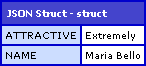
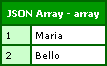
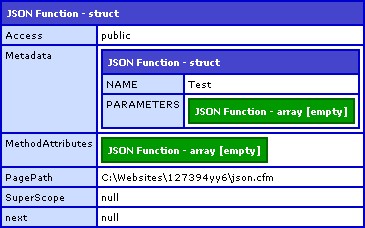
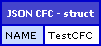
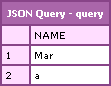
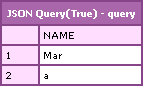
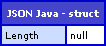
The ColdFusion array and struct values converted quite nicely. The simple values (string, number, dates, null) also converted nicely back into their ColdFusion counterparts. The null value could be debated, but I am ok with this (as long as this is what you expect). Both queries were converted back into ColdFusion query objects. The rest of the JSON data values converted back into ColdFusion structs. If you take a look at the JSON data values, none of this should be too much of a surprise.
The only real caveat here is the deserialization of the query objects. ColdFusion 8's DeserializeJSON() function takes two arguments: the JSON data value and the strict mapping flag. The strict mapping flag is optional and defaults to true. If you look at the JSON data for the query (either type), you will see that it is just struct notation. If we pass this strict mapping flag in as true (or omit it) then ColdFusion will convert the JSON data back into a struct since this is what the JSON data is defining from a "strict" point of view. However, if we pass in the strict mapping flag as false, we are giving ColdFusion the freedom to actually check to see if the JSON data can be converted to a ColdFusion query, and if so, that is should do that.
Queries have more than just their data values to be considered - queries also have data about their data. By dumping out the GetMetaData() for this query, we can see what else the query object has to tell us:
<!---
	Now that we have deserialized the query object
	(back from JSON), let's dump out the meta data
	to see what comes back.
--->
<cfdump
	var="#GetMetaData( DeserializeJSON( objJSON.QueryTrue, false ) )#"
	label="Deserialized JSON Query"
	/>
This gives us the following CDump output:
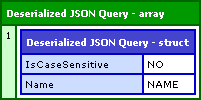
It appears that even though our original query had explicit data types, no query column data types can survive the JSON conversion. Again, looking at the resultant JSON created from the SerializeJSON() function, this should not be too much of a surprise.
Overall, the serializing and deserializing of JSON data works very well for simple values, structs, and arrays. Queries, while not technically proper JSON data types are handled well and leave you the option to use them as structs or queries. Other data types in ColdFusion (Java values, CFC, user defined functions) can be serialized into JSON data, but only in reflection of the fact that they have struct-like properties.
In addition to the conversion methods, ColdFusion also supplies the IsJSON() method which takes a JSON string and determines if it is a valid JSON data string (that you could then pass to DeserializeJSON()).
Want to use code from this post? Check out the license.

Reader Comments
@Ben: I think you've stumbled across a pretty big bug. The keys should always return in the same case. The fact that only some of keys are coming back as non-uppercase is a bug that will cause problems down the road.
Have you reported this to Adobe? If not, you should file a bug with them.
@Dan,
I am always hesitant to submit bugs because I am never sure what is planned and what is not. I really appreciate you taking the time, not only to actually read through my wordier entries, but also on making these suggestions.
It might have something to do with what they consider a "Struct". For instance, the keys that come back in the Function serialization are not for a "Struct", they are for a Function. It just so happens that most things in ColdFusion have struct-like interaction. So, just like "strict mapping" of the DeserializeJSON(), maybe they are being "strict" in their interpretation.
That being said, I agree, they should all come back upper case to be consistent.
I have submitted it.
@Ben:
Glad you submitted this as a bug. It definitely is one.
In order for this to work correctly, they really need to make sure all keys are the same case. Otherwise, it can cause all sorts of issues trying to access keys.
I see this as a pretty severe bug as well. If this makes it in to CF8, then what happens is if they change the behavior later, then all of your JS code could break.
They actually had a similar issue with WDDX a while back. They made some case changes between versions in the way that CFWDDX tag generated code when converting from CFML2JS which made JS stop working.
Good to know. I will keep my fingers crossed.
Bit late coming to this one but do you know if there is a way for SerializeJSON to not return null when there is an empty string value from a db query?
I have just noticed that Internet Explorer (7 and 8b2) populates my html form with the text "null" whenever there is an empty value. The JSON contains null values as constructed by SerializeJSON and I would prefer if they were treated as "" (an empty string) instead of null.
Any ideas, or should I just build the JSON string manually?
Cheers,
Dave
@Dave,
I don't know much about this. Personally, I don't like like return Query objects in remote calls because I don't like the way it serializes them. I would rather convert the query to an array-of-structs before serializing and returning them. This way, the data just seems cleaner to me.
Ben,
Regarding your last comment, do you have an example of returning an array-of-structs posted somewhere? If not, could you post one?
This is the way I ended up implementing which I found on another blog (sorry can't remember which one):
Build an array from the query (using cf8 implicit arrays):
<cfloop query="sortPeople">
<!--- Array that will be passed back needed by jqGrid JSON implementation --->
<cfset arrPers[i] = [UniqueNo,Surname,FirstName,Attribute,AttDscr,AttGrpCode,LSDateFormat(StartDate,"dd/mm/yyyy"),LSDateFormat(EndDate,"dd/mm/yyyy")] />
<cfset i = i + 1>
</cfloop>
Create a structure (again cf8 implicit struct):
<cfset strReturn = {total=totalPages,page=arguments.page,records=sortPeople.recordcount,rows=arrPers} />
This may not be the best way but it produces the right json for the jquery grid that I am using it for.
Cheers,
Dave
@Dave,
That looks good to me.
@Brian,
Returning an array of structures is inherent with the JSON return format. Just build an array of structs as you would in ColdFusion and then return it. I am not sure what you would want to see in the example?
I have yet to venture into the array and struct side of ColdFusion. So far I've been able to do just about everything I wanted to with queries.
My current project has me learning to write my own components instead of embedding the queries in the page. I'm also building my components with the idea of converting them into web services.
So if you could point me to an example of "build an array of structs as you would in ColdFusion", that would be great.
I have found that if you create a structure key by using "associative array notation" rather than "Object.property notation" then you can get the key in its original case. So,
options.lowercase = "not really lower case" ;
will get you {"LOWERCASE":"not really lower case"}
while
options["lowercase"] = "really lower case" ;
will get you {"lowercase":"really lower case"}
@Curtis,
Yeah, that is true; but, somewhat disconcerting. I don't like that you can get it to return multiple ways - that makes the client code (Javascript) more brittle since it doesn't know what to expect.
@Curtis,
For AJAX returns, I would suggest always using dot-notation to enforce standard casing.
Hi Ben,
I need to pass the query result from a cfc to a javascript function and display it in the cfm page.
Thanks in advance Ben.
@Abhijit,
I find working with query objects on the client side to be unpleasant. I would suggest either changing it to an arary of structs and passing that back, or actually creating the HTML (on the server) that you want to render (on the client) and just returning that and injecting it into the web page.
Hi Ben,
Thanks a lot for the suggestions.
Actually,
I have an application where all the html designs are created dynamically through javascripts.Divs,spans and everything are created dynamically through javascript.
Just need some advice from you like how can I show query results in the cfm page since all the htmls are created dynamically.
Just a small example may really help.
Thanks Ben.
Abhijit
Hi,
Also we can use cf8 features.Please advise
Hi Ben,
What I mean is we are using cf8.
Thanks
I am using cfajaxproxy.Basically I need to use the query object as a json variable.
But I am struggling to make the hierarchy tree using json.
Help me Ben.
Thanks,
Abhijit
@Abhijit,
I am not a big fan of working with query objects. Rather, I would convert it to an array of structs so it has a more natural structure.
If you are using the SerializeJSON() mehtod, however, there is a serializeQueryByColumns argument you can use to get a more natural object, but still a bit weird if you ask me.
Thanks Ben.............Can you provide me a small example using serializeQueryByColumns or SerializeJSON() mehtod?
Thanks,
Abhijit
Hi,
I have one problem.
I did JSON.parse & getting output in javascript variable "temp" in format like this
("2222":{"MId":106607,
"Title":"VIDEOCON Semi Automatic Marine 6.8kg",
"Name":"washma01",
}
How will i access this data in java script ?
Hi,
I did JSON.parse & getting output in javascript variable "temp" in format like this
("2222":{"MId":106607,
"Title":"VIDEOCON Semi Automatic Marine 6.8kg",
"Name":"washma01",
}
I tried like
alert(temp[0][0]);
alert(temp.2222[0].MId);
but not getting out put.
How will i access this data in java script ?
@Mangesh,
I have not used the JSON.parse method yet, but it should return a structure within a structure such that you can access it like:
temp[ "2222" ].Mid
temp[ "2222" ].Title
temp[ "2222" ].Name
Hi Ben,
Need help on this.
I have a page test.cfm.
Its basically a display page where I am accessing the a cfc query by creating an object.
I have dynamic table created through javascript.
This table basically displays data in json format..........
So wat I did was like looping through the query object and arrange the data in json like structure and ultimately using the javascript to display the table rows.
Its working fine.
But the problem I am facimg is to do pagination.
I planned to use Ajax.But Since I have inline javascripts and also in ajax call i am again calling the page with parameters as required for pagination logic.
The query(using Cfdump I saw) is changing on ajax call I mean showing correct data but the javascript table is not loaded at all.May be the reason is I used inline javascript.I cannnot use external javascript as I need to use the coldfusion variable(json formatted ) in the javascript function to create the table.
Please advise on this Ben.
Advanced Happy new tear wishes.
Rgds,
Vicky
Hey sorry for mistyping...I meant Advanced Happy new year wishes.
Ben,
I'm just getting into JSON as I've usually used XML, but this is for a wireless app and so JSON is more attractive due to the smaller footprint.
Anyhow, I have noticed what I believe is an anomaly with producing an erroneous comma.
Try this:
<CFSET stJSON = StructNew()>
<CFSET stJSON.MyArray1 = ArrayNew(1)>
<CFOUTPUT>#SerializeJSON(stJSON)#</CFOUTPUT>
Now, I know this is pretty meaningless, but as an example, you should see the output look like this:
{
"MYARRAY1":
[
], <--- Notice this comma. Why is that there if there are no other elements in my struct?
}
@Steve,
That comma definitely should not be there. That's got to be some weird bug.
Hi Ben,
first thanks for all your blog-entries, I spend a lot of time here.
I have a funky problem, which I do not really understand... every time I use the "SerializeJSON" - function, it produce JavaScript-comment-signs before the object. For example:
<cfset objActress = {
Name = "Maria Bello",
Attractive = "Extremely"
} />
Struct: #SerializeJSON( objActress )#
Produce the following output:
Struct: //{"NAME":"Maria Bello","ATTRACTIVE":"Extremely"}
So I get an error when I try to use the DeserializeJSON - function in a direct way:
JSON parsing failure at character 1:'/' in //{"NAME":"Maria Bello","ATTRACTIVE":"Extremely"}
and have to programming around with something like
<cfset objActress = Right(SerializeJSON( objActress ),Len(SerializeJSON( objActress ))-2) />
I have not found anything about this issue in the adobe-help, may be you could tell me, how I get the normal functionality of SerializeJSON ???
Best regards,
Isabel
@Isabel,
This is the "JSON Prefix" and is a security feature of ColdFusion, which can be turned off. You can turn this off in the ColdFusion administrator or in your Application.cfc framework component:
[Application.cfc]
<cfset this.secureJSON = false />
Turning this off will remove the "//" before the serialized JSON values.
Thank you sooooooo much and have a nice weekend!!
@Isabel,
Any time :)
Hi Ben,
This post looks really good to understand the serializeJSON and DeserializeJSON function.
I am executing the following code scenario (I copied the example from the CF 8 docs for SerializeJSON and DeserializeJSON function):
==================================
I have a page called s1.cfm where in - i have copied the example given in CF 8 docs for "SerializeJSON" function.
I have another page called s2.cfm where in - i have copied the example given in CF 8 docs for
"DeSerializeJSON" function(I have changed the path of the filename in cfhttp).
in s2.cfm --> s1.cfm is called via CFHTTP. i tried that example to work with - but it is not working correctly. Its giving error.
I tried to debug that error but i am unable to solve it.
Can you please try that example and let me know how that example can be made better.
Thanks..
Does anyone know of a better way around this?
(1) I have a JavaScript object that I convert to a JSON string using the jQuery.toJSON
(2) It creates a JSON string just fine, looks like this:
{"rows":[{"id":"10000228637555","cell":["10000228637555","ACSN","444657#002",""]}]}
(3) So I submit that to my cfc and try to turn it back into a ColdFusion struct like such:
<cfset z = DeserializeJSON(this_tring_above)>
(4) But it results in "JSON parsing failure: Unexpected end of JSON string". I know it's because of the pound symbol. And I have fixed the problem by replacing all #'s with ##'s back on the page before even submitting the string. But my question is what if I didn't want to a Javascript replace before sending the string, what if I wanted to handle that in the cfc?
I tried doing many different combinations like this but with no success...
<cfset z.cleanJSON = replace(arguments.records,'##','####','all')>
<cfset z = DeserializeJSON(z.cleanJSON)>
no joy.
Hi Ben,
Nice work.
I had to produce JSON serverside that gets fed to a JavaScript function. ColdFusion's case-insensitivity threw a wrench in the wheels as the JavaScript logic expected camelback casing for key names.
Anyway after some fiddling around this seems to work in CF9
<cfset
strcOfflineScopes = {
"sSes" = {
"userInfo" = {
"id" = #session.userinfo.id#,
"la" = #session.userinfo.language#
}
}
} />
If you put quotes around the key names than it appears to work:
struct
____sSes (struct)
__________userInfo (struct)
_______________id 17514
_______________la 9
I've come across a frustrating issue with DeserializeJSON(). The twitter API returns an "id" field and an "id_str" field. One has the id of the tweet as a number and the other as a string. The string version exists because javascript will truncate to 15 decimal places of accuracy large tweet ids, but the string will be left untouched. Unfortunately DeserializeJSON converts id_str to a number which javascript then truncates. You are then left with an id and id_str field that are both numeric and truncated. I think I will have to resort to post processing the object to turn numbers back to strings before handing it on to javascript (or avoiding a deserialize step).
Good article. I can't seem to find an answer to a question I have and I thought I would ask you. Your advice would be greatly appreciated. I have spend all day trying to figure this out.
I'm building a phone app using appery.io that uses Coldfusion to query data on our servers. It uses Rest and Json to query the data. I have built the rest services and all the test went well. The website is expecting the data in a column format and it's not. The json data comes across in a query format and I can't seem to figure out how to format it in a serializeQueryByColumns like you can in the SerializeJSON function.
query json(this is how the data comes out):
{"COLUMNS":["CITY","STATE"],"DATA":[["Newton","MA"],["San Jose","CA"]]}
serializeQueryByColumns json(this is want I need):
{"ROWCOUNT":2, "COLUMNS":["CITY","STATE"],"DATA":{"City":["Newton","San Jose"],"State":["MA","CA"]}}
Any ideas?