
Before ColdFusion 8 came around, tags could only be defined in one way. With the introduction of ColdFusion 8's new AttributeCollection attribute, tag attributes can now be defined in ColdFusion structures. This attribute can be used in all ColdFusion 8 tags except for cfargument, cfbreak, cfcase, cfcatch, cfcomponet, cfdefaultcase, cfelse, cfelseif, cffunction, cfif, cfimport, cfinterface, cflogout, cflogin, cfloginuser, cfloop, cfparam, cfprocessingdirective, cfproperty, cfrethrow, cfreturn, cfset, cfsilent, cfswitch, and cftry. To see how it can be used, let's take a look at the CFFile tag; traditional, if you wanted to copy one file to another, you would do something like this:
<!---
	Using the traditional ColdFusion tag structure,
	we would define all the required attributes as
	part of the tag itself.
--->
<cffile
	action="COPY"
	source="#ExpandPath( './puppy.jpg' )#"
	destination="#ExpandPath( './puppy2.jpg' )#"
	/>
Nothing new there. But, with the introduction of ColdFusion 8, we now have this new AttributeCollection. The attribute collection attribute takes a ColdFusion struct that contains the tag's entire set of defined attributes. Each struct key is the same as its corresponding tag attribute. Using this new attribute collection, we could rewrite the above CFFile tag as such:
<!---
	With ColdFusion 8's new attributeCollection tag,
	we can now define a structure that has all the
	same attributes. This struct can then be used to
	define the tag.
--->
<cfset objAttributes = {
	action = "COPY",
	source = ExpandPath( "./puppy.jpg" ),
	destination = ExpandPath( "./puppy3.jpg" )
	} />

<!--- Copy flie. --->
<cffile
	attributecollection="#objAttributes#"
	/>
Notice that the action, source, and destination attributes are now keys within the objAttributes struct. Also notice that the AttributeCollection attribute is now the only attribute being set in the CFFile tag. This is mandatory; if you chose to use the attribute collection, you cannot use any other tag attribute - it's an all or nothing deal.
The above example demonstrates how it can be used, but it does nothing to show you how cool this attribute collection actually is. Imagine that you had a deal with a ColdFusion tag whose attribute existence depending on the request environment. Take for example the CFMail tag where you have the optional attributes for server, username, and password. On one server, you might not need those, but on another server you do. Using ColdFusion 7 and earlier, you would have to use a CFIF tag with two different CFMail tags - one for each scenario - since you could not leave in blank server attributes.
The power of the AttributeCollection struct is that we can now build dynamic sets of attributes without having to duplicate any attributes of even tags. To see the raw power of this, let's take a look at the CFHttp tag. ColdFusion CFHttp tag has the power to store its target URL content directly to file or to return it as the FileContent of the result structure. Imagine we had some variable, blnDownload, which flagged whether or not our CFHttp tag should store the target URL to file. Instead of using two different CFHttp tags to handle the two scenarios, we can now build one attribute collection and use one CFHttp tag:
<!---
	Start by defining the default CFHttp tags
	attributes. These are the attributes we are
	going to use no matter what.
--->
<cfset objAttributes = {

	<!--- The method. --->
	Method = "GET",

	<!--- The target URL. --->
	URL = (
		"http://farm1.static.flickr.com/201/" &
		"516472664_cd4284abe1.jpg?v=0"
		),

	<!--- Set the broadcasted user agent. --->
	UserAgent = CGI.http_user_agent,

	<!--- How we want to handle the CFHttp result. --->
	Result = "objGet"

	} />


<!---
	Now that we have our basic CFHttp attributes
	configured, let's check to see if we are
	downloading the response or capturing the
	response binary to a file.
--->
<cfif blnDownload>

	<!---
		Now that we know we are downloading, we
		need to set additional CFHttp tag attributes.
	--->

	<!---
		Tell ColdFusion to grab the target URL
		as a binary so that we can write the binary
		data to disk.
	--->
	<cfset objAttributes.GetAsBinary = "yes" />

	<!--- Define the storage directory. --->
	<cfset objAttributes.Path = ExpandPath( "./" ) />

	<!--- Define the storage file. --->
	<cfset objAttributes.File = "lady.jpg" />

</cfif>


<!---
	ASSERT: At this point we have our attribute collection
	struct fully defined regardless of whether or not we
	are downloading the target file.
--->


<!--- Execute the CFHttp tag. --->
<cfhttp
	attributecollection="#objAttributes#"
	/>


<!--- Dump out the result. --->
<cfdump
	var="#objGet#"
	label="CFHttp Results"
	/>
Running the above code, we get the following CFDump:
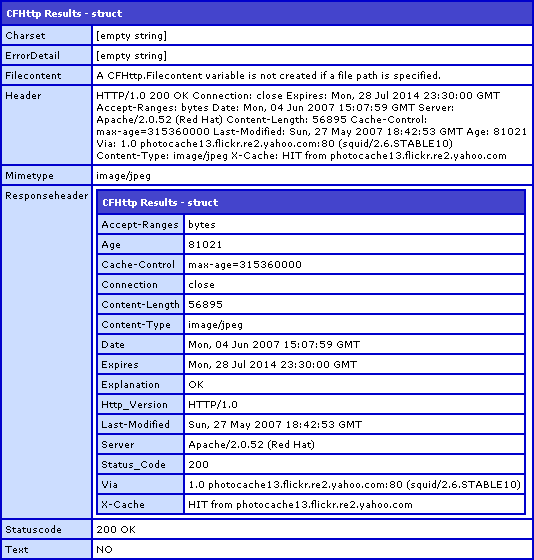
Can you see how nice this is? Are you beginning to see the possibilities. By using this attribute collection, you can save a lot of duplicate code and cut down on the chance of errors. You can even store default application values with base structs which would then be added to at run time when necessary.
Going back to the ColdFusion CFMail tag example touched on above, we could build our code to be quite flexible by providing default server settings at the application level and then adding to them at the page level. Somewhere in our application configuration, we could have base CFMail settings like this:
<!---
	Define the base attributes for the CFMail tag. Since
	these are defined one place in the application, we can
	easily update the CFMail tags across the board.
--->
<cfset REQUEST.BaseCFMailAttributes = {
	Server = "xxxxxx",
	Username = "yyyy",
	Password = "zzzz"
	} />
Then, for each CFMail tag, we could add to this base settings structure:
<!---
	Set up the CFMail attributes for this particular
	CFMail tag.
--->
<cfset objAttributes = {
	To = "ben@xxxxx.com",
	From = "ben@yyyyyy.com",
	Subject = "Hey Dude, ColdFusion 8 Is Mad Sexy!",
	Type = "HTML"
	} />

<!---
	Now that we have our CFMail attributes set, we need
	to add the base CFMail attributes.
--->
<cfset StructAppend(
	objAttributes,
	REQUEST.BaseCFMailAttributes
	) />


<!--- Send out the CFMail using the defined attributes. --->
<cfmail
	attributecollection="#objAttributes#">

	<p>
		Dude, you gotta try ColdFusion 8! It is so freakin'
		awesome, I couldn't even call asleep last night
		because I couldn't stop thinking about it.
	</p>

</cfmail>
Now, you might look at that and think it's a lot of work. Well, it is certainly extra work. But what are your options? If you were in a situation where the mail server information might change from time to time or implimentation to implimentation (think something like BlogCFC), can you imagine how much code you would need to update?!? If, however, you planned ahead and built your code using a default attribute collection for certain tags, then should the mail server info ever change, you would only have to change it in one place.
I am not advocating that you do this type of thing if you don't need it. KISS - keep is simple, stupid. I am merely trying to demonstrate that power and flexibility that ColdFusion 8's new AttributeCollection can provide.

Reader Comments
The only issue I have with this is a wish you didn't have to do any of the structure manipulation to add runtime attributes.
I LOVE the idea of passing attribute collection to any of the tags, but I still think it should work like a module or function call does, letting you override with inline attributes.
Having to structAppend() and duplicate your cached attributes structure to me seems non-intuitive and basically adding work / lines to a feature that should have saved work / lines.
Basically, this looks worlds better to me:
<cfmail attributecollection="#REQUEST.BaseCFMailAttributes#" to="lsjdf" from="ldjfls" subject="lsdjkflsdj" type="html"></cfmail>
Mike.
@Mike,
I agree with you 100%. Someone actually brought that up at the NYC Ben Forta talk and I believe he said that figuring out which attribute would have precedence would be too difficult. At least I think that is what he said (I don't want to misquote). However, I am not sure why this would be difficult:
1. Check attribute collection
2. Add inline attributes
3. Validate set of attributes
Seems very straightforward to me. Maybe it's a compilation issue?
I wish I knew what the issue was. Seems to me they would be able to use near the exact same logic they use to handle cfmodule.
I feel its not up to us to deal with how hard it is, but to ask for features that we want. That's the only way Adobe will get a clear picture of what we want. So when a feature like this is brought to the table I say do it right or don't bother.
As nice an idea as the feature is, I'm thinking of never using it because it will become a language inconsistency. Personally given the way CF acts with function calls and modules already, this would just confuse me in code and saves me no code over the way i do things now when I have to dupe structs, etc..
It kind of gives me the same "half assed" notion as the implicit structures / arrays as you discovered. I know the team can do a great job with these features, but it seems like we haven't really gotten that with a couple items in this release.
Mike.
We know that users want to be able to "mix-and-match" attributeCollection and inline attributes. We just didn't get to it this time. Look for this to be fixed in a future update.
Sweeet!
Thanks a lot for the update Tom, that is great to hear!
Woohoo! Now I am officially excited about this feature hehe. The ColdFusion team listens and amazes once again.
Mike.
Ben, great article. One qualification: AttributeCollection existed in ColdFusion 7 for fewer tags, but it did exist. One might think, from your intro, that this feature was new with ColdFusion 8. :)
Judith
@Judith,
Thanks. I was not aware that AttributeCollection existed before ColdFusion 8. I knew that CFInvoke (and methods calls) had ArgumentCollection, but I rarely even use that. Do you know which tags can use it in CF7?
@mike
a simpler syntax to deal with the fact we cant mix and match inline attributes and attributecollection - use the implict structure creation syntax to simplify the code like this:
// build the keys that are needed for this email
_maildata={to="jon.briccetti@troywebconsulting.com",subject="TESTING ArgumentsCollection #now()#"};
// append on the base keys that are defined in our application with the username, pwd, etc... (see the onApplicationStart event
structAppend(_maildata,application.cfmail);
<cfmail attributecollection="#_maildata#" >
TEST EMAIL
</cfmail>
I guess CF8 has introduced some new bugs. I did not figure out how to fix my old stuff yet. However, I have to say the attributeCollection, which was passed to a CFX tag, used to work until we went for a CF8 upgrade. I get the following error due to that.
<cfx_XYX attributeCollection="#myStructAttrs#" />
The above code used to work pre-CF8. The error in CF8 is as follows.
"The attributeCollection attribute cannot be used in combination with other attributes in the cfx tag"
If anybody faced a similar problem and has a solution, please contact me.
Thanks..
Ben,
<br />
<br />
how does attributeCollection handle empty or null struct keys? Does it ignore the attribute and go with the attributes default value?
<br />
<br />
Thanks
@P,
That's a very interesting question. My guess is that it would ignore those keys as they are not really part of the struct in the common sense (they show up in a CFDump as an "undefined key"). But, I will do some testing. Good thought!