
Learning ColdFusion 8: CFThread Part I - Data Exchange
NOTE: This blog has been updated. Originally, it has misinformation about the VARIABLES scope and the manner in which threads share that scope. Thanks to Dan G. Switzer, II, who took the time and energy to point out this mistake, this blog post should now be more accurate.
ColdFusion 8 has introduced the new CFThread tag which allows you to programmatically launch new threads that can run in parallel with the current page processing thread. The primary page can wait for these additional threads to finish, thereby joining them back into the page, or it can end its processing and let the alternate threads carry on. This is going to mean huge performance increases for pages that carry out lots of independent processing and for actions not important to the end user (set it and forget it scenarios).
NOTE: For this post I will be concentrating mostly on data exchange between child threads and the page. I am also covering sleeping a thread since I will probably never touch on it again (how can one think about sleep when there is so much CF-goodness to be learned!?!?!).
Most uses of ColdFusion 8's new CFThread tag will apply to newly launched threads; however, one CFThread tag action applies to the currently running page (so let's get it out of the way). That is the SLEEP action. Using CFThread's sleep action will request the current page thread to sleep for the given number of milliseconds:
<!--- Output the current time. --->
#TimeFormat( Now(), "h:mm:ss TT" )#<br />

<!---
	Now, let's cause the page to sleep for two seconds.
	Notice that the duration is actually in milliseconds,
	hence my multiplying by 1000.
--->
<cfthread
	action="sleep"
	duration="#(2 * 1000)#"
	/>

<!--- Output the current time again. --->
#TimeFormat( Now(), "h:mm:ss TT" )#
Running the above code gives us the output:
7:37:36 AM
7:37:38 AM
Notice that the second time is two seconds later. Now, one thing to be careful of when sleeping a thread, it does not appear to pause the request timeout of the page. Remember in previous version's of ColdFusion, we would grab the current thread and call its Sleep() method. This would actually pause the timeout count down. CFThread's SLEEP action seems to let the request timeout to continue counting down. Look at this demo:
<!--- Set the page to timeout after two seconds. --->
<cfsetting requesttimeout="2" />

<!--- Output the current time. --->
#TimeFormat( Now(), "h:mm:ss TT" )#<br />

<!---
	Now, let's cause the page to sleep for five seconds.
	Let's see if this will cause the page to timeout.
--->
<cfthread
	action="sleep"
	duration="#(5 * 1000)#"
	/>

<!--- Output the current time again. --->
#TimeFormat( Now(), "h:mm:ss TT" )#
Running the above code gives us the output:
The request has exceeded the allowable time limit Tag: cfoutput
18:
19 : <!--- Output the current time again. --->
20 : #TimeFormat( Now(), "h:mm:ss TT" )#
The overall page time exceeded the page's request timeout, however, the page did not crash during the sleeping of the thread - the page crashed the second the page attempted to perform another task after sleeping (and after the request timeout had already drained). Interesting little caveat there.
I am not sure if you can call a thread sleep from within a child thread, and I don't have enough time to test it 'cause, let's face it - sleeping a thread is sooo not interesting. I just wanted to get it out of the way so we could start talking about something really sexy - the launching of new, concurrent threads and child thread data exchange.
Before we get into the specifics of the thread actions, it is very important to understand that the child threads (the new threads launched by the page process via CFThread) are NOT part of the current page thread. Therefore, they cannot output values to the page buffer and if they crash, the current page will continue to process without showing any error. Remember, your page can stop processing and these child reads may continue to run; that is the beauty of these marvelous tags.
Because these threads are separate from the page, data exchange is slightly more tricky, but no more so than you might be used to from ColdFusion custom tags. Passing data to a new thread can happen in several ways. For starts, a thread can refer directly to values defined in the parent page:
<!---
	Set a name in the parent page. I am using the VARIABLES
	scope here just to drive home the fact that this is
	part of the currently-processing page request.
--->
<cfset VARIABLES.strName = "Christina Cox" />


<!--- Launch a new thread. --->
<cfthread
	action="run"
	name="mythread"
	priority="normal">

	<!---
		Store the value of the name in the parent scope into
		this thread's publically accessible thread scope.
	--->
	<cfset THREAD.Value = strName />

</cfthread>


<!--- Join the thread to the current page process. --->
<cfthread
	action="join"
	name="mythread"
	/>


<!---
	Now that all of our threads are joined together,
	we can access the name stored in the thread.
--->
#mythread.Value#
Running the above code gives us the output:
Christina Cox
Notice that the child thread, mythread, was able to directly reverence the variable strName defined in the parent page. I guess that is what you would call implicit data passing. In addition to the VARIABLES scope, the child threads have access to REQUEST scope as well as the APPLICATION and, I assume, the SESSION scope (although I did not test the SESSION scope).
Be cautious about referencing data in this fashion as race conditions might apply. Remember, a new thread referencing an APPLICATION-scoped variable is just like a new page request referencing an APPLICATION-scoped variable - race conflicts may arise, but not necessarily. Just be careful.
We can also pass data to the child tag explicitly through the CFThread tag attributes:
<!---
	Launch a new thread and pass in the name of an actress
	as part of the CFThread tag definition.
--->
<cfthread
	action="run"
	name="mythread"
	priority="normal"

	<!--- Pass in data attributes. --->
	actress="Christina Cox">

	<!---
		Store the value of the passed-in name into this
		thread's publically accessible thread scope.
	--->
	<cfset THREAD.Value = ATTRIBUTES.Actress />

</cfthread>


<!--- Join the thread to the current page process. --->
<cfthread
	action="join"
	name="mythread"
	/>


<!---
	Now that all of our threads are joined together,
	we can access the name stored in the thread.
--->
#mythread.Value#
Running the above code gives us the output:
Christina Cox
Notice that we are passing the name, Christina Cox, as a custom data attribute of the CFThread tag. This value then becomes accessible to the child tag through its ATTRIBUTES scope. This is exactly the same way a ColdFusion custom tag works and this ATTRIBUTES scope is available only to the current thread and will last only as long as the thread is processing.
What is not apparent from this interaction is that all data passed into the CFThread tag in this manor is passed by deep-copy. This means that the values and objects used by the child thread do NOT contain references to the parent page objects. Take a look at this example:
<!--- Define an actress object. --->
<cfset objActress = {
	Name = "Christina Cox",
	Movie = "Better Than Chocolate"
	} />


<!---
	Launch a new thread and pass in the name of an actress
	object as part of the CFThread tag definition.
--->
<cfthread
	action="run"
	name="mythread"
	priority="normal"

	<!--- Pass in data attributes. --->
	actress="#objActress#">

	<!---
		Change the value of the movie of the passed-
		in actress object.
	--->
	<cfset ATTRIBUTES.Actress.Movie = "Chronicles of Riddick" />

</cfthread>


<!--- Join the thread to the current page process. --->
<cfthread
	action="join"
	name="mythread"
	/>


<!---
	Now that all of our threads are joined together,
	let's output the movie value of our actress to
	see if the child thread acted on it.
--->
#objActress.Movie#
In this example, we are passing in the structure, objActress to the ColdFusion 8 CFThread tag. Traditionally, we would look at that and say, OK, that object is a struct and is being passed by reference. If that were the case, then outputting the final Movie value would give us "Chronicles of Riddick" since the thread changed it (and then we made sure we waited for the thread to re-join. However, when we run the above code, we get the output:
Better Than Chocolate
The objActress.Movie value retained it original value because the child thread never really had access to it; ColdFusion passed it a complete (deep) copy of the struct for its own use.
Another form of implicit data exchange is through the use of the CFThread's VARIABLES scope. All threads launched by the same parent page share the same VARIABLES scope. EDIT: The children thread and the parent page both share the same VARIABLES scope. Therefore, values stored explicitly into the VARIABLES scope by one child thread will be accessible not only by other child threads, but also by the parent page via the VARIABLES scope. Take a look at this example:
<!--- Set a message into the VARIABLES scope. --->
<cfset VARIABLES.Message = "From Parent Page" />


<!--- Launch a child thread. --->
<cfthread
	action="run"
	name="ThreadOne">

	<!---
		Store a message into this thread's VARIABLES
		scope. This is NOT the page's VARIABLES scope;
		threads have their own version.
	--->
	<cfset VARIABLES.Message = "From Thread One!" />

</cfthread>


<!---
	Let's wait for thread one to finish so that we know
	exactly where all of our values are coming from.
	Remember, these threads are asyncronous. In fact, they
	might not even execute in the same order in which they
	were defined.
--->
<cfthread
	action="join"
	name="ThreadOne"
	/>


<!--- Launch a child thread. --->
<cfthread
	action="run"
	name="ThreadTwo">

	<!---
		Get the message from the VARIABLES scope
		and store it into this thread's publically
		accessible THREAD scope.
	--->
	<cfset THREAD.Message = VARIABLES.Message />

</cfthread>


<!---
	Join the second thread to the current page process.
	After this, all our child threads will have finished
	executing (and in the same order as they were declared).
--->
<cfthread
	action="join"
	name="ThreadTwo"
	/>


<!--- Output the message stored into thread two. --->
Thread Two: #ThreadTwo.Message#<br />

<!--- Output the message stored in the parent. --->
Parent: #VARIABLES.Message#
Running the above code gives us the output:
Thread Two: From Thread One!
Parent: From Thread One!
Notice that the VARIABLES.Message value in thread Two was taken from thread one. Also notice that when we now output the message stored in the parent's VARIABLES scope, it reflects the altered message. This is cool, but again, I cannot stress enough that these threads run in parallel (unless each one is joined in order - but that defeats the purpose of multi-threading). Just because you set a value into the VARIABLES scope in one thread, this does not mean it will be available YET in the next thread. And, just as with any shared memory scope, if you do see race conditions being a problem then you will have to put CFLock tags around VARIABLES access (but only when necessary).
That's how you get data into a ColdFusion 8 CFThread-launched child thread. When it comes to getting data out of a child thread, there are also a few different options. In the above examples, you have seen me store data into the child thread's THREAD scope. The THREAD scope is local to the child thread, but storing data into it is doing something very special: it is binding that value to the thread representation in the parent scope. Meaning, that variable is now accessible as a key within the scope that is the name of the child thread.
For example, if we tried to access a variable without storing it in the THREAD scope:
<!--- Launch a child thread. --->
<cfthread
	action="run"
	name="MyThread">

	<!--- Create a local variable. --->
	<cfset Message = "Great Scott!" />

</cfthread>

<!--- Join the child thread to the curren page. --->
<cfthread
	action="join"
	name="MyThread"
	/>

<!--- Output the message from the child thread. --->
#MyThread.Message#
... ColdFusion will throw the following error:
Element MESSAGE is undefined in MYTHREAD.
However, if we store that message into the THREAD scope of the child tag:
<!--- Launch a child thread. --->
<cfthread
	action="run"
	name="MyThread">

	<!--- Create a local variable. --->
	<cfset THREAD.Message = "Great Scott!" />

</cfthread>

<!--- Join the child thread to the curren page. --->
<cfthread
	action="join"
	name="MyThread"
	/>

<!--- Output the message from the child thread. --->
#MyThread.Message#
... we get the output:
Great Scott!
The THREAD scope binds the variable "message" so the parent variable MyThread.
In addition to making "return" data accessible through the THREAD scope of the child thread, we can also grab the content generated by the child thread. Remember, since the child thread is not really part of the parent page processing (a different thread all together), the child thread cannot write output to the page's content buffer. To deal with this, CFThread takes any output generated within the CFThread and makes it available through the thread's Output attribute.
To demonstrate this, look at the following example:
<!--- Launch a child thread. --->
<cfthread
	action="run"
	name="MyThread">

	<!--- Output a message. --->
	Great Scott!

</cfthread>

<!--- Join the child thread to the curren page. --->
<cfthread
	action="join"
	name="MyThread"
	/>

<!--- Output the content of the child thread. --->
#Trim( MyThread.Output )#
Notice that we are not storing the phrase, "Great Scott!" into any particular variable. This implicitly stores it into the Output key of the thread object, and so, the above code gives us:
Great Scott!
Both the parent page and the child thread have access to the thread's THREAD scope (the child thread though the scope itself, the parent page through the name of the child thread variable). The THREAD scope has more than just the explicitly stored variables and the Output of the tag; there are several other potentially useful variables:
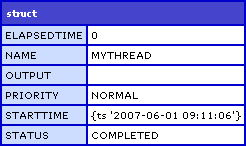
Let's take a look at each of the values.
ElapsedTime is the time in milliseconds that the thread has been running.
Name is the name of the thread (as assigned by the CFThread tag's name attribute).
Output is the generated content of the thread. Remember, child threads are not part of the page process and cannot output to the page buffer directly.
Priority helps the ColdFusion server decide how much processing time to give the thread. I believe this is just a "suggestion" to the server, but I do not know. I assume that you can relate priority to how long the thread will take to process (lower priority thread may take longer as the ColdFusion server does not dedicate as many resources).
StartTime is the time at which the child thread began processing.
Status is the mode in which the child thread is executing (think of ExecutionMode in a ColdFusion custom tag). This attribute can have several values (as taken directly out of the documentation):
NOT_STARTED The thread has been queued but is not processing yet.
RUNNING The thread is running normally.
TERMINATED The thread stopped running due to a cfthread tag with a terminate action or an error.
COMPLETED The thread ended normally.
WAITING The thread has executed a cfthread tag with action="join" but one or more threads being joined has not completed.
There is one more attribute not shown in the CFDump above and that is Error. Remember that since a child thread is not part of the current page, if it crashes, the current page will continue to run. If the child thread does crash, then ColdFusion will populate the Error attribute with the Exception object (similar to that of the CFCatch tag).
To see this in action, let's create a thread and throw an error:
<!--- Launch a child thread. --->
<cfthread
	action="run"
	name="DoomedThread">

	<!--- Throw an error. --->
	<cfthrow
		type="DoomThread.Suicide"
		message="You Thread Has Offed Itself"
		detail="You Thread Has Offed Itself, But You Are OK"
		/>

</cfthread>


<!--- Join the child thread to the curren page. --->
<cfthread
	action="join"
	name="DoomedThread"
	/>

<!--- Output thread object. --->
<cfdump var="#DoomedThread#" />
When we CFDump the thread scope (via the named-thread), we get the following output:
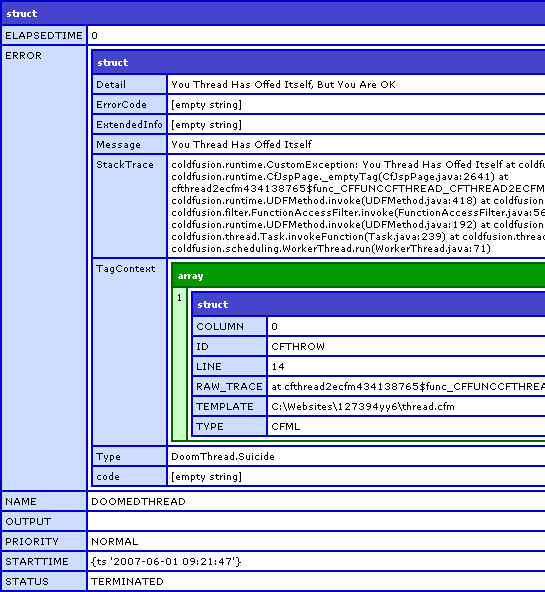
Notice that this time, the Error attribute of the thread scope available and contains the ColdFusion Exception object.
So, that covers ColdFusion 8's new CFThread tag and how data can be passed to the child threads, retrieved from the child threads, and shared between the child threads. In the next post, we will go more into how freaking cool this is and some use case stuff. But, learning the basics first is a must!
Want to use code from this post? Check out the license.

Reader Comments
Not that you would ever do such a thing, but if you accidentally leave a variable in a thread unscoped, it is automagically put into Thread scope, not Variables scope, as might be intuitive.
<cfset a=1>
<cfthread name="t1">
<cfset b=2>
</cfthread>
<cfset c=3>
<cfthread action="join" name="t1"/>
<cfdump var="#Variables#">
In that example, your dump only contains A and C, but not B, even though you didn't VAR it or explicitly scope it.
I'm not going to say whether or not this is a Good Thing, but it is definitely something to watch out for.
@Rick,
Good point, I didn't think to check for unscoped variables in the thread. Good to know. Thanks for the tip.
@Ben:
"The overall page time exceeded the page's request timeout, however, the page did not crash during the sleeping of the thread - the page crashed the second the page attempted to perform another task after sleeping (and after the request timeout had already drained). Interesting little caveat there."
This has always been the case when performing an action that itself is exceeding the timeout--like in a <cfquery /> tag. If the page is supposed to timeout in 30 seconds, but a query on the page takes 60 seconds to run, the page timeout won't occur until the query finishes executing.
-Dan
@Ben:
I don't have quick access to CFMX 8 at the moment, but I believe your "From Thread One!" test is wrong.
If you sleep that thread for a few seconds before updating the variables.message, I think you'll see that thread 2 returns "From Parent Page".
What I believe you're seeing when you ran that code thread 1 finished running before thread 2 started. You could probably refresh the page really rapidly and see that sometimes you get the "From Parent Page" message.
It's really important to remember the first <cfthread /> tag won't necessarily be the first to actual execute or to finish.
-Dan
@Ben:
I got a chance to install RC1 on my laptop this afternoon and I can confirm my last comment was correct.
The "From Parent Page" code and analysis above is wrong. For me if I run the code as you have it verbatim, I sometimes get the "From Thread One!" and sometimes the "From Parent Page" message.
This is because Thread 2 is reading the state of the VARIABLES.Message when it runs. Sometimes Thread 1 has already updated the variable, sometimes it hasn't.
If you place a sleep command in Thread 1 to ensure that it updates the message after Thread 2 runs, you'll see that you always get the "From Parent Page" message.
This is why it's so important to really have a firm grasp on threading before developers start using them in their code. It's really easy to make mistakes like this...
I think what you were trying to say is that "unscoped" variables in a thread are isolated in their own sandbox--which is true.
For example:
<!--- Launch a child thread. --->
<cfthread
action="run"
name="ThreadOne">
<cfset Variables.Message = "From Thread 1 Variables Scope!" />
<cfset Message = "Oops, this is private!" />
</cfthread>
On the surface, this might appear that if you output Variables.Message after the join, that the value would be "Oops, this is private!" but it's actually "From Thread 1 Variables Scope!"
This is because unscoped variables appear to be private from the other threads. That means to access global variables you absolutely need to scope the variables scope inside a CFTHREAD tag.
Here's a complete sample code that should show off what I'm talking about:
<!--- Set a message into the VARIABLES scope. --->
<cfset VARIABLES.Message = "From Parent Page" />
<!--- Launch a child thread. --->
<cfthread
action="run"
name="ThreadOne">
<cfset Variables.Message = "From Thread 1 Variables Scope!" />
<cfset Message = "Oops, this is private!" />
</cfthread>
<!--- Launch a child thread. --->
<cfthread
action="run"
name="ThreadTwo">
<cfthread
action="sleep"
duration="#(1000)#"
/>
<!---
Get the message from the VARIABLES scope
and store it into this thread's publically
accessible THREAD scope.
--->
<cfset THREAD.Message = VARIABLES.Message />
</cfthread>
<!--- join all the threads --->
<cfthread action="join" name="ThreadOne,ThreadTwo" />
<!--- Output the message --->
VARIABLES.Message: <cfoutput>#VARIABLES.Message#</cfoutput>
<br />
ThreadTwo.Message: <cfoutput>#ThreadTwo.Message#</cfoutput>
@Dan,
From you comments I believe that you are correct, although I will not have access to CF8 again until Monday. Thank you for taking the time out to really evaluate what was going on posting the code. After testing, I will update this blog post to contain more accurate information.
@Ben:
Not a problem. I finally decided to watch the Dream Theater Score DVD, so I thought it would be a perfect opportunity to update my CFMX8 install and take a look at this issue.
@Dan,
You are the man. Thanks so much for pointing out the inaccuracy in my VARIABLES scope stuff. I have updated this blog post and will probably post a new brief one outlining just this stuff. Thanks.
I know ColdFusion does not allow you to launch threads within threads, but theoretically is it possible using java inside a cfscript or something like that?
I have an ajax process bar that reports progress from an executable's line-by-line output, but for the ajax to work I have to call the CFC that contains the exe using cfthread , then that CFC contains its own cfthreads for handing the I/O of the executable properly per the function at the bottom of this page: http://cfsearching.blogspot.com/2008/01/using-runtimeexec-mencoder-and-cfthread.html
I get an "Child threads are not supported" error when trying to run it. Any advice would be great.
@David,
Sorry, I have never tried to make threads inside of threads.
Thanks. I found a workaround. I was able to remove the child threads that are processing the input and error streams by combining the output into a single stream using the magic "2>&1" switch at the end of my command line. I posted full details at http://cfsearching.blogspot.com/2008/01/using-runtimeexec-mencoder-and-cfthread.html
I thought I would be smart about a long process I was running (btw, if anyone has ANY way to pull a list of records from Active Directory using the System.DirectoryServices.dll that is faster than doing a lookup up, a search, and then pulling individual data items ala searchResults.Get_Item().Get_Properties().Get_Item().Get_Item(0), could you please let me know?)
Sorry, I digressed -- but I wanted to within a CFC, call a function threaded, passing in a couple parameters...
<cffunction name="parent">
<cfloop>
<cfthread name="x" action="run">
<cfset DoAFunction(a,b,c)>
</cfthread>
</cffunction
My problem, however, was that a,b, and c were var-scoped to "parent" -- and the values were not passing through to DoAFunction.
So, I'm changing to variables-scoped a,b, and c, BUT, is there any way to pass var-scoped variables to within a thread?
Thanks...BJK
Following up (Hey, I learned something):
Turns out you CAN pass var-scoped values into a CFThread... I was getting frustrated because my variables-scoped loop values that surrounded my thread were incrementing before my thread invocation completed... I didn't recognize this until I had to unspool the whole thing and look at dump after dump...
So I read the documentation. (Look, I was REALLY frustrated)
Anyhow, CFTHREAD has an attribute scope internal to the thread, and the CFTHREAD tag allows you pass in custom attributes...to wit:
<cfthread action="run" name="myThread" startRow="#startrow#" endRow="#endRow#" >
What's more, it supports the attributeCollection attribute (is that redundant?), so it's not near as ugly for some of the other values I wanted to pass in.
And now my CFC is completely var-scoped and safe again.
BJK
@BJK,
Yeah, using loops and CFThread can get a bit hairy. Glad you got it sorted out.
Ben, I wanted to mess with sessions from inside a thread, so I created this page (cfthread.cfm) to test it out:
http://atuttle.pastebin.com/f1a734bff
My tests, in CF8, show that the session variable isn't updated as far as the original process (page that creates the thread) can tell...
@Adam,
I assume what you are saying is that while the CFThread is running, you refresh the top level page and see that SESSION does not have a FOO key in it (even though it takes 120 seconds to full execute the thread?
If so, that is very fascinating! What happens if you remove the StructDelete() at the end of the thread? In that case, is the session updated after the fact?
Very curious!
<<<Not that you would ever do such a thing, but if you accidentally leave a variable in a thread unscoped, it is automagically put into Thread scope, not Variables scope, as might be intuitive.>>>
With respect to the comment made by Rick O, the variable, I believe, actually ends up in the 'thread-local' scope, which is not the same as the thread scope. Reference: Adobe CF8 Dev Guide, page 304.
http://livedocs.adobe.com/coldfusion/8/htmldocs/help.html?content=functions-pt0_01.html
My comment about the session variables is that they DO update just fine. I'm not sure why Adam's did not.
Now I have a question and a problem. I have a page with 4 threads on it. I keep getting an error that says that the threads can not be created because only 1 by that name per page.
Hmmmmmmm.
Why would it think there are more than 1 of each name per page? Multiple users hitting it at the same time?
Do I need to make the thread names unique for each user?
@Don,
The issue has to do with the NAME attribute of the CFThread tag. You cannot launch more than one thread on the same request with the same name. As in the following:
<cfthread name="myThread"> .. </cfthread>
<cfthread name="myThread"> .. </cfthread>
If you don't care what the threads are named (if you don't need to refer to them later on), you can use a UUID:
<cfthread name="#createUUID()#"> .. </cfthread>
... or you can simply name them differently:
<cfthread name="myThread1"> .. </cfthread>
<cfthread name="myThread2"> .. </cfthread>
Does that help at all?
Well, I know that. But on my page I have
<cfthread name="aThread">...</cfthread>
<cfthread name="bThread">...</cfthread>
And it is throwing the error saying it can not create aThread because it already exists. Same for bThread.
So I decided to check and make sure they were terminated before creating them. It said they didn't exist so couldn't terminate.
I'm wondering if somehow my page is reloading. It does have a cfform on it. Would that make the page load twice and try to run the cfthread twice?
@Don,
Hmmm, very funky. Try throwing in the createUUID() just to see if that takes care of it. If *even* that breaks, then something really weird is going on.
nice example , i made some exersices to test what is posted here and it seems me very powerfull, for example the multithread , we can see it in action with this example.
<cfset person = { fname= "samuel",lname="jaimes"} />
<cfset message = "" />
<cfthread action="run" name="process_1" >
<cfset variables.message = "hi from 1">
<cfthread action="sleep" duration="2000" />
<cfset person.fname= "Johan">
</cfthread>
<cfthread action="run" name="process_2">
<cfset variables.message = "hi from 2">
<cfset person.lname= "paola">
</cfthread>
<cfthread action="join" name="process_1" />
<cfthread action="join" name="process_2" />
<cfoutput>#variables.message#</cfoutput>
<br />
<cfoutput>#person.fname#</cfoutput>
we got :
hi from 2
Johan
cause we join the threads after call all the threads
------------
but if we were use:
<threa 1
<join threa 1
<threa 2
<join threa 2
we had gotten :
hi from 2
paola
@Samuel,
Yeah, CFThread is very cool, but as you are showing, people have to be very careful about the possible order in which things execute. Threads are not guaranteed to execute in the order in which they were defined. Typically what I do now is deep-copy values (via CFThread tag attributes) and then store "return" values into the THREAD scope (which will be accessible after the thread has joined).
Hi Ben,
I was wondering if using cfthread sleep action could be a workaround to slow down cfmail speed, as I have a lot of "too many conexions, slow down" mail issues.
Something like this :
Of course, would be ehanced with counter and so on, but what about perfs matters or whatever my low programming level could miss ?
Thanks in advance,
Antoine
Sorry, for the last block of code, I should have written
Are <cfthread />'s safe to use inside singleton instantiated objects?