
I have never needed to maintain a user session across multiple ColdFusion CFHttp calls before; I don't do that much screen scraping. But, I can't help people debug their own code (an unaswered "Ask Ben" question) until I understand how this works, so I thought I would give it a go. In order to do this, I created an extremely simple ColdFusion application that did nothing more than keep track of the number of times a user hit a page.
Here is the Application.cfc ColdFusion component that defines this mini application:
<cfcomponent
	hint="Hanles the application events and setup.">

	<!--- Define application. --->
	<cfset THIS.ApplicationName = "Session Test" />
	<cfset THIS.ApplicationTimeout = CreateTimeSpan( 0, 0, 5, 0 ) />
	<cfset THIS.SessionManagement = true />
	<cfset THIS.SessionTimeout = CreateTimeSpan( 0, 0, 5, 0 ) />
	<cfset THIS.SetClientCookies = true />


	<!--- Define request. --->
	<cfsetting
		showdebugoutput="false"
		enablecfoutputonly="true"
		/>

</cfcomponent>
As you can see, this does nothing more than define the application and session management as well as the request settings. The only other page in that application, index.cfm, keeps track of the page requests for the give session:
<!--- Param the session hit count. --->
<cfparam
	name="SESSION.HitCount"
	type="numeric"
	default="0"
	/>


<!---
	Add one to the hit count. This session is very simple.
	We are using this purely to see if the hit count goes
	up from page to page indicating that the session has held.
--->
<cfset SESSION.HitCount = (SESSION.HitCount + 1) />

<!--- Set the return value. --->
<cfset strOutput = ("Hit Count: " & SESSION.HitCount) />


<!---
	Return the hit count. We are returning it via the
	CFContent tag so that we can stream it to the browser
	without ever using the CFOutput tags.
--->
<cfcontent
	type="text/html"
	variable="#ToBinary( ToBase64( strOutput ) )#"
	/>
As you can see, another really simple page; it builds the output text (the hit count string) and then streams it to the browser using ColdFusion's CFContent tag and variable attribute (the use of the Variable attribute is something I love, but it is not required).
Ok, so now, we need to set up a page outside of this application that performs a ColdFusion CFHttp call to grab that index.cfm page's output. For this demo, our test page exists in the directory above the sub application and belongs to its own application (whose definition is of no consequence for the experiment).
Since, I am not 100% sure how multiple calls using CFHttp will react, I felt the first thing I needed to try was just that - calling CFHttp multiple times without any special actions or parameters:
<!---
	Get the URL of the application page that we want to
	grab. This page lives under a different application
	and will have different session management (that we
	must account for in subsequent requests).
--->
<cfset strURL = (
	CGI.server_name &
	GetDirectoryFromPath( CGI.script_name ) &
	"/app/index.cfm"
	) />


<!---
	Store the user agent that we want to send (so CFHttp
	doesn't send "ColdFusion" as the user agent). Since I
	am testing this in a browser, I am just going to grab
	the current user agent.
--->
<cfset strUserAgent = CGI.http_user_agent />


<!---
	Grab the first page request. In this one, we are not
	going to sent any CFHttpParams since we don't know
	anything about the target application environment.
--->
<cfhttp
	method="GET"
	url="#strURL#"
	useragent="#strUserAgent#"
	result="objGet"
	/>

<!--- Dump out the CFHttp response. --->
<cfdump
	var="#objGet#"
	label="First CFHttp Request"
	/>


<!---
	Now, let's make a second request, same as the first
	to see what gets send back.
--->
<cfhttp
	method="GET"
	url="#strURL#"
	useragent="#strUserAgent#"
	result="objGet"
	/>

<!--- Dump out the CFHttp response. --->
<cfdump
	var="#objGet#"
	label="Second CFHttp Request"
	/>
When I running that code, I CFDump out the two result objects returned by the vanilla CFHttp calls.
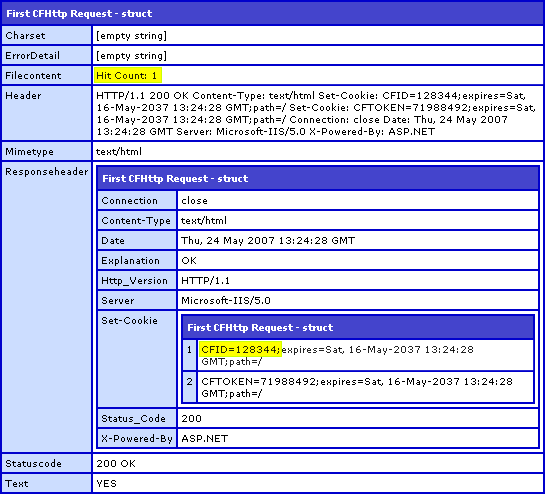
First CFHttp Request:
Second CFHttp Request:
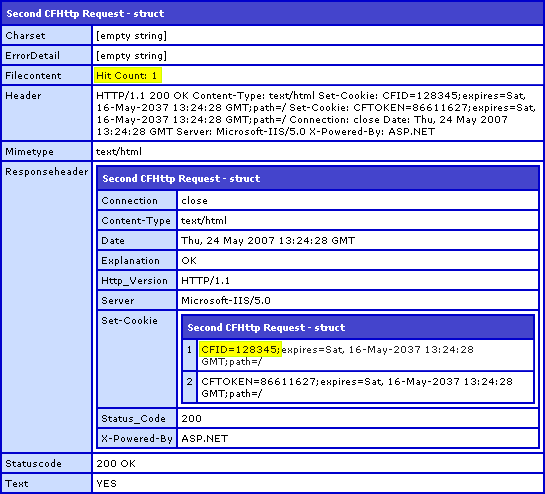
Notice that in both CFHttp result objects, the FileContent variable (highlighted in yellow) reports "Hit Count: 1". This happens because the session was not maintained across the two calls and hence, each request was given a new SESSION scope and therefore a new base line hit count. Furthermore, if you look at the cookies sent back from the browser, Set-Cookie (also highlighted in yellow), you will see that the two CFHttp requests receive two different CFID and CFTOKEN values. Since a session is represented by its CFID/CFTOKEN combination, these two requests clearly have different sessions.
In order to maintain session on the subsequent CFHttp requests, we must need to maintain the same cookies. Therefore, we need to be able to parse the cookies out of the response header of one CFHttp request result and use them as parameters in subsequent CFHttp requests.
To do this, I created a ColdFusion user defined function (UDF) that would take a CFHttp result and parse the returned cookie strings into some sort of easily usable structure:
<cffunction
	name="GetResponseCookies"
	access="public"
	returntype="struct"
	output="false"
	hint="This parses the response of a CFHttp call and puts the cookies into a struct.">

	<!--- Define arguments. --->
	<cfargument
		name="Response"
		type="struct"
		required="true"
		hint="The response of a CFHttp call."
		/>


	<!--- Define the local scope. --->
	<cfset var LOCAL = StructNew() />

	<!---
		Create the default struct in which we will hold
		the response cookies. This struct will contain structs
		and will be keyed on the name of the cookie to be set.
	--->
	<cfset LOCAL.Cookies = StructNew() />

	<!---
		Get a reference to the cookies that werew returned
		from the page request. This will give us an numericly
		indexed struct of cookie strings (which we will have
		to parse out for values). BUT, check to make sure
		that cookies were even sent in the response. If they
		were not, then there is not work to be done.
	--->
	<cfif NOT StructKeyExists(
		ARGUMENTS.Response.ResponseHeader,
		"Set-Cookie"
		)>

		<!---
			No cookies were send back in the response. Just
			return the empty cookies structure.
		--->
		<cfreturn LOCAL.Cookies />

	</cfif>


	<!---
		ASSERT: We know that cookie were returned in the page
		response and that they are available at the key,
		"Set-Cookie" of the reponse header.
	--->


	<!---
		Now that we know that the cookies were returned, get
		a reference to the struct as described above.
	--->
	<cfset LOCAL.ReturnedCookies = ARGUMENTS.Response.ResponseHeader[ "Set-Cookie" ] />


	<!--- Loop over the returned cookies struct. --->
	<cfloop
		item="LOCAL.CookieIndex"
		collection="#LOCAL.ReturnedCookies#">


		<!---
			As we loop through the cookie struct, get
			the cookie string we want to parse.
		--->
		<cfset LOCAL.CookieString = LOCAL.ReturnedCookies[ LOCAL.CookieIndex ] />


		<!---
			For each of these cookie strings, we are going to
			need to parse out the values. We can treate the
			cookie string as a semi-colon delimited list.
		--->
		<cfloop
			index="LOCAL.Index"
			from="1"
			to="#ListLen( LOCAL.CookieString, ';' )#"
			step="1">

			<!--- Get the name-value pair. --->
			<cfset LOCAL.Pair = ListGetAt(
				LOCAL.CookieString,
				LOCAL.Index,
				";"
				) />


			<!---
				Get the name as the first part of the pair
				sepparated by the equals sign.
			--->
			<cfset LOCAL.Name = ListFirst( LOCAL.Pair, "=" ) />

			<!---
				Check to see if we have a value part. Not all
				cookies are going to send values of length,
				which can throw off ColdFusion.
			--->
			<cfif (ListLen( LOCAL.Pair, "=" ) GT 1)>

				<!--- Grab the rest of the list. --->
				<cfset LOCAL.Value = ListRest( LOCAL.Pair, "=" ) />

			<cfelse>

				<!---
					Since ColdFusion did not find more than one
					value in the list, just get the empty string
					as the value.
				--->
				<cfset LOCAL.Value = "" />

			</cfif>


			<!---
				Now that we have the name-value data values,
				we have to store them in the struct. If we are
				looking at the first part of the cookie string,
				this is going to be the name of the cookie and
				it's struct index.
			--->
			<cfif (LOCAL.Index EQ 1)>

				<!---
					Create a new struct with this cookie's name
					as the key in the return cookie struct.
				--->
				<cfset LOCAL.Cookies[ LOCAL.Name ] = StructNew() />

				<!---
					Now that we have the struct in place, lets
					get a reference to it so that we can refer
					to it in subseqent loops.
				--->
				<cfset LOCAL.Cookie = LOCAL.Cookies[ LOCAL.Name ] />


				<!--- Store the value of this cookie. --->
				<cfset LOCAL.Cookie.Value = LOCAL.Value />


				<!---
					Now, this cookie might have more than just
					the first name-value pair. Let's create an
					additional attributes struct to hold those
					values.
				--->
				<cfset LOCAL.Cookie.Attributes = StructNew() />

			<cfelse>

				<!---
					For all subseqent calls, just store the
					name-value pair into the established
					cookie's attributes strcut.
				--->
				<cfset LOCAL.Cookie.Attributes[ LOCAL.Name ] = LOCAL.Value />

			</cfif>

		</cfloop>


	</cfloop>


	<!--- Return the cookies. --->
	<cfreturn LOCAL.Cookies />
</cffunction>
If we pass a CFHttp result to the above UDF and then CFDump out the structure, we get something like this:
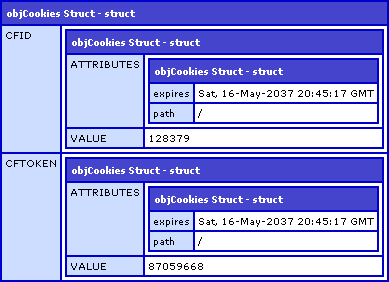
Once, we have our cookies parsed into a ColdFusion struct, we can send them as ColdFusion CFHttpParam values in subsequent CFHttp requests. For our next request, CFHttp request three, we are going to assume that request one and two have already been done and that the objGet from the second request is available for cookie parsing:
<!---
	At this point, we have established that multiple requests
	with CFHttp do not inherently keep the session. Now, let's
	figure out what happens when we send across the returned
	cookie values.
--->


<!---
	Get the cookies from the last response object. These are
	the cookies that we are going to echo back in subsequent
	CFHttp requests.
--->
<cfset objCookies = GetResponseCookies( objGet ) />


<!---
	Now, let's make a subsequent CFHttp call, but this
	time, we are going to pass in the cookies that were
	returned in the last call to see if we can maintain
	the same session.
--->
<cfhttp
	method="GET"
	url="#strURL#"
	useragent="#strUserAgent#"
	result="objGet">

	<!--- Loop over the cookies we found. --->
	<cfloop
		item="strCookie"
		collection="#objCookies#">

		<!--- Send the cookie value with this request. --->
		<cfhttpparam
			type="COOKIE"
			name="#strCookie#"
			value="#objCookies[ strCookie ].Value#"
			/>

	</cfloop>

</cfhttp>


<!--- Dump out the CFHttp response. --->
<cfdump
	var="#objGet#"
	label="Third CFHttp Request"
	/>
Running that code, we get the following CFHttp result object:
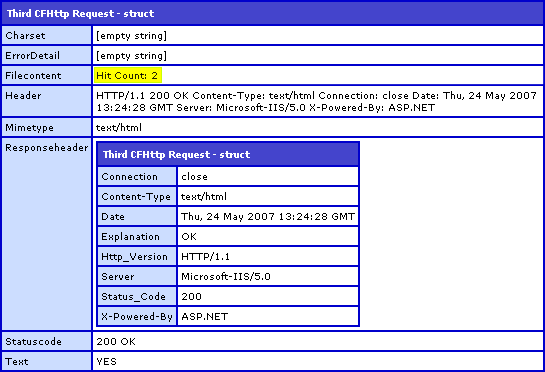
Notice that the FileContent of the third request (highlighted in yellow) is "Hit Count: 2". The only way that the second hit count could be returned is if the sub application maintained the session from the second CFHttp request to the third. Notice also that in the result of the third CFHttp request, no cookies were sent back. ColdFusion only sets the cookies when the user's session begins. Since the session is maintained across page requests, ColdFusion does not require any further cookies to be set and therefore sends no cookie requests in the response header.

Reader Comments
Nice work
Thanks dude. Always fun to try something new out.
Great... Great Article.. Ben...
@Dav,
Thanks a lot. Please let me know if you can think of a good way I might expand upon this idea in a way that people might find useful.
Interesting article. I hadn't ever thought about the idea that sessions wouldn't be maintained.
In response to expansion idea, how about a custom tag that is aware of it's own session and keeps it across requests. e.g. <cf_http session="mySession1">
@Jeremy,
That could be a cool idea. Let me play around with it a bit. Thanks for the suggestion.
You shouldn't need to pass cookies, just pass the session info as a url parameter. You should be able to shorten your code to just one line:
<cfhttp
method="GET"
url="#urlSessionFormat(strURL)#"
useragent="#strUserAgent#"
result="objGet">
NOTE: If the urlSessionFormat() tag doesn't work, just manually append the required URL parameters (cfid/cftoken or jsessionid.)
@Dan,
What you are saying is most definitely true, assuming we are talking about a ColdFusion application and that we already have the CFID / CFTOKEN values handy. But, what if this was calling an eBay site or something? Totally different technology and application scope. The returned page request will have nothing to do with the session of the code that is calling the CFHttp tag.
I use cfhttp to communicate with another server through a web service, and I have to maintain the session. Since the web service is behind a single sign-on layer, I have to grab the cookies set by the SSO login, and pass it to the web service login. I have to keep sending the cookies with every call to the web service because cfhttp doesn't automatically keep track of the session.
I like the way you are handling the cookies. I am basically doing the same thing. I store my cookies in an array. Each array item is the name/value pair for the individual cookies. I send one value for the cookies in the cfhttp call like this:
<cfhttpparam type="header" name="Cookie" value="#ArraytoList(cookieArray';')#">
This way I don't have to loop through the structure collection every time.
Just adding my 2 cents.
Matthew
@Matt,
That is really cool. I didn't realize it would recognize the entire cookie string and parse it correctly (on the receiving end). This is MUCH easier than looping. Thanks!
When ever I try to run your code I keep getting returned error: Variable GETRESPONSECOOKIES is undefined.
92 : CFHttp requests.
93 : --->
94 : <cfset objCookies = GetResponseCookies( objGet ) />
95 :
96 :
I created the GetResponseCookies.cfc file and I don't understand the error. I'm totally confused.
@Jason,
GetResponseCookies() is a user defined function; it doesn't have to be in a CFC. The CFFunction tag just has to be included somewhere in your application the way any user defined function would be. It looks like you are just not including or defining the function before you try to utilize it.
Hi Ben. One thing to note - this code chokes when a single cookie is set by the server (in which case, it comes back as a single string rather than a struct). A quick check to see what type of data is in the Set-Cookie item will fix this.
@James,
Really?? That is so strange. I figured ColdFusion would have kept the same data type no matter what. That seems really lame that they don't automatically create a struct regardless of number of cookies.
Thanks for the heads up.
I get a loop error on line 84 of this UDF. I think I'm running into the issue James mentions, though I'm not sure how to fix this.
@Gernot,
Make sure you have the most up to date CFC for this project:
www.bennadel.com/projects/cfhttp-session.htm
Ben, have you considered putting this up at riaforge?
@James,
I have considered it. It's just a matter of finding the time.
This explains a hell of a lot about Ajax and CF for me ...
Thanks a million!
E
@Edward,
Glad to help.
Hi Ben,
I am using your script to login to a Moodle (LMS) based site (moodle.org) and that went well without a problem.
My problem is that when I try to click to the user's profile page, it forces me to login again.
could it be that the Moodle based site is looking at sessions that it has created or referrer is coming from it's own url? How do I solve this? I've even created cookies but that does not seem to work.
What happens if there are a lot of internal pages, would the sessions belong to CF or the application?
Thanks
I just had a need for sending cookies back and found this blog post quite helpful. I was even able to use the original function as is. I did have to strip out extraneous quotes on the cookie value though.
Also, in case anyone else has problems seeing the cookies that are being set, you may need to add redirect="no" to your cfhttp request. This happened to me. The next url location in the sequence should come up in the response header. This took me a bit to figure out and was solved by an old thread on House of Fusion
http://www.houseoffusion.com/groups/cf-talk/thread.cfm/threadid:38156
I need to check out your "projects" section more often. This is one sweet component that just saved me a lot of time.
Just wanted to express my gratitude. Thank you.
@Gabriel,
I appreciate that, thanks.
Ben, I am a bit new to cfc's etc and I have a site that I need to http a request grab the cookie and send it back so this is perfect for my project however I am getting this error.
Loop error.
Invalid collection mansession_id="4dc0573e"; Version="1"; Max-Age=60. Must be a valid structure or COM object.
************************************
The error occurred in C:\Websites\.........\cfc\GetResponseCookies.cfc: line 77
75 :
76 : <!--- Loop over the returned cookies struct. --->
77 : <cfloop
78 : item="LOCAL.CookieIndex"
79 : collection="#LOCAL.ReturnedCookies#">
any help would be appreciated.
@Leadco,
GetResponseCookies is a function, not a CFC. If you want to see the fully-fleshed out version of this component, check out the CFHTTPSession.cfc:
www.bennadel.com/projects/cfhttp-session.htm
As I was struggling with a 3P web service site that was throwing back 302 redirect messages and trying to set cookies, Google brought me here and after applying the wisdom contained herein to my particular problem I exclaimed the following to a colleague over IM:
(11:17:49 AM) craig328: Ben Nadel IS a freakin' CF God.
I just needed to pass this along. Happy Friday, Ben and I give thanks for the info contained in this blog on a regular basis. :)
@Craig,
Ha ha, awesome! That just totally made my Friday :) Have a great weekend!
Hey Ben
Once again, great work, great code, and thanks.
I wondered if you or anyone has ever tried to use this code to persist cookies from a NetSuite API login (or ssoLogin). When posting to the ssologin I do receive back some cookies (JSessionID and NSVer) and I see that they are persisted and reapplied with your cfc on the next call, but when I post back to NS it is failing with 'Your connection has timed out. Please log in again.' FAULT message.
NS has NO support or knowledge of CF it seems so far, and since this is the hub of all CF glory, figured I'd post it here to see if you or anyone has insight/solution/experience with CF and the NS API!
Thanks as always,
Matt
I'm obviously being stupid. Can anyone help? The site I want to cfhttp has changed and now won't work, so I was looking at this maintaining state. But I don't get it. The site in question maintains an ID in the URL, once you are logged in. I can't work out how to it using Ben's code. Can anyone help?
I am trying to integrate this CFHTTPsession into an application that will log into zeekrewards.com to post ads and I am not having any luck. The code works perfectly for logging into other websites, just not zeekrewards. The submit part of the form on zeekrewards is an image type, not a submit type, would this have anything to do with it? I know everyone here is busy but any help would be greatly appreciated.
It's also worth mentioning, I have come across instances where servers do not favor the construct of CF's cookie implementation. So as an alternative to:
I have used:
I tried to use Ben's great component to automate login to some site, but it keeps failing... after hours of work, I find that when setting the cookie using addparam(type="cookie")... it somehow messes up the cookie (by escaping it maybe?) Instead, it will work if you set the cookie using addParam(type="header"...)
Here is the lines that I chanced on Ben's code (line 820)
<!--- cfhttpparam
type="cookie"
name="#LOCAL.Key#"
value="#VARIABLES.Instance.Cookies[ LOCAL.Key ].Value#"
/ --->
<cfhttpparam
type="header"
name="cookie"
value="#LOCAL.Key#=#VARIABLES.Instance.Cookies[ LOCAL.Key ].Value#"
/>
Ben, if you see this, can you verify what I am doing make sense or not.
Shoot me... I didn't see Jason's post in 2012. I was solved two years ago! Could have saved me hours and hours!
@Yush - lol CF can be a fickle little bi*¢h!