
Yesterday, I demonstrated how to use a ColdFusion custom tag in order to define an Application.cfc body such that you could extend the current Application.cfc instance with a base Application.cfc using a relative path. In the comments to that post, Walter Seethaler dropped a knowledge bomb on us, explaining that you could accomplish the same thing by simply extending a local proxy that, itself, CFInclude'd the root Application.cfc. This might just be brilliant!
To quickly outline this approach, imagine that you have an Application.cfc in a sub-directory that needs to extend a root Application.cfc; but, you don't know what the web-root relevant class path for that root Application.cfc is. To use a relative path (relative to the sub-directory Application.cfc), you can extend a local proxy:
<cfcomponent extends="RootProxy">
	<!--- Sub-directory App.cfc. --->
</cfcomponent>
This local proxy (RootProxy.cfc) then does nothing more than include the root Application.cfc using a relative path:
<!--- RootProxy.cfc -- Include root App.cfc --->
<cfinclude template="../../Application.cfc" />
Here, we are taking advantage of the fact that CFInclude works with relative paths and that one ColdFusion component can be CFIncluded into another ColdFusion component. In the end, we are using a relative path to extend a ColdFusion component.
Now, in the comments, Walter mentioned that there were some issues with object creation during the CFInclude process, so I wanted to make sure that I tested this thoroughly. Here is my testing directory structure:
./
./Application.cfc
./Test.cfc
./index.cfm
./sub/
./sub/Application.cfc
./sub/RootApplication.cfc
./sub/index.cfm
This time, you'll notice that there is a Test.cfc ColdFusion component in the root directory. There is nothing in this component (save a CFComponent tag); it is there simply to determine whether or not calls to the createObject() function will succeed or fail during various aspects of the page load.
Ok, let's dive into the code. First, let's take a look at our root-level Application.cfc file:
Application.cfc (In The Root-Directory)
<!--- NOTE: This is the ROOT Application.cfc file. --->

<cfcomponent
	output="false"
	hint="I define the application settings and event handlers.">


	<!--- Define the application settings. --->
	<cfset this.name = "AppExtendViaProxyInclude" />
	<cfset this.applicationTimeout = createTimeSpan( 0, 0, 10, 0 ) />

	<!---
		Store the path of the current template. We want to see if
		this shows up as the root template or the sub template.
	--->
	<cfset this.ROOT_currentTemplatePath = getCurrentTemplatePath() />

	<!---
		Try to create an instance of the Test CFC located in the
		root. Will the createObject() call be relative to the
		current template? Or, to the sub-directory template?
	--->
	<cftry>
		<cfset this.ROOT_testCFC = createObject( "component", "Test" ) />
		<cfcatch>
			<cfset this.ROOT_testCFC = cfcatch.message />
		</cfcatch>
	</cftry>


	<!--- ------------------------------------------------- --->
	<!--- ------------------------------------------------- --->


	<cffunction
		name="onApplicationStart"
		access="public"
		returntype="boolean"
		output="false"
		hint="I initialize the application.">

		<!--- Set some app variables for testing. --->
		<cfset application.ROOT_onApplicationStart = true />

		<!--- Return true so the page can process. --->
		<cfreturn true />
	</cffunction>


	<cffunction
		name="onRequestStart"
		access="public"
		returntype="boolean"
		output="false"
		hint="I initialize the request.">

		<!--- Set some request variables for testing. --->
		<cfset request.ROOT_onRequestStart = true />

		<!---
			Try to create an instance of the Test component located
			in the root directory. Will the createObject() call be
			relative to teh current template? Or the sub-directory
			template?
		--->
		<cftry>
			<cfset request.ROOT_testCFC = createObject( "component", "Test" ) />
			<cfcatch>
				<cfset request.ROOT_testCFC = cfcatch.message />
			</cfcatch>
		</cftry>

		<!--- Return true so the page can process. --->
		<cfreturn true />
	</cffunction>


	<cffunction
		name="onRequest"
		access="public"
		returntype="void"
		output="true"
		hint="I process the user's request.">

		<!--- Define arguments. --->
		<cfargument
			name="script"
			type="string"
			required="true"
			hint="I am the request script."
			/>

		--- START SCRIPT REQUEST ---<br />
		<br />

		<!--- Output the current THIS collection. --->
		<cfdump
			var="#this#"
			label="THIS"
			/>

		<br />
		<hr />
		<br />

		<!--- Include (execute) requested script. --->
		<cfinclude template="#arguments.script#" />

		<br />
		--- END SCRIPT REQUEST ---<br />

		<!--- Return out. --->
		<cfreturn />
	</cffunction>

</cfcomponent>
As you can see, we're going to be checking a number of things:
-
What does getCurrentTemplatePath() give us in the pseudo constructor.
-
Is createObject() relative to the current template in the pseudo constructor.
-
Is createObject() relative to the current template in the onRequestStart() event handler.
-
What does the THIS object look like within the onRequest() event handler.
Normally, I would execute the index.cfm in the root and show you the output; but, let's face it - when we're in the root of the application, there's nothing special going on. As such, let's proceed directly to the Application.cfc located within our sub-directory:
Application.cfc (In The Sub-Directory)
<!--- NOTE: This is the SUB Application.cfc file. --->

<cfcomponent
	extends="RootApplication"
	hint="I define the application settings and event handlers.">


	<!--- Define the application settings. --->

	<!--- Store the path of the current template. --->
	<cfset this.SUB_currentTemplatePath = getCurrentTemplatePath() />

	<!---
		Try to create an instance of the Test CFC located in the
		root. Will the createObject() call be relative to the
		current template? Or, to the root-directory template?
	--->
	<cftry>
		<cfset this.SUB_testCFC = createObject( "component", "Test" ) />
		<cfcatch>
			<cfset this.SUB_testCFC = cfcatch.message />
		</cfcatch>
	</cftry>


	<!--- ------------------------------------------------- --->
	<!--- ------------------------------------------------- --->


	<cffunction
		name="onSessionStart"
		access="public"
		returntype="void"
		output="false"
		hint="I initialize the session.">

		<!--- Set some session variables for testing. --->
		<cfset session.dateInitialized = now() />

		<!--- Return out. --->
		<cfreturn />
	</cffunction>


	<cffunction
		name="onRequestStart"
		access="public"
		returntype="boolean"
		output="false"
		hint="I initialize the SUB request.">

		<!--- Invoke the super onRequestStart() method. --->
		<cfset super.onRequestStart( arguments[ 1 ] ) />

		<!--- Set some request variables for testing. --->
		<cfset request.SUB_onRequestStart = true />

		<!---
			Try to create an instance of the Test component located
			in the root directory. Will the createObject() call be
			relative to the current template? Or the root-directory
			template?
		--->
		<cftry>
			<cfset request.SUB_testCFC = createObject( "component", "Test" ) />
			<cfcatch>
				<cfset request.SUB_testCFC = cfcatch.message />
			</cfcatch>
		</cftry>

		<!--- Return true so the page can process. --->
		<cfreturn true />
	</cffunction>

</cfcomponent>
In this Application.cfc ColdFusion component, we are testing the same functionality, roughly; how things work in the pseudo constructor vs. the event handlers. You'll notice, however, that this component extends the sub-directory-based RootApplication.cfc component. And, as I described above, this proxy does nothing more than CFInclude the root Application.cfc:
RootApplication.cfc (In The Sub-Directory)
<!--- This is the RootApplication.cfc in the SUB directory. --->

<!--- Include the root Application.cfc. --->
<cfinclude template="../Application.cfc" />
Ok, now we need to pull all of this together into a test. In our sub-directory, we have an index.cfm file which outputs the Application and request scopes, followed by a new instance of the local Application.cfc component. If you look back up in the root-level Application.cfc, however, you'll see in the onRequest() event handler that we also start off by CFDump'ing out the current THIS configuration (of the current request):
Index.cfm (In The Sub-Directory)
<!--- NOTE: This is the SUB index. --->

<cfdump
	var="#application#"
	label="Sub Application"
	/>

<br />

<cfdump
	var="#request#"
	label="Sub Request"
	/>

<br />

<cfdump
	var="#createObject( 'component', 'Application' )#"
	label="Sub Application.cfc Instance"
	/>
When we run the above page, we get the following output. Since there are a lot of interesting things going on here, I have marked up the CFDump output with numbers, which I will then explain below.
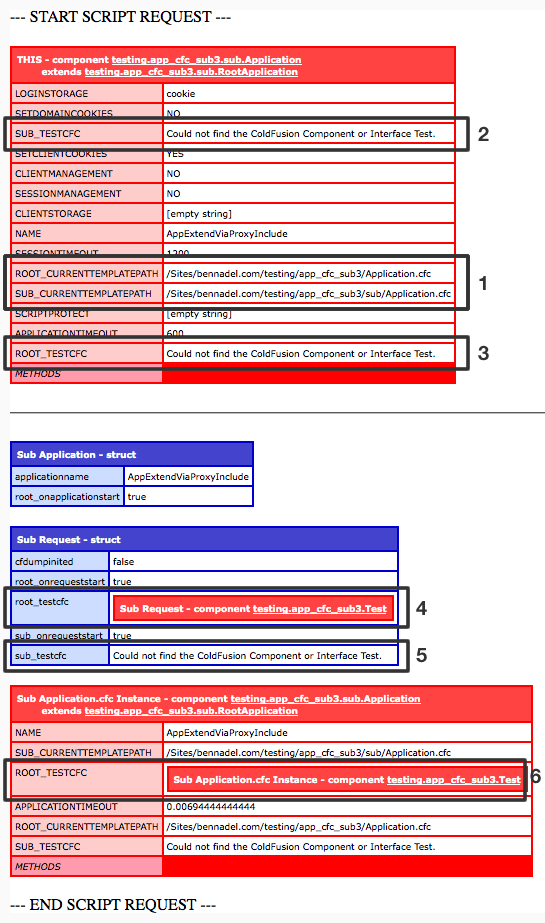
In the above output, there is a horizontal line. The Application.cfc instance above the horizontal line is the THIS scope of the Application.cfc that has been implicitly instantiated by the ColdFusion application server as a way to process the incoming page request. The Application.cfc instance below the horizontal line is a completely new instance that we manually instantiate and output. I make sure to draw this distinction because these two modes of instantiation result in different behaviors.
Ok, let's take a look at the callouts in the above output:
-
We can see that calls to the getCurrentTemplatePath() function return the appropriate paths. The root Application.cfc reports as the root version and the sub Application.cfc reports as the sub version.
-
Within the sub-directory Application.cfc pseudo constructor, we could not create an instance of our root-directory Test.cfc component. This indicates that the pseudo constructor of the sub-directory Application.cfc executes relative to the sub-directory (and therefore cannot locate the Test.cfc class definition that resides in the directory above).
-
In addition to #2, we also could not instantiate Test.cfc from within the pseudo constructor of our extended root-directory Application.cfc. Since the root Application.cfc is in the same directory as the Test.cfc component, this indicated that the pseudo constructor of the base Application.cfc (that we are extending) executes relative to the sub-directory.
-
If you look at the code, you'll see that our sub-directory Application.cfc onRequestStart() event handler invokes the super-scoped onRequestStart() event handler. The use of "super" in this case allows us to invoke the onRequestStart() event handler defined within our root-directory Application.cfc. From the CFDump, you can see that we were able to instantiate our Test.cfc component. This indicates that the event handlers of our super component execute relative to the root-directory even when invoked from within our sub-directory.
-
The event handlers within the sub-directory execute relative to the sub-directory (this is the expected behavior) and therefore, cannot instantiate the Test.cfc component located within the parent directory.
-
This is from the instance of the sub-directory Application.cfc that we instantiated manually. You'll notice that when instantiated manually, we were able to create an instance of our Test.cfc from within the pseudo constructor of our base Application.cfc. This is the opposite of what we found in #3. It appears that the context of the pseudo constructor of the base component changes depending on the explicit vs. implicit nature of instantiation.
Another thing that I noticed (but did not show in the testing) was that within the pseudo constructor of the extended-by-CFInclude Application.cfc, there are no methods in either the THIS scope or the VARIABLES. Typically, you can use local methods within the pseudo constructor; but, not in the extended version - those methods are not available until within the event handlers.
NOTE: You could use unscoped methods (ie. no THIS or VARIABLES prefix); but, they still execute relative to the sub-directory.
So, there's a lot of stuff going on here; but, this totally works if you follow the one main caveat:
Don't do anything within your pseudo constructor.
Of course, you still need to define the application settings (ie. this.name, this.applicationTimeout, etc.) in the pseudo constructor; but, don't do any real file-based logic within your pseudo constructor such as trying to load component instances.
This might seem like a big limitation; but, in my experience, it's not really. The ColdFusion application framework provides hooks to the life-cycle of the page request by giving you event handlers. You really shouldn't need to go outside of these event handlers to initialize your application (too much). I know people who have some requirement to load template-specific DSN values in the pseudo constructor or boot up ColdSpring instances; but, I still don't fully understand these requirements, so I can't speak to them.
We've done a lot of exploration of the Application.cfc ColdFusion application framework component over the last few days. There's definitely a lot to absorb here; and, I'm sure the exploration is far from comprehensive. A huge thanks to Walter for bringing this particular approach to light.

Reader Comments
Ben, Can we invoke application.cfc as web-service?
@Manoj,
You cannot invoke Application.cfc directly; is there a reason you would want to?
@Ben,
I was just asking for a security concern. So it means that the application.cfc file is a most secure file in a project.
@Manoj,
Yes, Application.cfc is completely safe. If you try to access it directly from the URL, it will throw an error.
Hi Ben - I just wanted to make sure I'm reading and implementing the appropriate solution based on my needs.
So - if I'm trying to use something like...
<cfset AddBioInfo=createobject("component", "../cfc/AddModule")>
Which I know fails - I can use the above instead? Or am I looking at the wrong solution for this problem? Thanks in advance.
This technique as well as the earlier posted method using cfinclude work great in Adobe Coldfusion (9) but NOT in Railo (3.2.3). None of the application-scoped variables appear to pass through to the Application.cfc in the subdirectory. Instead, the entirety of the application scope contents is:
application.applicationname = '';
Any ideas anyone?
Thanx for this. I have been wrestling with a related challenge wishing I could extend a dynamic Class path set in an ini since the dev and prod environs are dif. I combined the above solution with a Charlie Arehart solution from awhile ago and it seems to have done the trick in my situation. I will ditto the use of the word brilliant above, and yet simple. Very cool, intuitive and much appreciated.
This post came in real handy when I had to set up a sandbox folder. Within the sandbox I needed the onApplicationStart method to load all the singletons, but I needed to override onRequestStart and onRequestEnd since they both include the site layout. Having a RootProxy.cfc allows me to extend the root-level Application.cfc and override those methods at the same time.
Is it then necessary to create a different RootApplication.cfc file in every subdirectory that extends the root Application.cfc? I am having trouble getting a subdirectory Application.cfc to extend a RootApplication. also located in the root.
Hey, Ben! Unless I'm missing something (always a possibility!), you're making this too hard on yourself: as our friend Sean Corfield showed us way back in 2005 in his post at http://corfield.org/entry/Extending_Your_Root_Applicationcfc, you can proxy the root Application.cfc in the root directory and then extend that proxy from anywhere. The key is that it's not that you can't extend Application.cfc, it's that you need to do it in the same directory as Application.cfc. The big advantages of Sean's approach are: you only have to proxy the root Application.cfc one time and you can extend it from anywhere in the app (as a result of the fact that ColdFusion will search up the directory tree but not down it for the proxy, in your approach you would have to proxy the root Application.cfc in every sub-directory, albeit not in any sub-directories of those sub-directories) and you don't add a code portability consideration in your sub-directory (since your approach is utilizing a relative path in the proxy in the sub-directory, if that code is moved up or down the directory tree, the relative path will have to be changed).
@Josh, I think this is a great topic. I recall long ago researching and finding various solutions from many and now simply employ an ApplicationProxy in the webroot that extends the Application.cfc in same folder and any child App.cfc's extend this proxy with super. Seems to work fine and it's simple :-) Anyway, this reminds me of a similar wishlist item and you folks may know - it'd be cool if CFC's could extend via a dynamic ClassPath. I think that is still not possible - correct? eg: RegistrantManager.cfc - extends="#application.stApplication.componentClassPath#.UserManager" I suppose if in same folder it doesn't matter but I remember this surfacing somewhere in my travels... Thanks, B-
Okay so I have extending the application.cfc working via applicationProxy.cfc sitting in the root with the application.cfc (awesome).
Now I have a situation (bummer).
I'm incorporating Ray Camdem's Canvas Wiki (x2) within this application, had to change the application.cfm files to cfc (no biggie).
Session information seems to be flowing without an issue (great) - until ...
I invoke a process that allows administrative people to assume being another user. In short it updates all the session information to that assumed user's information minus a bit-flag to change back.
This process works fine but when I go back into the Wikis the original session information exists, I'm not getting the updated session information.
Doing a cfdump of the session in the root of the application or any sub-folders (minus the wiki folder) I'm showing the correct assumed session information. Doing a cfdump in the Wiki sub-folders I'm showing the original pre-assumed session information.
I'm obviously missing something here and any insight that someone could provide would be greatly appreciated.
Thanks!