ColdFusion Custom Tags Cannot Act As ColdFusion Component Mixins
The other night, I was laying in bed, thinking about ColdFusion code (as I often times find myself doing), and it suddenly occurred to me that I wasn't sure of the expected behavior of ColdFusion custom tags that execute within a ColdFusion component context. Anyone who has created a user defined function (UDF) library or used free-standing functions knows that UDFs get bound to the calling page, not to the defining page. Unless, of course, the UDF is being called as a class method on a ColdFusion component; in that case, the UDF is bound to the component instance, not to the calling context. But what happens when you execute a ColdFusion custom tag within a ColdFusion component? What is the CALLER scope bound to? And, how do method invocations via the CALLER scope work?
To test this, I created a simple ColdFusion component that had a public method, a private method, and private variable:
Greeting.cfc
<cfcomponent
	output="true"
	hint="I am here to test the binding of CALLER to a ColdFusion component.">


	<!--- Set a local variable to the component. --->
	<cfset variables.name = "Sarah" />


	<cffunction
		name="sayHello"
		access="public"
		returntype="void"
		output="true"
		hint="I say hello.">

		<!--- Say hello. Use the loacl NAME variable. --->
		Hello, my name is #variables.name#!

		<!--- Return out. --->
		<cfreturn />
	</cffunction>


	<cffunction
		name="privateMethod"
		access="private"
		returntype="void"
		output="false"
		hint="I am just a private method for CFDump.">

		<cfreturn />
	</cffunction>


	<!---
		Now, execute a custom tag that will invoke the sayHello()
		method in the CALLER context.
	--->
	<cf_sayhello />

</cfcomponent>
As you can see, this is very simple; the public method, sayHello(), makes use of the private variable, name, in order to output a greeting. As part of the pseudo constructor, we are then executing a ColdFusion custom tag (sayhello.cfm) which will invoke the sayHello() method. The private method is there just to help us figure out which scopes are being bound (a private method will not show up on a public-scope binding).
The sayhello.cfm ColdFusion custom tag then turns around and invokes the sayHello() method on its Caller scope (and various combinations of caller-based paths):
sayhello.cfm (ColdFusion Custom Tag)
<!---
	Define a local variable to the custom tag. This will not collide
	with the caller's variables scope, but since it is named the same
	as a variable in the caller context, it will allow us to figure
	out where the method invocation is being bound.
--->
<cfset variables.name = "customTag" />

<!---
	Invoke the sayHello() method on the CALLER scope. If the caller
	scope were just a standard CFM template, then the function would
	execute with a local, custom-tag context. However, in this case,
	the caller context is a CFC - where will the function bind??
--->
<cfset caller.sayHello() />

<br />
<br />

<!---
	Now, try to invoking the method by explicitly calling the
	variables scope associated with the caller context.
--->
<cfset caller.variables.sayHello() />

<br />
<br />

<!---
	Now, try invoking the method by explicitly calling the
	this scope associated with the caller context.
--->
<cfset caller.this.sayHello() />


<br />
<br />


<!---
	Now, let's CFDump out the caller scope to see what the actual
	binding is.
--->
<cfdump
	var="#caller#"
	label="CALLER Scope"
	/>

<br />

<!---
	And, let's output the caller-bound varaibles scope to see what
	the actual binding is.
--->
<cfdump
	var="#caller.variables#"
	label="CALLER.Variables Scope"
	/>

<br />

<!---
	And, let's output the caller-bound this scope to see what
	the actual binding is.
--->
<cfdump
	var="#caller.this#"
	label="CALLER.This Scope"
	/>


<!--- Exit out of the tag. --->
<cfexit method="exitTag" />
As you can see, the first thing we are doing is defining a custom-tag-local variable, name, with the value "customTag". This will help us determine where the sayHello() method is being bound. Then, we try to execute the sayHello() method on various caller-based objects: caller, caller.variables, caller.this. When we instantiate the Greeting.cfc ColdFusion component, thereby running the above ColdFusion custom tag, we get the following page output:
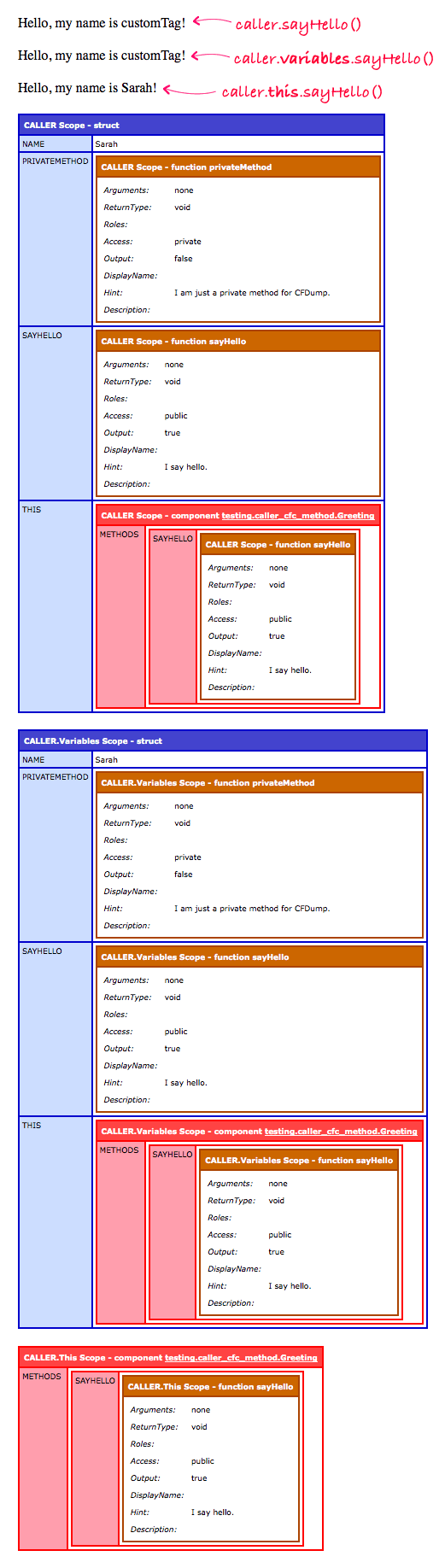
Now this is some very interesting stuff! The first thing we can see is that some of our class method invocations actually acted like unbound user-defined functions; that is, their execution was bound to their calling context (the custom tag), and not to the ColdFusion component instance as one might expect:
caller.sayHello() :: NOT bound to CFC.
caller.variables.sayHello() :: NOT bound to CFC.
caller.this.sayHello() :: Bound to CFC.
Furthermore, from our CFDump output, we can see that there is a clear distinction between the CALLER scope the ColdFusion component itself. The Caller scope is mysterious and powerful beast. I have blogged before about the special way in which the Caller scope treats keys for getting and setting values. As such, it's not too surprising that the caller scope doesn't map to a ColdFusion component even when the target context is a ColdFusion component.
When you look at the CFDump, you'll notice that the ColdFusion custom tag has access to the private method - privateMethod() - of the ColdFusion component when it outputs the variables scope. However, variables-scope-based invocations do not bind to the CFC. The only way that we could get the method to bind to the CFC is when we invoke it via "caller.this"; unfortunately, when we do that, as you can see in our last CFDump, we no longer have access to the private method.
From this, I can see two important take-aways: 1) a ColdFusion custom tag, when executed from within a ColdFusion component, can gain access to both the public and private methods of the given component, and 2) although the custom tag can access both the public and private methods of the CFC, it cannot act as though it were a ColdFusion component mixin. In short, a custom tag acts like a completely separate, encapsulated object which happens to have the ability to access unbound private methods.
I suppose it would help to starting thinking about the Caller scope more like a "bridge" to another context and less like a reference to an existing object or scope.
Want to use code from this post? Check out the license.

Reader Comments
Our experience is use Custom Tags for content handlers, view tools and not for logic. With that concept in mind we would not be against your use case but that level of content handling might work better from a component to start with.
Why were you trying to use a custom tag inside a mixin component to start with... that might shed some light on the subject. Was this something from a takeover project. (It is where the frustration hits me more often for things like this.)
@John,
I can't think of a great use-case for in-CFC custom tags. This was more to explore the behavior of the Caller scope within a CFC context. I just wanted to know how it works!
@Ben,
Functional exploration has a value in the Mix. Thanks for the exploration of one of my favorite topics... 'how ColdFusion thinks'.
@John,
Agreed - understanding the way things works is always quality.
@Ben,
When I run your code and dump caller.this, I see both sayHello() and privateMethod() inside the dump. What version of CF are you running? I'm on 9,0,1,274733.
@Tony,
Uh oh :) I ran this in ColdFusion 8.1 (or whatever the latest CF8 version is. Furthermore, when I try to access the privateMethod():
<cfset caller.this.privateMethod() />
... I get:
The method privateMethod was not found in component /Sites/bennadel.com/testing/caller_cfc_method/Greeting.cfc. Ensure that the method is defined, and that it is spelled correctly.
It works if I call:
<cfset caller.variables.privateMethod() />
... but, of course, outputs nothing.
Can you actually invoke the private method without error?
@Ben,
No it still errors out. Must just be an update to cfdump that's causing the difference in results.
@Tony,
Ha ha, I can't tell which is worse : a change in behavior of the caller scope across versions... or a completely misleading CFDump :)