
Javascript Multiline Regular Expressions Don't Include Carriage Returns In IE
In a Regular Expression (RegEx) pattern, the ^ and $ characters typically match the start and end of an entire string. However, if you run a regular expression pattern in "Multiline" mode, the ^ and $ characters should match the start and end of each individual line, respectively. This is a pattern construct that I typically use on the server-side for data file parsing. On the client side, however, I very rarely use it. And, because of this seldom usage, I tend to forget that client-side support for multiline patterns is not universally consistent.
Case in point, last week I discovered some buggy behavior in my jQuery Template Markup Language (JTML) project. In the underlying rendering engine, JTML compiles down to an executable Javascript function in which each line of the JTML template is written to an output buffer in order to reduce string concatenation costs. The individual template lines were extracted using a multiline regular expression. This worked perfectly in Firefox, but created unterminated string constant Javascript errors in IE.
At first, debugging this problem was very frustrating because it appeared that both Firefox and IE supported multiline regular expressions. And, in fact, they do. But, they do not support these pattern constructs in the same capacity. After much alert()'ing and console.log()'ing, I finally figured out what the difference was - Internet Explorer (IE) does not include carriage returns (\r) in its multiline match delimiters. As such, those \r characters were being compiled down into mid-string line breaks, which is what was causing the unterminated string errors.
To see this in action, I am going to loop over the lines of a given Script tag using a multiline regular expression:
<!DOCTYPE HTML>
<html>
<head>
	<title>Javascript Multline Regular Expression</title>
</head>
<body>

	<h1>
		Javascript Multline Regular Expression
	</h1>

	<!-- This is our input data. -->
	<script id="template" type="text/jtml">
		This data
		is spread across
		multiple lines.
	</script>

	<!-- This is our output element. -->
	<form>
		<textarea
			id="output"
			style="width: 500px ; height: 100px ;">
		</textarea>
	</form>


	<script type="text/javascript">

		// Grab the HTML of the template node.
		var jtml = document.getElementById( "template" ).innerHTML;

		// Grab the FORM output.
		var output = document.getElementById( "output" );

		// Create a counter for the number of lines found.
		var lineCount = 0;

		// Iterate over the JTML content in MULTILINE mode; this
		// should match the
		jtml.replace(
			new RegExp( "^(.*)$", "gm" ),
			function( $0 ){
				// Append mached line to output.
				output.value += $0;

				// Increment line count.
				lineCount++;
			}
		);

		// Append line count to output.
		output.value += lineCount;

	</script>

</body>
</html>
As you can see, as I am matching the individual lines in the Script tag, I am outputting them to the Textarea output and incrementing my line count. When I run this in Firefox, I get the following page output:
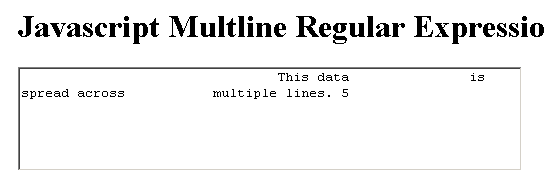
As you can see, Firefox found 5 individual lines in the Script tag. And, since it used both the carriage return and the new line characters as multiline delimiters, the resultant textarea has no hard line breaks.
On the other hand, when we run the above code in Internet Explorer (IE), we get the following page output:
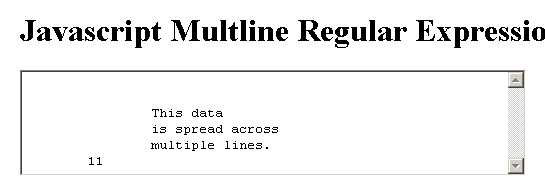
This is a very different story. As you can see, Internet Explorer also found multiple, individual lines; but, it found 11 lines rather than just 5. This is because it did not include the carriage return (\r) character in the multiline pattern delimiter. As such, the resultant textarea does contain hard line breaks as well as lines consisting of just the \r character (hence the additional line count).
NOTE: Some of the line count in IE can be reduced by using the (+) qualifier rather than the (*) qualifier in the matching regular expression.
I've had multiline problems before. But, as I was saying, I don't use multiline regular expressions very often in Javascript. Hopefully, this time, I'll remember that even in the most modern browsers, they are not quite supported consistently enough for use.
Want to use code from this post? Check out the license.

Reader Comments
That's quite alarming. I've used regular expressions to seperate lines before.
Gotta take a deeper look into that...
Thanks for pointing it out Ben!
@Martin,
Yeah, this is frustrating stuff. There are some other odd Javascript RegExp differences in the other browsers, specifically with looping and exec(). This seems like the kind of thing that should be pretty universal.
Hi,
Nice post, Please tell me what of the both i can use for begin (the ^ and $)?
Thank you for this answer.
Sincerely
http://www.gutlin.com
IE is now complying if DOCTYPE is 1st in streeming. Without it, same old bug.