
POI Utility Now Supports Formulas And Cell Aliasing In Custom Tags
Hot on the heels of my last update, I am releasing another mini update for the ColdFusion 8 version of my POI ColdFusion custom tags. Taking Zac Spitzer's most excellent advice, I haven't just included formula support, I've also built in support for cell aliasing. What this means is that rather than using values in your formulas like "D8", you can alias a cell and use that name in the cell formula (ex. SUM( @Start:@End )).
Right now, this is only part of the ColdFusion 8 version of the tags because of the REMatch() function (and some other syntax short-hands). But hopefully soon, I can reorganize my code a bit to have a little UDF support that will make the CF7 compatibility steps easier.
To alias a cell, all you have to do is add the "Alias" attribute. An alias can be composed of alpha-numeric data, underscores, and dashes:
<poi:cell
	value="35000"
	type="numeric"
	numberformat="0.00"
	alias="StartSum"
	/>
The above cell has been aliased with the name "StartSum". Now, when referring to this alias in a cell formula, you need to use the "@" symbol:
<poi:cell
	value="SUM( @StartSum:@EndSum )"
	type="formula"
	numberformat="0.00"
	/>
Now, your code can grow without you having to worry about recalculating the formulas with every edit. Let the POI custom tags keep track of that for you.
If you care to see a demo, here is the new code file that I am shipping with this release:
<!--- Import the POI tag library. --->
<cfimport taglib="./poi/" prefix="poi" />


<!---
	Create an excel document and store binary data into
	REQUEST variable.
--->
<poi:document
	name="REQUEST.ExcelData"
	file="#ExpandPath( './incomes.xls' )#"
	style="font-family: verdana ; font-size: 10pt ; color: black ; white-space: nowrap ;">


	<!--- Define style classes. --->
	<poi:classes>

		<poi:class
			name="title"
			style="font-family: arial ; color: white ; background-color: green ; font-size: 18pt ; text-align: center ;"
			/>

		<poi:class
			name="header"
			style="font-family: arial ; background-color: lime ; color: white ; font-size: 14pt ; border-bottom: solid 3px green ; border-top: 2px solid white ;"
			/>

		<poi:class
			name="footer"
			style="background-color: red ; color: white ; border-top: 3px solid black ;"
			/>

	</poi:classes>


	<!--- Define Sheets. --->
	<poi:sheets>

		<poi:sheet name="Incomes">

			<!--- Define global column styles. --->
			<poi:columns>
				<poi:column style="width: 150px ;" />
				<poi:column style="width: 150px ;" />
			</poi:columns>


			<!--- Title row. --->
			<poi:row class="title">
				<poi:cell value="Yearly Incomes" colspan="2" />
			</poi:row>

			<!--- Header row. --->
			<poi:row class="header">
				<poi:cell value="Name" />
				<poi:cell value="Income" />
			</poi:row>


			<poi:row>
				<poi:cell value="Katie" />
				<poi:cell value="35000" type="numeric" numberformat="0.00" alias="StartSum" />
			</poi:row>

			<poi:row>
				<poi:cell value="Allison" />
				<poi:cell value="72500" type="numeric" numberformat="0.00" />
			</poi:row>

			<poi:row>
				<poi:cell value="Libby" />
				<poi:cell value="57000" type="numeric" numberformat="0.00" />
			</poi:row>

			<poi:row>
				<poi:cell value="Kit" />
				<poi:cell value="110000" type="numeric" numberformat="0.00" />
			</poi:row>

			<poi:row>
				<poi:cell value="Anna" />
				<poi:cell value="63000" type="numeric" numberformat="0.00" alias="EndSum" />
			</poi:row>


			<!--- In the footer, create a formula for summing the income values. --->
			<poi:row class="footer">
				<poi:cell value=" " />
				<poi:cell value="SUM( @StartSum:@EndSum )" type="formula" numberformat="0.00" />
			</poi:row>

		</poi:sheet>

	</poi:sheets>

</poi:document>


<!--- Tell the browser to expect an Excel file attachment. --->
<cfheader
	name="content-disposition"
	value="attachment; filename=incomes.xls"
	/>

<!---
	Tell browser the length of the byte array output stream.
	This will help the browser provide download duration to
	the user.
--->
<cfheader
	name="content-length"
	value="#REQUEST.ExcelData.Size()#"
	/>

<!--- Stream the binary data to the user. --->
<cfcontent
	type="application/excel"
	variable="#REQUEST.ExcelData.ToByteArray()#"
	/>
This code aliases the StartSum and EndSum cells that make up the first and last rows of our salary column data. Running the above code results in the following Excel file:
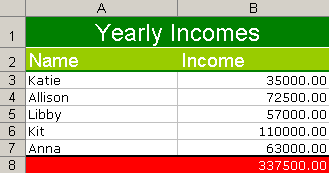
The value in the red at the bottom is the sum of the invoices above it.
You can download the new release from my POI Utility Project page.
Want to use code from this post? Check out the license.

Reader Comments
Ben and Zac,
Great functionality!
To make things even more variable, is it possible to change the cell reference in Excel to R1C1?
Then if the row an column numbers could be replaced by variables the following should be possible:
<cfloop from="1" to="12" index="I">
<poi:cell type="formula" NumberFormat="0" value="R24C#I#-R12C#I#"/>
</cfloop>
And that would make life so much easier!
Greetz,
Chris
@Chris,
I am not sure that I follow what you are saying. The Value attribute is a ColdFusion attribute, so you can make it dynamic with ## signs as you use. But I am not sure if you are asking something more than that?
Ben,
In Excel you can choose to refer to your cells using R(ow)C(olumn) names.
There is a option you can check in Extra -> Options -> General to change the referral type from A1 to R1K1.
If you'd be able to use that, things will get a lot easier!
Chris
Is it possible to autosize column with the content?
Ben,
I've found myself wanting to be able to influence the magnification default when Excel opens, since my data overflows the screen on a default resolution...
I've added the following to the sheet.cfm:
<!---
The magnification of the sheet. Defaults to 100%.
--->
<cfparam
name="ATTRIBUTES.ZoomIn"
type="string"
default="100"
/>
<cfparam
name="ATTRIBUTES.ZoomOut"
type="string"
default="100"
/>
<cfset VARIABLES.ZoomIn = ATTRIBUTES.ZoomIn />
<cfset VARIABLES.ZoomOut = ATTRIBUTES.ZoomOut />
<!---
Check if a custom magnification has been given
--->
<cfif (
(VARIABLES.ZoomIn NEQ 100) OR
(VARIABLES.ZoomOut NEQ 100)
)>
<!--- Set zoom level --->
<cfset VARIABLES.Sheet.setZoom(
JavaCast( "int", VARIABLES.ZoomOut ),
JavaCast( "int", VARIABLES.ZoomIn)
) />
</cfif>
Works great :)
PS. I've also found a work around for not being able to use the R1C1-reference for formulas.
I've created an array:
<cfset ColumnArray = ArrayNew(1)>
<cfset ColumnArray[1] = "A">
<cfset ColumnArray[2] = "B">
...
<cfset ColumnArray[51] = "AY">
<cfset ColumnArray[52] = "AZ">
(Don't need more columns at the moment)
Which allows me to do this:
<cfloop from="1" to="22" index="I">
<poi:cell type="formula" NumberFormat="0" value="#ColumnArray[2+I]#18 + #ColumnArray[2+I]#22" />
</cfloop>
Makes looping thru columns quite nice :)
@Chris,
That looks pretty straightforward. I will see about adding it to the project. Thanks!
@Chris,
Thanks for the Zoom tip. I am adding that to the project today.
Great Ben, thanx ;)
Ben,
This utility looks great. However the POI library that comes with CF is version 2.5 released in 2004.
I was able to get this working at a very basic level (reading excel files) with POI Version 3.1-FINAL (2008-06-29) but not Version 3.2-FINAL (2008-10-19). I'm fine with that since there was tons of fixes from version 2.5 to 3.1.
If you need to upgrade the POI being used by CF, here's how:
1. Stop the CF Service.
2. Go to C:\JRun4\servers\cfusion\cfusion-ear\cfusion-war\WEB-INF\cfusion\lib and remove or rename poi-contrib-2.5.1-final-20040804.jar and poi-2.5.1-final-20040804.jar
3. Download POI 3.1 from http://archive.apache.org/dist/poi/release/bin/poi-bin-3.1-FINAL-20080629.zip
4. Copy poi-3.1-FINAL-20080629.jar and poi-contrib-3.1-FINAL-20080629.jar to
C:\JRun4\servers\cfusion\cfusion-ear\cfusion-war\WEB-INF\cfusion\lib
5. Restart CF.
@Erik,
Thanks for writing out the steps to upgrade.
Ben,
Thanks for the great work.
When using a formula that references another sheet the formula somehow doesn't work correctly.
I have two sheets: sheet1 and sheet2. On sheet1 I have an ID and Name column with several rows of data which I reference by @start and @end.
On sheet2 I have the formula VLOOKUP(1;sheet1!@start:sheet1!@end;2)
Excel correctly substituts to VLOOKUP(1;sheet1!A2:sheet1!B4;2) but the formula appears as text, not as a value which should be the Name column. Only after editing the formula in Excel and pressing enter the formula works.
What causes this problem?
Hi Ben,
Number Formatting Masks :
how can i set this one : #,##0.00
not working below:
<poi:cell value="#value#" type="numeric" numberformat="#,##0.00" />
Never Mind it works :
<poi:cell value="#value#" type="numeric" numberformat="##,####0.00" />
@kilatkyut,
Yeah, because you are inside of a ColdFusion (custom) tag, you have to escape your pound signs.
@Eugene,
It might not be trying to pull the Formula from the column. I can't remember off hand but I am not if Formulas are checked when reading IN Excel data (only when outputting it).
I admittedly have been very poor about updating the POI stuff in the last few months. Things just have been a bit hectic! Will try to make some more time to get to it.
@Erik,
Just a note, if you upgrade to a newer version of POI then the ColdFusion Report Builder will not function correctly when exporting to Excel.
Hi Ben,
It would be great if the following tag would be supported to insert an image in Excel.
<poi:cell type="image" value="images/sample.gif" />
Perhaps in an upcomming release? ;-)
@Everett,
That is good to know. But I heard rumors that the next version of ColdFusion would include the latest JAR so I am assuming they made updates to report builder (if rumors are true).
@Eugene,
I actually tried to do something like that, but the current POI JAR won't allow it. I need to upgrade to the next version.
Ben - Any update on Eugene's image question? It would be reeeeeeally useful? B->
All the best
</cliff>
@Cliff,
Images are not supported in the POI package that ships with CF8. I think CF9 will use the newest POI package for the CFSpreadSheet tag, which should open up more opportunity.
Also, we can start using JavaLoader to load the other package, which is what some people are doing.
Mahieu above (on 9/2008 a while back!) asked about autosizing columns. Has this been built into the tags or POI at all?
Hey Ben
I've been using your poiutility.cfc for years and really love these new custom tags and rendering!!
Another idea/concept that would be real helpful, and not sure if you are developing anymore with this because of cf9 cfspreadsheet or not, but it would be slick if a custom tag was added that would in effect allow you to change html tables saved in a cfsavecontent to <poi:rows> and cells. This way depending on if the page is rendered in a browser to view view html in the app, or wants to be saved to excel, the queries and data can be laid out in tables and saved in a variable and then the custom tag runs that can return it in the <poi:xxxx> format and then output with the class definitions and sheet structure and streamed.
Anyways, just a thought - thanks for all your great work with this!
Matt
@Matthew,
I believe that auto-sizing the widths is not supported in the previous versions of the POI jar. I think if you install the latest JAR files, that feature is supported (although not present in the custom tags).
As far as converting HTML tables into actual XLS files, that should be pretty doable. I haven't worked on this in a while (mostly just because I tend to just keep moving forward)... but I'd like to give some time to this since I haven't touched in a good while.
Hi Ben
I found a small bug in the custom tags...
in cell.cfm on line 214 originally i believe...
<cfset VARIABLES.DocumentTag.CellAliases[ "@#ATTRIBUTES.Alias#" ] = (
VARIABLES.DocumentTag.ColumnLookup[ Fix( VARIABLES.RowTag.CellIndex / ArrayLen( VARIABLES.DocumentTag.ColumnLookup ) ) ] &
VARIABLES.DocumentTag.ColumnLookup[ VARIABLES.RowTag.CellIndex MOD ArrayLen( VARIABLES.DocumentTag.ColumnLookup ) ] &
VARIABLES.SheetTag.RowIndex
) />
if the cellindex is 52 then the
VARIABLES.RowTag.CellIndex MOD ArrayLen( VARIABLES.DocumentTag.ColumnLookup )
resolves to 0 and throws an error for the 0 position of the VARIABLES.DocumentTag.ColumnLookup
I solved it this way, adding the -1 to the cellindex in the first part and then forcing the second part as 26 as that is the lookup we want when it is 52, 78, etc (becomes Z)... there might be something cleaner but this seems to work!
<cfif VARIABLES.RowTag.CellIndex MOD ArrayLen( VARIABLES.DocumentTag.ColumnLookup ) eq 0>
<cfset VARIABLES.DocumentTag.CellAliases[ "@#ATTRIBUTES.Alias#" ] = (
VARIABLES.DocumentTag.ColumnLookup[ Fix( (VARIABLES.RowTag.CellIndex-1) / ArrayLen( VARIABLES.DocumentTag.ColumnLookup ) ) ] &
VARIABLES.DocumentTag.ColumnLookup[ 26 ] &
VARIABLES.SheetTag.RowIndex
) />
<cfelse>
<cfset VARIABLES.DocumentTag.CellAliases[ "@#ATTRIBUTES.Alias#" ] = (
VARIABLES.DocumentTag.ColumnLookup[ Fix( VARIABLES.RowTag.CellIndex / ArrayLen( VARIABLES.DocumentTag.ColumnLookup ) ) ] &
VARIABLES.DocumentTag.ColumnLookup[ VARIABLES.RowTag.CellIndex MOD ArrayLen( VARIABLES.DocumentTag.ColumnLookup ) ] &
VARIABLES.SheetTag.RowIndex
) />
</cfif>
Is it possible to write to an Excel template and retain the formatting in the xls? I can use the CSS to an extent, but would like a way to send data and let the pre-formatted xls take care of the cell formats.
Thanks for the great utility!
Hi Ben,
I just posted on my blog about 500 Null errors with POIutility - java.lang.OutOfMemoryError
http://murrayhopkins.wordpress.com/2010/12/11/500-null-errors-with-poiutility-java-lang-outofmemoryerror/
Just in case it helps anyone else.
Thanks again for a very useful utility!
Cheers,
Murray