The other day, Dustin Chesterman asked me about an XML parsing error he was seeing. He was getting the "Content is not allowed in Prolog" XmlParse() error. I have blogged about this error before - it is an exception that is thrown when you try to parse XML that has data or white space prior to the encoding declaration or root node. This is often caused when an XML feed does not trim it's return value. Usually, passing the content through ColdFusion's Trim() method before calling XmlParse() does the trick; however, in Dustin's case, Trim() didn't seem to be helping.
He was working with Authorize.NET's API, which returns XML responses. Let's take a look at the call that was being made. For demonstration purposes, I am just going to call the Authorize.NET API without any data - this will error on their side, but will return a valid XML response:
<!---
	Call Authorize.NET API. This will fail because we are not
	passing any of the require information, but at least it will
	return an XML result (error message) that we can then use.
--->
<cfhttp
	method="get"
	url="https://apitest.authorize.net/xml/v1/request.api"
	result="objGet"
	/>

<!--- Dump out the results. --->
<cfdump
	var="#objGet#"
	label="Authorize.NET Result"
	/>
Running this code, we get the following CFDump output:
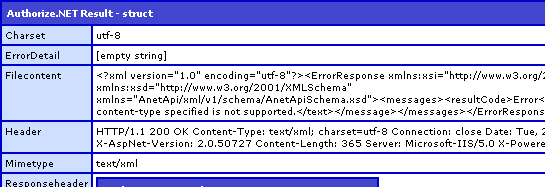
If you look at the FileContent key above, you will see that an XML document was returned. And, furthermore, from what you can see, it appears that the first piece of data returned is the encoding:
<?xml version="1.0" encoding="utf-8"?>
But, now, let's try to parse this return value:
<!---
	Parse Authorize.NET resposne into a ColdFusion XML object.
	Be sure to Trim() the content to get rid of any white space.
--->
<cfset xmlResult = XmlParse(
	Trim( objGet.FileContent )
	) />
Notice that we are running the objGet.FileContent through ColdFusion's Trim() method before parsing it. Usually, this would take care of any prolog data issues; however, running the above code, we get the following error:
An error occured while Parsing an XML document. Content is not allowed in prolog.
Clearly, there is data there that we are not seeing. Let's loop over the first few characters of the response data to see what is going on:
<!--- Loop over first few characters of response. --->
<cfloop
	index="intCharIndex"
	from="1"
	to="6"
	step="1">

	<!--- Get the character in question. --->
	<cfset strChar = Mid(
		Trim( objGet.FileContent ),
		intCharIndex,
		1
		) />

	<!--- Output char and Ascii values. --->
	[#strChar#] - #Asc( strChar )#<br />

</cfloop>
After running the loop, we can see that there is, indeed, a leading character:
[] - 65279
[<] - 60
[?] - 63
[x] - 120
[m] - 109
[l] - 108
There is a mysterious leading character - 65279.
It turns out, this character is not just random data, it's something called a Byte-Order-Mark and in an XML document, it is used to flag the encoding type of the XML. When you convert this byte into Hexadecimal, you get "FEFF". If you look on www.opentag.com, you will see that this byte signals a UTF-16 (big-endian) encoding:
- EFBBBF - UTF-8
- FEFF - UTF-16 (big-endian)
- FFFE - UTF-16 (little-endian)
- 0000FEFF - UTF-32 (big-endian)
- FFFE0000 - UTF-32 (little-endian)
- None of the above - UTF-8
Unfortunately, ColdFusion does not appreciate the use of this Byte-Order-Mark, or BOM. In order to get this kind of XML feed to play nicely with ColdFusion, we have to remove the BOM before we parse the document. Luckily, getting rid of this requires nothing more than a simple regular expression that strips out all characters before the first bracket:
<!---
	Parse the return value into a ColdFusion XML
	document. Remove the Byte-Order-Mark (BOM) by
	stripping all pre-"<" characters.
--->
<cfset xmlResult = XmlParse(
	REReplace( objGet.FileContent, "^[^<]*", "", "all" )
	) />

<!--- Dump out XML resposne. --->
<cfdump
	var="#xmlResult#"
	label="Authorize.NET Clean Response"
	/>
Running this, we get the following CFDump output:
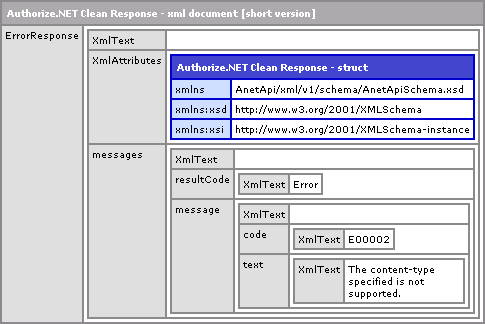
As you can see, with the BOM character easily stripped out, we can now parse the XML data without issue. I don't know much about BOM characters or how often they are used. I assume that since ColdFusion doesn't play nicely with them that they are NOT common practice; but, I can't really say for sure. Clearly they aren't used everywhere or I would have come across this issue before. As such, I wouldn't go around implementing this code for every XML feed you encounter - only for those that error out because of it.

Reader Comments
as i recently told somebody in the forums having the same issue (maybe the same guy?) it appears that a BOM is valid in XML & any parser (including cf's) should be able to handle this. looks like a bug in xmlParse().
ah i must be getting old, just noticed that you got the UTF-16 BOM call right (i called it UTF-8 BOM in the forums).
that makes authorize.net a lying so & so, it declared the xml encoding to be UTF-8, yet it supplied a UTF-16 BOM. which might mean xmlParse() is actually bombing because the BOM is lying & just telling us the wrong error???
@PaulH,
Interesting point. I didn't even notice that when I was checking this stuff out. I don't know how parsing works, but it seems like if the encoding was misleading that could lead to serious errors. But, from the error that ColdFusion is throwing, it looks like it is having trouble just kicking off the parsing. If there is "bad" data in the prolog, I am not sure if would even get to the tag-based encoding.
I guess this is some sort of bug, if this is following standards.
On a side note - given your regular expression you can change your scope attribute on the REReplace call to "one" or leave blank as it defaults to one. The nature of your expression will catch all the characters prior to the opening chevron.
Is it necessary? Yes, and noticeably depending on the size of your document. In putting together a quick example using a moderately sized XML, ColdFusion registered 0ms when using "one" as the scope and 16ms when using the "all" scope.
If I've learned anything in working with regular expressions, it that you should always be mindful of performance. Once you find a regular expression that works - try to refactor a more efficient one. You can use free tools (dontate-ware) like Regex Coach to help build and step through your expressions.
#Replace(previousComment, "necessary", "faster")#
@Shayne,
It's funny that you bring that up cause as I was writing the RegEx, that thought did pop into my mind, but I ignored it. I am just used to writing "all". But you are correct - one should be mindful of their regular expressions and "one" was more my *intent*.
Also, RegEx Coach rocks :) I have it in my quick-launch at all times.
@All...
So which is it? A CF bug or not properly formatted XML response? Ben, thanks for this post. You helped me in the past with this but now I have a better understanding as to what is going on.
Ben, you are wicked smart. :)
If anyone is nerd enough to seek further reading, I highly recommend Wikipedia's information on this subject. I just looked up byte order marks and endianness (big-endian vs. little-endian) and I learned a ton.
@David,
Thanks :) To be honest, I don't even know that much about encoding at all. I just use the default encoding (probably not the best practice). A weakness in my brain!
@ben, "just use unicode" is all the encoding advice anyone needs.
@dv, both. that xml is lying through it's teeth (it was actually utf-8) & i just tested w/real utf-8 & utf-16 xml & both bombed xmlParse() when a BOM was included.
Thanks for the post.
In the past (CF7 for sure, probably CF8.0 as well) we had successfully parsed some XML documents starting with a UTF-8 BOM. After upgrading to CF 8.0.1 we also got this error "Content Is Not Allowed In Prolog" when parsing such documents. So it seems like a bug in CF 8.0.1 to me, but I didn't investigate further. Could someone confirm if this was still OK in 8.0 and got broke in 8.0.1?
@Thilo,
I can confirm that my example (in the post above) was done in ColdFusion 8.0.1 and failed to parse the UTF-16 BOM.
Thilo, I can test tomorrow using Ben's example. I'll let you know what I find out.
Thilo,
This error also occurs on CF8 version: 8,0,0,176276. I ran Ben's sample code and got the same "Content Is Not Allowed In Prolog" error. I also tried his sample on outputting the first few char codes and I got the same output. Hope this helps.
@Javier,
Way to help us double-team this problem :)
No problem man! You did the hard part though! Working up the effort to write all that code. :) Did a good old copy and paste on our DEV server which runs CF8 (my local runs the latest 8.0.1) so figured I'd help out. Glad to do my part!
Thanks Ben & Javier!
Seems I have to look a little futher into CF XML parsing to get around this error which in our case is related to some scecial characters and does not occur every time. (some XML documents including a BOM got successfully parsed, some not)
I'll post a follow-up when I know more...
This does seem like a bug - but not with xmlParse, rather with cfhttp which is preserving the BOM in the response. When a string parser reads a string under a specific encoding, it is not supposed to store the BOM as a character within that string.
Other string functionality (such as cffile) handle this correctly. For example, try saving the cfhttp.filecontent, then use [cffile action="read" charset="utf-8"] on it, and pass that to xmlParse - you will not have a problem.
So the issue is that however cfhttp is parsing response strings, it's failing to properly handle the BOM, and returning it as if it were part of the string - which it's not.
This is probably faster than the regular expression:
[!--- Remove BOM from the start of the string, if it exists ---]
[cfif Left(xmlText, 1) EQ chr(65279)]
[cfset xmlText = mid(xmlText, 2, len(xmlText))]
[/cfif]
1) some of my tests used an xml string w/a BOM directly, no cfhttp was involved.
2) more importantly, as far as i can tell the W3C says xml parsers *have* to understand BOMs. period (see #1).
3) your cffile test doesn't apply. cffile doesn't write a BOM out in the first place.
I can understand where your confusion comes from, byte order markers are not described in incredible detail, because their use is largely becoming out of date.
I started writing a lengthy comment discussing the virtues of preserving vs discarding BOM, what my own research has revealed, etc, but decided this was getting off-topic to this discussion (the topic of this discussion being how to handle the disconnect between cfhttp preserving BOM and xmlParse expecting it to have been discarded).
A specific reply to PaulH:
1) If you author a string from within ColdFusion with a BOM, of course it's going to have the BOM, you've made outside character decoding which BOM is designed for.
2) I'll address this in my blog.
3) The point isn't whether cffile writes a BOM, it's whether it reads a BOM then discards it after character decoding is complete (it does) - behavior which is inconsistent with cfhttp. Since discarding BOM has to be intentional, while preserving BOM could easily be accidental, it's my belief that Adobe intends to discard BOM. As to whether BOM should be discarded - that's discussed in my blog too.
You can read my full response at http://www.bandeblog.com/2008/05/bom-is-it-part-of-data.html
And sorry, I didn't mean to say, "your confusion" as if I necessarily am the authority on everything, that's what happens I guess when I write a long comment here, then snip it to little pieces to try to avoid going totally OT here.
1) if an xml stream has a BOM, xmlParse() or whatever is supposed to be able to handle it (as far as i can tell). doesn't matter where it's created. according to the unicode standard, a BOM is not part of the text.
2) can you cite references for your opinion?
3) oops, you're right, reading too quick, for utf-8 a BOM is entirely optional (it really has no use as far as endiness goes for utf-8) but many s/w use it as a hint that the following content is utf-8 (notepad for instance). in fact now that i reread the section on "Unicode Encoding Schemes", a BOM is always optional (though i swear it was required for utf-16/32 in earlier unicode versions), see: http://www.unicode.org/versions/Unicode5.0.0/ch03.pdf#G7404
1) the XML 1.0 standard says that when reading a binary stream, BOM is useful to indicate endianness and should be interpreted and discarded (for example, in no language, under no XML DOM, can you identify from a parsed DOM whether it started with a BOM or not, once parsing of the string is done, this information is discarded). Once the byte stream has been converted to a character array, it no longer serves a purpose (ala java's bytea.toCharArray() ). It's not part of the DOM, only a hint to correctly parse the bytes making up the data.
BOM is only significant in a byte array/stream, not a character array. I think you may be confusing multi-byte string encoding with post mb-string decoded data.
2) as stated in my blog, I tried to find an authoritative source for or against, and in fact there are none that I could find. It seems to be as long as you're maintaining a non-character-decoded byte stream (eg, a byte array), you preserve BOM, but again, once you convert byte stream -> character array, it no longer serves a purpose. When you go to convert Char[] back to Byte[] for writing to a file or sending to someone else, you have to use some kind of encoding (most people use UTF-8 any more), and you may want to write a new BOM if you think there's a chance the consumer of your byte stream might not know your byte order or encoding.
3) I want to clarify a statement you made here, "but many s/w use it as a hint that the following content is utf-8" - actually BOM has nothing really special to do with utf-8 other than that utf-8 has a unique representation of BOM that other character encodings don't. If we look for UTF-8's BOM at the start of a byte stream, and find it, chances are pretty good (but not guaranteed) that it's encoded as UTF-8.
In UTF-16BE (big-endian), BOM (U+FEFF) is encoded as 0xFE 0xFF. In UTF-16LE (little-endian), BOM is encoded as 0xFF 0xFE. UTF-16, as you probably know, uses two bytes for every character. UTF-32 of course uses 4 bytes for every character, so UTF-32BE's BOM is 0x00 0x00 0xFE 0xFF, while UTF-32LE's BOM is 0xFF 0xFE 0x00 0x00
UTF-8, as you probably also know, is a variable-width character encoding; characters under U+00F0 are encoded with a single byte, characters from U+00F0 and over are encoded with two or more bytes. Specifically how that encoding happens is actually covered in a scheduled blog entry which appeared earlier this morning as a followup to my Unicode post yesterday. U+FEFF is represented in UTF-8 as a three-byte character: 0xEF 0xBB 0xBF. However, once a string is parsed, U-FEFF is not typically represented in memory as 0xEF 0xBB 0xBF. In Java, it's essentially represented as 65279 (a number of type int [32 bits] whose hex representation of course is \x0000FEFF).
This is the difference between a byte array and a character array. A character array is effectively an array of ints (32 bits) (not quite, but close enough for argument's sake), while a byte array is an array of bytes (8 bits). If you read UTF-8 encoded data with a leading BOM into a byte array, the first three elements will be \xEF \xBB \xBF. If you read the same string into a character array (assuming BOM is preserved) the first element would be 65279 (or \xFEFF). If you re-read that same exact byte stream into a character array but decode it as UTF-16BE, the first two elements will be \xEFBB \xBF?? (where ?? is the hex value of the first byte following BOM). Parsed as UTF-32BE, the first element would be \xEFBBBF??.
It's useful in UTF-8 as a hint that the data may be encoded as UTF-8, because in Unicode, U+EFBB is a reserved character, and should not show up in any normal plain text stream. However although it's convenient, it doesn't guarantee anything in the context of UTF-8, as pointed out by John Boyer here: http://lists.w3.org/Archives/Public/w3c-ietf-xmldsig/2000JulSep/0356.html . Basically when you don't know the encoding of the text, it can help you guess, but it's quite possible for it to be wrong, and so shouldn't be relied on if it can be helped (this is perhaps why it's not mandatory to start every UTF-8 encoded stream with BOM).
This still all boils down to: when converting Byte[] into Char[], BOM may help to correctly decode Byte[], but most software doesn't preserve the BOM since BOM was probably added by the string encoding subsystem and wasn't a part of the original data.
Finally,
If you think about it, it makes sense to silently discard BOM. BOM is only a BOM if it is the first character in a stream, and contributes nothing to the in-memory representation of a decoded string. Its only purpose is to help properly decode the string. Also, if you had two strings which started with BOM, and concatenated them together, you would be introducing a BOM into the middle of the string, where it does not belong (see http://unicode.org/faq/utf_bom.html#38 - "What should I do with U+FEFF in the middle of a file?"). Preserving BOM in the in-memory representation of a decoded string means every string concatenation and every string operation would first need to detect if the leading character is BOM, which would be a huge and needless waste of resources. Much better, since by this point its entire contribution to the string has been fulfilled, to discard it and recreate it later if we need it.
CF's strings are closer to Char[], not Byte[], if you create a string within CF which starts with U+FEFF, you're effectively setting the first array element to Character(\xFEFF), CF won't stop you, nor should it, nor should it discard it once you've created it there for performance reasons. If you convert to Byte[] and back again (which requires you specify some character encoding for both directions), you'll probably discover it disappears.
That said, it would still be nice if parseXml() silently ignored a leading BOM just for corner cases like this; but I still believe the fault is with cfhttp for not properly decoding the string in the first place.
1) xmlParse() still has to be able to handle BOMs ie. you can pass it a file name, maybe you forgot about that option? i'm still arguing that this is a bug in xmlParse().
3) as far as "clarifying my statement", it doesn't--many s/w still use a BOM as an encoding hint no matter your opinion. as for the rest, please tell me something i don't already know.
I'm not sure there's a need to get hostile, but maybe I'm reading too much into it.
1) I haven't forgotten about cffile's ability to take a filename as an argument. Indeed, xmlParse(ExpandPath('file_with_bom.xml')) works correctly, meaning xmlParse() is compliant with the XML standard when dealing with byte streams (which is the context of the XML standard which talks about BOM). Further evidence this is a bug with cfhttp.
3) right, they write a bom to help other systems read the text - but the point is the software prepends the actual data with the bom, just like a http response is prepended with the http headers. But you don't get http headers back as part of the cfhttp.filecontent. It's metadata, it's not actual data.
If I choose UTF-8 as the encoding when saving a file in Notepad, it does indeed write a BOM as you suggest. But as I suggest, when I close and re-open that file, the BOM is not preserved. It's added by the character encoding routine, and stripped by the decoding routine. When you do decode(encode(something)) you should get exactly the same value back as you passed into it, which wouldn't be the case if BOM was preserved. BOM isn't part of the data, it's part of the encoding of that data.
Life saver.
Thanks a bunch.
Chris.
Believe it or not I finally got this error! I applied the fix provided by one of the comments. I replace the first character or two if the match is met that the first character is chr(65279). Since you had the issue with Authorize.NET I think its just in general a .NET issue. Here at my job we build RESTful web services so we all build services in a variety of technologies. I was interacting with one built in .NET providing that BOM. Hope this helps others!
@Javi,
Glad you both got and contributed some value here :) Sweeet.
Glad I remembered reading this post a while back, just ran into this issue and your post saved me hours of debugging. For the interest of everyone else, I ran into this issue when reading an XML file saved as utf-8 out of a .zip file using the cfzip tag and passing the XML string into XMLParse. Stripping out the BOM cleared the issue up.
Thanks Ben!
@Ryan,
Glad you found some value.
Ben thanks, and like the other guy said you are wicked smart!
Dave
Thanks. This is exactly the solution I was looking for.
Thanks for the great post Ben. Your advice helped me out while I was adding additional feeds for a new health section on nobosh.com
Thanks again. I hope we can chat sometime.
Brett
http://nobosh.com
I've been banging my head against the wall with this prolog issue the past few days.
When I dump the xml similar to above I get:
[<] - 60
[?] - 63
[x] - 120
[m] - 109
[l] - 108
If I run the reg exp above it changes the error to a footer error. Trim() isn't doing anything. Any other ideas here?
Just came across this issue myself, thanks for the blog post :)
Thanks Ben, saved me from a headache!
Thanks Ben, although your exact example wasn't the issue I was experiencing it helped me think outside the box and solve my issue.
Ben, I am running across similar. I think this is isolated to CF7, but not sure.
Anyway, when I do the above fix, the 'An error occured while Parsing an XML document. Content is not allowed in prolog' error goes away, but then I get the Premature end of file.
Any ideas on this would be helpful. Fun stuff. :)
@Bret,
The premature end of file is usually associated with web services. Are you performing a web service call?
@ben. yes, i was. i actually figured out my problem, too. everything mimiced what you had above, but was coming in from google api when trying to return contacts. everything worked on CF8 but not CF7. i eventually figured the problem to be because they use different default charsets, so i had to specify in my cfhttp which to use. once i did that, it worked everywhere (knock on wood).
i was getting end of file, because once i cleaned off the BOM, the content was empty. hence...end of file.
sometimes its the smallest things that take the longest to figure it out. but i got it. and you helped, so thanks for posting this!
@Bret,
Oh nice! Glad you got it worked out. Character sets are something I would like to have more of a mastery over.
Thanks for the tip, Ben. I found your page when I Googled the error message. Your fix worked well. I added your name and a link to this page to the comments in my CF page (internal to NASA) so that future developers may know of your contribution.
@Ken,
Awesome! Glad to help; hey, do you know Kyle Dodge by any chance? He's a FLEX / CF guy working with you guys (NASA).
Just wanted to quickly thank you (again) for posting this. Had the EXACT problem you describe (with Authorize.net BTW) and googled it - found this page and fixed inside 30 seconds...awesome!
Just been doing something similar with CF parsing Unicode data from SQLServer 2005. If you're doing Unicode replacements db-side, watch for this.
There's an issue with SQLServer's REPLACE function and handling of certain high Unicode values.
Example 1: works as expected.
SELECT REPLACE(N'test' + NCHAR(65500), NCHAR(65500), '')
Example 2: no REPLACE() occurs.
SELECT REPLACE(N'test' + NCHAR(65533), NCHAR(65533), '')
Example 3: collate as binary to perform the REPLACE() to work around the issue.
SELECT REPLACE(N'test' + NCHAR(65533) COLLATE Latin1_General_BIN, NCHAR(65533) COLLATE Latin1_General_BIN, '')
Reference:
http://connect.microsoft.com/SQLServer/feedback/ViewFeedback.aspx?FeedbackID=385082
Hope this helps someone.
@Ed,
Very interesting. Extended characters is just a universe that I don't have a good handle on yet. It seems to very rarely be an issue; but I am sure when it comes up, I will need to be more prepared.
Thankyou Ben!! Coldfusion wouldn't be the same without you!
Any thoughts as to why someone would start an XML document with "k", as in "k<roottag>..."
@Pete,
That's odd. That could be a typo? Or maybe some sort of security / obfuscation technique?
I'm assuming it's a typo in the XML but I've considered it might be a security thing, I'll post up anything I find out.
@Pete,
Ok cool - let us know what you find out.
Thanks for this post Ben, just found it really really helpful!
@Bret, I am having the same problem as you, except trying to consume data from a FMS Admin API. Could you share what you changed the charset too for your request? I have tried utf-8, which is the default for CF8, but I still have the same problem.
YAY YAY YAY!
thanks dude,u r a life saver
cheers from NY
@Arun,
Glad to help... also from NY (NYC).
Thank you! Thank you! Thank you!
One more additional bit to add to this: in addition to the, "Content is not allowed in Prolog," error solved by Ben's REReplace, I was also getting, "An invalid XML character (Unicode: ... ) was found in the element content of the document." My first attempt to fix this was to use http://cflib.org/udf/xmlFormat2 but it seemed pretty slow on large amounts of XML. Then, based on one of the comments above, I added charset="utf-8" to the cfhttp I'm using to fetch the XML and, BOOM, no more invalid XML characters!
Thank you! Thank you! Thank you!
@John,
UTF-8 is a tricky beast in ColdFusion. I've only got a vague understanding of all its ins-and-outs. Glad you got it working.
We started getting this error when we upgraded our JRE version to 1.4.2_24. We were running on 1.4.2_11 w/o problems, so had to role back. Will have to give these suggestions a try.
@Joe,
Good luck; let us know if it works out.
You saved the day, Ben. Thanks a million times.
@Richard,
Glad this helped you sort it out.
Sorry it has taken so long to respond. The solution to our "Content not allowed in prolog" was interesting. Since we use a webservice for authentication over SSL/TLS I didn't know that we had to import PKI certificate of the webserver that does the authentication to the java trusted key store. Once this was completed everything magically worked.
Link to importing cert: http://www.talkingtree.com/blog/index.cfm/2004/7/1/keytool
@Joe,
Ahh - that's a great post. Steven Erat's post on the keytool saved me a HUGE headache a while back when we were having trouble CFHTTP'ing to a 3rd party service.
I'm working on integrating an external java api that returns xml and I've been getting this error, but inconsistently. In other words, it pops up with certain resultsets (from our data, not xml) and doesn't with others. (btw, we're still running cfmx 7)
I'll still give it a shot using Ben's regexp and see if that fixes it. If not, it's gotta be some other bad data. Will keep y'all updated though.
As usual, muchas gracias Ben!
roger
@Roger,
Let us know if that worked out.
@roger vengunta,
Is the Java API accessed via SSL? If so look at my post in regards to storing the SSL certificate in the CA store in JRE/JDK.
@Joe,
Yes it is through SSL. I did read your post and it is very similar to the setup that I'm working with. Although I did set up the SSL key in the CA store in JRE. That was the first thing I set up before doing anything else. I'm still working on diagnosing the problem with xmlParse that I'm having. Should have a solution sometime tomorrow.
roger
Update: Ben's ReReplace worked for the part that I was having trouble with. But I ran into another, similar, yet not so similar issue.
This time, I'm consuming another webservice using cfhttp get, and when output the FileContent using the loop, instead of the special character, I have a long string of error message like "System.InvalidOperationException:Missingparameter:make.atSystem.Web.Services yada yada". So I went ahead and tried this:
<cfset xmlResult = XmlParse(REReplace( objGet.FileContent, "^[^<]*<\?x", "<?x","one" )) />
to remove everything before the first <? but I still keep getting the "content is not allowed in prolog" error. Oh and btw, I could've done the regexp different but that is my level of regexp knowledge. :)
roger
@Roger,
It doesn't sounds like the stuff in the front of the < should be there. I wonder where that error is coming from. After you remove it, are you left with XML?
Sorry for the delay, but I've got an update:
Ben's solution to strip the BOM worked just fine. I was having issues with another webservice. The .net error was due to changes that were made on the client's end (within the webservice itself) which was why I was getting the error.
Once the new parameters were added in, everything went off just fine!
-roger
Yeah, I'm getting this error right now and have absolutely NO IDEA why I'm getting it.
Sadly, it's one of the VERY few times ColdFusion does not tell you where the error in your code is. There is no trace to a document and line number, so I'm just randomly looking through the application trying to find out what the heck went wrong.
I'm on hour 4 right now; gonna take a quick break and then get right back on it. Sometimes you just gotta distance yourself when you've been bashing your head against the wall for too long. :)
Hi Ben, I have also faced the same problem but after using Replace function it shows an error:Premature end of file.
I had the same problems and eventually found out that all of my xml tags "<" and ">" were being replaced with "htmltag ". This was being caused by a fraud setting in the ColdFusion administrator. Once disabled, I had no problems.
Thanks for the help. :)
Hi Ben,
I am calling the coldfusion webservice from the flash file. I got the error "Content Is Not Allowed In Prolog". I used Rereplace and error is out, but got Premature end of file.
I am doing this:
Created a XML and invoking the webservice in coldfusion using Action Script. Webservice accepts XMl as input. In the coldfusion Webservice I got the error. Also I see there are no bad characters in the received XMl.
Any other chances of getting this error?
Ben, this saved my ass. Thanks for having the energy in your busy schedule to post this stuff.
Ben, Thanks for the post. I have a fix around this issue. I see the issue with the input XML. All the < XML tag symbols converted to <. This made the XMLParse giving an error.
In coldfusion replaced all the < to < and it worked fine. But it is a temporary solution. From flash need to send a clean XML as an input.
For that in flash used a property called xmlSpecialCharsFilter and it worked. Now no issues with webservices.
Thanks, just the trick for getting zillow xml feeds.
Hi
I have a problem trying to read and XML file exposed by OANDA.com which is useful to read the exchange rates.
The thing is: I have to send them something like this:
url="http://www.oanda.com/cgi-bin/fxml/fxml?fxmlrequest=<convert><client_id>XYZ</client_id><expr>EUR</expr><exch>CHF</exch></convert>"
to consume the web service. In case I put in a browser, the OANDA return a XML page, but when I need to run inside the CFM I get the error message "Premature end of file"
If I send the url without the ?fxmlrequest=<convert....</convert> part, the web service display an error in XML format. The CF was capable to read the error in XML format and parse it to the internal CF language.
I think I am having troubles with the <..> tags, but I didn't find out the way to solve it
Thanks in advance for your help
Danilo
@Sonu,
I am not sure why that is happening. In an XML setting, a premature end of file error might indicate that there is an open tag missing a related close tag? I am not sure.
@Mark,
Sounds like that was caught by the XSS (Cross-Site Scripting) protection. I have only heard of this feature, but I have never really looked into it myself.
@Sureen,
Glad you got it working because I would have had NO idea what that was happening :D
@Paul, @Mike,
Glad this helped!
@Danilo,
Do you have to send it as part of the query string? Or can you POST it as the request body / form field? It might be much easier to encode the request in that way.
Ben,
I used your example to loop through the xml reponse data and, whereas your example has leading data such as [] - 65279, mine has [] - 32 at the end! I'm getting the same error as described above.
Your thoughts?
Ok, we have been using CF8 and accessing a middleware webservice with the createObject call successfully for quite some time. I upgraded to CF10 and now I am getting the "Content Is Not Allowed In Prolog" error when trying to do the same call. Is there a way to ignore the BOM using the createObject call?
Nice Trick, I would waste days to find out the reasons of error.
Thanks =)
Muchas gracias por la ayuda, yo estaba peleando con unos endPoints pues me cambiaron de desarrollo a producción y el paso debio ser transparente.
Gracias!!!
Dear Ben,
I am encountering the following error "XML Parsing error : An error occured while Parsing an XML document. Content is not allowed in prolog"
and my HTTP Request is below
<cfhttp method="post" resolveurl="Yes" url="https://testtool-itt:4400/index.cfm" timeout="60">
<cfhttpparam name="fuseaction" type="FORMFIELD" value="API.testIP">
<cfhttpparam name="app_login" type="FORMFIELD" value="apitest">
<cfhttpparam name="app_password" type="FORMFIELD" value="XXXXXX">
</cfhttp>
<cfdump var="#cfhttp#"><cfabort>
The Response is
struct
Charset [empty string]
ErrorDetail I/O Exception: peer not authenticated
Filecontent Connection Failure
Header [undefined struct element]
Mimetype Unable to determine MIME type of file.
Responseheader struct [empty]
Statuscode Connection Failure. Status code unavailable.
Text YES
But if directly use the URL , I have a Operation Succeeded response
https://testtool-itt:4400/index.cfm?fuseaction=API.testIP&app_login=testapi&app_password=XXXXX
I am not sure if it is a Firewall or proxy change issue. Can you please assist me in this regard. Thanks in advance.
Regards,
Santosh